This guide explains how to purchase, enable, and activate the ECU Flash function for commercial vehicles on Launch X-431 truck diagnostic tools.
✅ Supported Launch X-431 Truck Scanners
- X-431 PAD V LINK HD (ECU Flash function is pre-installed)
- X-431 PRO3 SE HD
- X-431 PRO3 LINK HD
- X-431 V+ Smartlink HD
- X-431 Pro3s+ Smartlink HD
🚚 What the ECU Flash Function Covers
The ECU Flash function supports a wide range of commercial vehicle systems, including:
🔧 Engine ECUs:
- Cummins: Full-range ECU read/write (China III–VI)
- Bosch:
- ECU flashing for China III–VI engines
- Boot mode (low-level) flashing
- Cross-version flashing without hardware removal
- Delphi:
- Unit pump ECU flash
- Engine data flash (China III–VI)
- Denso: Hino, Shanghai Diesel, Wuxi Diesel, Dongfeng, Sinotruk
- Weichai / Wuxi Diesel: Complete engine data flashing
- Yuchai: Proprietary ECU and NG (natural gas) systems
- Nanyue: Unit pump ECU flash (R01/R02)
🧠 Control Modules:
- Sinotruk:
- CBCU / CBCU3
- BBM, VCU, 2012 cluster models
- SCR system
- Foton:
- BCU, AMT, CBCU3, and instrument clusters
- Dongfeng Commercial:
- OEM-grade online flashing
- China VI compliance
🔋 Natural Gas Systems:
- Woodward, WPDS, Bosch EGC4
- Sinotruk-Yuchai-Wuxi Econtrols
- Yuchai NG and OH6 platforms
🧼 Aftertreatment (DCU) Coverage:
- Over 20 supported systems:
- Tenneco, Kelong, Sanli, Dinex, Bosch, ACM, Tianlan, Weifu, and more
🛒 Step 1: Purchase the ECU Flash License
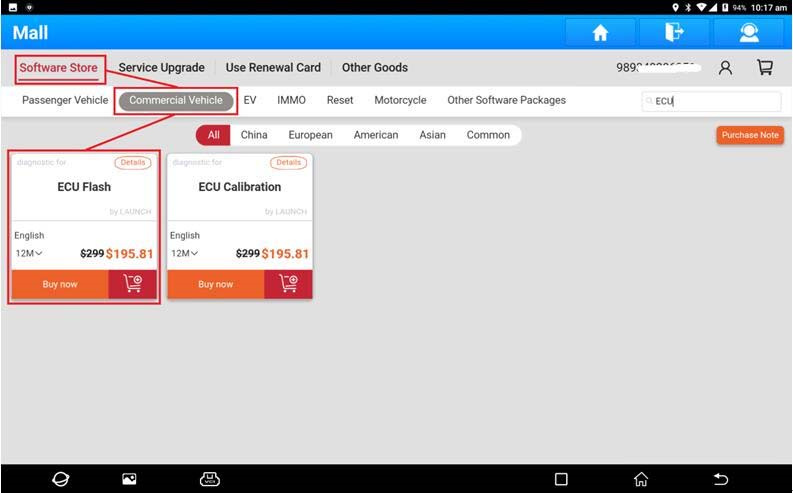
- On your X-431 device, open the Mall app.
- Go to: Software Store > Commercial Vehicle > ECU Flash.
- Complete your purchase and enter the required details.
⚙️ Step 2: Enable the ECU Flash Feature
To activate ECU Flash, you must modify the configuration file on your device.
📁 File Paths:
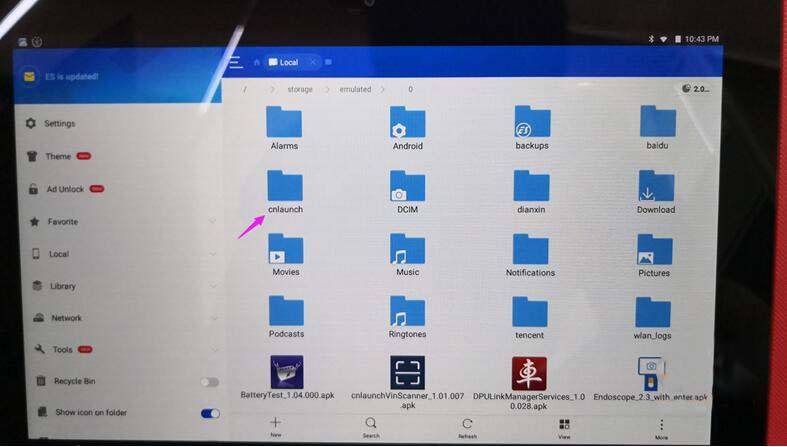
- PAD V LINK HD:
/storage/emulated/0/cnlaunch/X431PADV/assets/StdCfg.ini - PRO3 SE HD / PRO3 LINK HD / V+ HD / Pro3s+ HD:
/storage/emulated/0/cnlaunch/X431Pro3S/assets/StdCfg.ini
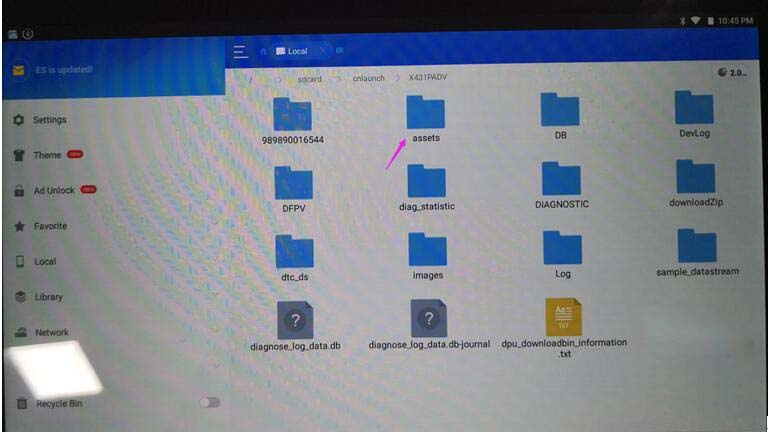
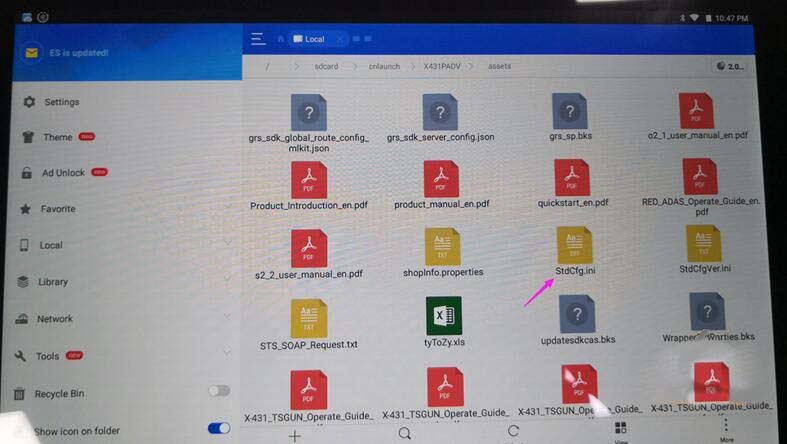
📝 Edit Instructions:
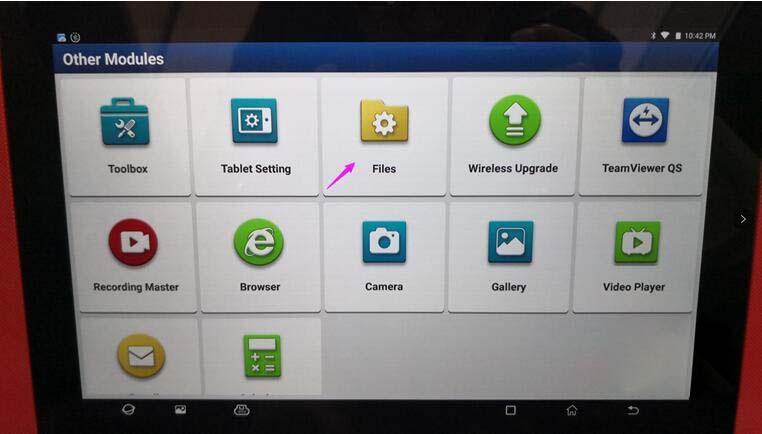
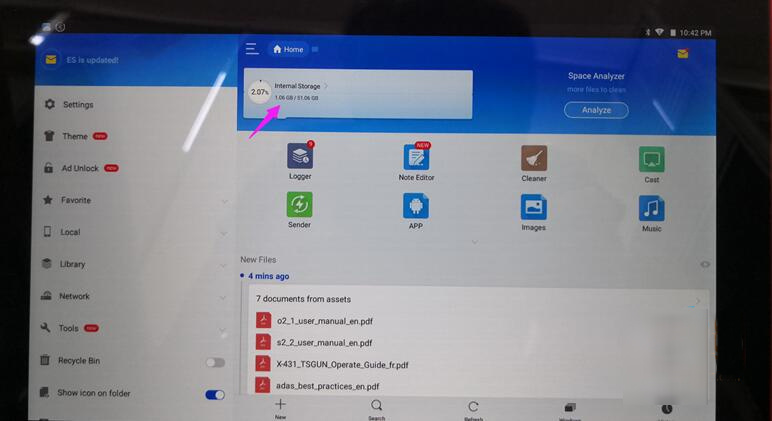
- Open the File Management app on the device.
- Navigate to the corresponding file path above.
- Locate and open the file StdCfg.ini using a text editor.
- Find the lines:
OnlineFlash=0
Flash=0
- Change both values to:
OnlineFlash=1
Flash=1
- Save the file.
Note:
If these lines do not exist, add them at the end of the file manually.
✅ Once saved, the ECU Flash function is activated.
📲 Step 3: Confirm in the Application
After enabling the ECU Flash feature, the following changes will appear:
In the X-431 HD App:
- “ECU Flash” appears under Local Diagnosis > Manufacturer
- “ECU Flash Data Management” appears under More
In the X-431 Main App:
- “ECU Flash” appears under Local Diagnosis > HD > ALL
- “ECU Flash Data Management” appears under Tools
⚠️ Note: Enabling OnlineFlash=1 and Flash=1 also unlocks the online programming feature (for PAD series).
📋 Step 4: Supported Brands & Systems
| ID | Category | Supported Brands/Systems |
|---|---|---|
| X109023558 | HD_ECU | CBCU, Bosch, Continental, Delphi, Denso |
| X109023558 | HD_ECU | Dongfeng Commercial, Foton, Cummins |
| X109023558 | HD_ECU | Aftertreatment (SCR/DCU), Jiangling Motors |
| X109023558 | HD_ECU | Liaoning Xinfeng, Nanyue, Hino, Sany |
| X109023558 | HD_ECU | Natural Gas Systems, WIT, Weichai, Isuzu |
| X109023558 | HD_ECU | Qingling, FAW Jiefang, Yikong, Yuchai |
| X109023558 | HD_ECU | Sinotruk |