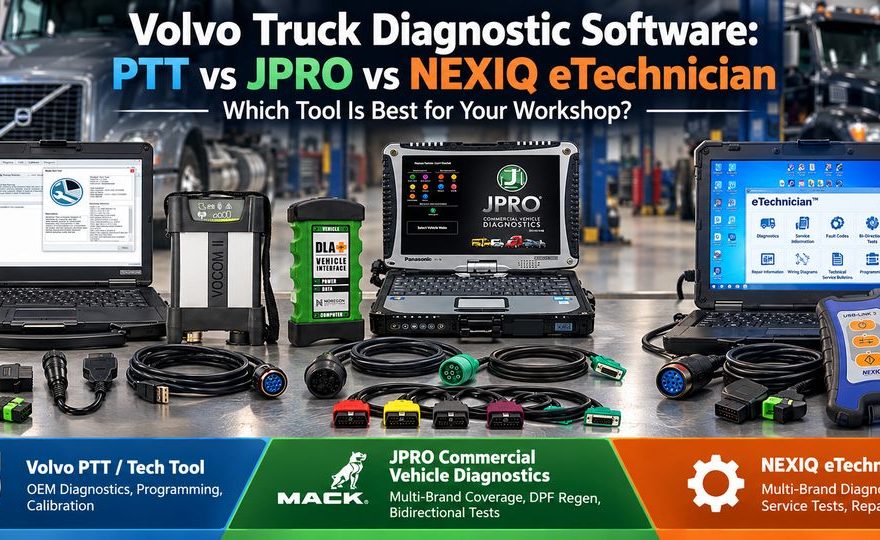
Choosing the right Volvo truck diagnostic software can make a major difference in repair time, diagnostic accuracy, and workshop efficiency.
Whether you maintain Volvo VNL trucks, Volvo VNR models, Mack Anthem vehicles, or a mixed fleet of commercial trucks, three diagnostic platforms commonly appear in tool comparisons:
- Volvo Premium Tech Tool (PTT): OEM diagnostic software for supported Volvo Group vehicles, including advanced diagnostics, calibrations, parameter programming, and authorized ECU programming.
- JPRO Commercial Vehicle Diagnostics: Multi-brand truck diagnostic software offering fault code analysis, live data, guided troubleshooting, and supported bidirectional tests.
- NEXIQ eTechnician: Multi-brand diagnostic software designed for commercial-vehicle troubleshooting, maintenance, and selected service functions.
These platforms share some diagnostic capabilities, but they are not interchangeable.
A technician performing routine DPF regeneration may find JPRO sufficient, while a Volvo specialist replacing an engine ECU may require authorized Volvo Tech Tool access.
This guide compares Volvo PTT, JPRO, and NEXIQ eTechnician, explains VOCOM and RP1210 adapter compatibility, and shows how to select the right diagnostic equipment for different repair situations.
1. Volvo PTT vs Tech Tool: Are They the Same?
Yes. Volvo Premium Tech Tool, PTT, and Tech Tool refer to the same Volvo Group OEM diagnostic software environment.
Volvo designed Tech Tool to support diagnosis, testing, calibration, and service operations on its commercial vehicles and selected related platforms.
According to Volvo’s official documentation, Tech Tool supports:
- Volvo Trucks and Prevost models from 1998 onward
- Mack Trucks using VMAC I, II, III, and later platforms
- Certain UD Truck applications from model year 2010 onward
Actual system support depends on vehicle year, ECU architecture, installed modules, software release, and the user’s authorization level.
What Is the Latest Volvo Premium Tech Tool Version?
Volvo’s official Premium Tech Tool page currently lists Tech Tool 2.8.390.
However, aftermarket diagnostic packages may include different software releases, such as PTT 2.8.241 or PTT 2.8.380.
The software version supplied with a diagnostic kit should not be confused with the latest release listed by Volvo.
Before buying a Volvo diagnostic tool, confirm the included software build, supported truck model years, compatible interface, licensing requirements, and availability of updates.
2. What Can Volvo Premium Tech Tool Do?
Unlike a generic heavy-duty scanner, PTT works within Volvo Group’s manufacturer-specific diagnostic environment.
Its functions can include complete vehicle identification, control-module communication, fault tracing, guided service procedures, and supported programming tasks.
Read and Clear Diagnostic Trouble Codes
PTT can retrieve supported Volvo and Mack fault information, including manufacturer-specific diagnostic data.
For example, when a Volvo D13 engine displays an aftertreatment warning, a technician may use PTT to investigate relevant engine and emission-control modules.
The available information can help determine whether the problem involves a sensor, electrical circuit, control system, or operating condition.
Monitor Live Data
PTT provides access to real-time values from supported control modules.
Depending on the vehicle and system, useful measurements may include:
| Diagnostic area | Examples of monitored parameters |
|---|---|
| Engine | Engine speed, operating temperature, fuel pressure |
| Air system | Intake pressure, boost-related values, air temperature |
| Aftertreatment | DPF differential pressure, exhaust temperature, NOx sensor data |
| Transmission | Gear selection, operating status, transmission parameters |
| Electrical systems | Sensor signals, control-module status, voltage |
| Vehicle systems | Selected PTO, chassis, and configuration information |
Live data is particularly valuable when a component appears to function normally while the vehicle is stationary but develops problems under load.
Perform Active Tests and Calibrations
Supported Tech Tool functions can include:
- Component activation and operational tests
- Selected engine and aftertreatment service tests
- Calibration of supported components
- Injector Trim Code changes on eligible OBD2013 and newer vehicles
- Manufacturer-specific fault-tracing procedures
The exact available tests depend on the truck’s configuration and software authorization.
Change Vehicle Parameters
PTT may provide selective parameter programming for supported vehicles.
Examples can include certain vehicle configuration values, PTO-related parameters, and other manufacturer-defined settings.
Important: Parameter access is controlled by vehicle design and user permissions. Not every visible setting can be modified.
Volvo ECU Programming
One of PTT’s most important advantages is its OEM programming environment.
Volvo documents authorized ECU programming for supported OBD2013 and newer vehicles, including applications involving:
- Engine Electronic Control Module (ECM)
- Aftertreatment Control Module (ACM)
- Transmission Electronic Control Unit (TECU)
- Vehicle Electronic Control Unit
ECU programming may require a valid software entitlement, appropriate user permissions, Volvo online services, compatible vehicle communication hardware, and stable programming power.
A VOCOM adapter or installed copy of PTT alone does not guarantee access to ECU software downloads or authorized programming.
3. Volvo VOCOM I vs VOCOM II: Which Interface Should You Use?
The communication adapter is just as important as the diagnostic software.
VOCOM devices connect the vehicle communication network to the diagnostic computer.
Volvo VOCOM I (88890300)
VOCOM I is an established Volvo Group diagnostic interface used in numerous Tech Tool installations.
It remains relevant for workshops supporting compatible older Volvo and Mack vehicles.
OBD2TOOL product recommendation:
Volvo VOCOM 88890300 Diagnostic Interface with PTT Software
This OBD2TOOL listing provides several package configurations, including hardware-only options, PTT software choices, and laptop bundles.
It is worth considering for workshops that need a compatible Volvo diagnostic setup and want to select their hardware and software package separately.
Check the specific configuration before ordering because included software versions and accessories differ.
Volvo VOCOM II (88894000)
VOCOM II is a later-generation Volvo Group communication interface used with supported Tech Tool diagnostic operations.
Compared with older hardware, the appropriate VOCOM II configuration may offer better alignment with newer diagnostic environments.
OBD2TOOL product recommendation:
Volvo VOCOM II 88894000 Diagnostic Tool with Premium Tech Tool
The OBD2TOOL product page lists interface packages with optional software installation, storage media, and laptop configurations.
This is a relevant option for Volvo/Mack-focused technicians who want dedicated communication hardware for supported PTT procedures.
VOCOM I vs VOCOM II Comparison
| Feature | VOCOM I | VOCOM II |
|---|---|---|
| Hardware generation | Earlier | Later |
| Volvo/Mack diagnostics | Supported configurations | Supported configurations |
| PTT compatibility | Version-dependent | Version-dependent |
| Legacy vehicle work | Useful for supported vehicles | Coverage depends on configuration |
| New vehicle architectures | More limited | Check exact hardware revision |
| Advanced programming | Depends on support and authorization | Depends on support and authorization |
| Recommended user | Legacy Volvo/Mack workshop | Volvo/Mack specialist requiring supported later-generation hardware |
For the newest Volvo architectures, do not assume that every device sold as “VOCOM II” provides the same connectivity.
Volvo’s published adapter matrix distinguishes specific VOCOM II Tough, VOCOM II Mini, and newer hardware configurations.
Check the exact part number and supported vehicle architecture rather than relying on the VOCOM generation name alone.
4. Can You Use NEXIQ USB-Link 3 with Volvo PTT?
Yes, supported RP1210 adapters can work with Volvo Tech Tool, but compatibility depends on the software version, adapter firmware, device driver, and the vehicle’s communication architecture.
RP1210 is an industry standard that allows compatible vehicle diagnostic applications to communicate through supported heavy-duty vehicle interfaces.
Common RP1210 adapter families include:
- Volvo VOCOM-compatible RP1210 interfaces
- NEXIQ USB-Link devices
- Noregon DLA+ interfaces
- Dearborn DPA interfaces
However, support for RP1210 does not automatically mean that all OEM functions are available.
NEXIQ USB-Link 3 vs Volvo VOCOM
| Comparison | NEXIQ USB-Link 3 | Volvo VOCOM |
|---|---|---|
| Primary purpose | Multi-brand communication | Volvo Group diagnostic communication |
| OEM software compatibility | Application- and driver-dependent | Designed for supported Volvo Group workflows |
| JPRO compatibility | Depends on software and adapter requirements | Not generally the primary JPRO adapter |
| Volvo PTT support | Requires exact compatibility verification | Supported hardware configurations |
| Mixed-fleet flexibility | Strong | More specialized |
| Advanced Volvo programming | Must verify adapter and authorization | Must verify adapter and authorization |
A NEXIQ adapter is a communication interface, not a substitute for a Volvo PTT license.
Likewise, purchasing a communication device does not automatically include eTechnician, JPRO, or OEM software access.
Related OBD2TOOL Product
NEXIQ 3 USB Link Diesel Truck Diagnostic Adapter
The linked product lists multiple cable configurations, including options for heavy-duty and Volvo connectors.
Compatibility warning: This particular listing also describes legacy operating-system and software limitations and states that its supplied software is older. It should not be assumed to provide the same firmware, operating-system compatibility, or capabilities as the current officially supported NEXIQ USB-Link 3. Confirm the exact hardware and driver requirements with the seller before purchase.
For current Volvo applications, consult the official Tech Tool adapter matrix.
For a more detailed setup walkthrough, read:
How to Configure a Diagnostic Adapter for Volvo Tech Tool
5. JPRO for Volvo and Mack Trucks: What Can It Do?
JPRO Commercial Vehicle Diagnostics is designed for technicians working across multiple commercial-vehicle brands.
It supports diagnostics for various engines, transmissions, ABS systems, and other vehicle components.
For Volvo and Mack trucks, supported JPRO capabilities can include:
Fault Code Reading and Vehicle Health Reports
JPRO can identify supported vehicle components and display standard and proprietary diagnostic trouble codes.
This is useful for workshops receiving different brands of trucks throughout the day.
Instead of switching between separate OEM programs for every vehicle during initial diagnosis, technicians can use one multi-brand diagnostic environment.
DPF Regeneration
JPRO provides supported DPF service regeneration functions for selected Volvo and Mack engine generations.
Before initiating a regeneration, technicians should verify that the vehicle meets the relevant operating and safety conditions.
DPF regeneration is not a substitute for repairing underlying faults involving exhaust temperature sensors, differential pressure sensors, dosing components, or other aftertreatment systems.
Cylinder Cutout and Bidirectional Tests
Depending on the engine family and software coverage, JPRO can provide functions such as:
- Cylinder cutout
- DPF service regeneration
- DPF system reset
- EGR function testing
- Fan activation testing
- Selected DEF dosing and pressure tests
- Selected vehicle parameters and service operations
Noregon’s published coverage documents identify the supported emissions generations for individual tests.
Bidirectional functionality should always be checked against the specific engine and software version.
Recommended JPRO Diagnostic Kit
For mixed-fleet repair shops, OBD2TOOL offers:
JPRO Heavy-Duty Truck Diagnostic Tool with DLA+ 2.0 Adapter
The product page lists configurations with diagnostic hardware, 6-pin and 9-pin cables, JPRO software selections, and optional laptops.
This package is best suited to technicians who want a complete multi-brand diagnostic setup rather than purchasing a standalone software package.
The exact software version, activation arrangement, and additional subscriptions should be confirmed before ordering.
Already Have a Compatible Diagnostic Adapter?
OBD2TOOL also lists:
JPRO 2026 V2 Commercial Vehicle Diagnostic Software
This can be relevant for workshops that already own an adapter supported by the supplied JPRO installation.
However, purchasing software alone does not eliminate the need for a compatible communication interface and valid software authorization.
Important limitation: JPRO is not a direct replacement for Volvo’s authorized ECU reprogramming environment.
6. NEXIQ eTechnician for Volvo/Mack Diagnostics
NEXIQ eTechnician is another commercial-vehicle diagnostic platform offering multi-brand coverage.
It should not be confused with NEXIQ USB-Link hardware.
NEXIQ USB-Link is an adapter. NEXIQ eTechnician is diagnostic software.
The software supports multiple commercial-vehicle systems, including applicable engine, transmission, chassis, and brake applications.
According to NEXIQ’s published coverage, Volvo and Mack engine generations include EPA 2007, EPA 2010, EPA 2013, EPA 2017, and EPA 2020 applications within its specified model-year coverage.
NEXIQ eTechnician Features
Supported functions can include:
- Reading and clearing fault codes
- Monitoring live sensor data
- Reviewing vehicle information
- DPF regeneration
- Injector cutout
- Power balance tests
- Aftertreatment-related diagnostics
- Selected configuration and maintenance operations
Availability varies by installed software modules, engine generation, vehicle, and diagnostic adapter.
JPRO vs eTechnician
Both products target multi-brand truck maintenance.
JPRO places considerable emphasis on whole-vehicle diagnostics, troubleshooting support, and supported bidirectional controls.
eTechnician provides a diagnostic environment with service tests, vehicle information, and additional repair-information integration.
For either product, review the latest coverage chart rather than assuming that a test advertised for one engine manufacturer also works on every Volvo or Mack engine.
7. Volvo PTT vs JPRO vs NEXIQ eTechnician: Complete Comparison
The following table summarizes their roles in a professional workshop.
| Diagnostic function | Volvo PTT / Tech Tool | JPRO | NEXIQ eTechnician |
|---|---|---|---|
| Read / clear DTCs | Yes | Yes | Yes |
| Live sensor data | Yes | Yes | Yes |
| Volvo-specific data | Strong OEM access | Supported | Supported |
| DPF regeneration | Supported | Supported | Supported |
| Cylinder cutout | Vehicle-dependent | Vehicle-dependent | Vehicle-dependent |
| Bidirectional testing | Supported | Supported | Supported |
| Aftertreatment diagnostics | Strong OEM coverage | Multi-brand coverage | Multi-brand coverage |
| Selected parameter changes | Yes | Limited by coverage | Limited by coverage |
| OEM-guided procedures | Strong | Multi-brand guidance | Diagnostic and repair support |
| OEM ECU reprogramming | With authorized access | Not a replacement | Not a replacement |
| Multi-brand diagnostics | Mainly supported Volvo Group vehicles | Strong | Strong |
| Best suited for | Volvo/Mack specialists | Mixed-fleet repair shops | Mixed-fleet maintenance |
Key takeaway: All three can be useful for Volvo and Mack diagnostics, but PTT has the clearest advantage when repairs require manufacturer-specific programming and protected OEM functions.
8. Real Workshop Scenarios: Which Diagnostic Tool Should You Use?
Choosing software becomes easier when the comparison is based on actual repair tasks rather than feature lists alone.
Scenario 1: Volvo D13 Truck with DPF Warning
Customer complaint: A Volvo truck displays an aftertreatment warning and may have reduced engine performance.
Recommended workflow:
- Read current and stored faults.
- Identify the affected engine or aftertreatment modules.
- Examine exhaust temperature, DPF differential pressure, and other relevant live values.
- Check for sensor, wiring, and aftertreatment component faults.
- Perform manufacturer-approved tests if the fault information requires them.
- Consider a stationary regeneration only when the truck meets the required conditions.
Tool recommendation:
JPRO or eTechnician may be sufficient for initial diagnosis and supported service regeneration.
Use Volvo PTT when the repair requires a manufacturer-specific procedure, deeper control-module access, or an authorized calibration.
Scenario 2: Volvo Truck Requires ECU Replacement
Customer complaint: The engine ECU has failed and requires replacement.
Replacing the physical module may not complete the repair.
The replacement may require correct software, compatible configuration data, and other manufacturer-authorized procedures.
Tool recommendation:
Use Volvo Premium Tech Tool with the appropriate software entitlement, supported communication adapter, and OEM programming access.
A universal fault-code reader should not be treated as an ECU programming solution.
Scenario 3: Mixed Fleet with Volvo, Freightliner and PACCAR Trucks
Workshop situation: An independent repair facility services several different truck manufacturers daily.
A technician needs to read engine, transmission, and ABS faults across multiple vehicles.
Tool recommendation:
A multi-brand platform such as JPRO or eTechnician will often be more efficient for initial fault diagnosis and routine maintenance.
An OEM-specific tool can be used when the repair exceeds the universal platform’s capabilities.
Explore the JPRO Heavy-Duty Diagnostic Kit
Scenario 4: Volvo Truck Needs Parameter Configuration
Workshop situation: A supported Volvo vehicle requires a PTO-related setting or another manufacturer-specific parameter change.
Tool recommendation:
PTT is the more appropriate starting point for deep Volvo parameterization.
JPRO and eTechnician may offer selected configurable parameters, but their coverage should not be assumed to equal full OEM configuration access.
Scenario 5: Truck Will Not Communicate with Diagnostic Software
Customer complaint: The diagnostic application cannot establish communication with the Volvo or Mack truck.
Before purchasing another tool, check:
- Vehicle diagnostic connector and applicable power supply.
- Adapter USB connection and indicator status.
- Installed RP1210 driver and firmware.
- Correct adapter selection inside the diagnostic application.
- Compatible diagnostic cable and vehicle protocol.
- Whether the software supports the truck’s electrical architecture.
If the software cannot detect the communication adapter, investigate the laptop and adapter setup before replacing vehicle components.
For a detailed Tech Tool configuration walkthrough:
Volvo Tech Tool Diagnostic Adapter Setup Guide
9. How to Choose the Right Volvo Truck Diagnostic Tool
Different workshops should prioritize different capabilities.
For Independent Heavy-Duty Repair Shops
Choose a multi-brand platform when most jobs involve initial fault diagnosis, routine maintenance, and supported service tests across several vehicle makes.
Recommended direction: JPRO diagnostic software with a compatible adapter.
For Volvo and Mack Specialists
Prioritize genuine OEM compatibility, reliable vehicle communication, manufacturer-specific diagnostics, and the appropriate access for advanced service work.
Recommended direction: Volvo PTT with a supported VOCOM interface.
For Mobile Diesel Technicians
Portability, straightforward setup, common service functions, and vehicle coverage are especially important.
A suitable multi-brand diagnostic package may reduce the need to carry separate interfaces for every engine manufacturer.
Recommended direction: A JPRO-based kit or appropriately supported eTechnician setup, depending on vehicle coverage.
For Workshops Performing ECU Programming
Confirm manufacturer authorization, vehicle software coverage, the correct hardware, programming power requirements, and network access before buying a kit.
Recommended direction: Volvo’s authorized OEM programming environment.
10. Volvo Workshop Toolbox: The Next-Generation Diagnostic Platform
Volvo has introduced Workshop Toolbox as its next-generation diagnostic platform.
It is a modular, cloud-based service environment designed for supported Volvo Group vehicles from 2013 onward.
Available or documented functions include:
- Vehicle check-in
- Diagnostic data collection
- Trip reports
- Steering calibration
- Software Center functions
- Selected parameter programming
- Campaign and vehicle software operations
Does Workshop Toolbox Replace Tech Tool?
Not completely.
Volvo states that Workshop Toolbox operates alongside Tech Tool while functionality continues to migrate.
PTT remains important for legacy platforms and established service operations.
Workshop Toolbox also supports suitable RP1210 interfaces, including specified VOCOM II and compatible third-party devices.
However, module availability, vehicle eligibility, software authorization, and supported operations must be confirmed.
At the time of writing, Volvo’s public Workshop Toolbox information describes dealer availability for certain applications and a developing rollout for fleets and customers.
Do not assume that purchasing a VOCOM adapter or an aftermarket PTT package automatically provides Workshop Toolbox access.
For current information, consult:
Volvo Trucks – Premium Tech Tool and Workshop Toolbox
11. Common Volvo Diagnostic Tool Buying Mistakes
Mistake 1: Assuming All Diagnostic Software Can Program ECUs
Reading faults, performing bidirectional tests, and downloading OEM ECU software are different operations.
JPRO and eTechnician should not be purchased on the assumption that they provide full Volvo ECU reprogramming capabilities.
Mistake 2: Buying an Adapter Without Checking Software Compatibility
Not every RP1210 adapter is suitable for every software release or newer vehicle architecture.
Always verify hardware generation, driver, firmware, connector type, and vehicle coverage.
Mistake 3: Confusing Software Installation with OEM Authorization
Successful installation does not guarantee that an OEM server will approve programming or provide a downloadable calibration.
Verify licensing, account access, and programming permissions.
Mistake 4: Selecting Software Based Only on Its Advertised Year
A product labeled “2026” does not necessarily include every 2026 vehicle or function.
Check the exact build and published coverage.
Mistake 5: Ignoring the Diagnostic Computer
Software and communication hardware must be compatible with the operating system.
Volvo’s current Workshop Toolbox requirements include Windows 11 Professional 64-bit, along with applicable security and hardware requirements.
Older software packages may have different operating-system requirements.
12. Frequently Asked Questions
Is Volvo PTT the same as Volvo Tech Tool?
Yes. PTT stands for Premium Tech Tool. It is the Volvo Group OEM service software also referred to as Tech Tool.
What is the best diagnostic software for Volvo trucks?
For OEM-specific Volvo/Mack diagnostics, parameterization, and authorized ECU programming, Premium Tech Tool is generally the strongest option.
For multi-brand maintenance and routine diagnostic work, JPRO or eTechnician may offer a more practical workflow.
Can JPRO diagnose Volvo D13 engines?
JPRO includes Volvo engine coverage and supports applicable Volvo/Mack diagnostic and bidirectional functions.
Specific functions depend on the engine’s emissions generation, vehicle configuration, and JPRO software version.
Can JPRO perform Volvo DPF regeneration?
Yes, on supported Volvo and Mack applications.
Check the current coverage chart and ensure that the vehicle meets the manufacturer’s regeneration prerequisites.
Can JPRO program Volvo ECUs?
JPRO is not a replacement for Volvo’s OEM ECU programming environment.
For authorized software downloads and programming, use the appropriate Volvo OEM system.
Can NEXIQ USB-Link 3 work with Volvo Tech Tool?
Certain officially supported NEXIQ adapters can communicate with Tech Tool.
Compatibility depends on the exact hardware, driver, firmware, software version, and vehicle architecture.
Do I need VOCOM II for Volvo PTT?
Not always.
Some versions of Tech Tool support specific RP1210 adapters, while particular Volvo diagnostic or programming operations may require hardware with additional capabilities.
Consult the official adapter compatibility matrix for your vehicle.
Is Volvo Workshop Toolbox replacing PTT?
Volvo is migrating functionality toward Workshop Toolbox, but Tech Tool continues to serve supported legacy vehicles and existing workflows.
Which tool is best for a mixed fleet?
JPRO or eTechnician is often the most convenient starting point when technicians work on Volvo, Mack, Cummins, Detroit, PACCAR, and other commercial-vehicle systems.
OEM tools remain valuable for specialized service operations.
Final Verdict: Volvo PTT, JPRO or NEXIQ?
There is no single diagnostic platform that is best for every heavy-duty repair business.
Choose Volvo PTT when the workshop specializes in Volvo/Mack vehicles and requires OEM-level diagnostics, advanced parameter access, calibrations, or authorized ECU programming.
Choose JPRO when the workshop services multiple truck brands and needs a unified platform for fault analysis, live data, guided troubleshooting, and supported bidirectional tests.
Consider NEXIQ eTechnician when its coverage and workflow suit your mixed-fleet diagnostic requirements.
For many professional repair shops, the most effective solution is a combination of multi-brand diagnostics and OEM software.
Use JPRO or eTechnician for initial inspections and everyday troubleshooting, then use Volvo PTT when manufacturer-specific procedures are necessary.
Explore Volvo and Heavy-Duty Diagnostic Tools at OBD2TOOL
For Volvo/Mack specialists:
Volvo VOCOM II 88894000 with PTT
For mixed-fleet workshops:
JPRO Heavy-Duty Diagnostic Tool with DLA+ 2.0
For technicians who already have compatible diagnostic hardware:
JPRO 2026 V2 Commercial Vehicle Diagnostic Software
Before ordering, confirm the diagnostic software version, supported trucks, operating system, compatible hardware, cable package, activation requirements, and available service functions.