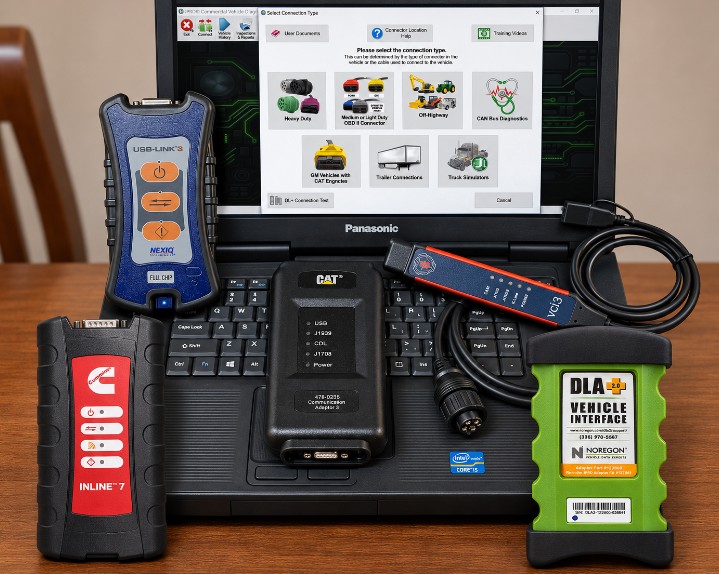
Choosing the right heavy-duty truck diagnostic software is an important investment for independent repair shops, diesel mechanics, fleet maintenance departments, and commercial vehicle service centers.
The wrong diagnostic tool can leave technicians unable to access important control modules, communicate with certain engine generations, or perform essential service functions. The right combination of software, communication hardware, and vehicle coverage can significantly improve diagnostic efficiency and reduce unnecessary downtime.
However, choosing a professional truck diagnostic system involves more than comparing software names or advertised vehicle coverage.
Before purchasing, you need to answer three important questions:
- Vehicle Coverage: Does the software support the truck brands, model years, engines, and electronic control modules you service?
- Software and Hardware Compatibility: Does it work with your Windows computer, communication adapter, and vehicle protocols?
- Diagnostic Capabilities: Can it perform the operations your workshop needs, including fault-code reading, live data, bidirectional tests, DPF regeneration, parameter adjustments, and supported programming?
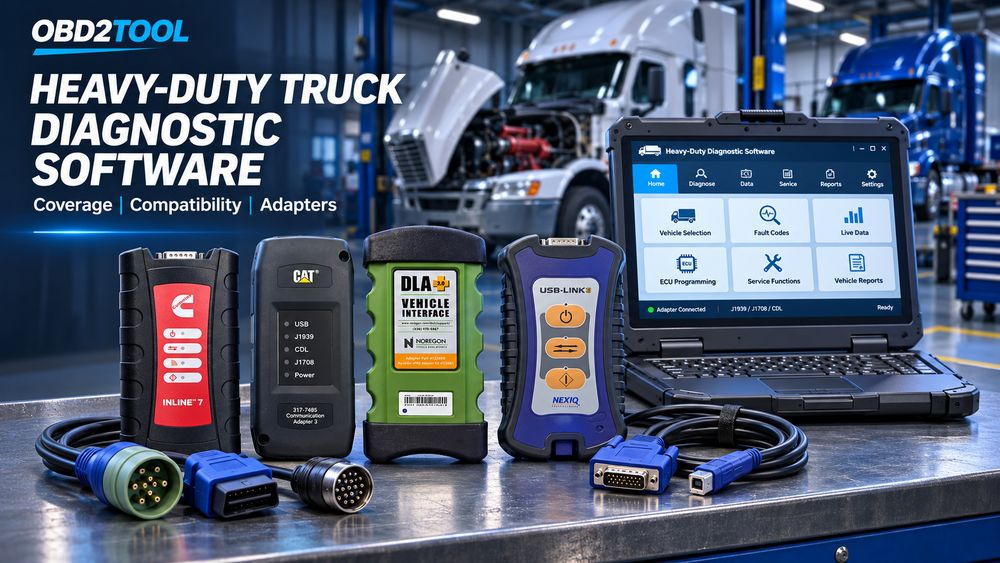
This guide explains how to evaluate heavy-duty truck diagnostic software, select the correct communication adapter, understand J1939 and RP1210 compatibility, and compare professional diagnostic solutions such as JPRO, NEXIQ eTechnician, Cummins INSITE, CAT ET, and Volvo Premium Tech Tool.
1. Why Choosing the Right Heavy-Duty Diagnostic Software Matters
Modern commercial trucks contain multiple electronic control modules that communicate through vehicle networks.
Depending on the truck, these modules may control:
- Engine management
- Automatic transmission
- Anti-lock braking systems (ABS)
- Aftertreatment and emissions systems
- Body and chassis electronics
- Instrument clusters
- Electronic suspension and other vehicle systems
When a truck develops a fault, technicians need more than a basic engine-code reader to identify the underlying problem.
Professional diagnostic software can provide access to fault codes, freeze-frame information, live sensor data, component tests, and manufacturer-specific troubleshooting information.
For example, a truck displaying a DPF warning may require technicians to examine differential pressure, exhaust temperatures, regeneration status, and related engine faults before deciding whether a forced regeneration is appropriate.
A suitable diagnostic platform can help identify the affected system and guide the repair process.
For busy workshops and commercial fleets, better diagnostic coverage means fewer unnecessary parts replacements, more efficient troubleshooting, and reduced vehicle downtime.
2. Vehicle Coverage: The First Thing to Check
Vehicle coverage should be the first consideration when selecting truck diagnostic software.
A diagnostic application may advertise support for Volvo, Mack, Cummins, Detroit Diesel, or PACCAR, but that does not mean every model year, engine, ECU, or service function is supported.
Always check the detailed coverage information before purchasing.
Single-Brand vs. Multi-Brand Diagnostic Software
Heavy-duty diagnostic software generally falls into two categories.
OEM-specific diagnostic software
OEM software is developed for a particular manufacturer or vehicle ecosystem.
Examples include:
- Cummins INSITE for supported Cummins engines
- Detroit Diesel DiagnosticLink (DDDL) for supported Detroit systems
- Caterpillar Electronic Technician (CAT ET) for Caterpillar engines and equipment
- Volvo Premium Tech Tool (PTT) for supported Volvo Group vehicles
- PACCAR DAVIE for supported PACCAR vehicles
These applications are particularly useful when technicians need manufacturer-specific troubleshooting, configuration, calibration, or authorized programming functions.
Multi-brand diagnostic software
Multi-brand applications allow technicians to diagnose different vehicle manufacturers through a common interface.
Examples include:
- Noregon JPRO
- NEXIQ eTechnician
- Other professional commercial-vehicle diagnostic platforms
These applications are useful for independent repair shops and fleet operators that service several truck manufacturers.
| Comparison | OEM Diagnostic Software | Multi-Brand Software |
|---|---|---|
| Vehicle coverage | Manufacturer-specific | Multiple manufacturers |
| Fault-code diagnostics | Deep OEM information | Broad multi-brand coverage |
| Live data | Manufacturer-specific | Supported vehicle systems |
| Bidirectional tests | OEM-specific procedures | Supported tests |
| Parameter changes | Depends on OEM authorization | Selected supported parameters |
| ECU programming | Available for eligible applications | Generally more limited |
| Best application | Brand specialists | Mixed-fleet workshops |
Buying advice: If your workshop mainly services one manufacturer, OEM software is usually the better starting point. If you work with several brands every day, multi-brand diagnostic software may provide better overall value.
Check Model Years and Engine Coverage
Vehicle coverage should be checked at the engine and ECU level, not just by truck brand.
For example, two Volvo trucks may use different engine generations and electronic architectures. A diagnostic function supported on one vehicle may not be available on another.
Before buying, confirm:
- Truck manufacturer
- Model and model year
- Engine manufacturer and engine family
- Emissions generation
- ECM and transmission controller
- ABS and chassis system coverage
- Available bidirectional tests
- Parameter adjustment capabilities
- Supported programming operations
Aftertreatment coverage deserves particular attention because DPF, SCR, DEF, EGR, and NOx-related repairs are common in heavy-duty workshops.
A tool may read aftertreatment fault codes without supporting every associated service test or reset.
Always review the detailed coverage chart rather than relying on a general compatibility statement.
3. Software and Computer Compatibility
After confirming vehicle coverage, check whether the software is compatible with your diagnostic computer.
Most professional heavy-duty diagnostic applications run on Windows-based laptops or tablets.
However, different software releases have different requirements.
Windows Operating System Requirements
Examples of current software requirements include:
| Software | Operating System Considerations |
|---|---|
| JPRO 2026 V2 | Windows 10/11 64-bit |
| Cummins INSITE 9.3.0 | Check the supplied package; OBD2TOOL lists Windows 10/11 |
| CAT ET | Depends on the software release; current product configurations list supported Windows versions |
| Volvo PTT | Depends on the PTT release and installation configuration |
| NEXIQ eTechnician | Check the specific software release and supported hardware |
For JPRO 2026 V2, Noregon lists support for Windows 10 and Windows 11 (64-bit).
Its recommended computer configuration includes an Intel Core i5 processor, 8 GB RAM, and at least 20 GB of available storage.
Other diagnostic applications may require different configurations.
Before installing software, check the exact operating system, processor architecture, memory, storage, USB ports, and driver requirements.
Why a Rugged Diagnostic Laptop Is Useful
A standard office laptop may work for many diagnostic applications, but workshop environments can be demanding.
A rugged laptop offers advantages such as:
- Better resistance to vibration
- More durable construction
- Improved portability
- Multiple USB connections
- Suitability for mobile service work
Popular workshop computers include Panasonic Toughbook and Getac rugged laptops.
However, you don’t always need an expensive rugged computer. A compatible Windows laptop that meets the software requirements may be sufficient.
4. Understanding Heavy-Duty Diagnostic Protocols: J1939, J1708, J1587, and RP1210
Vehicle communication protocols are another important part of diagnostic compatibility.
The software, communication adapter, cables, and truck must all support the required communication method.
SAE J1939
J1939 is widely used in modern heavy-duty commercial vehicles.
It provides communication between electronic control modules and is commonly used for engine, transmission, braking, and other vehicle systems.
Many heavy-duty trucks use a 9-pin Deutsch diagnostic connector that provides access to J1939 and, depending on the vehicle, legacy J1708/J1587 communication.
J1708 and J1587
J1708 and J1587 are associated with older heavy-duty vehicle communication systems.
They remain relevant when servicing legacy trucks.
A 6-pin Deutsch connector is commonly associated with J1708/J1587 applications, although connector and network configurations should always be verified against the vehicle.
OBD-II and 16-Pin Connectors
Some medium-duty trucks and commercial vehicles use a 16-pin OBD-II diagnostic connector.
However, a 16-pin connector does not automatically guarantee support for every diagnostic protocol or system.
Always check the vehicle’s actual communication architecture.
What Is RP1210?
RP1210 is not a vehicle communication protocol like J1939.
It is a standardized software interface that allows Windows-based diagnostic applications to communicate with supported vehicle communication adapters.
In practical terms:
- J1939 and J1708/J1587 describe vehicle-side communication.
- RP1210 provides a standardized way for diagnostic software to access compatible adapters.
- The adapter translates the communication between the computer and the vehicle network.
This is why RP1210 compatibility is important when selecting multi-brand heavy-duty diagnostic hardware.
Important: An RP1210-compliant adapter is not automatically compatible with every diagnostic application. The software vendor must support the particular adapter, driver, firmware, and required communication channels.
5. Choosing the Right Heavy-Duty Diagnostic Adapter
Diagnostic software cannot communicate with a truck on its own.
It needs a vehicle communication interface, commonly called a datalink adapter (DLA), VCI, or diagnostic interface.
The adapter connects the laptop to the vehicle’s diagnostic port and provides access to supported electronic control modules.
Different software platforms may require different adapters.
Noregon DLA+ Adapter for JPRO
Noregon DLA+ adapters are designed for use with JPRO and other supported commercial-vehicle diagnostic applications.
Depending on the hardware generation and software version, the DLA+ family provides communication through USB or wireless connections.
For a JPRO installation, verify:
- Adapter generation
- RP1210 driver
- Firmware version
- Supported JPRO release
- Required vehicle cables
- USB or wireless configuration
Important November 2026 compatibility update:
Noregon’s current adapter-driver notice states that DLA+ 2.0 adapters will no longer support vehicle connections with JPRO effective November 2026.
If purchasing a JPRO kit around or after this date, verify the adapter generation carefully and ask about a supported DLA+ 3.0 configuration.
OBD2TOOL currently lists JPRO packages with DLA+ 2.0 hardware, so don’t assume an older bundle automatically meets the newer adapter requirements.
OBD2TOOL product options:
JPRO Professional Diagnostic Tool with DLA+ 2.0 Adapter Kit
JPRO 2026 V2 Commercial Vehicle Diagnostic Software
The software-only listing is relevant to workshops that already have compatible communication hardware. Confirm the current adapter configuration with OBD2TOOL before ordering.
NEXIQ USB-Link 3
NEXIQ USB-Link 3 is a multi-application vehicle communication interface designed for commercial vehicle diagnostics.
The official USB-Link 3 specifications include support for:
- RP1210 A/B/C/D APIs
- J1939 and CAN FD
- J1708
- ISO 15765
- DoIP
- J2534-related applications
The wired version connects directly to a computer through USB.
Depending on the software application and vehicle, USB-Link 3 can be used with compatible diagnostic platforms.
However, RP1210 support alone does not guarantee compatibility with every software release.
OBD2TOOL product recommendation:
NEXIQ 3 USB Link Diesel Truck Diagnostic Tool
Check the product configuration carefully. The OBD2TOOL listing describes older software included on its CD and lists legacy operating-system limitations. Do not assume that the bundled software is the current official USB-Link 3 driver or that every included application supports modern Windows systems.
For a current USB-Link 3 setup, verify the hardware revision, official driver, firmware, and compatibility with the diagnostic application you intend to use.
Cummins INLINE 7
Cummins INLINE 7 is a dedicated communication adapter for Cummins diagnostic applications and supported third-party software.
It supports USB communication and RP1210 functionality.
The adapter is designed to work with Cummins INSITE and other supported service applications.
For Cummins-focused workshops, using the appropriate INLINE interface with INSITE provides a more direct diagnostic configuration.
OBD2TOOL product recommendation:
Cummins INLINE 7 with INSITE 9.3.0/8.7 PRO Software
This package offers different configurations, including hardware-only software options and laptop bundles.
Confirm the included INSITE version, Windows requirements, activation arrangements, and supported operations before purchasing.
CAT Communication Adapter 3
Caterpillar Electronic Technician requires compatible communication hardware to connect with supported Caterpillar ECMs.
CAT Communication Adapter 3 is a dedicated interface used for Caterpillar diagnostic applications.
It suits workshops servicing Caterpillar engines, excavators, loaders, generators, and other supported equipment.
OBD2TOOL product recommendation:
CAT Caterpillar ET Diagnostic Adapter 3 with Software Options
The listing offers different software and hardware configurations. Check the current software version and exact adapter configuration when ordering.
Volvo VOCOM II
Volvo VOCOM II is a Volvo Group communication interface designed for supported Volvo diagnostic environments.
It is used with Premium Tech Tool for applicable Volvo and Mack service operations.
Unlike a general-purpose adapter, VOCOM is specifically associated with Volvo Group diagnostic workflows.
OBD2TOOL product recommendation:
Volvo VOCOM II 88894000 with PTT Software
This product listing offers hardware-only and software/laptop configurations.
Check the included PTT release, vehicle coverage, hardware revision, and authorization requirements before ordering.
How to Choose Heavy-Duty Truck Diagnostic Software: Compatibility, Adapters & Vehicle Coverage
Choosing the right heavy-duty truck diagnostic software is an important investment for independent repair shops, diesel mechanics, fleet maintenance departments, and commercial vehicle service centers.
The wrong diagnostic tool can leave technicians unable to access important control modules, communicate with certain engine generations, or perform essential service functions. The right combination of software, communication hardware, and vehicle coverage can significantly improve diagnostic efficiency and reduce unnecessary downtime.
However, choosing a professional truck diagnostic system involves more than comparing software names or advertised vehicle coverage.
Before purchasing, you need to answer three important questions:
- Vehicle Coverage: Does the software support the truck brands, model years, engines, and electronic control modules you service?
- Software and Hardware Compatibility: Does it work with your Windows computer, communication adapter, and vehicle protocols?
- Diagnostic Capabilities: Can it perform the operations your workshop needs, including fault-code reading, live data, bidirectional tests, DPF regeneration, parameter adjustments, and supported programming?
This guide explains how to evaluate heavy-duty truck diagnostic software, select the correct communication adapter, understand J1939 and RP1210 compatibility, and compare professional diagnostic solutions such as JPRO, NEXIQ eTechnician, Cummins INSITE, CAT ET, and Volvo Premium Tech Tool.
1. Why Choosing the Right Heavy-Duty Diagnostic Software Matters
Modern commercial trucks contain multiple electronic control modules that communicate through vehicle networks.
Depending on the truck, these modules may control:
- Engine management
- Automatic transmission
- Anti-lock braking systems (ABS)
- Aftertreatment and emissions systems
- Body and chassis electronics
- Instrument clusters
- Electronic suspension and other vehicle systems
When a truck develops a fault, technicians need more than a basic engine-code reader to identify the underlying problem.
Professional diagnostic software can provide access to fault codes, freeze-frame information, live sensor data, component tests, and manufacturer-specific troubleshooting information.
For example, a truck displaying a DPF warning may require technicians to examine differential pressure, exhaust temperatures, regeneration status, and related engine faults before deciding whether a forced regeneration is appropriate.
A suitable diagnostic platform can help identify the affected system and guide the repair process.
For busy workshops and commercial fleets, better diagnostic coverage means fewer unnecessary parts replacements, more efficient troubleshooting, and reduced vehicle downtime.
2. Vehicle Coverage: The First Thing to Check
Vehicle coverage should be the first consideration when selecting truck diagnostic software.
A diagnostic application may advertise support for Volvo, Mack, Cummins, Detroit Diesel, or PACCAR, but that does not mean every model year, engine, ECU, or service function is supported.
Always check the detailed coverage information before purchasing.
Single-Brand vs. Multi-Brand Diagnostic Software
Heavy-duty diagnostic software generally falls into two categories.
OEM-specific diagnostic software
OEM software is developed for a particular manufacturer or vehicle ecosystem.
Examples include:
- Cummins INSITE for supported Cummins engines
- Detroit Diesel DiagnosticLink (DDDL) for supported Detroit systems
- Caterpillar Electronic Technician (CAT ET) for Caterpillar engines and equipment
- Volvo Premium Tech Tool (PTT) for supported Volvo Group vehicles
- PACCAR DAVIE for supported PACCAR vehicles
These applications are particularly useful when technicians need manufacturer-specific troubleshooting, configuration, calibration, or authorized programming functions.
Multi-brand diagnostic software
Multi-brand applications allow technicians to diagnose different vehicle manufacturers through a common interface.
Examples include:
- Noregon JPRO
- NEXIQ eTechnician
- Other professional commercial-vehicle diagnostic platforms
These applications are useful for independent repair shops and fleet operators that service several truck manufacturers.
| Comparison | OEM Diagnostic Software | Multi-Brand Software |
|---|---|---|
| Vehicle coverage | Manufacturer-specific | Multiple manufacturers |
| Fault-code diagnostics | Deep OEM information | Broad multi-brand coverage |
| Live data | Manufacturer-specific | Supported vehicle systems |
| Bidirectional tests | OEM-specific procedures | Supported tests |
| Parameter changes | Depends on OEM authorization | Selected supported parameters |
| ECU programming | Available for eligible applications | Generally more limited |
| Best application | Brand specialists | Mixed-fleet workshops |
Buying advice: If your workshop mainly services one manufacturer, OEM software is usually the better starting point. If you work with several brands every day, multi-brand diagnostic software may provide better overall value.
Check Model Years and Engine Coverage
Vehicle coverage should be checked at the engine and ECU level, not just by truck brand.
For example, two Volvo trucks may use different engine generations and electronic architectures. A diagnostic function supported on one vehicle may not be available on another.
Before buying, confirm:
- Truck manufacturer
- Model and model year
- Engine manufacturer and engine family
- Emissions generation
- ECM and transmission controller
- ABS and chassis system coverage
- Available bidirectional tests
- Parameter adjustment capabilities
- Supported programming operations
Aftertreatment coverage deserves particular attention because DPF, SCR, DEF, EGR, and NOx-related repairs are common in heavy-duty workshops.
A tool may read aftertreatment fault codes without supporting every associated service test or reset.
Always review the detailed coverage chart rather than relying on a general compatibility statement.
3. Software and Computer Compatibility
After confirming vehicle coverage, check whether the software is compatible with your diagnostic computer.
Most professional heavy-duty diagnostic applications run on Windows-based laptops or tablets.
However, different software releases have different requirements.
Windows Operating System Requirements
Examples of current software requirements include:
| Software | Operating System Considerations |
|---|---|
| JPRO 2026 V2 | Windows 10/11 64-bit |
| Cummins INSITE 9.3.0 | Check the supplied package; OBD2TOOL lists Windows 10/11 |
| CAT ET | Depends on the software release; current product configurations list supported Windows versions |
| Volvo PTT | Depends on the PTT release and installation configuration |
| NEXIQ eTechnician | Check the specific software release and supported hardware |
For JPRO 2026 V2, Noregon lists Windows 10 and Windows 11 64-bit support.
Its recommended computer configuration includes an Intel Core i5 processor, 8 GB RAM, and at least 20 GB of available storage.
Other diagnostic applications may require different configurations.
Before installing software, check the exact operating system, processor architecture, memory, storage, USB ports, and driver requirements.
Why a Rugged Diagnostic Laptop Is Useful
A standard office laptop may work for many diagnostic applications, but workshop environments can be demanding.
A rugged laptop offers advantages such as:
- Better resistance to vibration
- More durable construction
- Improved portability
- Multiple USB connections
- Suitability for mobile service work
Popular workshop computers include Panasonic Toughbook and Getac rugged laptops.
However, buying an expensive rugged computer is not always necessary. A compatible Windows laptop that meets the software requirements may be sufficient.
4. Understanding Heavy-Duty Diagnostic Protocols: J1939, J1708, J1587 and RP1210
Vehicle communication protocols are another important part of diagnostic compatibility.
The software, communication adapter, cables, and truck must all support the required communication method.
SAE J1939
J1939 is widely used in modern heavy-duty commercial vehicles.
It provides communication between electronic control modules and is commonly used for engine, transmission, braking, and other vehicle systems.
Many heavy-duty trucks use a 9-pin Deutsch diagnostic connector that provides access to J1939 and, depending on the vehicle, legacy J1708/J1587 communication.
J1708 and J1587
J1708 and J1587 are associated with older heavy-duty vehicle communication systems.
They remain relevant when servicing legacy trucks.
A 6-pin Deutsch connector is commonly associated with J1708/J1587 applications, although connector and network configurations should always be verified against the vehicle.
OBD-II and 16-Pin Connectors
Some medium-duty trucks and commercial vehicles use a 16-pin OBD-II diagnostic connector.
However, the presence of a 16-pin connector does not automatically guarantee support for every diagnostic protocol or system.
Always check the vehicle’s actual communication architecture.
What Is RP1210?
RP1210 is not a vehicle communication protocol like J1939.
It is a standardized software interface that allows Windows-based diagnostic applications to communicate with supported vehicle communication adapters.
In practical terms:
- J1939 and J1708/J1587 describe vehicle-side communication.
- RP1210 provides a standardized way for diagnostic software to access compatible adapters.
- The adapter translates the communication between the computer and the vehicle network.
This is why RP1210 compatibility is important when selecting multi-brand heavy-duty diagnostic hardware.
Important: An RP1210-compliant adapter is not automatically compatible with every diagnostic application. The software vendor must support the particular adapter, driver, firmware, and required communication channels.
5. Choosing the Right Heavy-Duty Diagnostic Adapter
Diagnostic software cannot communicate with a truck by itself.
It needs a vehicle communication interface, commonly called a datalink adapter (DLA), VCI, or diagnostic interface.
The adapter connects the laptop to the vehicle’s diagnostic port and provides access to supported electronic control modules.
Different software platforms may require different adapters.
Noregon DLA+ Adapter for JPRO
Noregon DLA+ adapters are designed for use with JPRO and other supported commercial-vehicle diagnostic applications.
Depending on the hardware generation and software version, the DLA+ family provides communication through USB or wireless connections.
For a JPRO installation, verify:
- Adapter generation
- RP1210 driver
- Firmware version
- Supported JPRO release
- Required vehicle cables
- USB or wireless configuration
Important November 2026 compatibility update:
Noregon’s current adapter-driver notice states that DLA+ 2.0 adapters will no longer support vehicle connections with JPRO effective November 2026.
If purchasing a JPRO kit around or after this date, verify the adapter generation carefully and ask about a supported DLA+ 3.0 configuration.
OBD2TOOL currently lists JPRO packages with DLA+ 2.0 hardware, so do not assume that an older bundle automatically meets the newer adapter requirements.
OBD2TOOL product options:
JPRO Professional Diagnostic Tool with DLA+ 2.0 Adapter Kit
JPRO 2026 V2 Commercial Vehicle Diagnostic Software
The software-only listing is relevant to workshops that already have compatible communication hardware. Confirm the current adapter configuration with OBD2TOOL before ordering.
NEXIQ USB-Link 3
NEXIQ USB-Link 3 is a multi-application vehicle communication interface designed for commercial vehicle diagnostics.
The official USB-Link 3 specifications include support for:
- RP1210 A/B/C/D APIs
- J1939 and CAN FD
- J1708
- ISO 15765
- DoIP
- J2534-related applications
The wired version connects directly to a computer through USB.
Depending on the software application and vehicle, USB-Link 3 can be used with compatible diagnostic platforms.
However, RP1210 support alone does not guarantee compatibility with every software release.
OBD2TOOL product recommendation:
NEXIQ 3 USB Link Diesel Truck Diagnostic Tool
Check the product configuration carefully. The OBD2TOOL listing describes older software included on its CD and lists legacy operating-system limitations. Do not assume that the bundled software is the current official USB-Link 3 driver or that every included application supports modern Windows systems.
For a current USB-Link 3 setup, verify the hardware revision, official driver, firmware, and compatibility with the diagnostic application you intend to use.
Cummins INLINE 7
Cummins INLINE 7 is a dedicated communication adapter for Cummins diagnostic applications and supported third-party software.
It supports USB communication and RP1210 functionality.
The adapter is designed to work with Cummins INSITE and other supported service applications.
For Cummins-focused workshops, using the appropriate INLINE interface with INSITE provides a more direct diagnostic configuration.
OBD2TOOL product recommendation:
Cummins INLINE 7 with INSITE 9.3.0/8.7 PRO Software
This package offers different configurations, including hardware-only software options and laptop bundles.
Confirm the included INSITE version, Windows requirements, activation arrangements, and supported operations before purchasing.
CAT Communication Adapter 3
Caterpillar Electronic Technician requires compatible communication hardware to connect with supported Caterpillar ECMs.
CAT Communication Adapter 3 is a dedicated interface used for Caterpillar diagnostic applications.
It is suitable for workshops servicing Caterpillar engines, excavators, loaders, generators, and other supported equipment.
OBD2TOOL product recommendation:
CAT Caterpillar ET Diagnostic Adapter 3 with Software Options
The listing offers different software and hardware configurations. Check the current software version and exact adapter configuration when ordering.
Volvo VOCOM II
Volvo VOCOM II is a Volvo Group communication interface designed for supported Volvo diagnostic environments.
It is used with Premium Tech Tool for applicable Volvo and Mack service operations.
Unlike a general-purpose adapter, VOCOM is specifically associated with Volvo Group diagnostic workflows.
OBD2TOOL product recommendation:
Volvo VOCOM II 88894000 with PTT Software
This product listing offers hardware-only and software/laptop configurations.
Check the included PTT release, vehicle coverage, hardware revision, and authorization requirements before ordering.
Diagnostic Adapter Comparison
| Adapter | Main Application | Connection | Important Consideration |
|---|---|---|---|
| Noregon DLA+ 3.0 | JPRO and supported applications | USB / Wireless variants | Verify current JPRO compatibility |
| NEXIQ USB-Link 3 | Multiple supported OEM applications | USB / Wireless variants | Check individual software compatibility |
| Cummins INLINE 7 | Cummins INSITE and supported applications | USB | Preferred Cummins-focused option |
| CAT Comm Adapter 3 | Caterpillar CAT ET | USB | Dedicated CAT diagnostic interface |
| Volvo VOCOM II | Volvo PTT | USB | Volvo Group-specific configuration |
The best adapter is not necessarily the one with the most protocols. It is the one supported by the software and vehicle systems you actually service.
6. USB, Bluetooth or Wireless: Which Connection Is Better?
Diagnostic adapters use different connection methods to communicate with the computer.
USB Connection
USB is a practical choice for workshop diagnostics.
Advantages include:
- Direct connection
- Simple setup
- Stable communication
- No wireless pairing required
- Suitable for many stationary diagnostic workflows
For operations involving ECU programming or software updates, a reliable wired connection is generally preferable when the manufacturer supports it.
Bluetooth Connection
Bluetooth gives technicians more freedom when working around the vehicle.
It can be useful for:
- Mobile diagnostics
- Live data monitoring
- Walking around the truck during inspection
- Workshop environments where USB cable routing is inconvenient
However, wireless range, interference, and adapter support should be considered.
Wi-Fi Connection
Some diagnostic adapters provide Wi-Fi connectivity.
This can be convenient when technicians need to move around larger vehicles or equipment.
However, a wireless connection should not automatically be considered suitable for every programming procedure.
Follow the software manufacturer’s requirements, especially when performing sensitive programming operations.
7. Diagnostic Capabilities: From Basic Fault Codes to Advanced Functions
Not all heavy-duty diagnostic software provides the same functionality.
A basic scanner may only read and clear engine fault codes, while a professional platform can access multiple control modules and perform selected service procedures.
Before buying, determine which functions your workshop actually needs.
Fault Code Reading and Clearing
Basic diagnostic coverage should include reading and clearing supported diagnostic trouble codes.
Professional software may also display:
- Active and inactive faults
- SPN and FMI information
- Freeze-frame data
- Fault occurrence information
- Module identification
This information helps technicians identify the affected system before starting physical repairs.
Live Data Monitoring
Live data allows technicians to monitor vehicle parameters while the engine is running.
Examples include:
- Engine speed
- Coolant temperature
- Fuel pressure
- Intake manifold pressure
- Exhaust temperature
- DPF differential pressure
- NOx sensor readings
- Transmission operating values
Graphing and recording functions are particularly useful for diagnosing intermittent faults.
Bidirectional Controls
Bidirectional diagnostics allows the software to send commands to supported vehicle systems.
Depending on the manufacturer and engine generation, functions may include:
- Cylinder cutout tests
- DPF stationary regeneration
- Injector-related tests
- Fan activation
- EGR tests
- Aftertreatment system tests
- Selected resets and calibrations
Not every function is available on every vehicle.
Check the specific software coverage chart before purchasing.
Parameter Adjustments and ECU Programming
Some professional tools support selected parameter adjustments.
Examples include:
- Idle shutdown settings
- Road speed limits
- Cruise control parameters
- PTO configurations
- Supported vehicle settings
However, changing a parameter is different from downloading new ECM software.
OEM-specific programming may require dedicated software, valid authorization, and compatible communication hardware.
A multi-brand diagnostic application should not automatically be assumed to provide complete OEM ECU programming.
8. JPRO vs NEXIQ eTechnician vs OEM Diagnostic Software
Three commonly considered options for professional truck repair shops are JPRO, NEXIQ eTechnician, and manufacturer-specific diagnostic software.
JPRO Commercial Vehicle Diagnostics
JPRO is designed for multi-brand commercial-vehicle diagnostics.
Its supported functions include:
- Fault code reading and clearing
- Vehicle health reports
- Live data
- Supported bidirectional tests
- DPF regeneration
- Selected parameter adjustments
- Diagnostic reporting
Its main advantage is diagnosing multiple vehicle manufacturers through a single application.
JPRO is particularly useful for independent repair shops and mixed-fleet maintenance facilities.
Recommended OBD2TOOL product:
JPRO Professional Diagnostic Software 2026 V2
Check the latest official JPRO adapter requirements before ordering. The software listing and older DLA+ 2.0 bundle should not be assumed to be interchangeable hardware configurations.
NEXIQ eTechnician
NEXIQ eTechnician is a multi-brand commercial-vehicle diagnostic software platform.
It is separate from NEXIQ USB-Link hardware.
The USB-Link is the communication adapter; eTechnician is the diagnostic application.
Depending on the software version and coverage, eTechnician can support:
- Fault code diagnostics
- Live data
- Selected service tests
- Engine and vehicle system information
- Supported repair-information integration
Its coverage and service functions should be checked against the exact engine and vehicle application.
OEM Diagnostic Software
For advanced manufacturer-specific work, OEM software remains important.
Examples include:
- Cummins INSITE
- Detroit Diesel DiagnosticLink
- Caterpillar CAT ET
- Volvo Premium Tech Tool
- PACCAR DAVIE
These applications are designed around the manufacturer’s control systems and service procedures.
If your workshop frequently performs ECU replacement, software downloads, or advanced calibrations, OEM access may be essential.
Which One Should You Choose?
Workshop Requirement Recommended Direction
Mixed-brand truck diagnostics JPRO
Multi-brand engine diagnostics NEXIQ eTechnician
Cummins engine diagnostics Cummins INSITE + compatible INLINE adapter
Detroit engine service Detroit DiagnosticLink
Caterpillar equipment diagnostics CAT ET + compatible CAT adapter
Volvo/Mack OEM diagnostics Volvo PTT + supported VOCOM
Advanced OEM programming Manufacturer-specific software and authorization
For many repair shops, combining a multi-brand diagnostic platform with one or more OEM applications provides the most practical setup.
9. Software Updates, Licensing and Technical Support
Diagnostic software is an ongoing investment.
Vehicle models, electronic architectures, and service functions change over time. An outdated software version may not support newer control modules or newly introduced diagnostic tests.
Before purchasing, investigate the following.
Software Version and Coverage Updates
Check:
- Latest available software release
- Supported truck model years
- Newly added engine coverage
- Updated bidirectional functions
- Adapter driver and firmware updates
For example, Noregon currently lists JPRO 2026 V2 as its current software release.
The official JPRO update page also explains that active license access is required.
Licensing and Activation
Different diagnostic products have different licensing arrangements.
Some use subscriptions, while others offer specific standalone or fixed-version packages.
Confirm:
- Whether the software requires online activation
- Number of supported computers
- License duration
- Update eligibility
- Whether a separate OEM account is required
- Whether programming functions need additional authorization
Never assume that purchasing an installed diagnostic application automatically includes OEM server access or all manufacturer programming permissions.
Technical Support
Installation and adapter configuration can be challenging.
Good technical support is important when dealing with:
- Driver installation
- RP1210 configuration
- Adapter firmware
- USB connection problems
- Software activation
- Operating-system compatibility
Before ordering, confirm whether installation assistance and post-purchase technical support are available.
10. How to Match Diagnostic Software to Your Workshop
The best diagnostic setup depends on the types of vehicles you service and the repairs you perform most frequently.
Independent Multi-Brand Repair Shops
A multi-brand diagnostic platform is usually the best starting point.
JPRO can help technicians diagnose supported engine, transmission, ABS, and other vehicle systems across different manufacturers.
A suitable Noregon adapter and the correct vehicle cables are essential.
Recommended direction: JPRO with a currently supported DLA+ adapter configuration.
Cummins-Focused Diesel Workshops
If most of your work involves Cummins engines, prioritize INSITE and the appropriate INLINE communication interface.
This setup suits Cummins-specific diagnostic procedures and supported service operations.
Recommended direction: Cummins INLINE 7 with INSITE.
Caterpillar Equipment Repair Shops
If your workshop primarily services excavators, wheel loaders, dozers, generators, and Caterpillar engines, CAT ET is a better fit.
Recommended direction: CAT ET with a compatible Caterpillar communication adapter.
Volvo and Mack Specialists
Volvo and Mack workshops should consider the manufacturer’s diagnostic environment.
Recommended direction: Volvo Premium Tech Tool with a supported VOCOM interface.
Mobile Diesel Technicians
Mobile technicians should prioritize portability and connection reliability.
A rugged laptop, compatible adapter, suitable cable set, and diagnostic application covering the most frequently serviced vehicles are important.
Wireless communication can improve mobility for routine diagnostics, while a wired setup may be preferable for operations that require a particularly stable connection.
11. Common Mistakes When Buying Heavy-Duty Diagnostic Software
Mistake 1: Buying Based Only on Vehicle Brand
A product advertising Volvo or Cummins coverage may not support every model year, engine, or ECU.
Always review the detailed vehicle coverage chart.
Mistake 2: Ignoring the Adapter
A diagnostic application cannot communicate with the truck without suitable hardware.
Check the required interface, drivers, firmware, and cables before ordering.
Mistake 3: Assuming Every RP1210 Adapter Works with Every Application
RP1210 compatibility matters, but individual software applications may support only certain adapter families.
JPRO is a particularly good example because its supported adapter list changes over time.
Mistake 4: Overlooking Connector Types
A truck may use a 6-pin Deutsch connector, 9-pin Deutsch connector, or 16-pin diagnostic port.
Make sure the adapter kit contains the correct vehicle-side cables.
Mistake 5: Purchasing Outdated Software
An older software package may have limited operating-system compatibility and incomplete coverage of newer trucks.
Check the software version and driver support rather than relying on the product title alone.
Mistake 6: Expecting Universal Software to Perform Every OEM Operation
Reading fault codes and running supported service tests differ from protected ECU programming.
If your repair work includes ECM replacement or calibration downloads, confirm the required OEM software and authorization.
12. Frequently Asked Questions
What is the best diagnostic software for heavy-duty trucks?
The best option depends on your vehicle coverage.
JPRO is a strong multi-brand diagnostic option. Cummins INSITE, Detroit DiagnosticLink, CAT ET, and Volvo PTT are better suited to manufacturer-specific service work.
What is the difference between J1939 and RP1210?
J1939 is a vehicle communication protocol used in heavy-duty applications.
RP1210 is a standardized software interface that allows diagnostic applications to communicate with compatible vehicle adapters.
They serve different purposes and should not be treated as interchangeable terms.
Can one adapter work with multiple truck diagnostic software programs?
Yes, some RP1210-compatible adapters support several diagnostic applications.
However, compatibility must be confirmed individually. Different software versions may require specific adapters, drivers, firmware, or communication channels.
Is NEXIQ USB-Link 3 compatible with JPRO?
Do not assume compatibility based only on RP1210 support.
Noregon’s current JPRO documentation specifies supported Noregon adapter families and requirements. Check the latest official compatibility list before pairing a NEXIQ interface with JPRO.
What adapter should I use with Cummins INSITE?
Cummins INLINE 7 is a dedicated option for supported Cummins INSITE configurations.
Other adapters may work for certain applications, but confirm the exact software release and required driver.
Does CAT ET work with NEXIQ USB-Link 3?
NEXIQ USB-Link 3 supports multiple commercial-vehicle communication applications, but CAT ET compatibility depends on the specific adapter, software release, and Caterpillar application.
A CAT Communication Adapter is the dedicated hardware option to consider for CAT-specific service work.
Do I need a Windows laptop for heavy-duty truck diagnostics?
Most professional heavy-duty diagnostic applications run on Windows.
However, operating-system requirements vary by software release. Always check the specific requirements before buying a laptop.
Can JPRO perform ECU programming?
JPRO provides selected diagnostic, bidirectional, and parameter-related functions.
It should not be treated as a universal replacement for OEM software when complete ECM programming or manufacturer-authorized calibration downloads are required.
Is a wireless diagnostic adapter better than USB?
Wireless adapters offer greater mobility, while USB provides a direct wired connection.
For routine diagnostics, either may be suitable when supported. For sensitive programming operations, follow the manufacturer’s recommended connection method.
Conclusion: Choose Software, Hardware and Coverage Together
Choosing heavy-duty truck diagnostic software is not simply about selecting the application with the longest list of supported manufacturers.
A professional diagnostic setup requires three things to work together:
1. Correct vehicle coverage
Confirm the truck manufacturer, model year, engine, ECU, and required diagnostic functions.
2. Compatible software and computer
Check Windows requirements, software version, licensing, drivers, and update availability.
3. The right communication adapter
Choose hardware that is specifically supported by the diagnostic application and supplied with the correct vehicle cables.
For mixed-fleet workshops, JPRO and NEXIQ eTechnician are worth comparing.
For manufacturer-specific repairs, Cummins INSITE, Detroit DiagnosticLink, CAT ET, and Volvo PTT provide more specialized diagnostic environments.
The most practical solution for many professional repair shops is a combination of multi-brand diagnostics and selected OEM software.
Explore Heavy-Duty Truck Diagnostic Tools at OBD2TOOL
Multi-brand truck diagnostics
JPRO Professional Diagnostic Software
Cummins engine diagnostics
Cummins INLINE 7 with INSITE Software
Caterpillar engine and equipment diagnostics
CAT Caterpillar ET Diagnostic Adapter 3
Volvo and Mack diagnostics
Volvo VOCOM II 88894000 with PTT
Multi-application communication hardware
Before ordering, confirm software versions, vehicle coverage, adapter compatibility, cable requirements, operating-system support, and activation conditions.
Technical note: Diagnostic functions and vehicle coverage vary by software release, engine generation, ECU, communication adapter, and licensing. Always verify compatibility with current manufacturer documentation before purchasing or performing service operations.