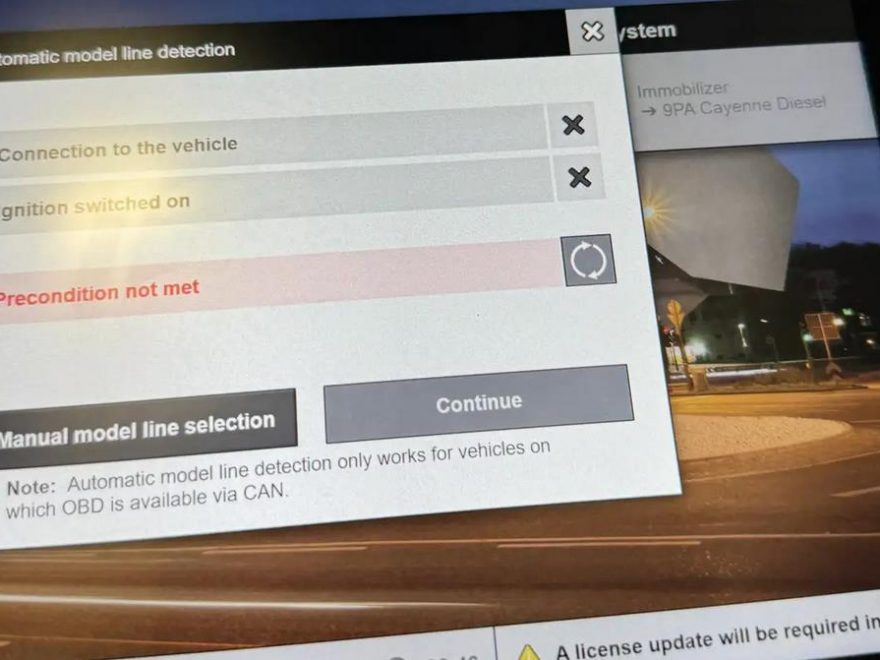
PIWIS 4 is Porsche’s official diagnostic tool, but connection issues are one of the most common problems technicians face. Whether the system fails to detect the vehicle, cannot identify the model, or connects but won’t perform functions, the root cause is usually not a single fault.
Based on real-world cases, official Porsche guidance, and industry troubleshooting data, this guide walks you through proven fixes for PIWIS 4 connection problems.
Common Causes of PIWIS 4 Connection Issues
Most issues fall into these categories:
- Low or unstable battery voltage
- Poor communication (WiFi instability or VCI issues)
- Incorrect ignition or key status
- Vehicle communication bus errors
- Software version mismatch
- Security/authorization restrictions
Step-by-Step Fix: PIWIS 4 Not Connecting
1. Ensure Stable Battery Voltage (Critical Step)
Low voltage is the #1 cause of connection failure.
✔ Use a 90A+ battery charger
✔ Keep voltage stable during diagnostics
✔ Avoid working on low battery
👉 Unstable voltage can interrupt ECU communication or abort coding.
2. Switch to USB Connection (Avoid WiFi Issues)
WiFi instability often causes:
- Random disconnections
- Failed ECU communication
- Interrupted coding
✔ Always connect PIWIS → VCI via USB cable
✔ Only use WiFi for non-critical tasks
3. Verify Key Recognition
If the vehicle does not detect the key properly, PIWIS may fail to communicate.
✔ Place key in the emergency start tray
✔ Ensure continuous key signal
✔ Avoid weak key battery
4. Set Correct Ignition State
Incorrect ignition state prevents ECU activation.
✔ Ignition: ON
✔ Engine: OFF
Some modules will not respond unless ignition power (Terminal 15) is active.
5. Allow VCI Firmware Update
After switching vehicles, the VCI may need to reload firmware.
✔ Wait for automatic update
✔ If connection fails → press F8 to retry
✔ Avoid interrupting update process
6. Fix “Vehicle Detected but Not Recognized” Issue
Symptoms:
- PIWIS connects
- Vehicle scanned
- Model line not identified
✔ Try manual vehicle selection
✔ Perform lock/unlock reset
✔ Let vehicle enter sleep mode
✔ If needed: perform terminal 30 reset (power reset)
👉 This resets vehicle communication modules.
7. Check for Security / Authorization Locks
Sometimes PIWIS connects but cannot perform actions.
This is NOT a connection issue.
✔ Ensure valid login/account
✔ Enable required Porsche security access (e.g., PVD/SFD)
✔ Verify internet connection
8. Update PIWIS Software
Outdated software can cause:
- Connection failure
- ECU mismatch
- Unsupported vehicle systems
✔ Always use latest or required PIWIS version
✔ Avoid using outdated offline versions
Best Troubleshooting Order (Quick Checklist)
Follow this sequence:
- Connect 90A+ battery charger
- Use USB connection (not WiFi)
- Place key in emergency tray
- Turn ignition ON (engine OFF)
- Allow VCI firmware update
- Press F8 if connection fails
- Reset vehicle (sleep / fuse / terminal 30)
- Check authorization/login
- Update PIWIS software
Conclusion
PIWIS 4 connection problems are usually caused by power, communication, or system state issues, not hardware failure.
By following a structured troubleshooting process—starting with voltage stabilization and ending with software and authorization checks—you can resolve nearly all connection problems efficiently.
FAQ (Frequently Asked Questions)
Q1: Why is PIWIS 4 not detecting my vehicle?
A: The most common reasons are low battery voltage, incorrect ignition state, or unstable communication (WiFi). Use a 90A charger and switch to USB connection.
Q2: Can WiFi cause PIWIS connection failure?
A: Yes. WiFi is often unstable and can interrupt communication. Always use USB for reliable diagnostics.
Q3: What does “vehicle detected but not recognized” mean?
A: This usually indicates a vehicle communication issue. Try manual selection, reset the vehicle (sleep mode), or perform a terminal 30 reset.
Q4: Why can PIWIS read data but not perform coding?
A: This is often a security authorization issue, not a connection problem. Check login, internet connection, and required permissions.
Q5: Do I need to update PIWIS software regularly?
A: Yes. Using outdated software can prevent proper communication with newer vehicles or ECUs.
Q6: What is the correct ignition state for diagnostics?
A: Ignition ON, engine OFF. This ensures all control units are active.
Still having PIWIS 4 connection problems?
If your PIWIS 4 keeps disconnecting, fails to detect the vehicle, or cannot complete diagnosis,
a complete PIWIS 4 setup may help you eliminate hardware and laptop-related issues faster.
Porsche Piwis Tester 4 PIWIS IV Diagnostic Tool Plus Panasonic CF54 Laptop
This complete bundle is designed for Porsche diagnostic work and is a practical choice for technicians
who want a ready-to-use PIWIS 4 solution.
Need a different laptop bundle? Explore more Porsche diagnostic tools for your workshop.