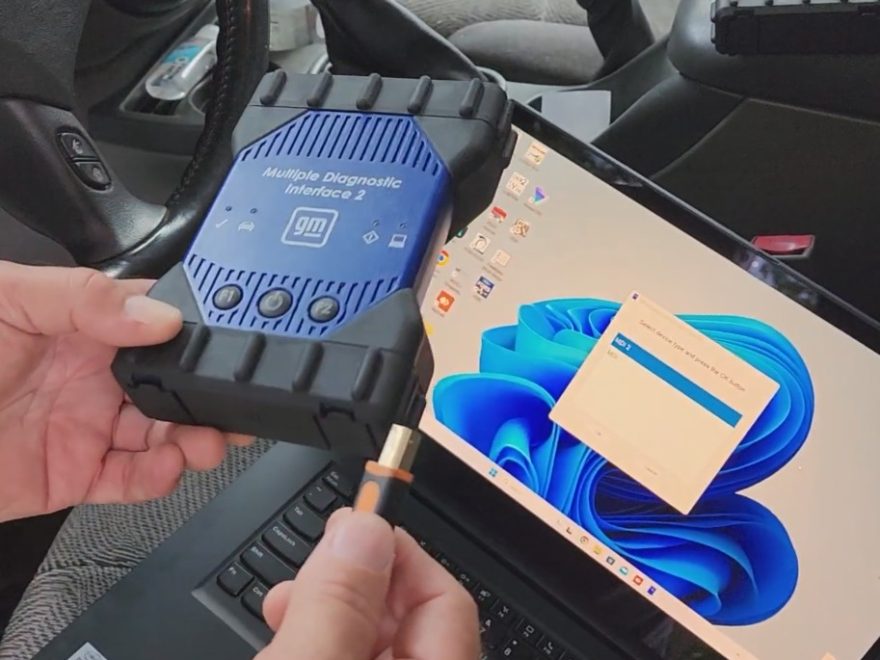
Replacing a GM 6L80 transmission may involve more than mechanical installation.
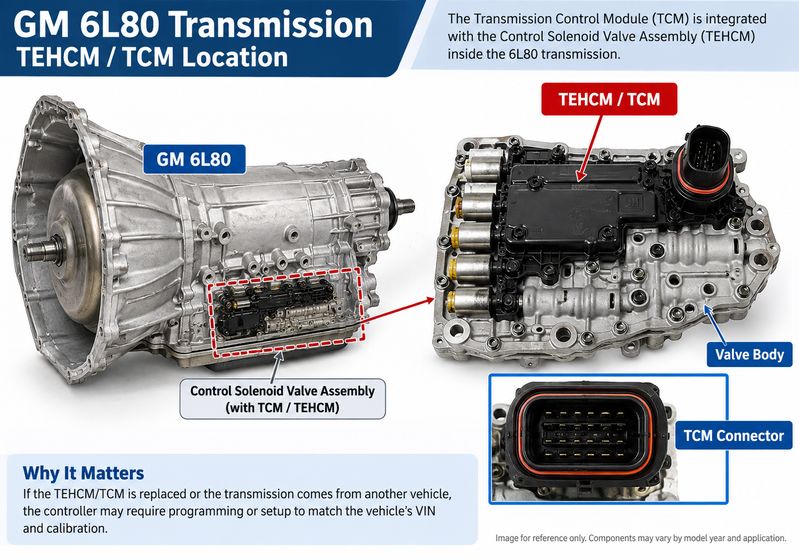
If the replacement includes a different or new TCM/TEHCM, the controller may require programming, setup, or adaptive relearning before the transmission operates correctly.
This guide explains when 6L80 transmission programming may be required, how GM MDI2 fits into the diagnostic workflow, and what technicians should check before and after the repair.
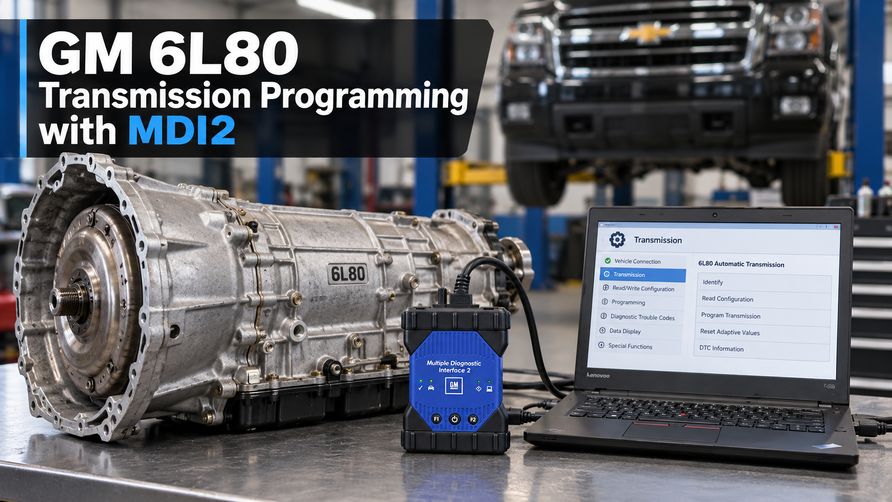
Does Every 6L80 Replacement Need Programming?
No.
Programming is more likely to be required when:
- You install a new or different TCM/TEHCM.
- A donor transmission contains another vehicle’s controller.
- You replace the Control Solenoid Valve Assembly.
- GM service information specifies module programming or setup.
If you retain the original controller, programming may not be required. However, adaptive reset or relearning may still be necessary.
A practical workflow is:
Identify what was replaced → Scan the vehicle → Verify TCM communication → Check the VIN-specific procedure → Program or relearn as required.
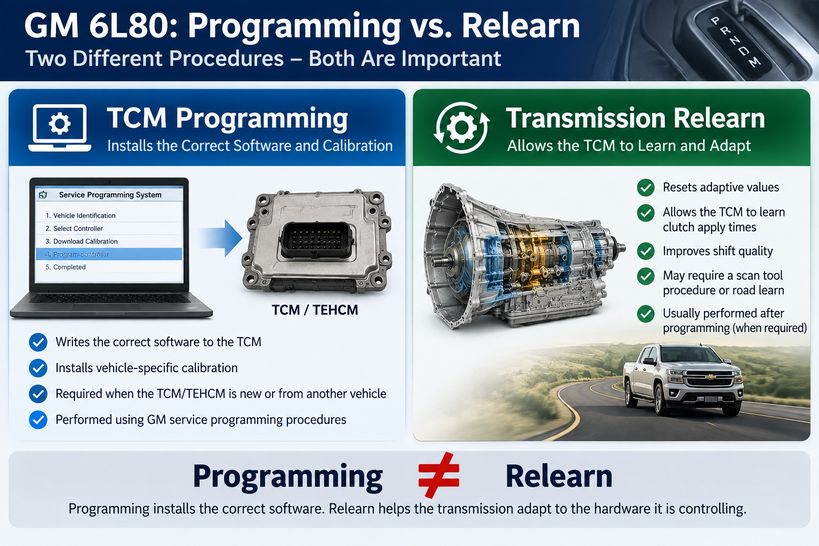
Programming vs. Relearn
Programming and relearning are different procedures.
TCM programming installs the appropriate software or calibration in the transmission controller.
Transmission relearning allows the TCM to adapt to the hydraulic and mechanical characteristics of the installed transmission.
Depending on the vehicle, the repair may require an adaptive reset, fast-learn procedure, or controlled road-learning process after programming.
What Do You Need?
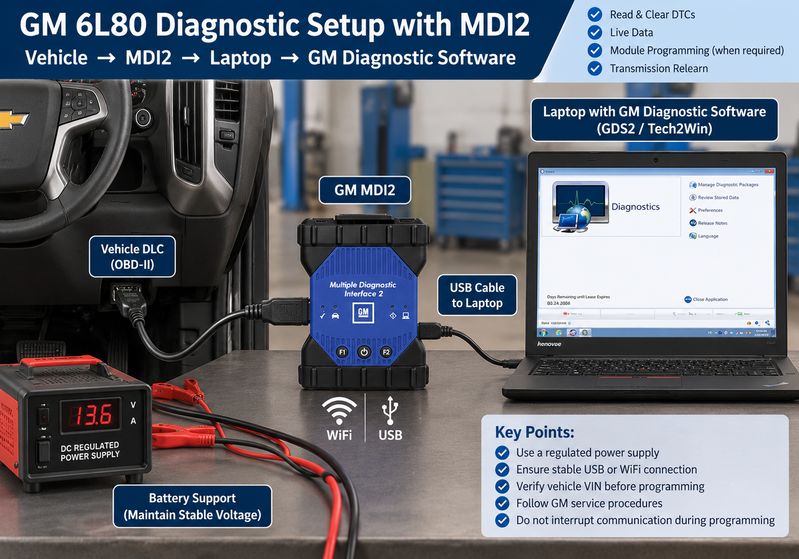
For professional 6L80 diagnosis and programming work, technicians may need:
- GM MDI2 or a supported pass-thru interface
- Compatible Windows laptop
- GM diagnostic software
- Applicable OEM programming access when required
- Stable internet connection for online programming
- Regulated battery support
- Correct vehicle VIN
For diagnostics, you can use MDI2 with compatible GM applications such as GDS2 and Tech2Win.
Before Programming a 6L80
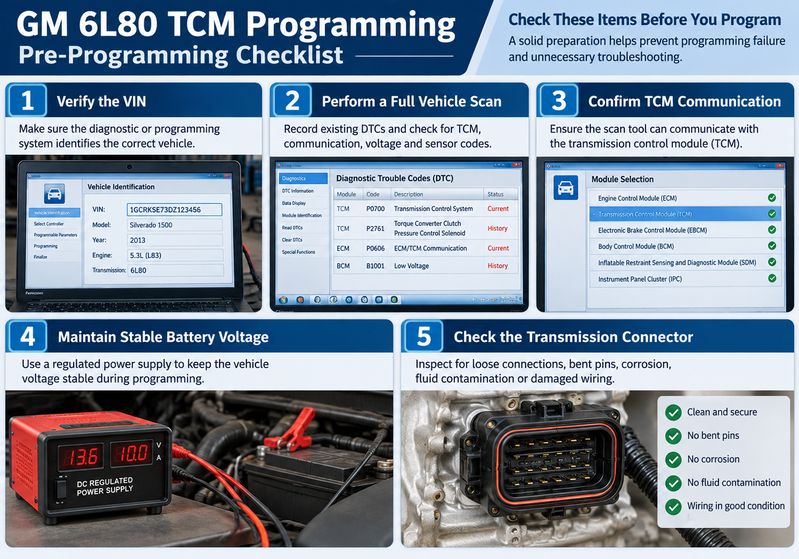
1. Verify the VIN
Make sure the service or programming system identifies the correct vehicle.
Do not use the VIN from the donor transmission or donor vehicle.
2. Perform a Full Vehicle Scan
Record existing DTCs before changing the module configuration.
Pay particular attention to:
- TCM communication faults
- CAN/GMLAN communication codes
- Low-voltage codes
- Input/output speed sensor faults
- Gear-ratio codes
- Pressure-control solenoid faults
3. Confirm TCM Communication
If the TCM does not communicate, check power, ground, wiring, connectors, and vehicle network communication before attempting programming.
Programming will not repair an electrical communication fault.
4. Maintain Stable Battery Voltage
Use a regulated programming power supply when programming the module.
Low or unstable voltage can interrupt communication and cause the programming procedure to fail.
5. Inspect the Transmission Connector
Check for:
- Loose connections
- Bent terminals
- Corrosion
- Fluid contamination
- Harness damage
General 6L80 Programming Workflow with MDI2
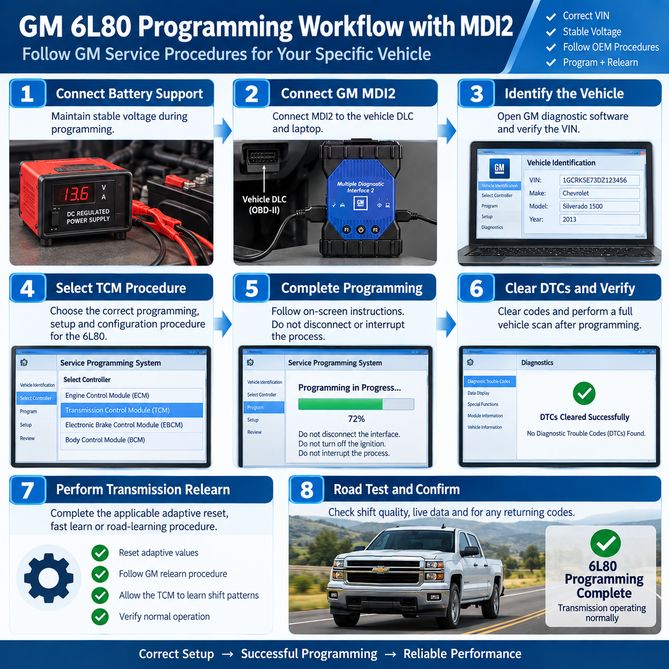
The exact procedure varies by vehicle, model year, controller, and repair performed. Always follow the applicable GM service information.
Step 1: Connect Battery Support
Maintain stable vehicle voltage throughout the programming procedure.
Turn off unnecessary electrical loads.
Step 2: Connect the GM MDI2
Connect MDI2 to the vehicle DLC and diagnostic computer.
Before programming, confirm that the interface can communicate with the required vehicle modules.
Step 3: Identify the Vehicle
Open the appropriate GM service environment and verify the VIN.
The calibration must correspond to the vehicle being repaired, not the donor transmission.
Step 4: Select the Correct TCM Procedure
Depending on the repair, the procedure may include:
TCM programming → Module setup/configuration → Transmission relearn
Follow the instructions for the specific VIN and controller.
Step 5: Complete Programming
During a programming event:
- Do not disconnect the diagnostic interface.
- Do not remove battery support.
- Do not let the laptop enter sleep mode.
- Do not cycle the ignition unless instructed.
- Do not interrupt the network connection.
Wait until the software confirms that the operation is complete.
Step 6: Clear DTCs and Rescan
Clear applicable DTCs and perform another full vehicle scan.
If a fault immediately returns, diagnose the underlying problem rather than repeatedly clearing the code.
Step 7: Complete the Required Relearn
Perform the applicable adaptive reset, fast learn, or road-learning procedure.
Avoid aggressive driving immediately after a transmission replacement or adaptive reset.
What If the 6L80 Still Shifts Poorly?
A successful programming event does not prove that the transmission is mechanically healthy.
If shift quality is still poor, check:
- Transmission adaptive values
- Fluid level and temperature
- Input and output speed data
- Commanded versus actual gear
- Wiring and connectors
- Valve-body condition
- Solenoids
- Internal hydraulic leakage
- Clutch or other mechanical faults
Programming cannot repair a mechanical transmission problem.
MDI2 Cannot Communicate with the TCM
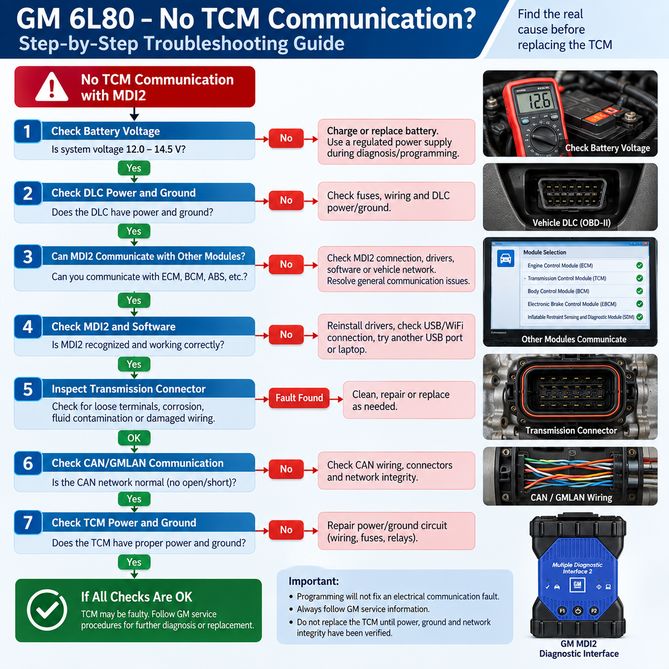
If MDI2 cannot communicate with the transmission controller, check:
- Vehicle battery voltage
- DLC power and ground
- Communication with other modules
- MDI2 connection and driver
- Transmission connector
- CAN/GMLAN wiring
- TCM power and ground
If MDI2 communicates with the ECM, BCM, and other modules but not the TCM, focus diagnosis on the transmission controller circuit and network connection.
Do not replace the TCM until you have verified power, ground, and communication integrity.
Can GDS2 Program a 6L80?
GDS2 and module programming are different functions.
GDS2 is primarily diagnostic software and can be used for functions such as:
- Reading and clearing DTCs
- Viewing transmission live data
- Checking module identification
- Performing supported output controls
- Diagnosing TCM communication faults
When you need to install module software or calibration, you need the applicable GM service programming environment.
MDI2 remains useful before and after programming because technicians can use it to verify communication, check DTCs, monitor live data, and confirm the repair.
What About HP Tuners?
The original 6L80 programming demonstration also mentions HP Tuners.
HP Tuners is a third-party performance tuning platform, not GM factory diagnostic software. On supported vehicles, it can read and write selected ECM and TCM calibrations using compatible HP Tuners hardware.
You don’t need it just because a 6L80 has been replaced.
For normal GM diagnostic and transmission repair work, this guide focuses on the GM MDI2 diagnostic workflow.
GM MDI2 for 6L80 Diagnostics
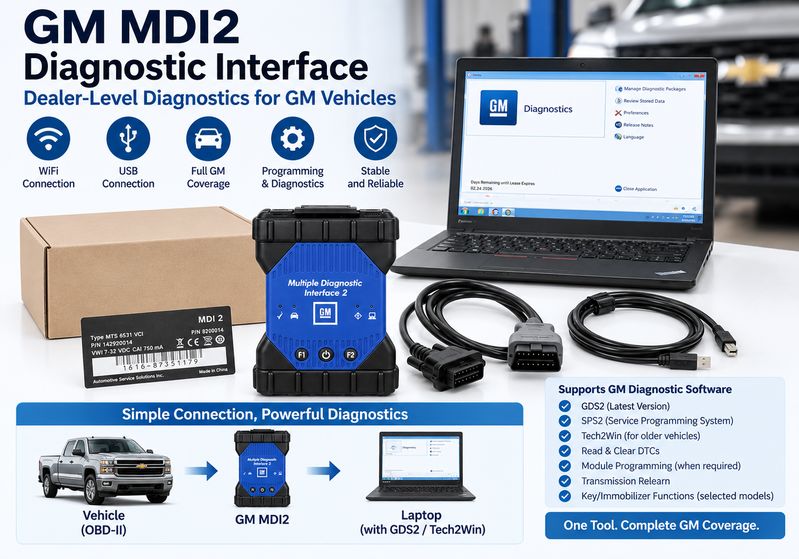
Which GM MDI2 Setup Should You Choose?
For 6L80 transmission diagnostics, the right setup depends on whether you need a standard MDI2, newer CAN FD/DoIP support, or software for an interface you already own.
Option 1 — Standard GM MDI2 with WiFi
The GM MDI 2 Diagnostic Tool with WiFi
is suitable for routine GM diagnostics using compatible GDS2 and Tech2Win software.
Best for:
- 6L80 transmission diagnostics
- Reading and clearing TCM DTCs
- Transmission live data
- TCM communication checks
- Conventional GM vehicle diagnostics
Option 2 — New MDI2 with CAN FD and DoIP
For workshops servicing newer GM platforms, the GM MDI2 Diagnostic Interface with CAN FD and DoIP
is the more future-ready choice.
It adds support for newer communication technologies such as:
- CAN FD
- DoIP
- Global A / Global B
- SAE J2534 Pass-Thru
- USB, Ethernet and WiFi
Best for workshops that work on both older GM vehicles and newer network architectures.
Option 3 — GDS2 / Tech2Win Software for Existing MDI or MDI2
Already have an MDI or MDI2 interface?
The GM MDI / MDI2 GDS2 & Tech2Win Software V2026.02
is available as a software HDD, SSD, or remote installation option.
Current product specifications include:
- GDS2 V2026.02
- GM MDI Manager V8.5.33.154
- Tech2Win
- High- and low-speed GMLAN
- UART, Class 2, KWP2000 and CAN support
- Coverage for supported Chevrolet, Buick, Cadillac, GMC, Hummer, Pontiac, Saab and Vauxhall/Opel vehicles
- Multi-language GDS2 support
The product page recommends GDS2 for newer GM applications and Tech2Win for many earlier GM vehicles. Online programming functions require the appropriate online account.
Best for: technicians who already own compatible MDI/MDI2 hardware and only need the GM diagnostic software environment.
Quick Recommendation
| Your Situation |
Recommended Product |
| Mainly 6L80 / conventional GM diagnostics |
GM MDI2 with WiFi — goods-10216 |
| Newer GM, CAN FD, DoIP, Global B |
New MDI2 CAN FD / DoIP — Item: A471-7
|
| Already own MDI or MDI2 |
GDS2 / Tech2Win Software — Item: S163
|
| Need hardware + diagnostic software |
Item: A194-4 or A471-7
|
| Need software only |
Item: S163 |
Quick 6L80 Diagnostic Workflow
Install the transmission
↓
Check battery voltage, wiring, and connectors.
↓
Connect MDI2 and scan the vehicle.
↓
Confirm TCM communication
↓
Determine whether the TCM/TEHCM was replaced.
↓
Confirm whether programming is required.
↓
Program if applicable
↓
Clear DTCs and rescan
↓
Complete the required relearn.
↓
Check fluid level and live data.
↓
Perform a controlled road test.
Frequently Asked Questions
Does every replacement 6L80 transmission need programming?
No. Programming is mainly required when you install a different or new TCM/TEHCM, or when the vehicle-specific GM service procedure requires module programming or setup.
Can GM MDI2 diagnose a 6L80 transmission?
Yes. With compatible GM diagnostic software, MDI2 can read DTCs, monitor transmission data, identify modules, and check TCM communication.
Does a 6L80 need a relearn after programming?
Depending on the vehicle and repair, you may need an adaptive reset or transmission relearn. Programming and relearning are separate procedures.
Can low battery voltage cause TCM programming failure?
Yes. Stable system voltage is essential during module programming. A voltage drop can interrupt the programming procedure.
Can programming fix a mechanically damaged 6L80?
No. Programming cannot repair worn clutches, valve-body wear, hydraulic leakage, faulty mechanical components, or other internal transmission damage.
Conclusion
A GM 6L80 replacement does not automatically require programming.
First, determine what was replaced, scan the vehicle, verify TCM communication, and check the correct VIN-specific service procedure.
If programming is required, maintain stable voltage and follow the applicable GM procedure. Afterward, clear DTCs, complete any required transmission relearn, check live data and fluid level, and perform a controlled road test.
For routine GM transmission diagnosis, GM MDI2 with compatible GDS2 or Tech2Win software provides technicians with the information needed to verify TCM communication and diagnose 6L80 problems before replacing additional parts.