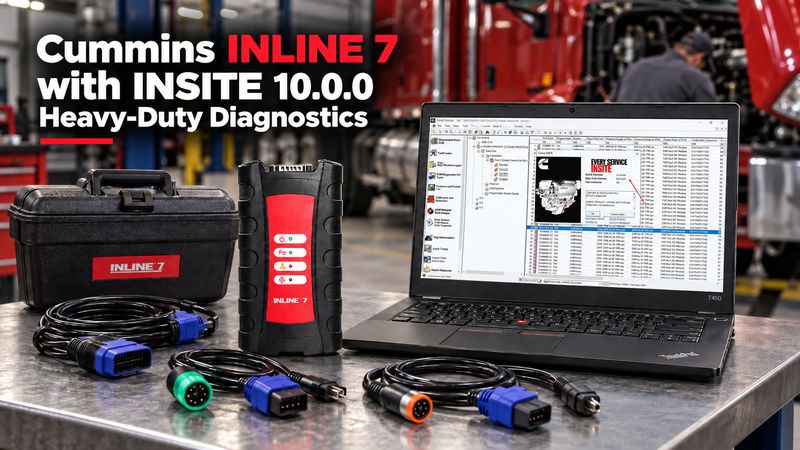
For technicians who regularly work on Cummins-powered trucks, buses, construction equipment, generators, or industrial engines, the diagnostic interface matters as much as the software.
The Cummins INLINE 7 Data Link Adapter connects a Windows PC to the vehicle or engine ECM and works with Cummins INSITE for fault diagnosis, live data, parameter checks, service functions, and supported ECM calibration work.
The current OBD2TOOL package is available with Cummins INSITE 8.7 or INSITE 10.0.0 PRO, with hardware-only, remote-installation, and full laptop options.
What Is Cummins INLINE 7?
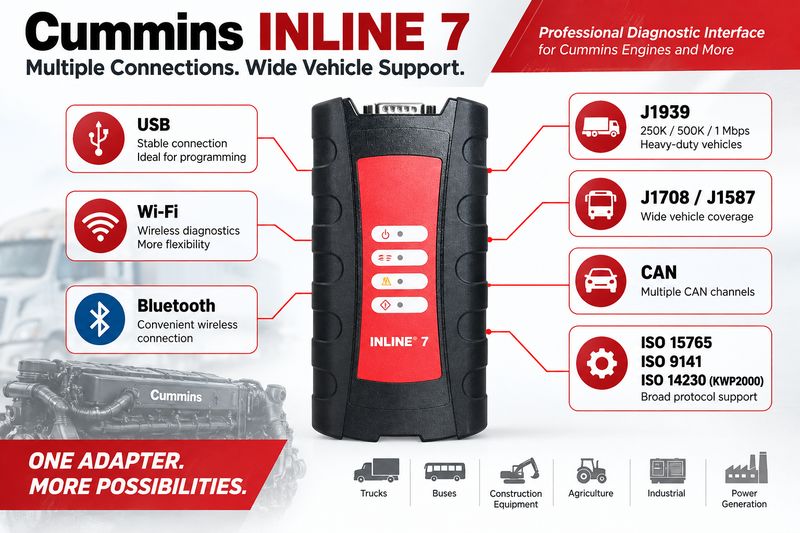
Cummins INLINE 7 is an RP1210-compatible vehicle data link adapter that translates communication between a PC and electronic control modules.
Compared with older adapters, INLINE 7 supports multiple communication methods and vehicle protocols, making it suitable for professional truck and diesel-engine diagnostics.
Official INLINE 7 specifications include support for:
- USB
- Wi-Fi
- Bluetooth
- J1708/J1587
- J1939
- CAN
- ISO 15765
- ISO 9141
- ISO 14230/KWP2000
It also supports 250K, 500K, and up to 1 Mbps communication speeds, with multiple CAN channels available.
For workshop use, however, USB is usually the preferred connection for ECM programming because it minimises the chance of a wireless communication interruption.
What Can INLINE 7 Do with Cummins INSITE?
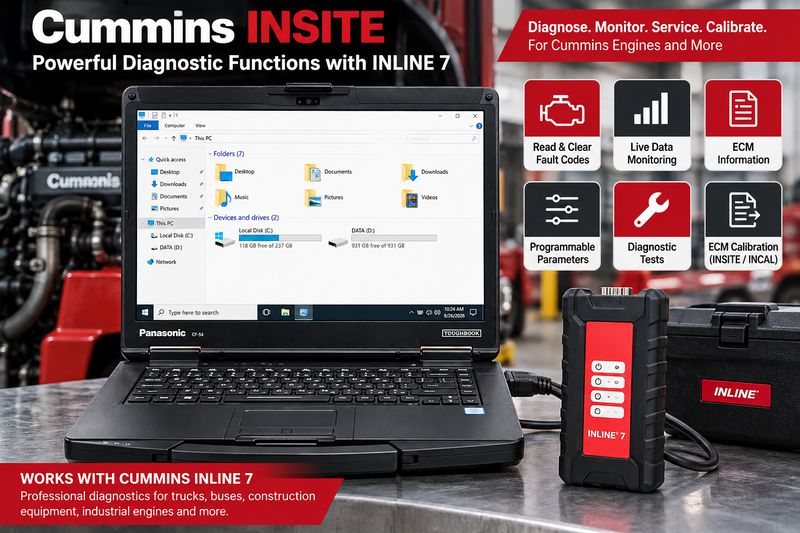
The adapter itself provides communication. Cummins INSITE provides the diagnostic functions.
With a supported INSITE installation, technicians can perform functions such as:
- Read and clear Cummins fault codes.
- View live engine data.
- Monitor sensor values
- Perform diagnostic tests
- Check engine operating parameters.
- Change supported programmable parameters.
- View ECM information
- Create and save work orders.
- Perform supported ECM calibration procedures.
- Use INCAL calibration files where applicable.
- Diagnose communication and engine-control problems.
INSITE is designed specifically for Cummins electronic engines and provides step-by-step diagnostic information that can reduce troubleshooting time compared with working only from fault-code descriptions.
INSITE 8.7 vs INSITE 10.0.0
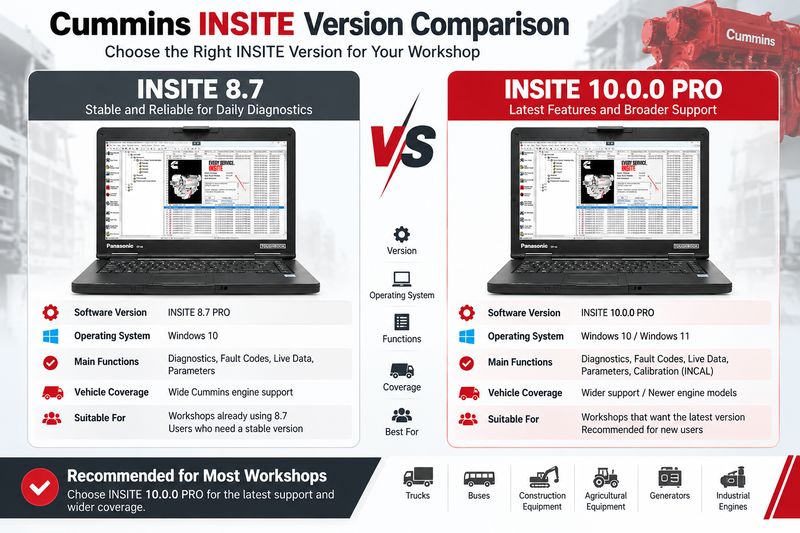
The OBD2TOOL INLINE 7 package currently gives buyers several software options.
INSITE 8.7
The 8.7 option suits users who already work with this established version and want a Windows 10 installation.
The current product page specifies:
- INSITE 8.7 PRO
- Windows 10
- Local/self-install software package
INSITE 10.0.0 PRO
INSITE 10.0.0 is the newer option and is better suited to workshops that want the latest package currently offered with this INLINE 7 kit.
The product page lists:
- INSITE 10.0.0 PRO
- Windows 10 or Windows 11
- Remote installation available
- Optional preconfigured laptop package
For a new workshop setup, INSITE 10.0.0 is generally the more practical choice, especially if the computer already runs Windows 11.
How to Connect INLINE 7 to Cummins INSITE
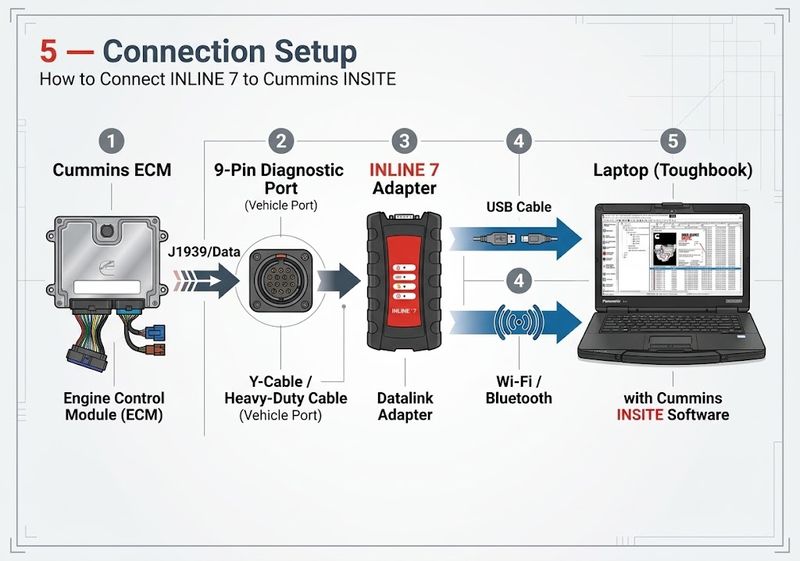
The basic setup is straightforward.
Step 1: Install the INLINE Driver
Install the correct INLINE/RP1210 driver before connecting to the engine.
After installation, confirm that Windows recognises the adapter.
Step 2: Connect INLINE 7 to the Vehicle
Use the correct diagnostic cable for the truck or engine.
The OBD2TOOL kit includes multiple cables, including a 9-pin data-link cable and other connectors for supported applications.
Step 3: Connect INLINE 7 to the Laptop
USB is the best starting point for workshop diagnosis.
Once communication is stable, Wi-Fi can be useful when the technician needs more freedom to move around the vehicle.
Step 4: Open Cummins INSITE
In INSITE, create or select an ECM connection.
Choose:
Datalink Adapter → Cummins INLINE → Correct RP1210 connection
Then connect to the ECM.
OBD2TOOL’s existing INSITE connection guide follows the same basic process: select a datalink adapter, choose the adapter vendor and protocol, then connect to the ECM.
USB or Wi-Fi: Which Should You Use?
Both are useful, but they suit different jobs.
Use USB When:
- Programming or calibrating an ECM
- Performing long diagnostic sessions
- Working in an electrically noisy workshop
- Diagnosing unstable communications
- Maximum connection stability is important.
Use Wi-Fi When:
- Reading fault codes
- Monitoring live data
- Performing routine diagnosis
- Moving around a truck while watching parameters
- A direct cable to the laptop is inconvenient.
For ECM flashing, I recommend using a wired connection whenever possible.
What Vehicles and Engines Can It Diagnose?
INLINE 7 is primarily intended for Cummins electronic-engine applications.
Typical workshop use includes Cummins engines installed in:
- Heavy-duty trucks
- Medium-duty trucks
- Buses
- Construction equipment
- Agricultural equipment
- Industrial machines
- Power-generation equipment
Actual INSITE functions depend on the engine ECM, calibration, software version, and access level.
Do not assume that every parameter or programming function is available on every Cummins engine.
Can INLINE 7 Work with Other Diagnostic Software?
Yes, one strength of an RP1210 adapter is that it can work with more than one service application when the software supports the adapter and protocol.
The OBD2TOOL product page lists compatibility with applications including:
- Cummins PowerSpec
- Detroit Diesel Diagnostic Link
- CAT Electronic Technician for supported on-highway applications
- Navistar ServiceMaxx
- Volvo PTT
- Allison DOC
- Eaton ServiceRanger
- Bendix ACom
- WABCO Toolbox
- Freightliner ServiceLink
However, adapter compatibility does not automatically provide software licenses, vehicle coverage, or programming authorisation.
Always verify the specific software and vehicle before buying INLINE 7 solely for a non-Cummins application.
Common INLINE 7 Connection Problems
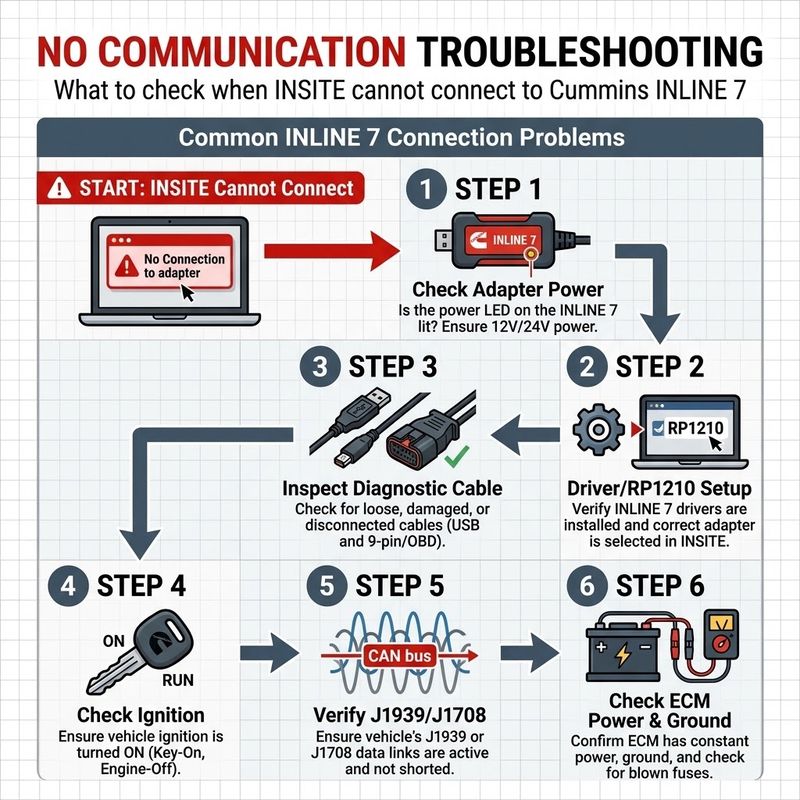
If INSITE cannot connect to the ECM, check the basics before reinstalling the software.
INLINE 7 Is Not Detected
Check:
- USB cable
- INLINE driver
- Windows Device Manager
- RP1210 configuration
- Adapter power
INSITE Sees the Adapter but Not the ECM
Check:
- Ignition/key state
- Vehicle diagnostic connector
- Correct diagnostic cable
- ECM power and grounds
- J1939/J1708 communication
- Correct INSITE connection profile
Communication Drops During Diagnosis
Try switching from Wi-Fi to USB.
Also inspect the diagnostic cable and verify that vehicle battery voltage is stable.
Which INLINE 7 Package Should You Choose?
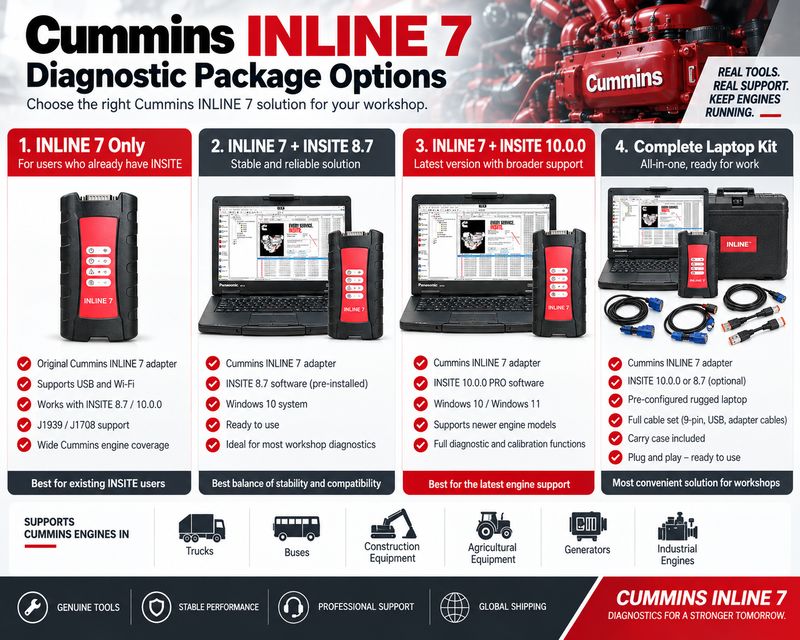
OBD2TOOL currently offers several configurations.
INLINE 7 + INSITE 8.7 is best for technicians who already use Windows 10 and specifically want the older INSITE environment.
INLINE 7 + INSITE 10.0.0 PRO is the better choice for most current workshop users and includes remote installation on one laptop.
INLINE 7 + Lenovo T450 + INSITE 10.0.0 is useful if you want a ready-to-use diagnostic package without preparing your own PC.
INLINE 7 + Panasonic CF-54 + INSITE 10.0.0 is better suited to workshop or field technicians who prefer a more rugged laptop.
What Comes in the INLINE 7 Kit?
The standard hardware package includes the main INLINE 7 adapter plus the required basic diagnostic cables.
Depending on the selected package, the kit may include:
- Cummins INLINE 7 adapter
- DB26 to OBD diagnostic cable
- USB cable
- DB26/2-pin/3-pin cable
- DB26/9-pin data-link cable
- Additional 3-pin connectors
- INSITE software
- Optional Lenovo or Panasonic laptop
The exact contents depend on the package selected at checkout.
Is Cummins INLINE 7 Still Worth Buying?
For a shop that regularly services Cummins engines, yes.
The main advantage isn’t just reading fault codes. It’s a dedicated communication interface that works with INSITE for deeper Cummins diagnostics.
INLINE 7 is especially useful for technicians who need to:
- Diagnose recurring Cummins engine faults.
- Monitor detailed ECM parameters.
- Perform service tests
- Change supported engine settings.
- Work with calibration files.
- Support multiple Cummins-powered vehicles.
For a mixed-brand fleet shop that only occasionally sees Cummins engines, a multi-brand RP1210 adapter may be more economical.
But for a Cummins-focused workshop, INLINE 7 remains a practical dedicated diagnostic option.
Recommended Cummins Diagnostic Package
from OBD2TOOL is available with either INSITE 8.7 or INSITE 10.0.0 PRO.
Current package choices include hardware and software, remote software installation, or complete diagnostic setups with a Lenovo T450 or Panasonic CF-54 laptop. The product page also lists USB and Wi-Fi connectivity and a 12-month warranty.
Recommended for: Cummins truck technicians, diesel repair shops, fleet maintenance teams, mobile diesel mechanics, engine rebuilders, and heavy-equipment service technicians.
FAQ
Does Cummins INLINE 7 work with INSITE 10.0.0?
Yes. The current OBD2TOOL package offers INLINE 7 together with INSITE 10.0.0 PRO.
Can INLINE 7 read and clear Cummins fault codes?
Yes. When used with compatible Cummins INSITE software, it can communicate with the ECM to read and clear diagnostic trouble codes.
Can INLINE 7 program a Cummins ECM?
INLINE 7 provides the communication link required for supported INSITE calibration and ECM programming procedures. Actual programming capability depends on the ECM, software configuration, calibration files, and authorisation.
Does INLINE 7 support J1939?
Yes. Official Cummins specifications list J1939 support at 250K, 500K, and up to 1 Mbps.
Does INLINE 7 support Wi-Fi?
Yes. INLINE 7 supports Wi-Fi and USB, and the official platform also supports Bluetooth.
Should I use Wi-Fi when programming an ECM?
A wired USB connection is generally the safer choice for programming because it reduces the risk of wireless interruption.
Conclusion
Cummins INLINE 7 remains a strong choice for professional Cummins engine diagnostics because it combines RP1210 compatibility, multiple heavy-duty communication protocols, and direct INSITE integration.
For most workshops buying a new setup in 2026, INLINE 7 + INSITE 10.0.0 PRO is the most practical configuration because it supports Windows 10/11 and provides the current software option offered with the OBD2TOOL package.
Before buying, choose the package based on how you work:
Own laptop → INLINE 7 + INSITE 10.0.0
Need a complete ready-to-use setup → INLINE 7 + Lenovo T450 or Panasonic CF-54