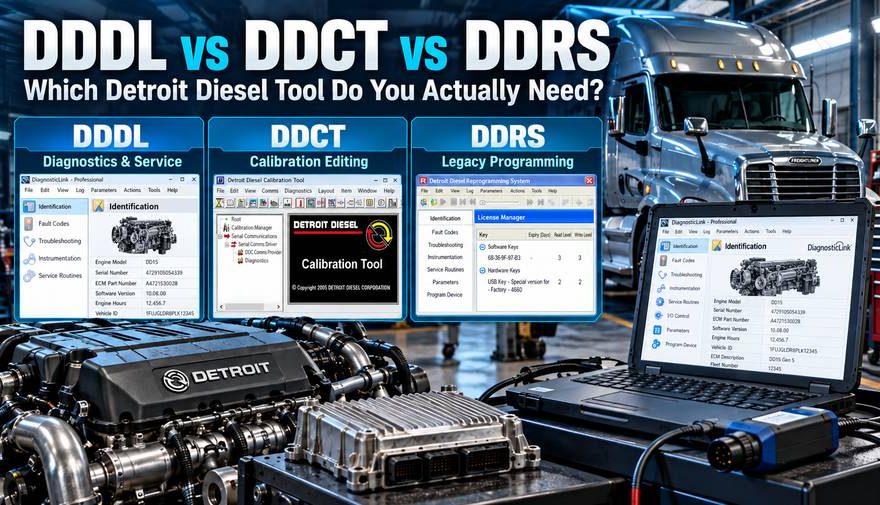
Choosing the right Detroit Diesel diagnostic software can make the difference between a straightforward engine repair and hours of unnecessary troubleshooting. Three names frequently appear when technicians search for Detroit diagnostic and programming tools: DDDL, DDCT, and DDRS.
Although these applications are all associated with Detroit Diesel electronic control systems, they serve different purposes.
The quick answer:
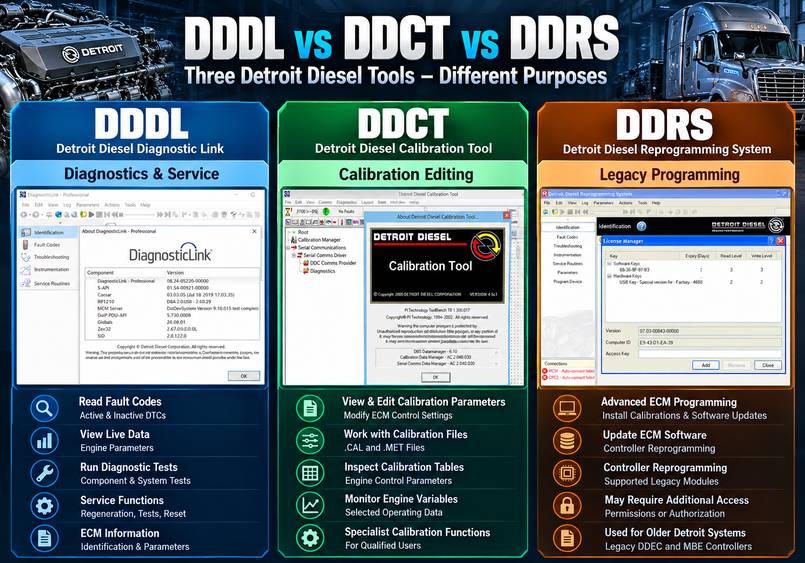
- DDDL (Detroit Diesel Diagnostic Link / DiagnosticLink): Best for everyday diagnostics, fault-code analysis, live data, service tests, and supported ECM parameter changes.
- DDCT (Detroit Diesel Calibration Tool): A specialist application for viewing and editing calibration parameters and working with compatible calibration and metafile formats.
- DDRS (Detroit Diesel Reprogramming System): A legacy programming platform formerly used for dealer-level reprogramming operations.
For most independent truck repair shops working on Detroit DD13, DD15, or DD16 engines, Detroit DiagnosticLink 8 is the most practical starting point. Technicians who need authorized controller programming for supported modern vehicles should consider DiagnosticLink Professional.
This guide explains the differences between DDDL, DDCT, and DDRS, compares their functions, and helps you choose the appropriate software and diagnostic adapter for your workshop.
1. What Are DDDL, DDCT, and DDRS?
DDDL – Detroit Diesel Diagnostic Link
Detroit Diesel Diagnostic Link (DDDL) is the diagnostic software used to communicate with supported Detroit engine electronic control modules.
It allows technicians to identify controllers, retrieve diagnostic trouble codes, monitor operating conditions, perform available service routines, and review or modify authorized engine parameters.
There are two important software generations:
Legacy DDDL 6.x
Legacy DDDL, including versions 6.50 and 6.51, is primarily intended for older Detroit engine systems.
Applications include:
- DDEC III, IV, and V systems
- Selected Detroit Series 60 engines
- Legacy MBE 900 and MBE 4000 controllers
- Other supported Detroit EPA 1998–2004 platforms
DiagnosticLink 8.x
DiagnosticLink 8 is the modern application used for supported EPA 2007 and newer Detroit and Daimler Truck North America systems.
It supports a broader range of engines, aftertreatment controls, powertrain controllers, and vehicle electronics.
Detroit currently lists DiagnosticLink 8.24, 8.23, and 8.22 among its supported releases.
For more information about software generations, supported engines, and installation requirements, read our Detroit Diesel DiagnosticLink 8.24 Software and Compatibility Guide.
DiagnosticLink Standard vs Professional
DiagnosticLink is available in two main editions.
DiagnosticLink Standard provides core diagnostic capabilities, including:
- ECU identification
- Active and inactive fault codes
- Live engine instrumentation
- Supported diagnostic tests
- Service routines
- Available ECU parameter changes
DiagnosticLink Professional includes the Standard functions and adds supported controller-reprogramming capabilities.
Programming access may still require an active manufacturer-authorized license, account credentials, internet access, and programming events.
For workshops comparing available software packages, see the Detroit Diesel DiagnosticLink 8.24 Professional Software listing at OBD2TOOL.
The listed offline package should not be assumed to include manufacturer-server authorization or unrestricted programming access. Confirm its exact functionality before purchasing.
2. What Is DDCT – Detroit Diesel Calibration Tool?
DDCT stands for Detroit Diesel Calibration Tool.
Unlike DiagnosticLink, which focuses on troubleshooting and servicing vehicles, DDCT is primarily designed for specialized ECM calibration analysis and modification.
Commonly encountered DDCT versions include 4.5 and 4.5C1.
What Can DDCT Do?
Depending on the software package, compatible controller, and calibration data, DDCT may allow qualified users to:
- View and edit supported ECM control parameters
- Inspect calibration tables
- Work with calibration files using theCAL format
- Use compatible.MET metafiles
- Monitor certain engine operating variables
- Compare and modify supported calibration values
Calibration parameters can affect fuel delivery, engine operation, control logic, and other electronic engine functions.
Is DDCT Needed for Normal Truck Diagnostics?
Usually not.
A mechanic troubleshooting an engine fault code, checking fuel pressure, or performing an aftertreatment service routine generally needs DiagnosticLink rather than DDCT.
DDCT is more relevant to specialized calibration work than ordinary commercial truck maintenance.
Important: DDCT is not the standard, manufacturer-authorized method for obtaining current production calibrations. Editing ECM calibration data can also affect reliability, safety, and emissions compliance.
Only properly authorized specialists should modify calibrations.
3. What Is DDRS – Detroit Diesel Reprogramming System?
DDRS refers to the historical Detroit Diesel Reprogramming System product line.
Versions such as DDRS 7.x supported advanced dealer and distributor reprogramming operations.
DDRS provided functions associated with installing calibrations, programming supported modules, and handling certain higher-level controller operations.
Is DDRS Still Needed in 2026?
For most newer Detroit truck applications, you don’t need a separate DDRS 7.x installation.
The modern DiagnosticLink 8 Professional platform incorporates authorized reprogramming capabilities for supported powertrain controllers.
However, older Detroit engines may require a different legacy application.
DDRS vs DRS: An Important Difference
Technicians often confuse DDRS with DRS (DDEC Reprogramming System).
DRS is the legacy reprogramming application used with older Detroit electronic engine platforms, including supported DDEC III–V and MBE controllers.
Depending on the controller and authorization, DRS can support:
- Legacy ECM programming and reprogramming
- Customer-parameter changes
- Controller software updates
- Selected injector calibration operations
- Legacy DDEC and MBE controller replacement procedures
Detroit currently documents DRS as an application for older engine systems and restricts reprogramming access to authorized users.
Practical advice: If you work on a 1990s or early-2000s Detroit Series 60, investigate legacy DDDL and DRS compatibility. If you service a newer Freightliner Cascadia with a DD15 engine, start with the appropriate DiagnosticLink 8 edition.
4. DDDL vs DDCT vs DDRS: Complete Comparison Table
Feature DDDL / DiagnosticLink DDCT DDRS / Legacy DRS
Main purpose Diagnostics and service Calibration editing Reprogramming
Read fault codes Yes Not primary purpose Not primary purpose
View live engine data Yes Selected variables Limited
Run diagnostic tests Yes Not primary purpose Not primary purpose
Edit customer parameters Supported functions Specialized calibration values Supported legacy functions
Edit calibration tables Not general-purpose Yes, on compatible files Not primary purpose
ECM reprogramming Professional, authorized Specialized operations Supported legacy modules
Modern Detroit support DiagnosticLink 8 Package-dependent Legacy platform
Older DDEC engines Legacy DDDL Application-dependent DRS
Best suited for Repair shops and fleets Calibration specialists Legacy programming specialists
Note: Actual capabilities depend on the application version, engine generation, ECM type, licensed permissions, available calibrations, and supported hardware.
5. Which Detroit Diesel Tool Can Read Fault Codes and Live Engine Data?
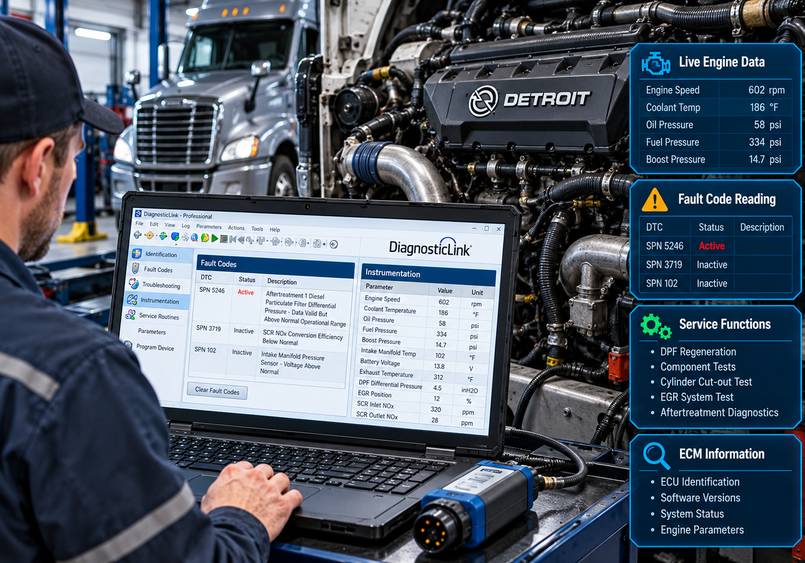
For routine fault finding, DiagnosticLink is the primary choice.
Reading Active and Inactive Fault Codes
Detroit engines and powertrain controllers use diagnostic information to identify system faults.
Depending on the connected vehicle, DiagnosticLink may provide:
- Active diagnostic trouble codes
- Previously stored fault codes
- SPN and FMI information
- Fault occurrence information
- ECU identification
- Supporting diagnostic data
Technicians can use this information to determine whether a fault is occurring now or was recorded under earlier operating conditions.
However, a fault code is a starting point, not a definitive diagnosis of a component.
For example, a fuel-pressure-related fault does not automatically mean the fuel-pressure sensor must be replaced. The technician should inspect relevant live data, wiring, fuel supply, and mechanical components before selecting a repair.
Monitoring Real-Time Engine Parameters
DiagnosticLink can display supported engine and vehicle measurements, such as:
- Engine RPM
- Coolant temperature
- Oil pressure
- Fuel pressure
- Boost pressure
- Intake-air temperature
- Exhaust temperature
- Battery voltage
- EGR operating values
- DPF and SCR information
The available measurements depend on the connected controller and engine generation.
Monitoring these values under appropriate operating conditions helps technicians identify abnormal behavior and avoid unnecessary parts replacement.
Performing Service and Functional Tests
Supported DiagnosticLink service functions may include:
- Cylinder cut-out testing
- Fuel-system checks
- Aftertreatment diagnostics
- DPF regeneration procedures
- EGR component testing
- Actuator and solenoid tests
- Supported engine and transmission service routines
Not every test is available on every model.
For example, DPF regeneration requires the appropriate vehicle system, acceptable operating conditions, and satisfaction of the manufacturer’s safety requirements.
For more background on heavy-duty aftertreatment testing, read How to Use JPRO Professional to Perform DPF Regeneration.
6. Which Tool Can Change Detroit ECM Parameters?
ECM parameters determine how certain engine and vehicle functions operate.
Depending on the vehicle, controller, and user authorization, DiagnosticLink may permit adjustments to supported settings such as:
- Road-speed limits
- Cruise-control settings
- Idle-shutdown parameters
- PTO configuration
- Engine-brake settings
- Selected engine-protection options
- Vehicle-related control settings
These features can be particularly useful for commercial fleets that need consistent vehicle configurations.
Example: Fleet Road-Speed Configuration
A fleet maintenance department may need to confirm that multiple Detroit-powered trucks have the correct road-speed settings.
The technician can use DiagnosticLink to inspect the available parameters and, where authorized, apply approved settings.
Certain parameters may be password-protected or restricted by the manufacturer.
DDCT is not normally required for this type of everyday fleet configuration.
Recommendation: Use DiagnosticLink for approved customer-parameter changes. Reserve specialized calibration applications for work that explicitly requires them.
7. Which Detroit Diesel Tool Is Used for ECM Programming?
One of the biggest misunderstandings about DDDL, DDCT, and DDRS involves ECM programming.
The correct software depends on the ECM generation and programming task.
Programming Newer Detroit Controllers
For supported newer Detroit vehicles, DiagnosticLink Professional is the manufacturer’s primary software platform for authorized reprogramming.
Depending on the truck configuration, programming operations may involve:
- MCM (Motor Control Module)
- ACM (Aftertreatment Control Module)
- CPC (Common Powertrain Controller)
- TCM (Transmission Control Module)
Actual controller support varies by vehicle generation and installed equipment.
Certain programming operations require access to Detroit’s server systems, appropriate user credentials, and a valid programming event.
Programming Older Detroit Controllers
Legacy DDEC and MBE applications may require DRS rather than the modern DiagnosticLink 8 programming workflow.
The correct legacy software must be selected according to the ECM generation.
What About DDCT?
DDCT can work with compatible calibration data, but it is not a universal replacement for the official DiagnosticLink Professional programming process.
Don’t confuse specialized calibration editing with downloading manufacturer-approved ECM updates.
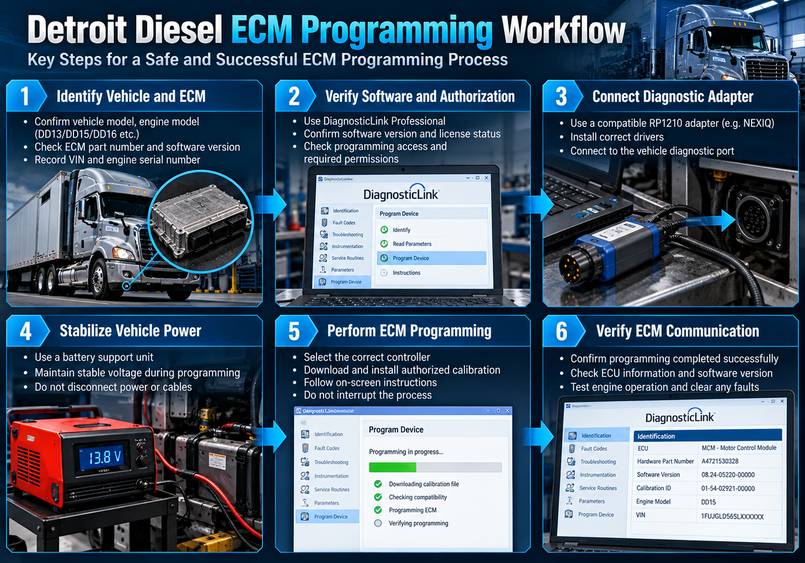
ECM Programming Safety Checklist
Before reprogramming any Detroit ECM:
- Verify the VIN, engine serial number, and controller identification.
- Confirm software compatibility and programming authorization.
- Use a suitable regulated battery support unit.
- Verify stable communication with the diagnostic adapter.
- Save existing parameters and configuration data when supported.
- Disable laptop sleep and hibernation.
- Maintain the required internet connection for online programming.
- Follow the manufacturer’s exact programming procedure.
- Do not disconnect cables or interrupt vehicle power during programming.
- Verify controller communication and configuration after completion.
An interrupted or incorrect programming operation can leave an ECM in an inoperative state and may require specialized recovery.
8. Detroit Engine Compatibility: DD13, DD15, DD16, and Series 60
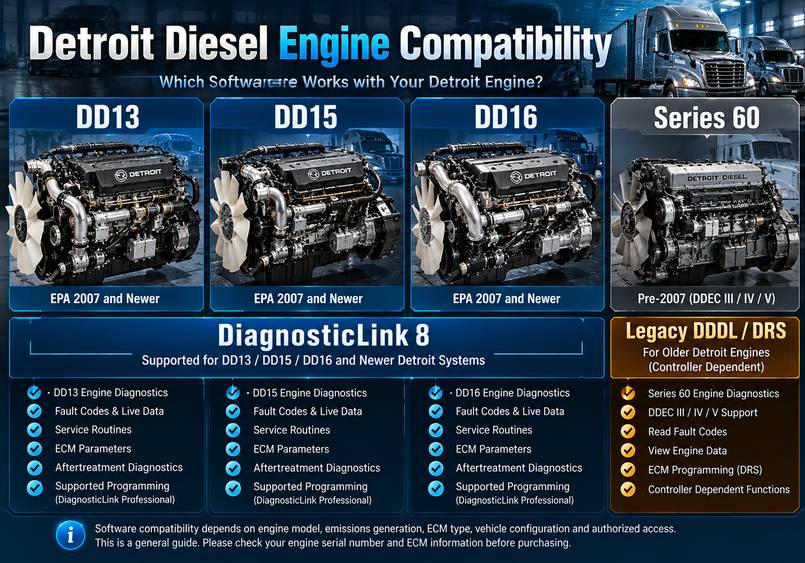
Detroit Diesel software compatibility depends more on the engine controller and emissions generation than the engine name alone.
Engine or system Typical software starting point
Older Series 60 with DDEC III–V Legacy DDDL 6.x
Older MBE 900 / MBE 4000 Legacy DDDL / DRS as applicable
DD13 EPA 2007 and newer DiagnosticLink 8
DD15 EPA 2007 and newer DiagnosticLink 8
DD16 supported newer generations DiagnosticLink 8
DD5 and DD8 supported systems DiagnosticLink 8
DT12 transmission DiagnosticLink 8, where supported
Legacy DDEC ECM reprogramming Authorized DRS
Modern controller programming Authorized DiagnosticLink Professional
This is a general selection guide, not a universal compatibility guarantee.
Before purchasing software, identify the truck’s model year, engine serial number, ECM generation, and required service procedure.
9. Windows Requirements and Diagnostic Adapter Compatibility
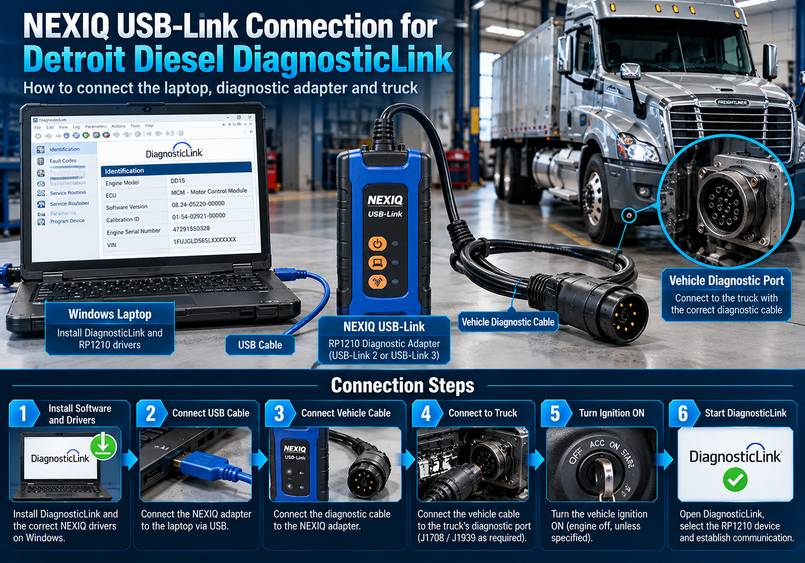
Choosing the correct application is only one part of the diagnostic setup.
A complete Detroit diagnostic system also requires a compatible Windows computer, vehicle communication interface, device drivers, and the correct connection cable.
Windows Requirements for DiagnosticLink 8.24
Detroit’s current published system requirements for supported DiagnosticLink installations include:
- Windows 11, 64-bit
- Dual-core processor, 2.0 GHz or faster
- At least 4 GB RAM
- Sufficient available disk space, including 20 GB free
- Display resolution of at least 1366 × 768
- Available USB port
- Reliable broadband internet connection
- Compatible RP1210 vehicle communication adapter
Some aftermarket offline software packages advertise Windows 10 compatibility. This must be distinguished from Detroit’s officially supported operating environment.
Legacy DDDL, DRS, and DDCT applications have separate compatibility requirements.
Which Diagnostic Adapter Works With Detroit Diesel?
DiagnosticLink uses compatible vehicle communication adapters through the appropriate drivers.
Common examples include NEXIQ USB-Link interfaces and other supported RP1210-compatible devices.
The adapter must support the protocol and vehicle connector required by the specific truck.
Option 1: NEXIQ USB-Link 2
For technicians working on supported older heavy-duty vehicles, the NEXIQ 2 USB-Link Diesel Truck Diagnostic Interface is one option to investigate.
OBD2TOOL lists an aftermarket interface package with cables and bundled legacy software.
Before purchase, confirm driver compatibility with your intended DiagnosticLink version. The bundled older software should not be assumed to support current trucks.
Related guide: NEXIQ USB-Link 2 FAQ and Setup Information.
Option 2: NEXIQ USB-Link 3
For workshops evaluating newer or mixed-fleet applications, OBD2TOOL also offers a NEXIQ 3 USB-Link Diesel Truck Diagnostic Interface.
A newer-generation interface may offer expanded protocol support, but actual compatibility must be checked for the specific hardware revision, vehicle, driver, and diagnostic software.
For either adapter, confirm whether the product is genuine or aftermarket and verify programming suitability before use.
Basic Diagnostic Connection Workflow
A typical connection process includes:
- Install the compatible diagnostic software.
- Install the correct RP1210 driver for the adapter.
- Connect the adapter to the Windows laptop.
- Connect the correct cable to the vehicle diagnostic connector.
- Turn on the ignition when instructed.
- Start DiagnosticLink.
- Select the appropriate communication interface if required.
- Establish communication and confirm the detected ECU information.
If the application reports that no compatible RP1210 device is available, check the driver installation, USB connection, interface settings, and adapter compatibility.
10. Which Detroit Diesel Software Should You Buy?
The most suitable software depends on your repair business and the Detroit engines you service.
Independent Mechanics and Truck Repair Shops
Recommended starting point: DiagnosticLink 8
If your work primarily involves troubleshooting DD13, DD15, and DD16, DiagnosticLink offers the most relevant OEM diagnostic functions.
It supports fault-code analysis, engine data monitoring, system testing, and supported service procedures.
Explore the Detroit Diesel DiagnosticLink 8.24 Professional Software package, and confirm the included functions and license conditions before ordering.
Fleet Maintenance Departments
Recommended approach: DiagnosticLink plus suitable fleet diagnostic equipment
A Detroit-focused fleet may benefit from DiagnosticLink for manufacturer-specific diagnostics and supported configuration work.
A mixed-brand fleet may also need a universal application.
For example, JPRO Professional Heavy-Duty Truck Diagnostic Software supports a range of commercial vehicle systems and can help with multi-brand fault finding and selected bidirectional tests.
However, JPRO does not replace all manufacturer-authorized Detroit programming functions.
Read our JPRO Professional 2026 V2 Update Guide to learn about expanded heavy-duty diagnostic support.
Workshops Servicing Older Detroit Series 60 Engines
Recommended approach: Legacy DDDL and DRS, as required
If your customers operate older Detroit engines with DDEC III, IV, or V controllers, verify which legacy applications and interfaces support those systems.
Modern DiagnosticLink 8 alone may not provide the required older-engine workflow.
Specialist ECM Calibration Workshops
Recommended approach: Application-specific calibration software
DDCT may be useful when a specialist legitimately needs to inspect or modify compatible ECM calibration data.
It should not be purchased simply because a workshop needs fault-code reading or ordinary controller updates.
Authorized ECM Programming Facilities
Recommended approach: DiagnosticLink Professional or authorized legacy DRS
For supported modern Detroit vehicles, use the appropriate DiagnosticLink Professional workflow.
For older DDEC systems, determine whether the authorized legacy DRS application is required.
11. Common Detroit Diagnostic Software Problems
Even with the correct application, technicians may encounter communication or installation issues.
Problem 1: DiagnosticLink Cannot Detect the Truck
Possible causes include:
- Missing or incompatible RP1210 drivers
- Incorrect communication interface selected
- Faulty USB or vehicle connection
- Incorrect diagnostic cable
- Insufficient vehicle voltage
- Unsupported interface or controller
Start by checking communication hardware before assuming that the ECM is defective.
Problem 2: No Compatible RP1210 Devices Found
Verify that the correct adapter driver is installed and that Windows recognizes the adapter.
Open the application’s hardware or interface configuration and select the corresponding device.
Problem 3: Programming Access Is Denied
A successful diagnostic connection does not guarantee programming permission.
Possible causes include:
- Incorrect software edition
- Missing manufacturer authorization
- Inactive subscription
- Missing programming event
- Unsupported vehicle or ECM
- Internet or server connection problem
Check the application authorization and manufacturer requirements instead of trying unapproved programming workarounds.
Problem 4: Legacy DDDL Cannot Communicate With the ECM
Check the ECM generation and determine whether it requires a legacy J1708/J1587 communication setup.
Verify the installed driver, the correct interface selection, the vehicle connector, and the ignition state.
Problem 5: Troubleshooting Information Is Expired
Outdated diagnostic literature may no longer be supported by the installed application.
The preferred long-term solution is to use current, appropriately licensed troubleshooting content and a supported software version.
Accurate technical information is particularly important when diagnosing emissions systems and safety-related electronic controls.
12. Frequently Asked Questions
Is DDDL the Same as DiagnosticLink?
The terms are often used interchangeably, but they differ in important ways.
Legacy DDDL 6.x supports older Detroit systems, while DiagnosticLink 8 is the newer diagnostic platform for supported EPA 2007 and later applications.
What Is the Difference Between DDDL and DDCT?
DDDL is primarily designed for diagnostics, service functions, and supported ECM configuration.
DDCT focuses on specialist calibration analysis and editing.
Most repair shops do not need DDCT for everyday truck service.
Can DDDL Reprogram an ECM?
Yes, DiagnosticLink Professional supports authorized programming on compatible controllers.
DiagnosticLink Standard is intended for diagnostics and supported parameter configuration, not the same level of controller reprogramming.
Access depends on licensing, controller support, manufacturer permissions, and programming requirements.
Do I Need DDRS if I Already Have DiagnosticLink 8.24?
Usually not for supported newer Detroit vehicles.
Modern DiagnosticLink Professional provides the appropriate authorized programming platform for these systems.
Legacy Detroit applications may require separate DDDL or DRS software.
Does DDDL Support Detroit DD15 Engines?
Yes. DiagnosticLink supports numerous DD15 engine generations.
The correct version and available functions depend on the vehicle year, ECM, emissions generation, and software authorization.
Can DDCT Be Used to Read Detroit Fault Codes?
DDCT is not intended to replace DiagnosticLink’s normal fault-code diagnostics and service workflow.
For troubleshooting, use the correct DDDL or DiagnosticLink application.
Does Detroit DiagnosticLink Work Offline?
Some diagnostic functions may operate without a continuous internet connection, depending on the software installation and authorization.
However, manufacturer-server programming, license validation, calibration downloads, and other protected functions may require online access.
An offline software package is not equivalent to an authorized OEM programming subscription.
Is NEXIQ USB-Link 3 Compatible With DiagnosticLink 8.24?
Detroit documents support for compatible USB-Link 3 drivers with supported DiagnosticLink versions.
However, compatibility must be verified for the exact interface hardware and driver. Aftermarket devices should not be assumed to have the same support or update capabilities as genuine hardware.
Which Detroit Software Should an Independent Mechanic Choose?
For newer Detroit-powered commercial trucks, begin with DiagnosticLink 8.
For older DDEC engines, investigate legacy DDDL and DRS.
For multi-brand repair shops, consider a universal diagnostic application alongside the manufacturer-specific software.
Final Verdict: DDDL, DDCT, or DDRS?
For most truck technicians, DiagnosticLink is the essential Detroit Diesel diagnostic application.
It provides a practical foundation for identifying faults, monitoring engine data, performing supported service routines, and adjusting authorized vehicle settings.
DiagnosticLink Professional adds reprogramming capabilities for supported modern Detroit controllers when you have the required permissions and programming resources.
DDCT serves a narrower calibration-specialist audience, while DDRS and DRS are associated with older Detroit programming environments.
Instead of buying every application, first identify your engine generation, required functions, Windows environment, interface compatibility, and programming authorization.
Build Your Detroit Diesel Diagnostic Setup at OBD2TOOL
- Detroit Diesel DiagnosticLink 8.24 Professional Software — For supported Detroit and Freightliner diagnostic applications.
- NEXIQ 2 USB-Link Diagnostic Interface — An aftermarket adapter option for compatible heavy-duty diagnostic applications.
- NEXIQ 3 USB-Link Diagnostic Interface — An additional interface option, subject to compatibility verification.
Before ordering, confirm your truck’s model year, engine serial number, intended service functions, and software requirements.