Choosing a laptop for Porsche PIWIS 3 requires more than checking the processor and memory. The computer must also match the installation method, SSD format, boot mode, display resolution, interface drivers, and PIWIS software build supplied with the diagnostic package.
For independent Porsche specialists, the safest approach is to purchase a complete, tested system or obtain a written compatibility check from the supplier before installing a PIWIS 3 SSD in an existing laptop.
This guide explains the practical hardware requirements, common compatibility problems, purchase options, and safety precautions technicians should evaluate before ordering a PIWIS 3 computer.
What Is Porsche PIWIS 3?
PIWIS stands for Porsche Integrated Workshop Information System. PIWIS 3, also called PIWIS Tester III or PT3, is a generation of Porsche’s workshop diagnostic platform.
Depending on the vehicle, software version, operating mode, interface, and authorization level, a PIWIS system may support functions such as:
- Reading and clearing fault codes
- Viewing actual values and live data
- Guided fault finding
- Activating supported components
- Vehicle handover and maintenance procedures
- Control-unit coding
- Calibration and initialization
- Software updates and programming
- Access to wiring and service information
- Vehicle analysis and diagnostic reports
Porsche describes PIWIS as its proprietary diagnostic platform for communicating with vehicle electronics and performing advanced service procedures that cannot normally be completed with a generic OBD-II scanner.
However, diagnostic access, online programming, security functions, and current service information may require separate Porsche authorization or official platform access. Porsche’s current technical-information system also provides a Virtual Tester option for eligible independent operators in supported markets.
Is PIWIS 3 a Laptop, Software or Diagnostic Interface?
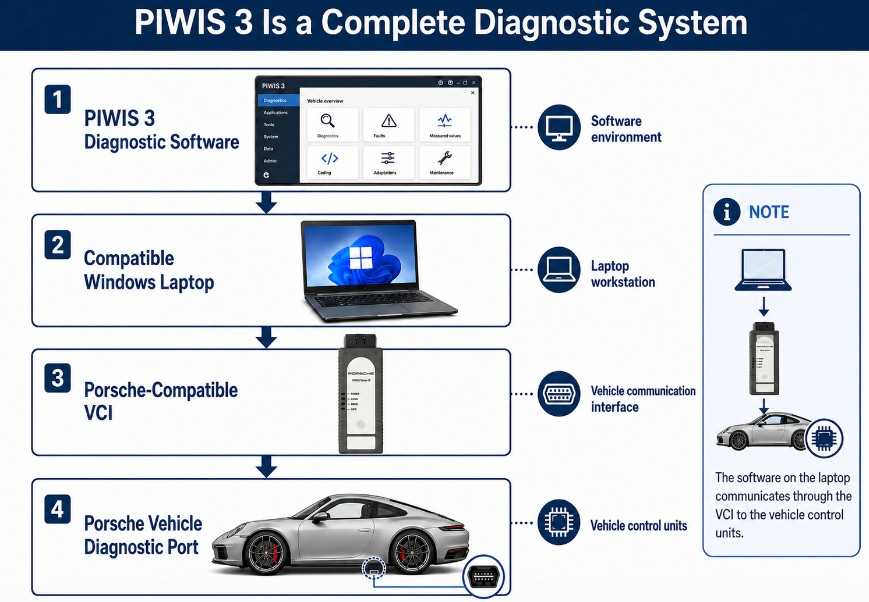
A complete PIWIS 3 setup normally contains three principal elements:
- Diagnostic software and operating environment
- A compatible Windows laptop or tester
- A vehicle communication interface, or VCI
The laptop runs the diagnostic application. The VCI connects the computer to the Porsche diagnostic port and communicates with the vehicle’s control units.
Some aftermarket systems are supplied as a complete laptop-and-VCI kit. Others provide only:
- A preconfigured SSD
- A software image
- A replacement diagnostic interface
- A remote installation service
These products are not necessarily interchangeable. A software image prepared for one boot configuration or computer family may not start correctly on another laptop.
PIWIS 3 PC Requirements at a Glance
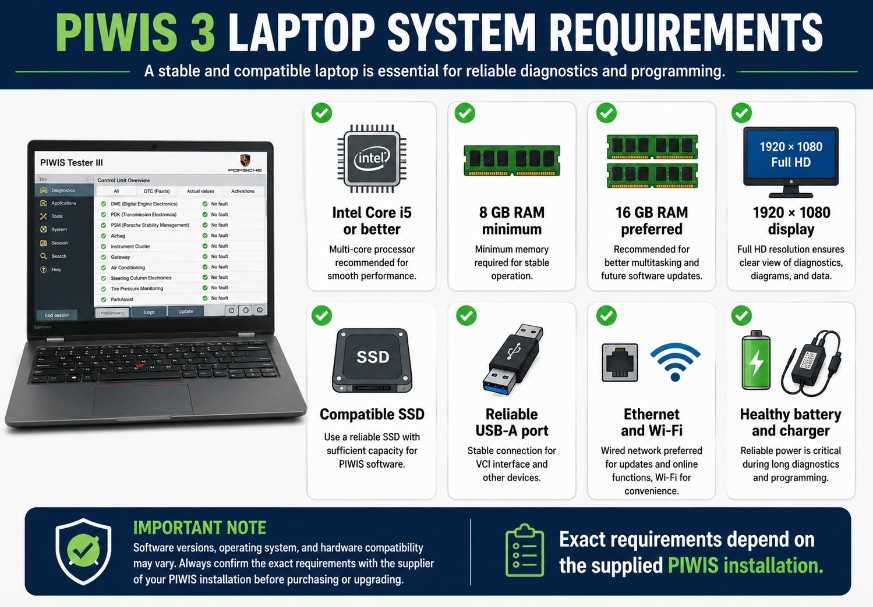
There is no single universal aftermarket PIWIS 3 laptop specification that applies to every software image. Requirements often depend on how the supplier built and configured the system.
A practical professional configuration should generally include:
| Component |
Practical recommendation |
| Processor |
Intel Core i5 or better |
| Memory |
At least 8 GB RAM; 16 GB preferred |
| Display |
1920 × 1080 resolution |
| Storage |
SSD with enough capacity for the complete software image |
| Operating system |
The exact Windows version specified by the supplier |
| USB |
At least one reliable USB-A port |
| Network |
Ethernet and Wi-Fi recommended |
| Power |
Healthy laptop battery and AC adapter |
| Boot support |
Must match the supplied SSD or image |
| Graphics scaling |
Must display the complete PIWIS interface correctly |
Aftermarket suppliers and owner-community installation guides commonly recommend an Intel Core i5-class processor, at least 8 GB RAM, and a Full HD display because lower specifications may lead to slow operation or incomplete display scaling.
These should be treated as practical aftermarket recommendations rather than universal Porsche-issued specifications.
1. Processor Requirements
An Intel Core i5-class processor is generally adequate for standard PIWIS 3 diagnostic work. An i7 processor can improve performance when the system is simultaneously handling:
- Diagnostic software
- Wiring diagrams
- Guided troubleshooting
- Remote support
- Large vehicle data files
- Multiple background services
The processor’s exact generation is less important than confirmed compatibility with the supplied installation.
Some sellers specify an 8th- or 9th-generation Intel processor for their installation package, while widely used PIWIS systems also appear on older Dell, Lenovo and Panasonic computers. This means that “8th or 9th generation only” should not be treated as a universal requirement.
Recommended choice
For a newly prepared workstation, use:
- Intel Core i5 or i7
- Four or more processor cores
- Stable thermal performance
- A business-class laptop rather than an ultra-low-power consumer model
Avoid choosing the processor alone. A fast computer with incompatible boot firmware may still be unable to run the supplied system.
2. RAM Requirements
Use at least 8 GB of RAM. For a professional workshop system, 16 GB is preferable.
Additional memory helps maintain responsiveness when:
- Loading large diagnostic sessions
- Opening service documentation
- Running remote support software
- Switching between diagnostic modules
- Viewing multiple control-unit data lists
An 8 GB system may work, but it leaves less capacity for background applications and later software builds. Community and supplier setup guides consistently identify 8 GB as a practical minimum.
3. Display Resolution
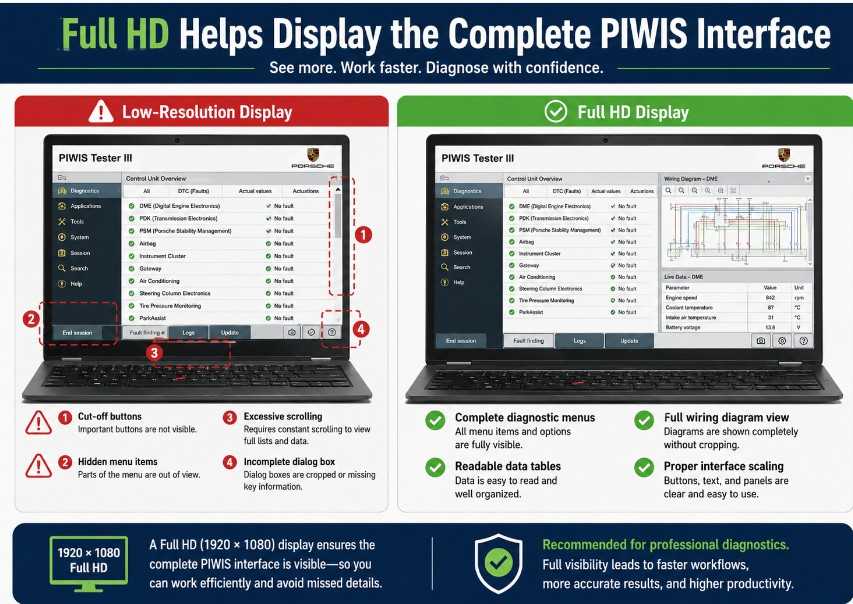
A 1920 × 1080 Full HD display is strongly recommended.
PIWIS menus, wiring diagrams, guided procedures, data tables, and programming windows can require substantial screen space. A lower-resolution panel may:
- Hide buttons
- Cut off dialog boxes.
- Require excessive scrolling
- Distort interface scaling
- Make wiring diagrams difficult to read.
Several PIWIS 3 suppliers specifically warn that the software interface may not display completely on a low-resolution screen.
A 14- or 15.6-inch Full HD display is generally comfortable for workshop use. A touchscreen is convenient but not essential.
4. SSD Type and Capacity
The laptop should use an SSD rather than a mechanical hard drive. SSD storage improves:
- Startup time
- Diagnostic application loading
- Database access
- Search performance
- Reliability when the laptop is moved around the workshop
The required capacity depends on the supplied image. Some installations may need approximately 200 GB or more of available space, while certain commercial packages specify a larger SATA SSD.
Is a SATA SSD mandatory?
Do not state that PIWIS 3 can never run from NVMe storage.
Some aftermarket bootable images are built specifically for a 2.5-inch SATA SSD and may not boot when copied directly to an NVMe drive. Other installations may use a different deployment method.
Before buying storage, ask the supplier:
- Is the image supplied on SATA or NVMe?
- Is the drive bootable or used as a virtual machine?
- What is the minimum drive capacity?
- Can the image be cloned?
- Is the drive locked to specific hardware?
- Does activation depend on the SSD serial number?
- Must the laptop have an internal 2.5-inch drive bay?
Purchase the storage type required by the exact software package rather than relying on a general internet rule.
5. BIOS, UEFI and Legacy Boot Compatibility
Boot configuration is one of the most common causes of PIWIS 3 installation failure.
Older or preconfigured diagnostic images may require:
- Legacy BIOS mode
- Compatibility Support Module, or CSM
- Secure Boot disabled
- SATA controller set to AHCI
- A specific boot order
Newer laptops may support only UEFI boot and may not provide Legacy or CSM options.
Before installing a supplied SSD, check the laptop BIOS for:
- Legacy or UEFI mode
- Secure Boot controls
- SATA mode
- USB boot support
- Drive detection
- Virtualization settings
- Boot-device selection
Do not change these settings randomly. Record the original configuration before making any changes.
Important purchasing rule
Ask the supplier to confirm the required boot mode in writing.
A laptop can meet the CPU, RAM, display and storage requirements but remain unusable if its firmware cannot boot the supplied image.
6. Windows Version
The correct Windows version depends on the PIWIS installation package.
Many aftermarket PIWIS 3 packages are built around Windows 10 64-bit. Some sellers advertise Windows 11 compatibility, but that does not prove that every PIWIS 3 image, VCI driver, or activation method will work correctly on Windows 11.
Before selecting a PC, confirm:
- Required Windows version
- 64-bit or 32-bit architecture
- Pro or Home edition
- Whether the system runs natively
- Whether it runs inside VMware or VirtualBox
- Whether Windows Update must be disabled
- Whether activation is linked to Windows
- Whether antivirus exclusions are required
- Which VCI driver version is included
Do not automatically update Windows after installation. A major operating-system update can change drivers, network settings, boot behavior, or software activation.
7. USB and Network Connections
A professional PIWIS 3 laptop should have at least one reliable USB-A port for the VCI.
A direct USB connection is preferable during:
- Control-unit programming
- VCI firmware updates
- Long diagnostic sessions
- Initial system configuration
Avoid using:
- Unpowered USB hubs
- Loose extension cables
- Damaged USB ports
- Aggressive USB power-saving settings
Ethernet and Wi-Fi are also useful for:
- Online authorization
- Technical-information access
- Software downloads
- Remote support
- Workshop networking
Even when an aftermarket PIWIS installation offers offline diagnostic functions, some programming, coding, security, software-update, or documentation features may require official online access.
8. Laptop Battery and Power Condition
A used laptop may appear suitable but have a worn battery, damaged charging port, or unreliable power adapter.
Before using the system professionally, check:
- Battery health
- AC adapter output
- Charging stability
- USB-port condition
- Cooling fan operation
- SSD health
- Display hinges
- Keyboard and touchpad
- Ethernet and Wi-Fi
- Sleep and hibernation settings
During ECU programming, connect the laptop to AC power and use an appropriate regulated battery-support unit on the vehicle.
A communication or voltage interruption during programming can leave a control unit incomplete or unresponsive.
Which Laptop Brands Work with PIWIS 3?
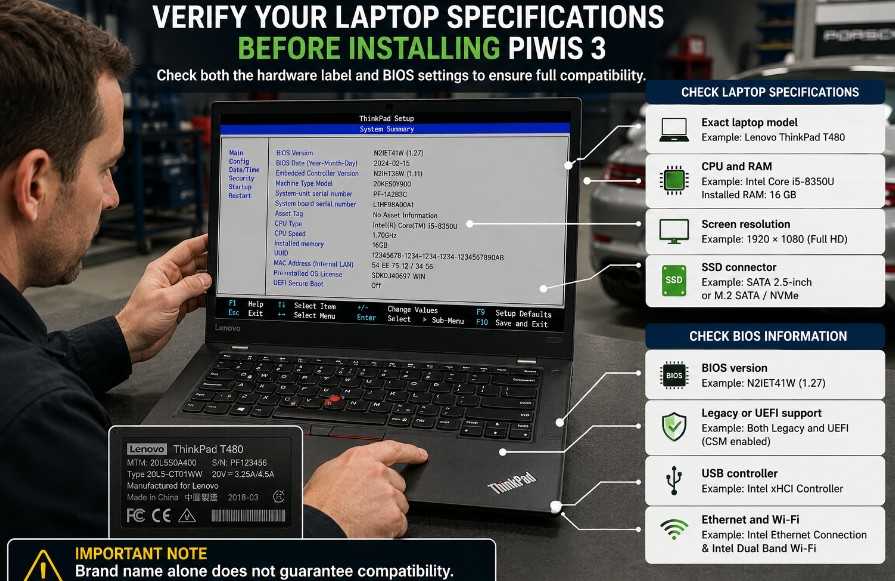
The original draft categorically advises avoiding HP, Acer, and Samsung computers. That recommendation is too broad unless it applies to a particular seller’s software image.
Laptop compatibility depends on the individual model and configuration, including:
- BIOS options
- Storage connector
- Graphics resolution
- USB controller
- Network hardware
- Driver support
- Boot mode
- Software deployment method
Business-class computers from Dell, Lenovo, and Panasonic are commonly used because they often provide:
- Accessible BIOS controls
- Replaceable SSDs
- Durable chassis
- Multiple USB ports
- Ethernet connectivity
- Widely available drivers
Commonly advertised models include:
- Dell Latitude E-series
- Lenovo ThinkPad T-series
- Lenovo Yoga business models
- Panasonic Toughbook models
However, a model name alone does not guarantee compatibility.
For example, two laptops with the same series name may use different:
- Screen resolutions
- Drive formats
- BIOS versions
- Processors
- USB controllers
- Network adapters
Confirm the complete specification and, ideally, request proof that the actual computer boots and communicates with the VCI.
Complete Kit vs. SSD-Only vs. Remote Installation
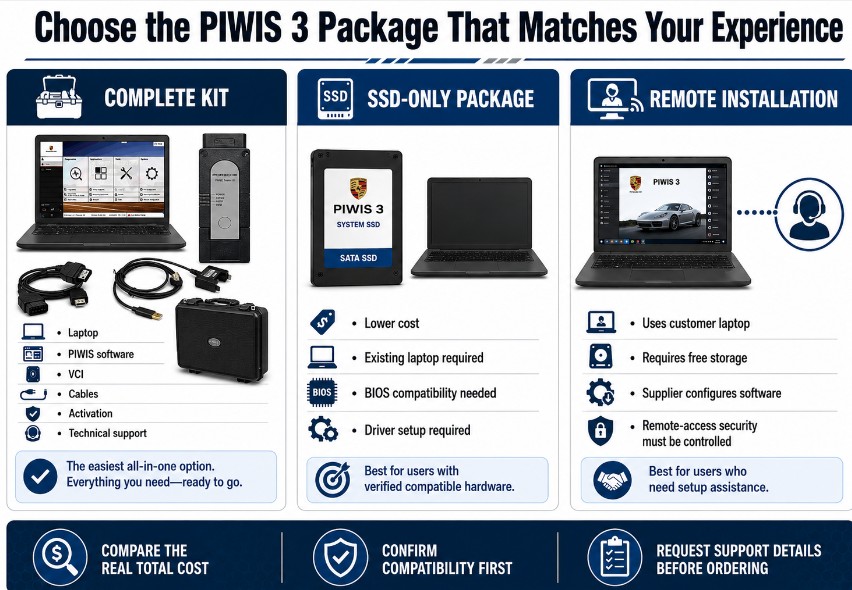
Complete PIWIS 3 Kit
A complete kit usually includes:
- Configured laptop
- PIWIS software
- Diagnostic VCI
- USB and vehicle cables
- Activation
- Technical support
Best for: Repair shops that want the lowest setup risk.
Advantages:
- Components are tested together.
- Faster initial setup
- Reduced BIOS and driver problems
- Easier warranty handling
- Supplier can verify communication before shipping.
Limitations:
- Higher purchase cost
- Laptop may be refurbished.
- Software licensing must still be verified.
- Online access may not be included.
- Upgrades may depend on the original supplier.
SSD-Only Package
An SSD-only package is intended for technicians who already own a compatible computer.
Best for: Technically experienced users with a verified laptop.
Advantages:
- Lower cost than a complete system
- Allows reuse of existing hardware
- Easier replacement of a failed drive
- May provide a straightforward version upgrade
Limitations:
- Boot-mode incompatibility
- Wrong drive connector
- Missing drivers
- Display-resolution problems
- Hardware-linked activation
- No guarantee that the image will boot
Before ordering, send the supplier:
- Laptop manufacturer
- Exact model number
- Processor
- RAM
- Display resolution
- Drive type
- BIOS screenshots
- Current boot mode
Software or Remote Installation
Some suppliers install the software remotely on a customer’s laptop.
Best for: Users with a suitable computer who want help with configuration.
Confirm:
- Required free storage
- Native or virtual-machine installation
- Operating-system requirements
- VCI compatibility
- Activation duration
- Reinstallation policy
- Update policy
- Remote-support availability
Do not provide unrestricted remote access to an unknown supplier. Use a reputable provider, supervise the session, and remove unattended-access permissions afterward.
Native Installation vs. Virtual Machine
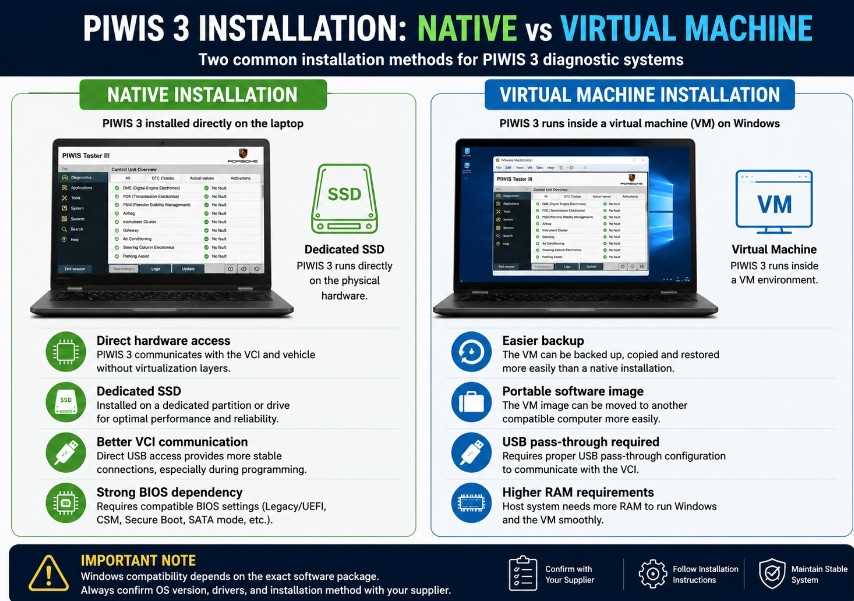
Some PIWIS configurations run natively from a dedicated system drive. Others run inside VMware or VirtualBox.
Native installation
Advantages:
- Direct hardware access
- Potentially better performance
- Simpler VCI communication
- Less virtualization overhead
Limitations:
- Greater dependence on the laptop’s BIOS
- May require a dedicated SSD
- Windows changes can affect the installation.
- Harder to move between computers
Virtual-machine installation
Advantages:
- Easier backup and restoration
- Can isolate the diagnostic environment
- May run on a broader range of computers
- Does not always require replacing the internal drive
Limitations:
- USB pass-through problems
- Network-adapter configuration
- Higher RAM and storage requirements
- Potential communication delays
- Increased risk during ECU programming if poorly configured
For programming work, use only a configuration that has been thoroughly tested with the target VCI and vehicle.
What Functions Should a PIWIS 3 Package Support?
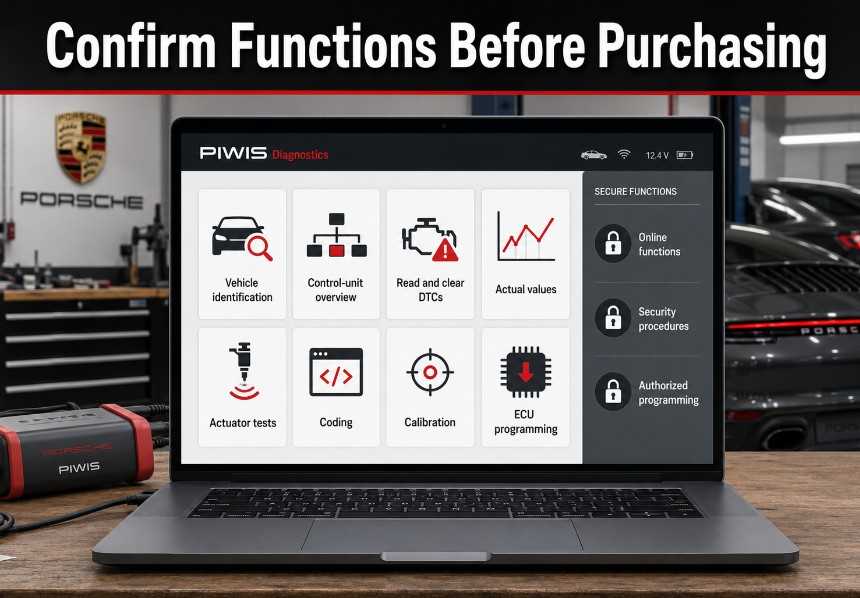
A seller should identify which functions are available rather than using the vague phrase “full dealer functions.”
Ask whether the package supports:
- Automatic vehicle identification
- Control-unit overview
- DTC reading and clearing
- Actual values
- Drive links or actuator tests
- Maintenance functions
- Coding
- Calibration
- Vehicle handover
- Guided diagnostics
- Wiring diagrams
- Offline programming
- Online programming
- Immobilizer or security procedures
- Engineering or developer mode
- VCI firmware updates
Some functions may depend on:
- Software version
- Vehicle generation
- Installed control unit
- Porsche online account
- Regional access
- VCI type
- Operating mode
- Supplier activation
Porsche’s current official diagnostic-access system requires separate eligibility and accreditation in some markets, so an aftermarket package should not be assumed to include unrestricted official online access.
PIWIS 3 Vehicle Coverage
Avoid using a fixed statement such as “supports every Porsche from 1996 through 2023” unless the seller provides a supported-model list for the exact version.
Coverage varies according to:
- PIWIS version
- Vehicle model
- Model year
- Control unit
- Diagnostic function
- VCI firmware
- Online access
- Regional configuration
PIWIS 3 is widely associated with newer Porsche generations and can also provide support for many earlier models, but some older vehicles may be better served by PIWIS 2 or legacy Porsche equipment. Third-party suppliers commonly advertise coverage through approximately 2023 for particular PIWIS 3 packages, but this is product-specific rather than a universal current guarantee.
For newer Porsche vehicles, confirm whether the required work has moved to a later PIWIS platform or Porsche’s current online diagnostic environment.
How to Choose a PIWIS 3 Laptop Step by Step
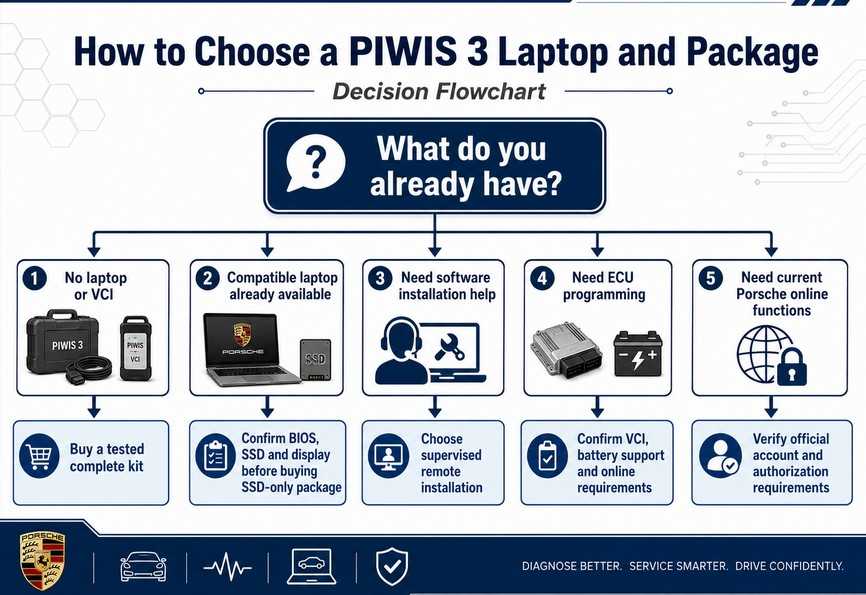
Step 1: Define the required diagnostic work
Determine whether you need:
- Basic diagnostics
- Maintenance resets
- Coding
- Calibration
- Module replacement
- ECU programming
- Engineering functions
- Security functions
- Online technical information
A system used only for DTCs and maintenance functions has different risk and access requirements from one used for ECU programming.
Step 2: Identify the exact software package
Request:
- PIWIS version
- Installation format
- Operating system
- Diagnostic mode
- Supported VCI
- Vehicle coverage
- Update method
- Activation method
- Online limitations
Do not buy based only on a version number. Sellers may package the same version differently.
Step 3: Match the laptop to the installation
Verify:
- Processor
- RAM
- Screen resolution
- Storage type and capacity
- BIOS boot options
- USB ports
- Network adapters
- Windows version
Step 4: Confirm VCI compatibility
Ask whether the installation supports:
- Original PT3G VCI
- Aftermarket PIWIS-compatible VCI
- USB connection
- Wi-Fi connection
- VCI firmware updating
- Programming functions
A laptop that boots correctly may still fail to communicate if the VCI driver and firmware do not match the software.
Step 5: Request proof of operation
Before ordering a complete system, request a video showing:
- The actual laptop booting
- PIWIS version information
- VCI detected
- Vehicle connection
- Control-unit overview
- Live data or a diagnostic scan
- Laptop model and specifications
A screenshot alone does not prove that the hardware and VCI communicate correctly.
Step 6: Verify warranty and support
Confirm:
- Laptop warranty
- SSD warranty
- VCI warranty
- Return period
- Activation support
- Reinstallation policy
- Update cost
- Remote-support hours
- Response time
- Replacement procedure
Step 7: Test immediately after delivery
Check:
- Laptop boots consistently.
- PIWIS software opens without errors.
- VCI is detected.
- USB and network connections work.
- A known vehicle can be identified.
- Control units can be scanned.
- Live data loads correctly.
- The laptop charges normally.
- No unexpected Windows updates begin.
- Recovery or backup instructions are available.
Buying Red Flags
Be cautious of listings that claim:
- Every laptop is compatible.
- Every Porsche model is supported.
- All online programming is included.
- Unlimited official updates
- No account is ever required.
- Any VCI works with any software version.
- Programming is completely risk-free.
- Developer mode automatically provides online authorization.
- The SSD can be moved between unlimited computers.
- Windows can be freely updated.
Also avoid sellers who will not disclose:
- Exact software version
- Computer specifications
- VCI type
- Installation method
- Activation terms
- Warranty
- Online-function limitations
ECU Programming Safety
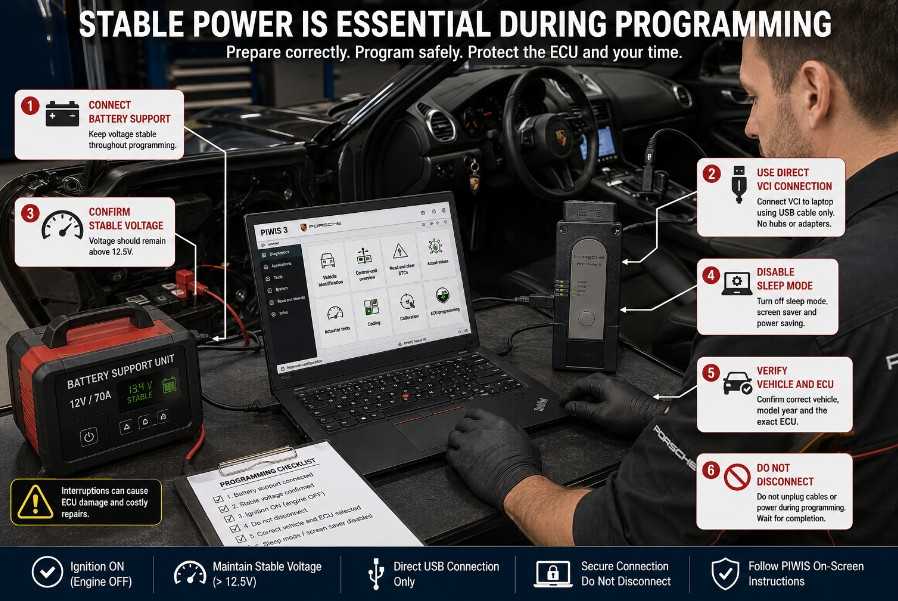
Before programming or updating a Porsche control unit:
- Connect a regulated vehicle battery-support unit.
- Connect the laptop to AC power.
- Confirm that the laptop battery is healthy.
- Use a stable direct VCI connection.
- Disable sleep, hibernation, and USB power saving.
- Close unnecessary software.
- Confirm the correct vehicle and control unit.
- Follow the relevant Porsche repair procedure.
- Do not disconnect the interface.
- Do not switch off the ignition unless instructed.
- Do not allow Windows to restart.
- Do not interrupt the programming process.
PIWIS should be used by trained technicians for coding and programming. An incorrect procedure, unstable voltage, or communication interruption can cause configuration errors or leave a control unit unable to communicate.
Maintenance and Backup Recommendations
To keep a PIWIS 3 workstation reliable:
- Use it as a dedicated diagnostic computer.
- Avoid unnecessary personal software.
- Prevent automatic major Windows upgrades.
- Back up the diagnostic drive when permitted.
- Record BIOS settings.
- Store drivers and activation instructions securely.
- Keep the VCI firmware and software versions documented.
- Shut down the system correctly.
- Protect the laptop from moisture, vibration, and workshop contamination.
- Test the system before a critical programming job.
Do not assume that an SSD image can be freely cloned. Some installations may use hardware-dependent or supplier-controlled activation.
Recommended PIWIS 3 Laptop Configuration
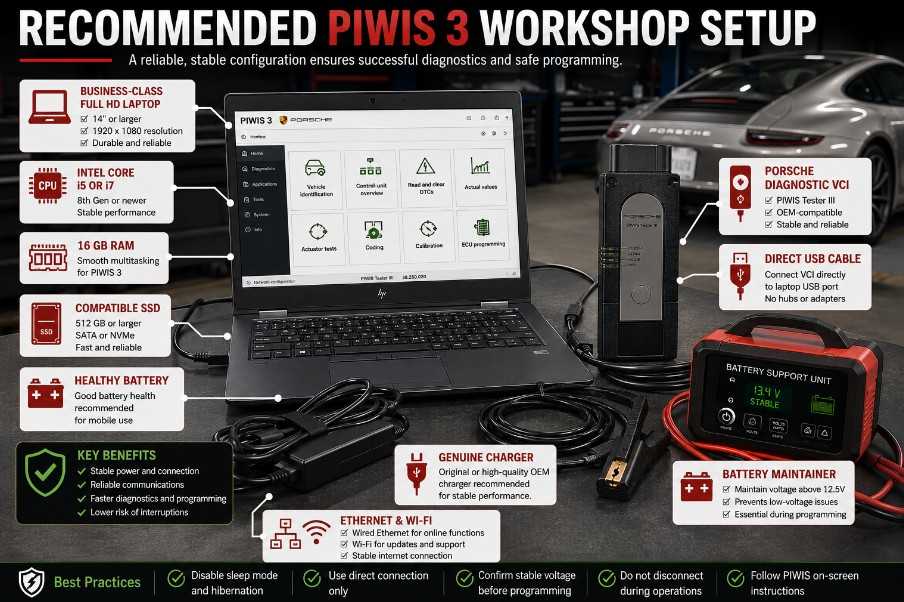
For a practical independent-shop system, choose:
- Intel Core i5 or i7 processor
- 16 GB RAM
- 1920 × 1080 display
- SSD capacity matched to the installation
- Reliable USB-A port
- Ethernet and Wi-Fi
- Healthy battery
- Genuine AC adapter
- Business-class chassis
- Confirmed boot-mode compatibility
- Supplier-tested VCI communication
The most important requirement is not a particular brand or CPU generation. It is proof that the exact laptop, software image, and vehicle interface work together.
Final Recommendation
A PIWIS 3 laptop should be purchased as part of a complete, tested diagnostic system rather than treated as an ordinary Windows computer.
For most Porsche repair shops, the lowest-risk option is a package that includes:
- A compatible laptop
- Correctly configured PIWIS software or system SSD
- A matching PIWIS VCI
- Required cables and drivers
- Activation or initial configuration
- A completed vehicle-connection test
- Backup or recovery guidance
- Technical support
- Clear warranty terms
An SSD-only package can be more economical, but it should only be selected after confirming the laptop’s boot mode, storage connector, display resolution, operating system, USB controller and hardware drivers.
Avoid categorical claims such as “all HP laptops are incompatible” or “PIWIS 3 always requires an eighth-generation processor.” Compatibility depends on the complete combination of laptop hardware, BIOS configuration, software image, VCI firmware and installation method.
Recommended Complete PIWIS 3 Packages
Option 1 — High-Quality PT3G VCI Package with Lenovo Yoga Laptop
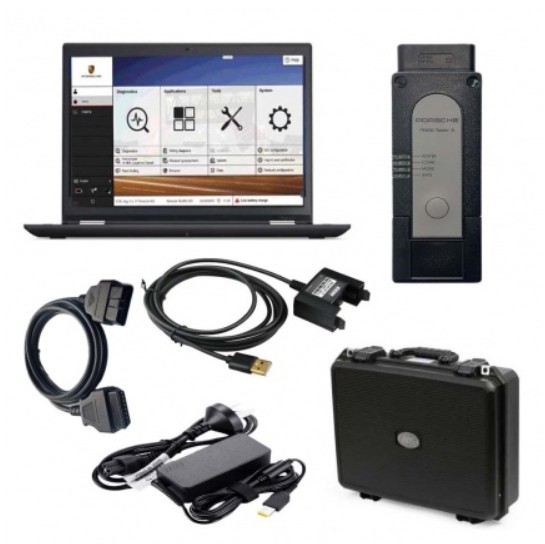
The High-Quality Porsche PIWIS 3 PT3G VCI Package is designed for professional workshops that want a more complete PIWIS configuration. The listed package includes a Lenovo Yoga i5 touchscreen laptop with PIWIS software and a PT3G vehicle interface. It is the stronger choice for technicians who prioritize interface quality, broader professional use and a preconfigured laptop environment. The current listing identifies PIWIS software versions V44.800.022 and V38.250.
View product:
High-Quality Porsche PIWIS 3 PT3G VCI with Lenovo Yoga Laptop
Option 2 — PIWIS 3 Diagnostic Tool with Lenovo Yoga Laptop
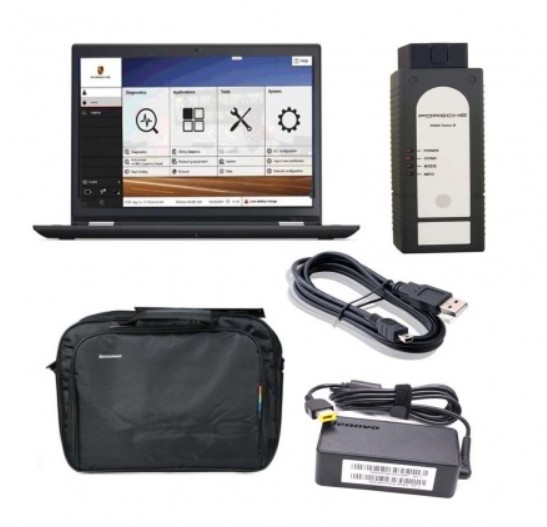
The Porsche PIWIS 3 Diagnostic Tool with Lenovo Yoga Laptop offers a more economical complete-system option for workshops that need a laptop, PIWIS software and compatible diagnostic hardware in one package. The current product page lists PIWIS versions V43.300.22 and V38.250 with a Lenovo Yoga i5 touchscreen laptop.
View product:
Porsche PIWIS 3 Diagnostic Tool with Lenovo Yoga Laptop
Option 3 — PIWIS 3 PT3G VCI with Panasonic Laptop
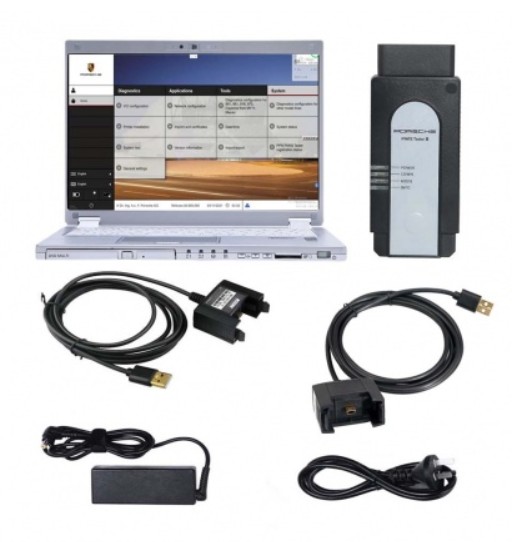
This complete package pairs the PT3G VCI with a Panasonic touchscreen laptop and preinstalled PIWIS software. The current product page identifies the computer as a Panasonic CF-MX5 with an Intel Core i5-6300U processor and a 256 GB SSD, although the URL still contains “CF-MX4.” Buyers should confirm the exact laptop model before ordering.
Best suited for: Workshops that prefer a compact Panasonic business-class laptop for mobile diagnostics.
View PIWIS 3 PT3G VCI with Panasonic Laptop
Before ordering either package, confirm the exact software version, included VCI type, laptop specifications, supported vehicle years, online-function limitations, update policy and warranty with the supplier.
Frequently Asked Questions
Can PIWIS 3 run on any laptop?
No. The laptop must meet the requirements of the specific PIWIS installation. Important factors include display resolution, RAM, storage type, boot mode, Windows version, USB support, and VCI drivers.
What is the minimum RAM for PIWIS 3?
Eight gigabytes is a commonly recommended practical minimum. Sixteen gigabytes is preferable for professional use, especially when running documentation or remote-support applications alongside the diagnostic software.
Does PIWIS 3 require a Full HD display?
A 1920 × 1080 display is strongly recommended because lower resolutions may not show all menus and dialog boxes correctly.
Does PIWIS 3 require a SATA SSD?
Some bootable aftermarket installations are supplied specifically for SATA SSDs. Other deployment methods may differ. Confirm the required storage interface with the software supplier before purchasing a laptop or drive.
Can PIWIS 3 use an NVMe SSD?
Possibly, depending on the installation method. Do not assume that a SATA image can be copied directly to NVMe storage. Ask the supplier whether the exact software build supports the laptop’s drive type.
Does PIWIS 3 require Legacy BIOS?
Some preconfigured SSD images require Legacy or CSM boot. Others may use UEFI or a virtual machine. Verify the required boot mode before purchasing the laptop.
Can PIWIS 3 run on Windows 11?
Some third-party packages advertise Windows 11 compatibility, but many PIWIS 3 installations are built around Windows 10 64-bit. Compatibility must be confirmed for the exact software image, VCI driver, and activation method.
Is a Dell Latitude E7450 suitable for PIWIS 3?
It is commonly used in aftermarket PIWIS packages because of its BIOS flexibility and replaceable storage. However, confirm its display resolution, SSD format, RAM, and boot configuration before ordering.
Should Windows Update be disabled?
Avoid uncontrolled major updates on a dedicated diagnostic laptop. Updates can change drivers, boot settings, network behavior or activation. Follow the supplier’s update policy rather than permanently turning off all security maintenance without a plan.
How is PIWIS 3 updated?
The method varies. Some systems use a replacement or re-imaged SSD, while others use remote installation or an updated software image. Official online functions and current Porsche platforms follow different access and authorization processes.
Can PIWIS 3 perform online programming?
Some official functions require Porsche-authorized access, accounts, or accreditation. An aftermarket offline PIWIS package should not be assumed to include unrestricted online programming.
Can PIWIS 3 damage a control unit?
Yes. Incorrect coding, unstable voltage, or interrupted programming can leave a module incorrectly configured or unresponsive. Use stable battery support and follow the correct Porsche procedure.
Is a complete kit better than buying an SSD only?
A complete kit is usually safer for workshops because the laptop, software and VCI should already be matched and tested. An SSD-only package is more suitable for experienced users who can verify BIOS, storage and driver compatibility.