The VCDS HEX-NET / HEX-V2 V2026.03 diagnostic interface is designed for diagnostics, coding, adaptation, service functions, and vehicle-system access on compatible Volkswagen, Audi, Skoda, and SEAT vehicles.
Depending on the interface version, communication is available through USB or WiFi, with support for VW Group diagnostic protocols including K-Line, K+L, Dual-K, and CAN.
For technicians working on both older and newer VAG vehicles, choosing the correct interface version is important because update policy, vehicle-year coverage, SFD support, TP16/81XX module access, and DoIP capability can differ.
VCDS HEX-NET V2026.03 Overview
Software Version: V2026.03
Supported Vehicles: Volkswagen, Audi, Skoda, SEAT and other compatible VAG passenger vehicles
Operating System: Windows 7 or newer
Connection: USB or WiFi, depending on interface version
Diagnostic Protocols: K-Line, K+L, Dual-K and CAN
Supported Vehicles: Volkswagen, Audi, Skoda, SEAT and other compatible VAG passenger vehicles
Operating System: Windows 7 or newer
Connection: USB or WiFi, depending on interface version
Diagnostic Protocols: K-Line, K+L, Dual-K and CAN
The supplied product information describes support for 14 languages. Listed languages include English, French, German, Chinese, Russian, Italian, Czech, Hungarian, Spanish, Portuguese, Swedish, and Dutch.
Note: Always verify the exact language package supplied with your software before installation.
What Can the HEX-NET Interface Do?
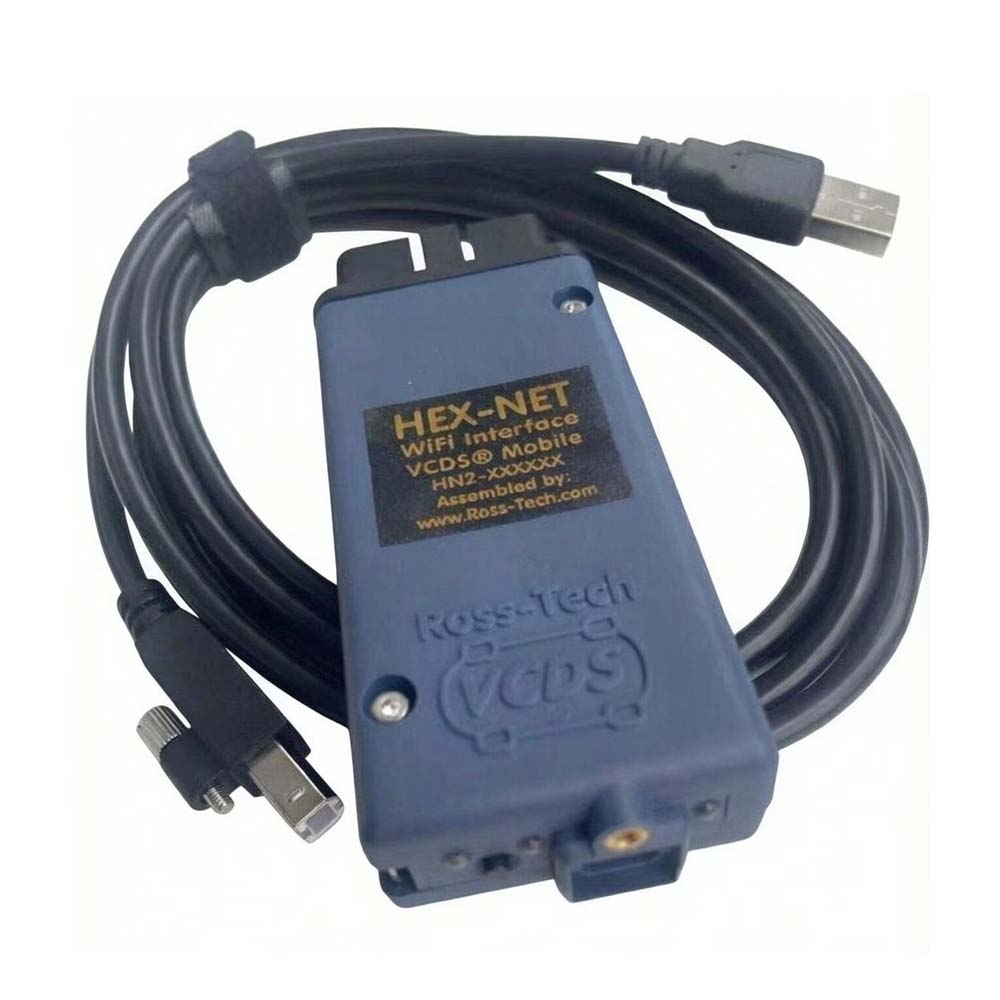
The HEX-NET combines a VCDS-compatible diagnostic interface with both wired and wireless communication capabilities.
1. USB and WiFi Connection
HEX-NET can communicate with VCDS on a Windows PC through either:
- USB connection
- 2.4 GHz WiFi connection
USB is normally the simplest choice for workshop diagnostics, while WiFi provides greater flexibility when working around the vehicle.
2. VCDS-Mobile Support
HEX-NET also supports VCDS-Mobile, allowing compatible diagnostic functions to be accessed from devices with a web browser, including:
- Smartphones
- Tablets
- Laptops
Available VCDS-Mobile functions may differ from the full Windows VCDS application.
3. Broad VW Group Vehicle Coverage
The interface is designed for diagnostic-capable VW Group passenger vehicles using:
- K-Line
- K+L
- Dual-K
- CAN
It works with a wide range of VW, Audi, Skoda, and SEAT vehicles from the 1990s through newer model years, depending on the selected interface and software version.
4. Detachable USB Cable
HEX-NET uses a detachable USB connection.
The supplied cable may use a screw-locking mechanism to prevent accidental disconnection during diagnostics. If needed, you can temporarily use a standard USB-A to USB-B cable when compatible.
5. Upgradeable Firmware
The interface uses a modern 32-bit microcontroller and supports firmware updating.
Firmware updates are important because communication requirements can change as newer VAG control modules and diagnostic protocols are introduced.
6. Diagnostic Status LEDs
Three bi-color red/green LEDs provide visual information about:
- Interface status
- Vehicle communication
- USB/WiFi activity
This can help technicians quickly determine whether the interface is powered and communicating correctly.
7. DoIP Support on Compatible HEX-NET Versions
Later HN2 HEX-NET interfaces with blue housings, introduced from around late 2020, support vehicle-side communication through DoIP (Diagnostics over Internet Protocol).
DoIP support depends on the specific interface hardware.
8. Embedded VCDS License
HEX-NET includes an embedded VCDS license and therefore functions as the software authorization dongle.
This means you can install VCDS on another compatible PC and use it when you connect the licensed interface.
Vehicle Compatibility
The OBD-II style connector plugs directly into the diagnostic port on most:
- 1995 and newer Volkswagen vehicles
- 1996 and newer Audi vehicles
Many earlier vehicles may also be supported, including selected:
- 1990–1995 Audi models
- 1990–1994 Volkswagen models
Compatibility on these older vehicles depends on the diagnostic system and protocol used by the specific control module.
Known Compatibility Exceptions
The interface does not fully support every VW Group-branded vehicle.
Notable exceptions include:
Volkswagen Routan
All model years of the Routan are excluded from normal VW diagnostic compatibility because the vehicle is based on a Chrysler platform and does not use the standard VW diagnostic architecture.
Some 1991–1994 Audi TDI Models
Certain early Audi TDI ECUs communicate at approximately 240 bps and may not be fully supported.
For older or unusual vehicles, confirm compatibility before purchasing the interface.
Computer Requirements
For reliable VCDS operation, the recommended minimum computer configuration is:
| Requirement | Recommendation |
| Processor | 1 GHz dual-core or faster |
| RAM | 1 GB minimum |
| Operating System | Windows 7 or newer |
| USB | Available USB port for wired operation |
| WiFi | Required for HEX-NET wireless operation |
Older computers and operating systems such as Windows 2000, XP, or Vista may work with some versions, but they are not officially supported.
A stable Windows installation and reliable USB connection are strongly recommended when performing coding, adaptation, or other vehicle configuration procedures.
HEX-NET WiFi Requirements
Wireless HEX-NET operation requires 2.4 GHz 802.11 b/g WiFi.
Access Point Mode
When using HEX-NET as an access point, the laptop, tablet, or smartphone connecting to it must support:
802.11 b/g at 2.4 GHz
Infrastructure Mode
For Infrastructure Mode, both the client device and the Internet-connected router need compatible 2.4 GHz 802.11 b/g communication.
According to the supplied specifications:
- 2.4 GHz WiFi is supported
- 5 GHz WiFi is not supported
- WiFi channels 12 and 13 are not supported.
If HEX-NET cannot be detected wirelessly, verify the router band and channel before troubleshooting the diagnostic software.
VCDS Software Compatibility
Use HEX-NET with a compatible version of VCDS.
Unlike a basic serial pass-through adapter, HEX-NET does not operate as a generic “dumb” serial interface. Therefore, it should not be assumed to work with unrelated third-party diagnostic software.
For VCDS V2026.03 or the latest available software, users should obtain the software from the appropriate official software source:
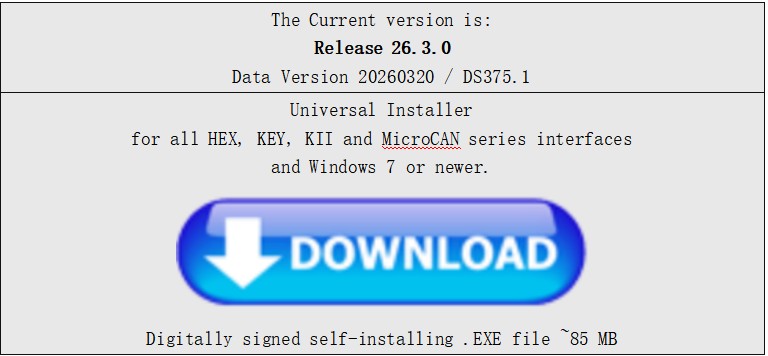
Installing the correct software version is especially important when working with newer control modules.
HEX-NET Driver Installation
HEX-NET normally enumerates in Windows as an HID device, so you generally don’t need a dedicated USB driver.
However, newer versions of Windows can have HID-related power-management behavior that affects communication.
The VCDS installer may therefore install a device-specific INF configuration file to help Windows handle the interface correctly.
WiFi Firewall Configuration
When VCDS communicates with HEX-NET through WiFi, Windows Firewall may prompt you to allow VCDS to communicate through the network.
Select Allow Access when prompted.
The VCDS installer may also provide an option similar to:
Open Windows Firewall for HEX-NET via WiFi
Enabling this option can help prevent Windows Firewall from blocking communication between VCDS and HEX-NET.
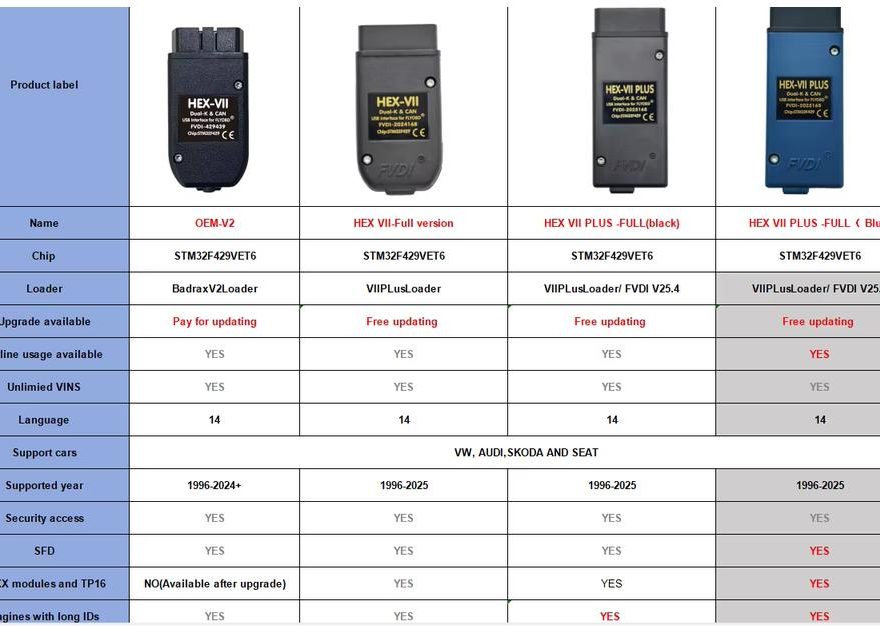
Different HEX-V2 / HEX-VII Versions Compared
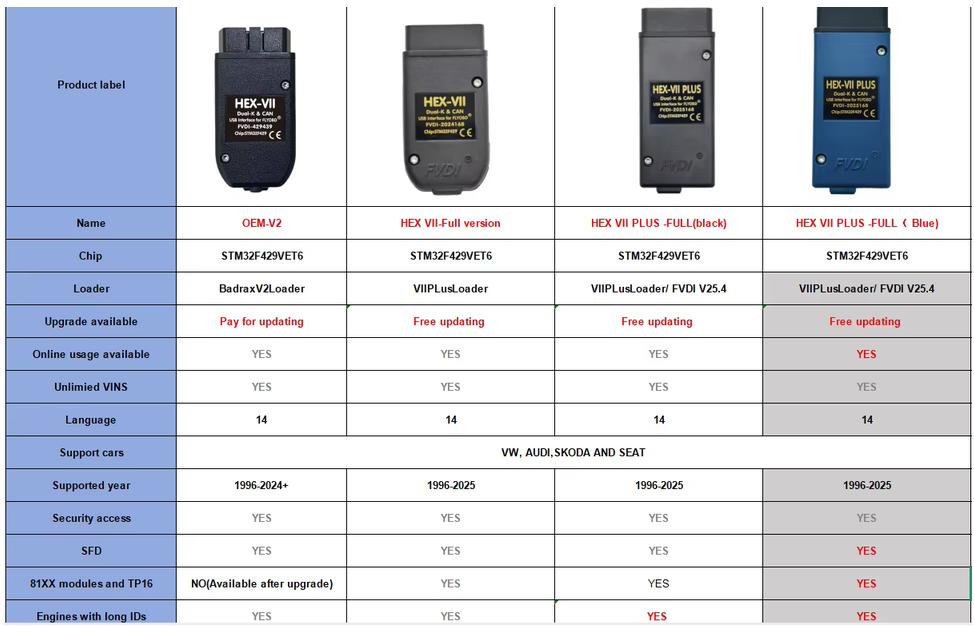
The following table is based on the supplied product comparison chart. Product names are retained as shown in the original chart.
| Feature | OEM-V2 | HEX VII Full Version | HEX VII PLUS FULL (Black) | HEX VII PLUS FULL (Blue) |
|
Chip
|
STM32F429VET6 | STM32F429VET6 | STM32F429VET6 | STM32F429VET6 |
|
Loader
|
BadraxV2Loader | VIIPlusLoader | VIIPlusLoader / FVDI V25.4 | VIIPlusLoader / FVDI V25.4 |
|
Upgrade Available
|
Pay for updating | Free updating | Free updating | Free updating |
|
Online Usage Available
|
Yes | Yes | Yes | Yes |
|
Unlimited VINs
|
Yes | Yes | Yes | Yes |
|
Languages
|
14 | 14 | 14 | 14 |
|
Supported Cars
|
VW, Audi, Skoda, SEAT | VW, Audi, Skoda, SEAT | VW, Audi, Skoda, SEAT | VW, Audi, Skoda, SEAT |
|
Supported Years
|
1996–2024+ | 1996–2025 | 1996–2025 | 1996–2025 |
|
Security Access
|
Yes | Yes | Yes | Yes |
|
SFD
|
Yes | Yes | Yes | Yes |
|
81XX Modules & TP16
|
No — available after upgrade | Yes | Yes | Yes |
|
Engines with Long IDs
|
Yes | Yes | Yes | Yes |
Which Version Should You Choose?
The four versions share the same STM32F429VET6 chip, unlimited VIN support, multi-language support, security access, and general VW/Audi/Skoda/SEAT coverage.
The main differences are in the loader, update policy, supported model years, and 81XX/TP16 support.
OEM-V2
Suitable for users who primarily work with older and mid-generation VAG vehicles.
According to the supplied comparison:
- Supports 1996–2024+ vehicles
- Unlimited VINs
- SFD support
- Security access
- 81XX/TP16 requires an additional upgrade
- Updates are paid
HEX VII Full Version
Adds broader functionality compared with the OEM-V2 version:
- 1996–2025 coverage
- Free updating
- Unlimited VINs
- Online usage
- SFD support
- 81XX and TP16 support
HEX VII PLUS FULL Black
The PLUS FULL version uses the VIIPlusLoader / FVDI V25.4 configuration and provides:
- 1996–2025 coverage
- Free updating
- Online usage
- Unlimited VINs
- SFD
- 81XX/TP16 support
- Long engine ID support
HEX VII PLUS FULL Blue
The blue FULL version has the same main specifications shown for the black PLUS version:
- STM32F429VET6 chip
- VIIPlusLoader / FVDI V25.4
- Free updating
- 1996–2025 vehicle coverage
- Online usage
- Unlimited VINs
- Security access
- SFD
- 81XX/TP16 support
- Long engine ID support
When selecting a version, don’t choose based on housing color alone. Check the loader, update capability, vehicle-year coverage, SFD requirements, and module support required for the vehicles you service.
Package Includes
- 1 × VCDS HEX diagnostic interface
Package contents may vary by selected interface version.
Recommended Product
If you need a VCDS-compatible diagnostic interface for Volkswagen, Audi, Skoda, and SEAT, you can check the VAG-COM VCDS HEX-V2 Intelligent Dual-K + CAN USB Interface available from OBD2Tool.
It is suitable for technicians and VAG vehicle owners who need functions such as fault-code diagnostics, live data, coding, adaptation, service functions, and control-module access on compatible vehicles.
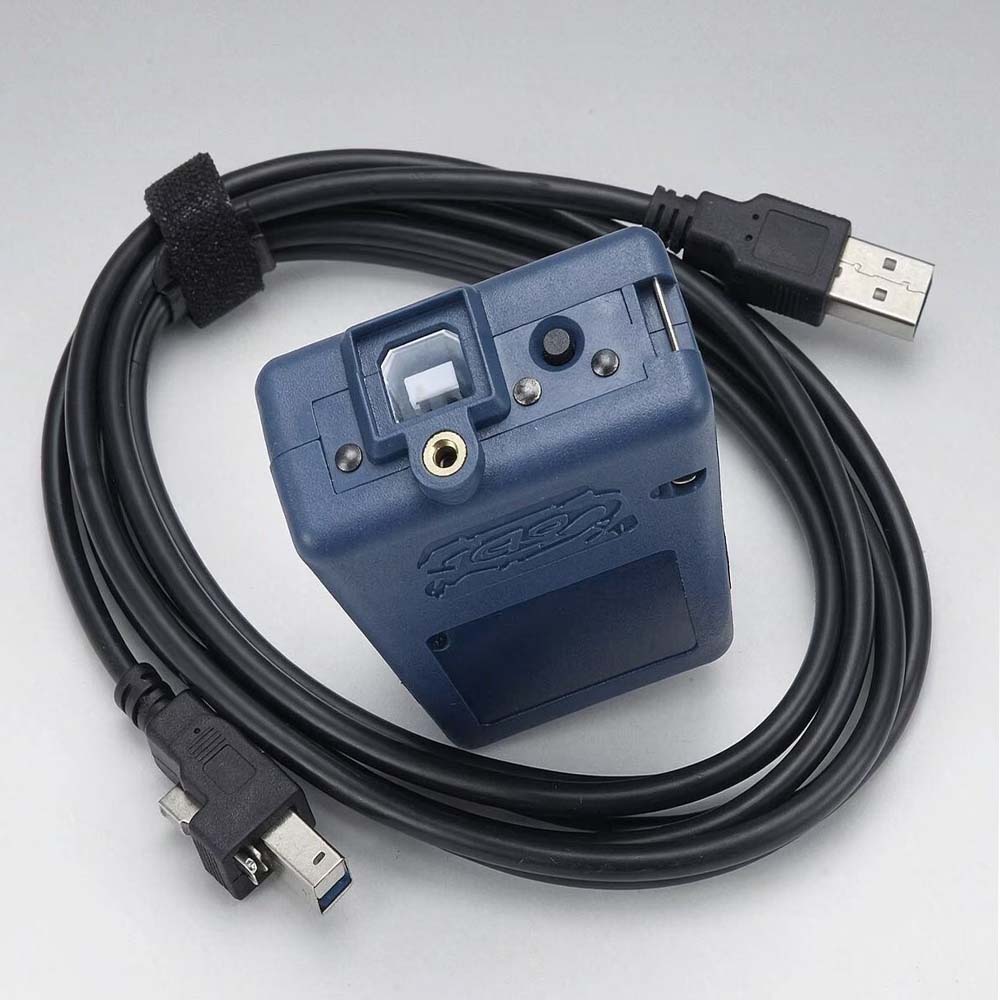
View Product:
https://www.obd2tool.com/goods-10902-VCDS-HEX-NET-HEX-V2-USB-WiFi-Diagnostic-Interface.html
Before ordering, confirm the required vehicle year, protocol, software version, SFD support, and module compatibility for your specific VW Group vehicle.
Before Using VCDS V2026.03
For more reliable diagnostics:
- Install VCDS on a compatible Windows computer.
- Connect the interface directly to the PC when using USB.
- Allow VCDS through Windows Firewall when using WiFi.
- Confirm that the interface is recognized before connecting to a vehicle.
- Verify the correct vehicle and control module before coding or adaptation.
- Maintain stable vehicle voltage during extended diagnostic or configuration procedures.
- Use the latest compatible firmware and software intended for your interface.
Final Summary
The VCDS HEX-NET / HEX-V2 V2026.03 diagnostic interface provides a practical solution for diagnosing Volkswagen Group vehicles, including VW, Audi, Skoda and SEAT.
HEX-NET is particularly useful for technicians who require both USB and WiFi diagnostic access, while the different HEX-V2/HEX-VII versions shown in the comparison chart provide different update policies and levels of module support.
Before purchasing, verify three points in particular: vehicle model/year, required communication method, and the exact interface version needed for newer functions such as SFD, 81XX/TP16, or DoIP.