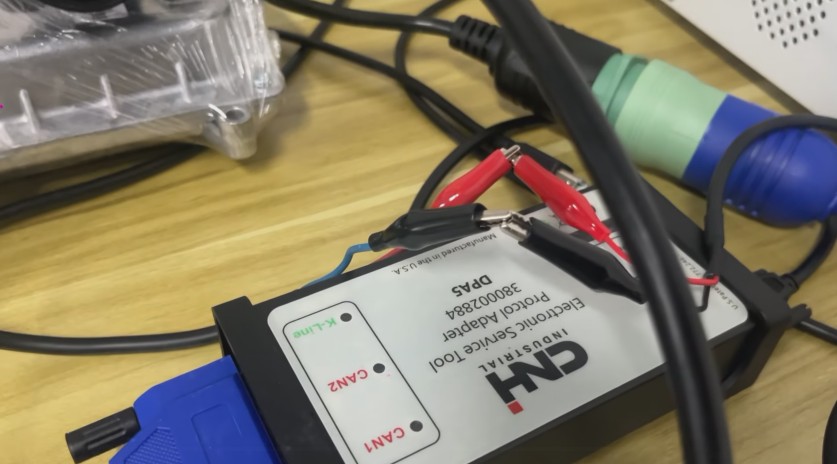
The CNH EST diagnostic tool is a PC-based diagnostic platform used to communicate with supported Case IH, New Holland, and other CNH-family equipment through a compatible communication adapter. At its core, EST can retrieve controller information, monitor parameters, read and clear fault codes, and provide diagnostic and service information. CNH’s current self-repair documentation also lists electrical and hydraulic schematics, fault-code repair procedures, and related service information.
Workshops using an engineering-level CNH EST package may also include diagnostic tests, ECU configuration, and certain programming operations. These advanced functions depend on the machine, controller, software, and access level, so you should never assume them based solely on the CNH name.
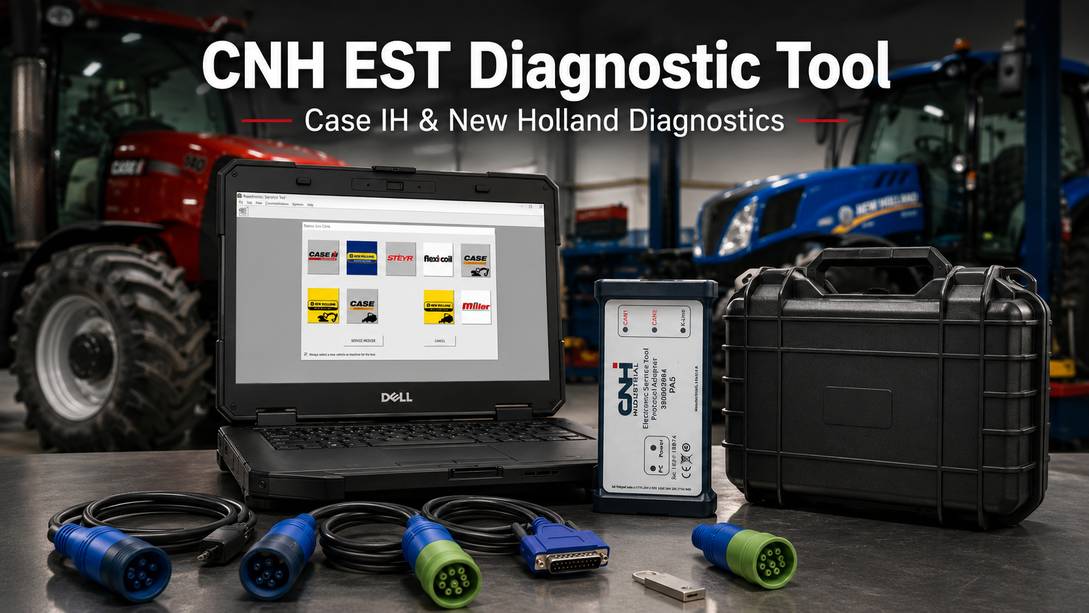
This guide explains how CNH EST fits into a real diagnostic workflow, what hardware is required, what CNH EST 9.15 offers, and what to check before attempting calibration or ECU programming.
What Is CNH EST?
CNH EST, or CNH Electronic Service Tool, is diagnostic software designed to communicate with electronic controllers fitted to supported CNH equipment.
Instead of treating the machine as a single ECU, EST lets the technician work with individual controllers responsible for systems such as the engine, transmission, hydraulics, implement control, and other electronically managed functions, depending on the machine configuration.
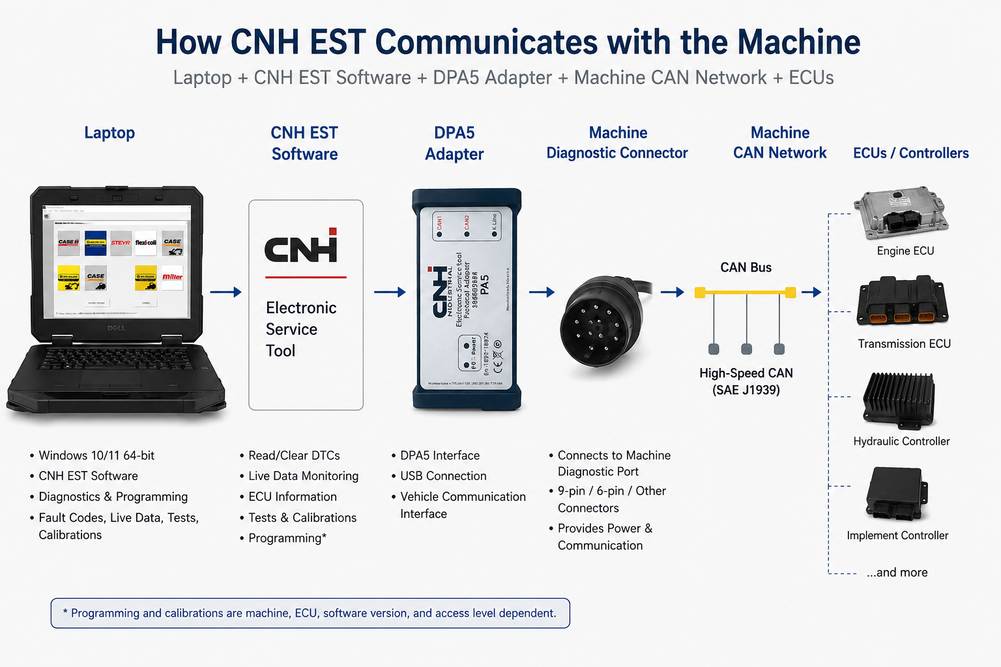
CNH’s official New Holland self-repair documentation confirms that EST connects a Windows PC to the machine’s CAN network through a protocol adapter. Officially documented functions include:
- Controller status and software/version retrieval
- Parameter monitoring
- Fault-code retrieval and clearing
- Fault-code descriptions and repair processes
- Electrical schematics
- Hydraulic schematics
- Service information and repair instructions
This is why EST is more useful than simply reading a dashboard fault number. A fault code identifies where the controller detected a problem; live parameters and service information help determine why the fault occurred.
Who Is CNH EST Useful For?
CNH EST is most relevant to technicians who regularly maintain CNH equipment, including:
- Case IH tractor and agricultural equipment repair shops
- New Holland tractor and agricultural equipment technicians
- Case Construction repair shops
- New Holland Construction technicians
- Farm equipment fleets with in-house maintenance
- Heavy equipment repair facilities
- Mobile agricultural and construction-equipment technicians
- Used machinery dealers performing pre-sale inspections
- Equipment rental companies maintaining their own fleets
For an occasional mechanical repair, EST may be unnecessary. For a workshop that routinely diagnoses electronic faults, CAN communication problems, transmission complaints, engine derates or controller-related failures, access to machine-specific diagnostic data becomes much more valuable.
Which Machines Does CNH EST Support?
This requires more qualification than many online descriptions provide.
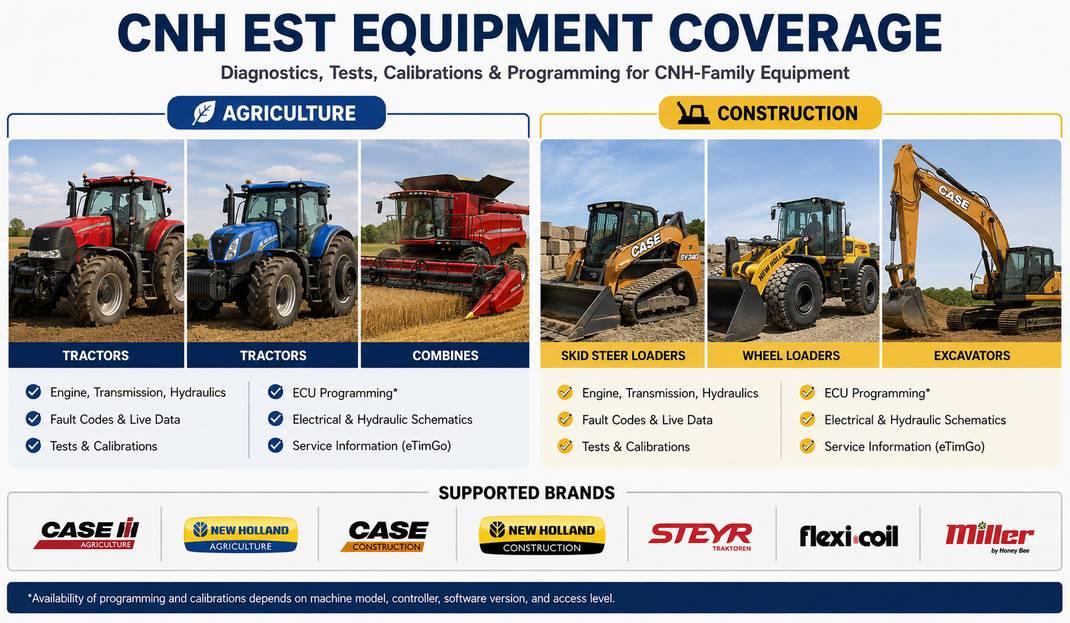
CNH’s current self-repair all-products EST license states that it supports vehicles within the selected brand from 1998 to the present, based on the period when the license is available for installation.
The current OBD2TOOL CNH EST 9.15/DPA5 package lists these core brands:
| Case | Agriculture |
| Case | Construction |
| New Holland | Agriculture |
| New Holland | Construction |
| STEYR | Agricultural equipment |
| Flexi-Coil | Supported product families |
| Miller | Supported product families |
The OBD2TOOL 9.15 package specifically lists Case Agriculture, Case Construction, New Holland Agriculture, New Holland Construction, Flexicoil, Miller and STEYR.
Do not assume every CNH machine uses the same diagnostic system.
This is particularly important on compact tractors and equipment fitted with engines supplied by other manufacturers.
CNH itself provides separate diagnostic products for some:
- Perkins-powered applications
- ISM-powered applications
- LS Mtron-powered applications
- Yanmar-powered applications
For example, CNH’s LS Mtron diagnostic software has a specific supported-model list covering selected Case IH Farmall and New Holland Boomer/Workmaster machines.
Therefore, a technician should verify the machine model, serial/PIN, engine family, and controller system before ordering a diagnostic package.
A CNH logo on the hood does not guarantee that one software module communicates with every ECU installed on that machine.
What Can CNH EST Diagnose?
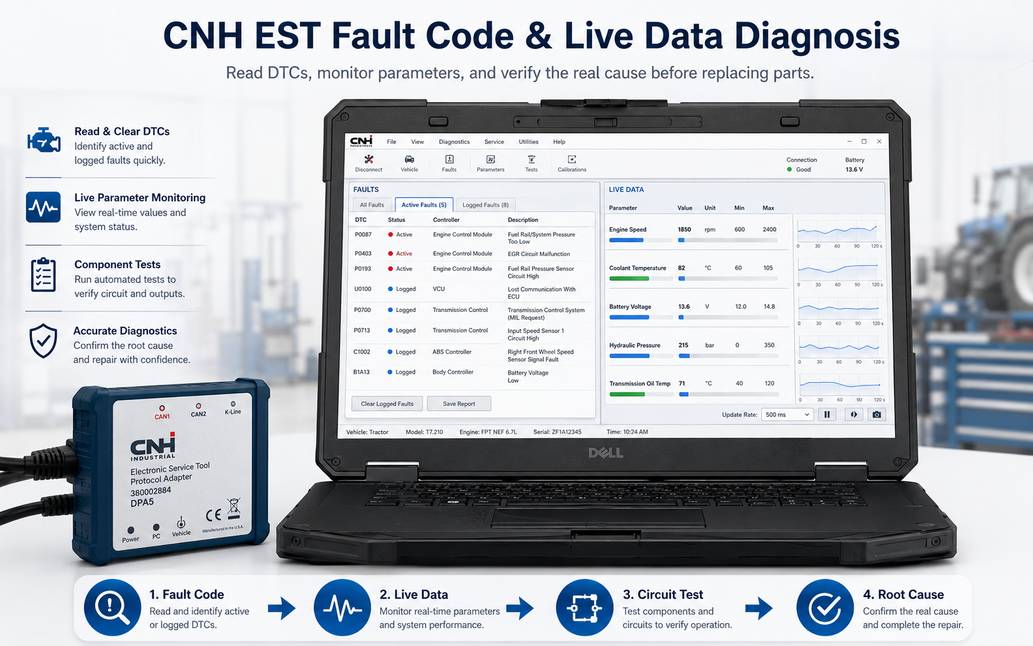
For most technicians, the most valuable capability is not clearing codes. It is the combination of fault information, controller data, and service documentation.
1. Read active and stored fault codes
Start with a complete controller scan before disconnecting components or clearing anything.
Stored fault information can reveal whether the problem is:
- Currently active
- Intermittent
- Associated with another controller
- A likely consequence of a communication or power-supply problem
Do not clear codes immediately. Doing so can remove information that helps reconstruct the original failure.
2. Monitor live parameters
Parameter monitoring is one of EST’s officially documented functions.
Live data is useful when diagnosing complaints such as:
- Engine power loss
- Sensor plausibility faults
- Hydraulic-control problems
- Transmission complaints
- Aftertreatment faults
- Intermittent electrical problems
- Controller communication failures
A fault code tells you what the ECU detected. The parameter list lets you compare what the ECU believes is happening with what is physically happening on the machine.
For example, if a pressure-related fault is active, do not immediately replace the pressure sensor. Compare the displayed pressure against operating conditions and, when appropriate, an independent mechanical measurement.
3. View controller status and software information
Controller identification is useful before:
- Replacing a module
- Reprogramming an ECU
- Comparing two machines
- Investigating an incorrect configuration
- Ordering replacement electronics
Save controller identification information before replacement whenever possible.
4. Use wiring and hydraulic information
CNH’s self-repair EST documentation specifically identifies electrical and hydraulic schematics as available diagnostic resources.
This matters because many apparent ECU failures are actually caused by:
- Poor power supply
- Weak grounds
- Corroded connectors
- Harness damage
- Open or shorted sensor circuits.
- CAN network faults
A wiring diagram lets the technician test the circuit instead of replacing components by trial and error.
Can CNH EST Perform Calibrations and Programming?
Potentially, but availability depends on the specific machine and software/access level.
The current OBD2TOOL CNH EST 9.15 engineering-level product listing includes:
- Diagnostic tests
- ECU and parameter programming
- Monitoring active and logged diagnostics
- Viewing/changing ECU configuration
- Diagnostic procedures
- Scope diagnostics
- Certain ECU programming/download operations
However, these should not be interpreted as a guarantee that every supported tractor, combine, excavator, or loader provides every function.
A particular service operation can depend on:
Machine → Controller → Firmware → EST version → Access level → Communication interface
Typical procedures that may require a factory-level diagnostic environment include controller configuration, component calibration or post-repair relearn routines.
The correct rule in the workshop is simple:
Run a calibration or programming routine only when the machine’s service procedure requires it and EST presents the appropriate function for that controller.
Do not perform calibration simply because the menu is available.
CNH EST 9.15 Software: Current OBD2TOOL Package Information
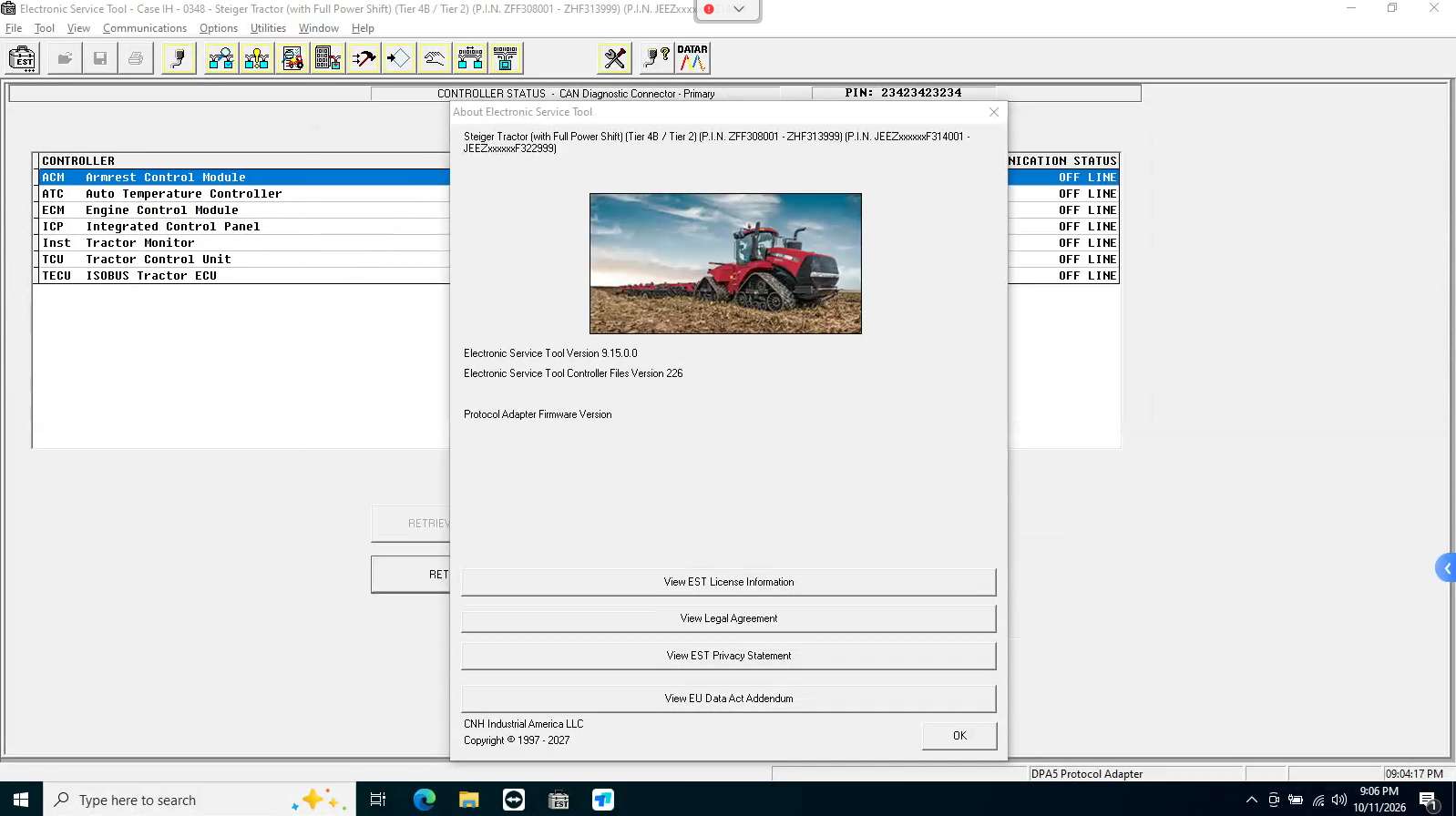
The current OBD2TOOL listing identifies CNH EST 9.15 as an engineering-level release updated in February 2026.
| CNH EST version | 9.15 |
| Update | 2026.09 |
| Software size | Approx. 100 GB |
| OS | Windows 10/11 64-bit |
| Architecture | 64-bit required |
| RAM | 8 GB or greater listed |
| CPU | Intel Core i5, later than 6th generation listed |
| Languages | English, Italian, Russian, Polish, Spanish, French, Portuguese, German, Dutch, Danish |
OBD2TOOL also currently lists eTimGo 8.22, updated 2026.04, as an optional offline repair-information database.
Storage deserves special attention.
Do not size the laptop drive only for EST itself.
OBD2TOOL currently recommends at least:
- 150 GB free on C: for the EST 9.15 installation option
- 300 GB free on C: when installing EST plus the listed eTimGo package
CNH’s current official self-repair computer requirements are more conservative and specify 500 GB or more storage, with SSD storage recommended.
For a workshop laptop, extra SSD space is preferable to operating close to the minimum.
What Is eTimGo and Do You Need It?
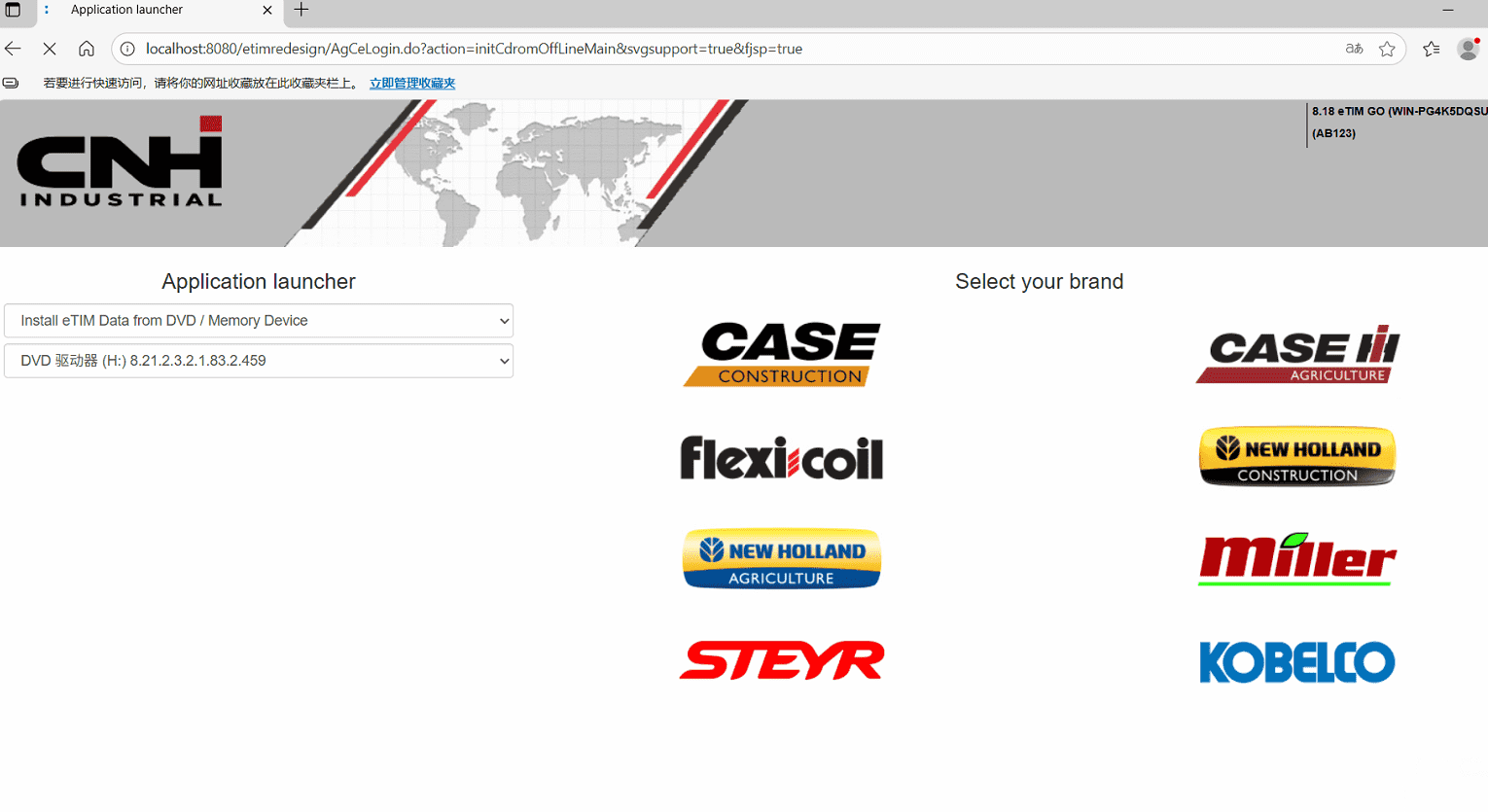
CNH EST is primarily the diagnostic environment.
eTimGo adds offline technical information that may include, depending on model and available database content:
- Fault-code resolutions
- Wiring schematics
- Service manuals
- Installation instructions
- Operator information
- Knowledge articles
- Service bulletins
The current OBD2TOOL package lists eTimGo 8.22 [2026.04] with English, French, German, Spanish, and Portuguese support. The seller also cautions that documentation may be incomplete for some model series, so check coverage when a specific machine is critical.
That qualification is important.
Do not assume that buying a large offline database guarantees a complete manual for every historical model.
What Hardware Is Required?
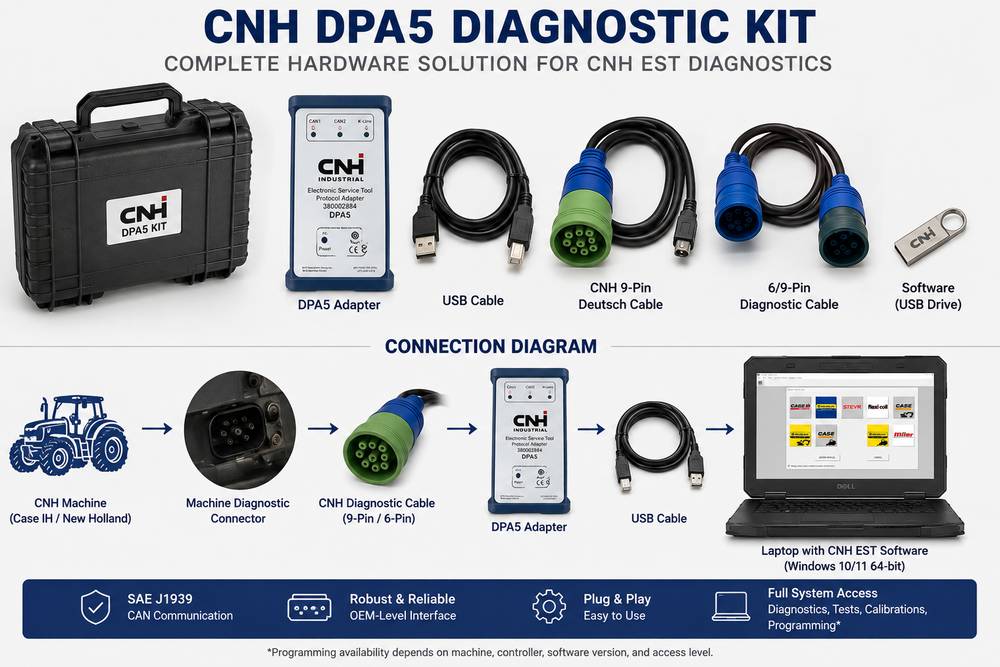
A typical CNH EST diagnostic path is:
Laptop → Communication Adapter → Diagnostic Cable → Machine Network → ECU
CNH’s official EST documentation confirms that a protocol adapter connects the PC to the machine CAN network.
The OBD2TOOL complete package currently includes a Dearborn Protocol Adapter 5 (DPA5) plus cables. The listed package contains:
- DPA5 interface
- USB cable
- CNH 9-pin Deutsch cable
- 6/9-pin cable
- Toolbox
Do all CNH machines use a 9-pin connector?
No assumption should be made here.
Machine connector type and network architecture vary with product family, age, and engine/controller configuration.
Check the correct service information before connecting adapters or converting diagnostic connectors.
How to Diagnose a Case IH or New Holland Machine with CNH EST
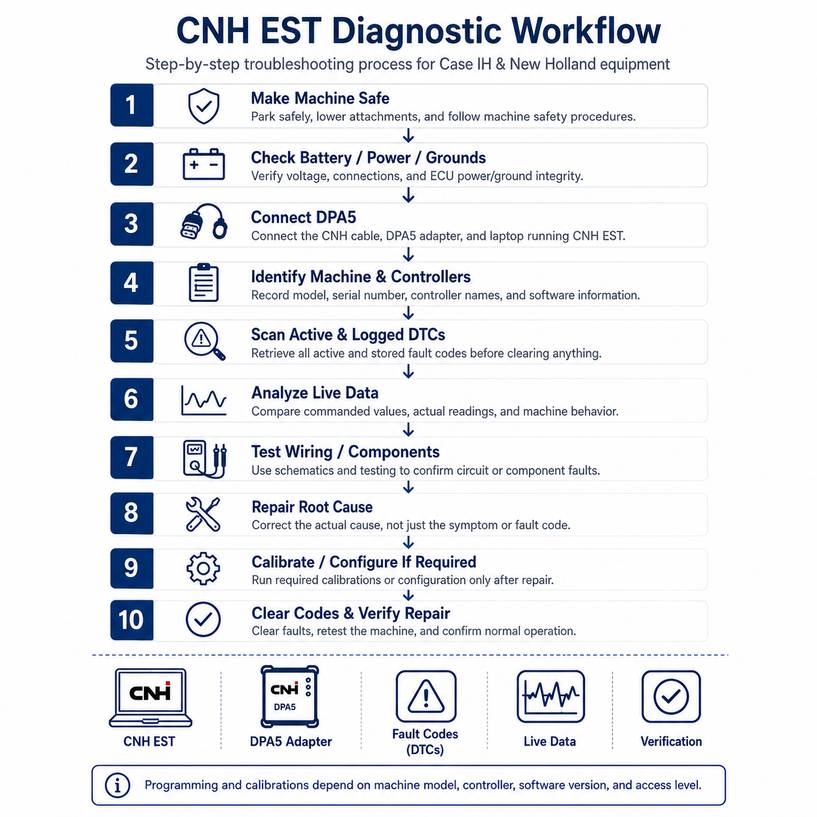
The software becomes useful only when the technician follows a disciplined diagnostic process.
Step 1: Make the machine safe
Before connecting or testing:
- Park on stable ground.
- Apply the parking brake.
- Place the transmission in the required safe position.
- Lower implements or attachments where practical.
- Keep personnel clear of hydraulic equipment and rotating components.
- Follow the manufacturer’s procedure if the test requires the engine running.
Hydraulic safety
Never assume that shutting off the engine removes stored hydraulic energy.
Accumulators, suspended implements and pressurized circuits can remain hazardous.
Step 2: Check battery and electrical condition
Before blaming the diagnostic interface, verify machine power.
Low battery voltage or poor grounds can produce:
- ECU communication faults
- Multiple unrelated DTCs
- Controller resets
- Failed programming
- Intermittent CAN communication
Inspect battery connections and the relevant power/ground circuits before continuing when several controllers disappear simultaneously.
For programming operations, use the power-support procedure specified for the machine.
Step 3: Connect the correct diagnostic interface
With the machine in the required key state:
Machine diagnostic connector → CNH cable → DPA5/protocol adapter → Laptop
Confirm that Windows recognizes the communication adapter before troubleshooting EST itself.
If the PC doesn’t recognize the interface, repeatedly cycling the tractor ignition has little value.
Step 4: Identify the machine and controllers
Select or identify the correct product.
Then record:
- Machine model
- PIN/serial number
- Controller names
- Controller part numbers where displayed
- Software versions
- Current configuration information
This information becomes particularly important if an ECU must later be replaced or programmed.
Step 5: Perform a complete fault scan
Retrieve active and logged diagnostic codes before clearing anything.
A useful first-pass strategy is to separate codes into three categories:
| One ECU, one circuit | Test the affected circuit/component |
| Multiple modules report communication faults | Investigate CAN network/power |
| Multiple unrelated modules show low-voltage faults | Check battery, supply and grounds first |
This prevents a common mistake: replacing multiple components when the real fault is a shared power or communication problem.
Step 6: Use live data to test the fault hypothesis
Don’t replace a sensor just because its name appears in a fault description.
Compare:
Commanded value → Actual value → Physical condition
Examples include:
- Commanded versus actual pressure
- Switch input versus physical switch position.
- Sensor value versus independent measurement
- Requested actuator position versus feedback
- Engine speed versus actual machine state
The objective is to prove whether the problem is the sensor, wiring, actuator, mechanical system, or ECU interpretation.
Step 7: Check wiring and service procedures
Use available EST/eTimGo electrical, hydraulic and repair information to locate:
- Connector positions
- Harness routing
- Power supplies
- Grounds
- Signal circuits
- Related controllers
- Required test procedures
Whenever possible, perform circuit tests before replacing an ECU.
Step 8: Repair the actual fault
Typical corrective actions may involve:
- Wiring repair
- Connector repair
- Sensor replacement
- Actuator repair
- Mechanical adjustment
- Hydraulic repair
- Network repair
- Controller replacement
The required repair depends entirely on the diagnosis.
Step 9: Perform the required calibration or configuration
If the service procedure requires post-repair calibration, configuration, or programming, perform it only after correcting the underlying fault.
ECU programming safety
Programming presents a much greater risk than reading codes.
Before starting:
- Maintain stable machine electrical power.
- Do not disconnect the VCI.
- Do not allow the laptop to sleep or shut down.
- Do not cycle ignition unless EST specifically instructs you to.
- Record the original controller configuration when possible.
- Confirm the correct controller and programming dataset before writing.
Interrupting an ECU programming operation can leave a controller unable to boot normally.
CNH EST Communication Troubleshooting
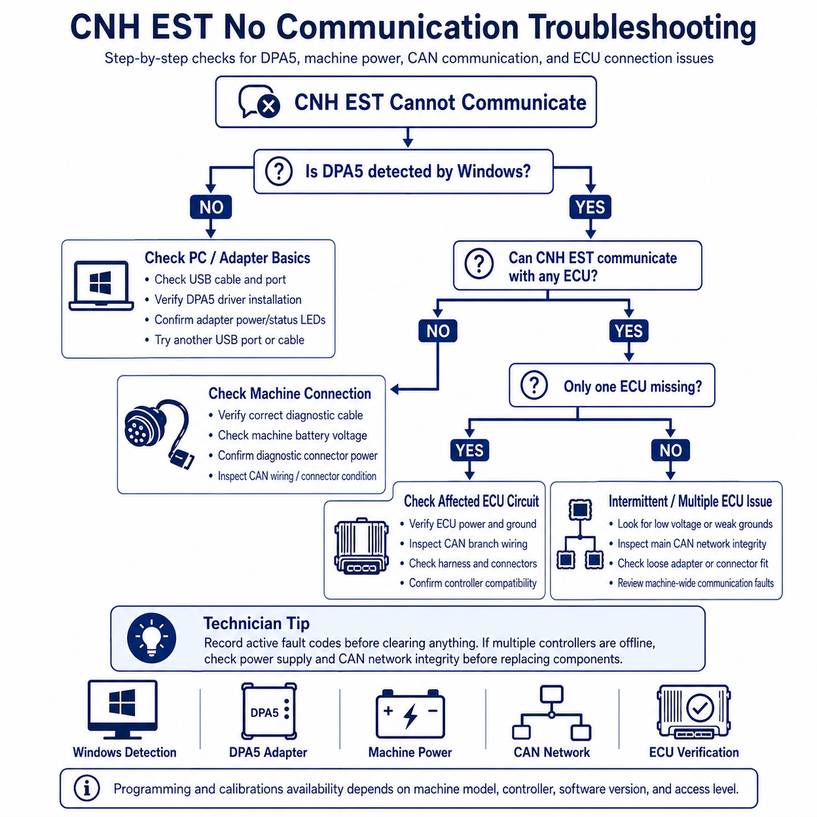
EST Does Not Connect to the Machine
| Adapter not detected by laptop | Driver, USB port, adapter power | Confirm Windows recognizes the VCI |
| Adapter detected but no ECU communication | Wrong cable, connector power, machine network | Verify diagnostic connector and machine power |
| Some ECUs communicate, others do not | Network branch, ECU power/ground | Test affected ECU circuit/network |
| Communication drops intermittently | Weak battery, connector, USB/cable issue | Stabilize power and inspect connections |
| Machine not present in software | Coverage/version issue | Verify model/PIN and EST database |
| Engine diagnostic utility will not start | Separate engine diagnostic package may be required | Verify engine manufacturer/system |
That final situation is especially important on compact or specialty equipment. CNH offers separate engine tools for some Perkins, ISM, LS Mtron, and Yanmar applications.
CNH EST Opens, but a Programming Function Is Missing
Don’t assume the software installation is defective.
Check:
- Correct machine identification
- Correct controller selection
- EST software version
- Access/license level
- Controller software
- Required companion diagnostic utility
- Whether that function actually exists for the machine
The competing article’s implication that CNH EST provides every function on every CNH machine is too broad. Even within CNH’s official ecosystem, some engine families require separate diagnostic software or hardware.
CNH EST vs a Multi-Brand Heavy Equipment Scanner
Neither solution is automatically better.
| Primarily Case/New Holland fleet | Strong fit | Useful |
| Multiple equipment manufacturers | Limited ecosystem | Stronger fit |
| OEM-specific documentation | Strong advantage | Varies |
| Basic code reading | Yes | Usually |
| Live data | Yes | Usually |
| Machine-specific calibration | Depends on machine/access | Depends on scanner |
| ECU programming/configuration | Depends on version/access/controller | Highly tool-dependent |
| One tool for mixed fleet | No | Major advantage |
A repair shop servicing CAT, John Deere, Komatsu, Volvo, JCB and CNH equipment may get more daily coverage from a high-end multi-brand platform.
A shop specializing in Case IH or New Holland may benefit more from CNH-specific diagnostic software, especially when fault descriptions, configuration information, and OEM service procedures matter.
Which CNH EST Package Should You Choose?
Option 1: You Need the Diagnostic Interface and Software
If your workshop doesn’t already have a compatible interface, the CNH DPA5 diagnostic kit is the more complete route.
The current OBD2TOOL package includes the DPA5 interface and CNH cables, plus multiple software options, including CNH EST 9.15 and an optional eTimGo offline repair-information package.
This option makes more sense when you need to build the complete diagnostic chain:
Machine → Diagnostic cable → DPA5 → Laptop → CNH EST
Before ordering, provide the machine model, year/PIN where available, and engine family if compatibility is critical.
Option 2: You Already Have Compatible Hardware
If you already have a suitable communication adapter and laptop, buying software separately may be more economical.
The current OBD2TOOL software listing offers CNH EST 9.13 and CNH EST 9.15 [2026.09] engineering-level software, with remote installation/activation listed for one PC.
Before choosing software only, confirm that your existing VCI is supported and that the required machine cable is available.
Common CNH EST Mistakes to Avoid
Clearing codes before recording them
Always save active and logged codes first. Historical information may disappear after clearing.
Assuming every CNH machine has identical coverage
Model, engine family, and controller architecture matter.
Replacing a sensor based only on its fault code
Test power, ground, signal, and mechanical conditions first.
Programming with unstable battery power
Voltage interruption can corrupt the programming process.
Assuming software version alone determines functionality
Programming and calibration availability may also depend on ECU type, dataset, access level, and machine configuration.
Buying software without checking the interface
EST still requires compatible communication hardware between the laptop and machine.
Treating eTimGo as guaranteed complete documentation
OBD2TOOL itself notes that documentation may be incomplete for some series. Verify important models before relying on it as the sole service-information source.
Is CNH EST Worth It for a Repair Shop?
For a shop that regularly services Case IH, New Holland Agriculture, or CNH construction equipment, CNH EST can be far more useful than a generic code reader because it combines machine communication with OEM-oriented diagnostic information.
Its real value isn’t simply clearing warning lights. It is the ability to move from:
Fault code → Controller data → Circuit information → Test → Repair → Calibration/verification
That diagnostic workflow reduces unnecessary parts replacement.
For a mixed-brand operation, treat EST as a CNH specialist tool rather than a replacement for every heavy-equipment diagnostic platform.
FAQ
Can CNH EST diagnose both Case IH and New Holland equipment?
Yes, CNH EST is used with Case and New Holland equipment, but you should check model and controller coverage before purchase. CNH’s EST licensing is brand- and product-dependent, while third-party engineering packages may list additional brands or legacy applications.
Can CNH EST read and clear fault codes?
Yes. Fault-code retrieval and clearing are explicitly documented functions of the official EST platform.
Can CNH EST perform ECU programming?
The OBD2TOOL CNH EST 9.15 engineering package lists ECU and parameter programming capabilities, but programming availability depends on the ECU, machine, software version, and access level. Don’t assume this applies to every model.
Does CNH EST work on Windows 11?
The current OBD2TOOL CNH EST 9.15 listing specifies Windows 10/11 64-bit. CNH’s current self-repair system requirements also list Windows 10 or 11 64-bit.
Do I need a DPA5 adapter?
You need a compatible protocol adapter between the computer and machine. The OBD2TOOL complete package uses a Dearborn DPA5 interface with CNH diagnostic cables. Verify other configurations before purchase.
Does eTimGo require CNH EST?
Not necessarily. EST provides the diagnostic environment. eTimGo is useful when you also want additional offline repair information such as wiring diagrams, manuals, service bulletins, and diagnostic procedures. Availability varies by model.