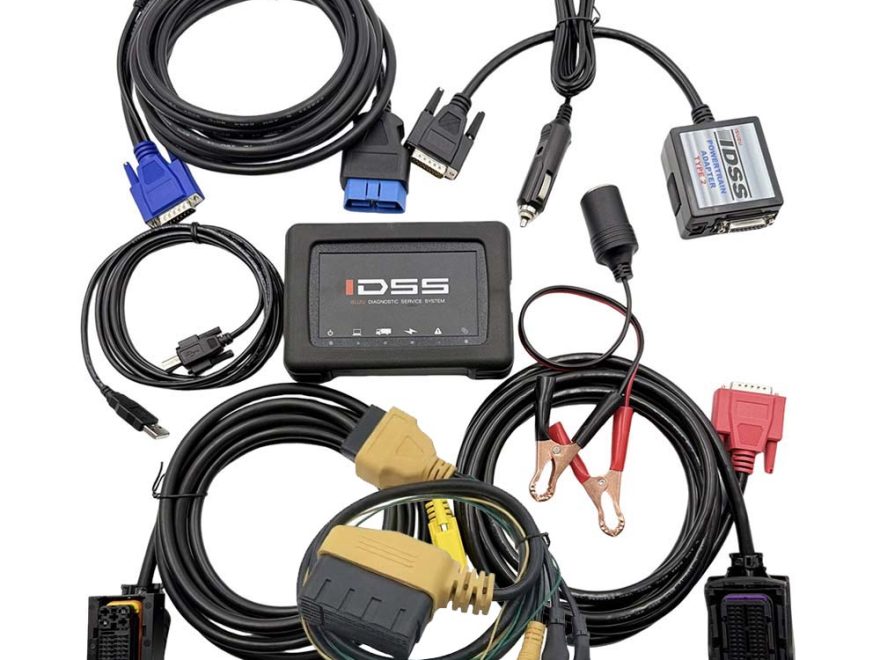
If you service Isuzu commercial trucks in a workshop or fleet, an Isuzu-focused IDSS diagnostic setup is worth a close look, especially when you need manufacturer-specific functions.
The right choice depends on the truck’s sales region, model year, engine, control modules, and the repair you need to do. A basic code reader can point you to an engine warning, but DPF regeneration, actuator tests, and service relearns need a closer look at coverage.
This guide covers what to look for in an Isuzu truck diagnostic tool and how to choose between an interface kit, a configured laptop package, and software for equipment you already own.
What this guide covers
- Which diagnostic functions matter for Isuzu trucks
- How to check 4HK1, 6HK1, NPR, NRR, and FRR compatibility
- The difference between US-IDSS, G-IDSS, and E-IDSS
- Whether the tool can run DPF regeneration and bidirectional tests
- Whether to buy an interface kit, laptop package, or software only
- What to confirm before ordering
1. What Makes a Good Isuzu Truck Diagnostic Tool?
A good tool matches the vehicles and repairs your workshop actually handles. Start with function coverage, then compare hardware and package options.
| Feature | Why it matters | What to verify |
|---|---|---|
| Vehicle and engine coverage | Shows whether the application matches the truck | Model, year, market, engine, and ECU |
| Manufacturer-specific fault codes | Gives you more than basic emissions diagnostics | Supported modules and code information |
| Live data | Lets you compare operating conditions during diagnosis | Required parameters and recording options |
| Bidirectional tests | Lets technicians command supported components | The exact active tests available |
| Aftertreatment functions | Supports DPF/SCR diagnosis and service where applicable | Regeneration, resets, and prerequisites |
| Module access | Extends diagnosis beyond the engine | ABS, transmission, and body-system coverage |
| Installation support | Helps you get a working software and interface combination | Computer requirements, drivers, and setup help |
The best package is the one that supports your actual jobs. Confirmation of a specific service function tells you more than a long list of general capabilities.
2. Will It Work With My 4HK1 or 6HK1 Isuzu Truck?
Engine family alone doesn’t guarantee compatibility.
Trucks with a 4HK1 or 6HK1 engine can differ in sales region, emissions equipment, ECU configuration, and diagnostic requirements.
For an NPR, NRR, FRR, or other Isuzu commercial model, have these details ready:
- Vehicle model and model year
- VIN or chassis identification
- Original sales market
- Engine model
- Target control module
- Diagnostic or service operation you need
- Diagnostic connector details
“I need to diagnose a 4HK1 engine” is only a starting point. A more useful request gives the truck’s year, market, and ECU, and says whether the job is reading fault codes, requesting a regeneration, or doing an injector-related procedure.
Check Each Module Separately
Being able to talk to the engine doesn’t prove you can reach the ABS, transmission, or body modules.
Coverage depends on the installed systems, the interface, and sometimes extra connections. Isuzu’s official cable information notes that some vehicles need additional connections for ABS communication, because those circuits aren’t available through the main diagnostic connector.
Confirm which cables you need for the system you plan to diagnose.
3. IDSS, US-IDSS, G-IDSS, and E-IDSS: Which Do You Need?
IDSS stands for Isuzu Diagnostic Service System. Pick the software application based on the vehicle’s market and the type of equipment.
The OBD2Tool listings distinguish the options like this:
| Software option | Intended application in the listings | Main selection check |
|---|---|---|
| US-IDSS | North American-specification Isuzu commercial vehicles | U.S./Canadian specification and supported systems |
| G-IDSS | Commercial-vehicle applications outside North America | Export market, vehicle, and software coverage |
| E-IDSS | Supported Isuzu industrial-engine and equipment applications | Equipment, engine, and controller identification |
These categories help narrow things down, but they don’t guarantee coverage of every vehicle or engine within a category.
Commercial Trucks vs Industrial Engines
An Isuzu-powered excavator or generator is a different diagnostic application from an Isuzu road truck.
Don’t choose software just because both use an Isuzu diesel engine. Confirm whether you need an application for a commercial vehicle or for industrial equipment.
The same caution applies to market. A truck running in North America may be an import, so its original sales market matters.
Can G-IDSS and E-IDSS Be Installed Together?
Not on the same laptop, according to the OBD2Tool kit listing, which warns against installing its supplied G-IDSS and E-IDSS packages together. If you need both truck and industrial-engine diagnostics, confirm the installation arrangement before you order.
If you already have suitable hardware, take a look at the Isuzu G-IDSS, E-IDSS, and US-IDSS software options.
4. Can an Isuzu Diagnostic Tool Perform DPF Regeneration?
For aftertreatment work, confirm support for your exact truck and the specific procedure.
Capabilities worth checking include:
- Reading aftertreatment-related fault codes
- Monitoring available exhaust-temperature and differential-pressure data
- Viewing DPF and SCR operating information
- Requesting a supported service regeneration
- Performing a specified reset after the relevant repair
DPF regeneration and DPF reset are different operations. Neither is a universal fix for a warning light.
A regeneration request may be unavailable when faults or operating conditions block it. Diagnose the underlying problem and follow the vehicle’s service procedure.
Regeneration also produces high exhaust temperatures, so use the specified work area and take the proper precautions.
Questions to Ask Before Buying
Rather than just asking whether a tool “does DPF,” ask:
Does this configuration support the required regeneration or reset procedure on my truck’s model year, engine, and emissions specification?
That gives you a much more useful answer.
5. Why Do Live Data and Bidirectional Controls Matter?
Fault codes tell you what was detected. Live data and active tests help you work out why.
When you’re chasing a sensor or actuator problem, you can compare:
- What the controller is requesting
- What the reported data shows
- What the component or circuit is actually doing
Ask whether the specific test you need is supported. A general claim of “bidirectional control” doesn’t confirm every actuator test, calibration, or relearn on every vehicle.
For ABS, transmission, and body diagnosis, check both the software coverage and the physical communication path.
6. Interface Kit, Laptop Package, or Software Only?
Choose based on what you already own.
Interface Kit: For an Existing Compatible Computer
An interface kit makes sense if you already have a suitable laptop.
Confirm:
- The supplied interface and drivers
- USB and vehicle cables
- The software application you’ve selected
- Computer requirements
- Installation and activation arrangements
Some configurations are self-install, while others offer remote setup.
Laptop Package: For a Workshop Starting From Scratch
A configured laptop package can cut down on setup work.
Confirm the laptop model, software application, driver installation, activation process, and included accessories.
Preinstalled software doesn’t automatically include every update, programming service, or online function.
Software Only: For Existing Hardware
Software alone is worth considering when you already own a confirmed compatible interface and computer.
Send the interface model and PC details before you buy. Don’t assume a software-only order includes communication hardware or vehicle cables.
7. Isuzu Diagnostic Tool Options at OBD2Tool
These products offer configurations to compare. Choose the package option carefully, because a laptop offered as an upgrade isn’t necessarily included in the base kit.
| Product | Configuration to compare | What to confirm |
|---|---|---|
| Isuzu IDSS Interface Kit — A514 | Interface/software options and Lenovo T450 laptop selections | Software region, installation option, and accessories |
| Isuzu Truck Diagnostic Kit — A464 | Kit configurations including Panasonic CF53 laptop options | Whether your selected order includes a laptop and the required cables |
| Isuzu IDSS Diagnostic Tool — A427 | Interface/software configurations and Lenovo T450 selections | Supplied hardware, application, and intended vehicle coverage |
| Isuzu Diagnostic Software — RD504 | G-IDSS, E-IDSS, or US-IDSS software selection | Existing interface compatibility and installation arrangement |
Laptop choices and installation options vary by product configuration, so check your selected option before checkout.
How Should You Choose Between the Kits?
The listings overlap quite a bit. If you’re not sure which package to pick, ask for a hardware and accessory comparison.
A useful recommendation should tell you:
- Which interface is supplied
- Which vehicle cables are included
- The software application and version
- Whether a computer is included
- Installation and activation arrangements
- Whether it supports your truck and the task you need
Don’t choose on price alone, or just because a version number is the newest.
8. Do Isuzu Diagnostic Tools Require Subscriptions or Activation?
Routine use of a supplied installation is one thing. Official subscriptions, software updates, programming access, and technical support are another.
Isuzu’s official North American IDSS offering includes subscription-based services. So “no subscription fees” shouldn’t be taken as a universal claim about all IDSS equipment.
For an OBD2Tool package, confirm the following:
| Item | Question to ask |
|---|---|
| Initial setup | Is installation included? |
| Activation | Is activation required before first use? |
| Routine diagnostics | Which supplied functions can I use after setup? |
| Updates | Are updates included, optional, or charged separately? |
| Reinstallation | What happens if the computer or drive is replaced? |
| Programming | Are additional accounts, access, or services required? |
| Support | What help is included, and for how long? |
A configured laptop can simplify installation, but you should still understand these terms.
9. What About Mixed Fleets?
If your fleet includes several truck brands, compare coverage on two levels:
- General fleet-wide code reading and data access
- Manufacturer-specific Isuzu service functions
An Isuzu-focused package won’t automatically diagnose other manufacturers’ vehicles. Likewise, check a multi-brand tool’s Isuzu coverage against the exact service task you need.
List your vehicles and the repairs you do most often. Then decide whether one platform covers it or whether you need an additional Isuzu application.
Frequently Asked Questions
What Is the Best Diagnostic Tool for an Isuzu NPR?
For manufacturer-specific work, look at an IDSS setup matched to the truck’s specification, year, engine, and the functions you need. Confirm the module and service procedure before buying.
Can It Diagnose Both 4HK1 and 6HK1 Engines?
Check each application. Engine-family names alone don’t establish compatibility across every vehicle, market, emissions configuration, or controller.
Can It Read ABS and Transmission Codes?
Verify coverage for the installed systems. Some applications also need extra cables or connections.
Does Every Kit Include a Laptop?
No. The linked pages offer different configurations, so select a laptop option explicitly if you need a computer.
Is E-IDSS the Right Choice for an Isuzu Road Truck?
The listings describe E-IDSS for industrial-engine and equipment applications. For a commercial road truck, look at the US-IDSS or G-IDSS option instead.
Will Clearing Codes Fix a DPF Problem?
No. Clearing codes won’t repair a failed sensor, blocked component, wiring fault, or unsuitable operating condition. Diagnose the cause and perform the service procedures the repair requires.
Can the Tool Program Every Isuzu Module?
Not necessarily. Diagnostic access doesn’t guarantee programming capability, so confirm the module, procedure, software, service access, and power requirements separately.
Choose the Setup Around Your Truck and Repair Tasks
The best Isuzu diagnostic tool is the one that fits your vehicles, software region, control modules, and service needs.
Before ordering, send OBD2Tool the following:
Truck model and year:
VIN or chassis identification:
Engine model:
Original sales market:
System and function required:
Existing interface and computer:
Preferred package: interface kit, laptop package, or software only:
Use the comparison above to pick a starting configuration, then confirm the software, cables, installation, and functions you need for your work.