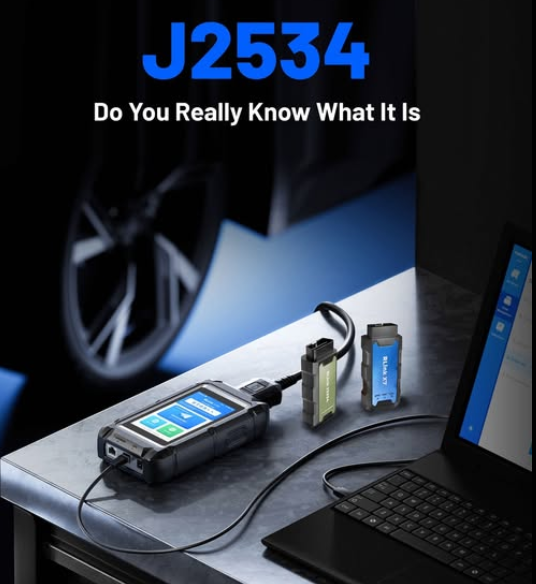
SAE J2534 Pass-Thru programming is a standardized way for OEM software on a PC to communicate with a vehicle through a compatible vehicle communication interface, or VCI, during ECU reprogramming.
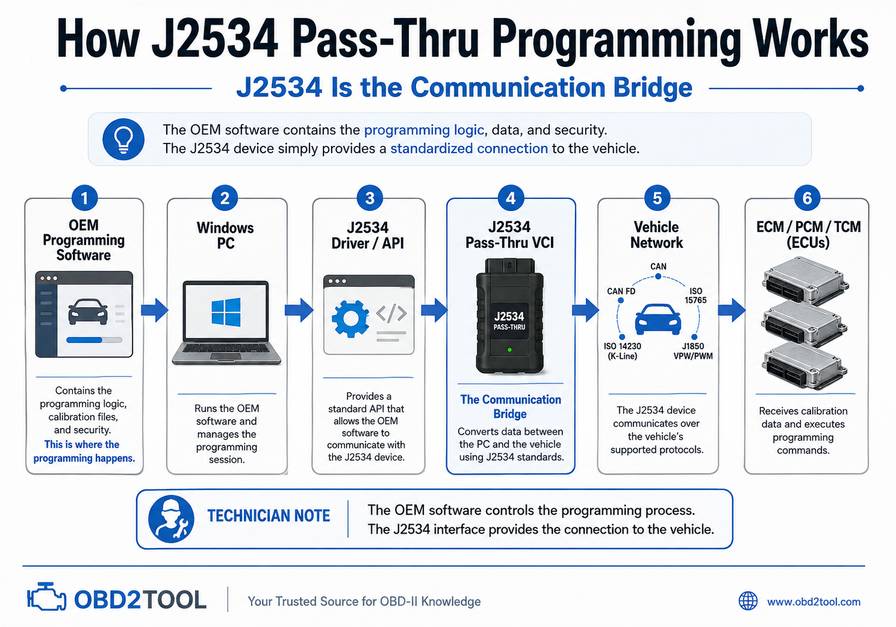
The important distinction is that the J2534 interface is the communication bridge—not the programming software itself. The vehicle manufacturer’s application controls the programming sequence, calibration file, security authorization, and supported modules.
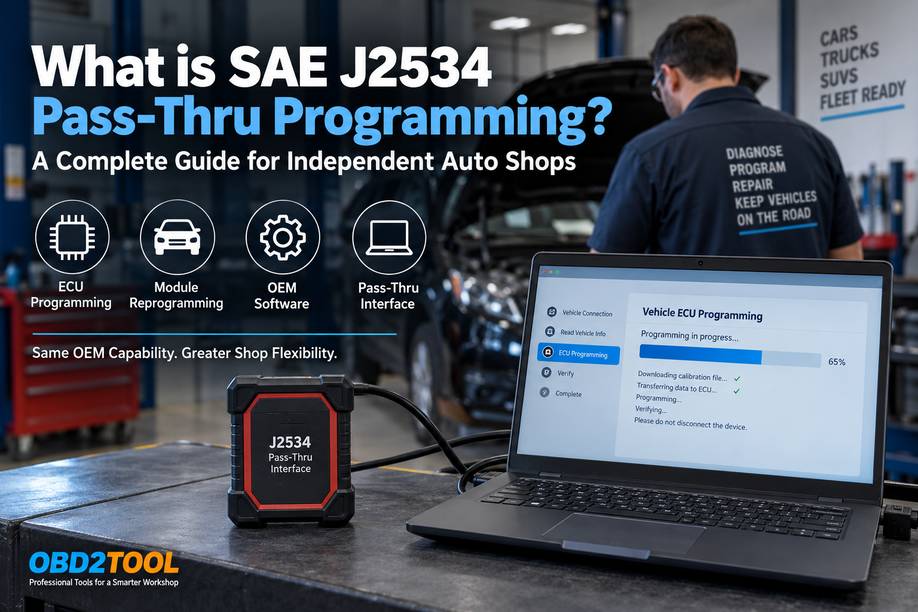
For an independent repair shop, a typical setup is:
OEM Software → Windows PC → J2534 Pass-Thru VCI → Vehicle Network → ECU
A J2534-capable interface can reduce the need for separate dealer-specific hardware. Still, it does not guarantee compatibility with every vehicle, module, OEM application, CAN FD network, DoIP vehicle, security procedure, or module-replacement operation. Compatibility must be verified before programming.
What Is SAE J2534?
SAE J2534 is a family of standards created by SAE International to define a standardized interface between vehicle-manufacturer software running on a computer and a vehicle communication interface.
SAE describes J2534-1 as an interface intended to allow vehicle manufacturers’ reprogramming applications to communicate through compatible aftermarket interfaces. Its original regulatory focus is reprogramming emissions-related control modules on 2004-and-later vehicles.
U.S. emissions regulations require manufacturers to make emissions-related reprogramming information available and specify SAE J2534 for applicable 2004-and-later OBD vehicles equipped with reprogramming capability.
This is why independent workshops can perform many OEM software updates without owning the exact VCI used at a franchised dealership.
J2534 Is an Interface Standard, Not a Programming Application
This distinction prevents one of the most common purchasing mistakes.
A J2534 VCI generally provides the communication path. The OEM application determines:
- which vehicle is supported
- which control module can be programmed
- whether a calibration update exists
- which calibration file is correct
- whether module initialization or configuration is required
- whether online authentication is needed
- whether security authorization is required
- what voltage and vehicle-preparation requirements must be followed
Buying a J2534 interface therefore does not automatically give a workshop access to Ford, GM, Toyota, Honda, BMW, Mercedes-Benz, JLR, or other OEM programming functions.
You still need to obtain the necessary OEM software, subscription, account permissions, and vehicle compatibility separately.
Why Was J2534 Developed?
Historically, ECU reprogramming frequently required proprietary manufacturer hardware.
That created a practical problem for independent shops: servicing several vehicle brands could require purchasing several different dealer interfaces.
J2534 created a common API between the OEM application and compatible aftermarket hardware. The manufacturer still controls the programming procedure, but an independent technician may be able to use an approved or compatible third-party VCI instead of dedicated dealer hardware.
SAE specifically describes reducing aftermarket tool costs while allowing each manufacturer to retain control over its ECU programming sequence as one purpose of the standard.
J2534-1 vs J2534-2: What Is the Difference?
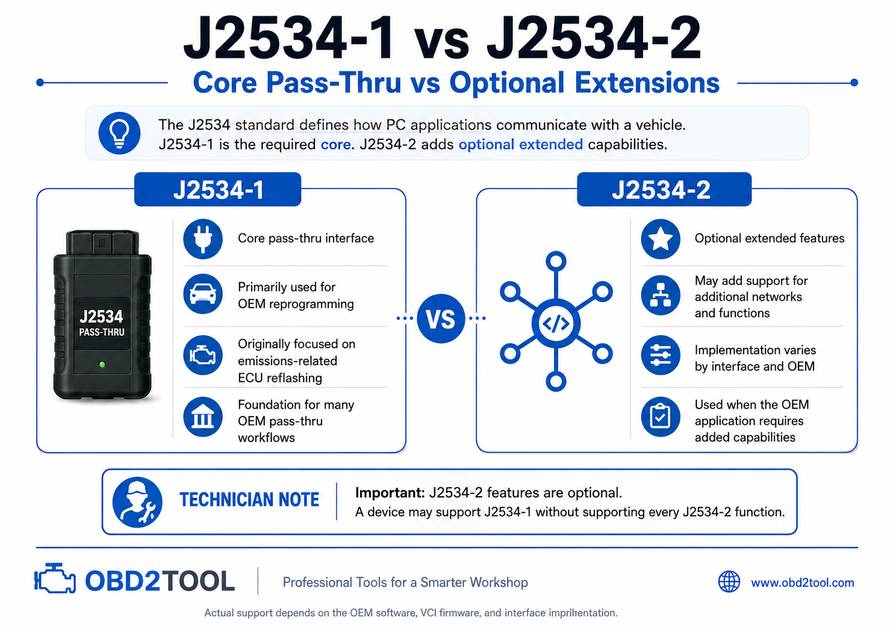
The distinction matters when comparing interfaces.
| Standard | Main Purpose | Important Limitation |
|---|---|---|
| SAE J2534-1 | Standardized interface primarily for reprogramming emissions-related control modules | Does not mean every ECU or OEM function is supported |
| SAE J2534-2 | Adds optional extensions for functions and networks beyond the core J2534-1 requirements | Support is optional and implementation varies by interface and OEM |
SAE describes J2534-2 as optional extensions intended to cover capabilities such as older vehicles and non-emissions-related modules beyond the original J2534-1 scope.
Newer SAE documents also define J2534-2 extensions for additional networking functions. For example, SAE J2534-2/5 defines a J1939 extension within the J2534 API framework.
What About J2534 API 04.04 and 05.00?
You may also see interfaces advertised as supporting J2534 API 04.04, 05.00, or both.
SAE published the J2534-1 API version 05.00 specification in 2022.
However, a higher API version alone does not determine real-world OEM compatibility.
Some current OEM applications and validated devices still use specific 04.04 implementations, while others support 05.00. Toyota, for example, publishes specific combinations of device firmware and J2534 API versions it has tested rather than simply stating that any compliant interface will work.
Technician rule: Check the OEM’s approved or validated VCI list whenever one is available.
What Can You Do With J2534 Pass-Thru Programming?
Depending on the OEM, vehicle, ECU, subscription, VCI, and repair procedure, J2534 may be used for tasks such as:
- PCM or ECM calibration updates
- TCM software updates
- ECU reflashing after a service bulletin
- programming certain replacement modules
- installing revised factory software
- manufacturer-supported control-module updates
- Some configuration or initialization procedures when specifically supported by the OEM application
The manufacturer determines the exact capability—not simply the J2534 label on the interface.
Honda, for example, states that its current ECU Reprogramming application supports compatible J2534 VCIs and that some late-model non-powertrain controllers can also be reprogrammed when instructed by applicable service information.
What J2534 Does Not Automatically Do
This section is especially important when evaluating a tool.
J2534 Does Not Automatically Provide Diagnostics
A basic J2534 pass-thru interface is not necessarily a full diagnostic scanner.
Toyota explicitly notes that its approved J2534 reprogramming devices provide reprogramming capability but do not automatically provide full scan-tool diagnostic functionality.
Some professional diagnostic platforms contain both:
- normal scan-tool functions, and
- a J2534-compatible VCI
But those are separate capabilities inside the same hardware ecosystem.
J2534 Does Not Automatically Program Every ECU
A vehicle may have dozens of controllers, but the OEM may allow pass-through programming for only certain modules.
Always confirm the individual:
Make → Model → Model Year → ECU → OEM Application → VCI
before accepting the job.
Reprogramming Is Not the Same as Module Initialization
These terms are often incorrectly used interchangeably.
Reprogramming/reflashing generally means writing a software or calibration package to a controller.
Initialization, configuration, setup, adaptation, relearn, or parameter transfer may be separate procedures required after module replacement.
Honda, for example, distinguishes control-module reprogramming from replacement-module initialization.
A successful flash therefore does not necessarily mean a replacement module is ready for service.
J2534 Does Not Automatically Provide Security Access
Modern vehicles may require additional authorization for immobilizer, security, gateway, or protected diagnostic functions.
Requirements can include:
- OEM user authentication
- Security Gateway access
- manufacturer-specific credentials
- NASTF Vehicle Security Professional authorization for certain U.S. security operations
- Additional OEM subscriptions
J2534 provides communication. It does not bypass OEM cybersecurity systems.
J2534 Does Not Automatically Mean CAN FD or DoIP Support
Modern multi-protocol interfaces may combine:
- SAE J2534
- CAN FD
- DoIP
- D-PDU
- RP1210
in one VCI.
That does not make these terms interchangeable.
A device advertised as “J2534 compliant” should not automatically be assumed to support every CAN FD or DoIP programming workflow.
For late-model vehicles, check the actual hardware specifications and the OEM application’s approved interface requirements.
What Equipment Do You Need for J2534 ECU Programming?
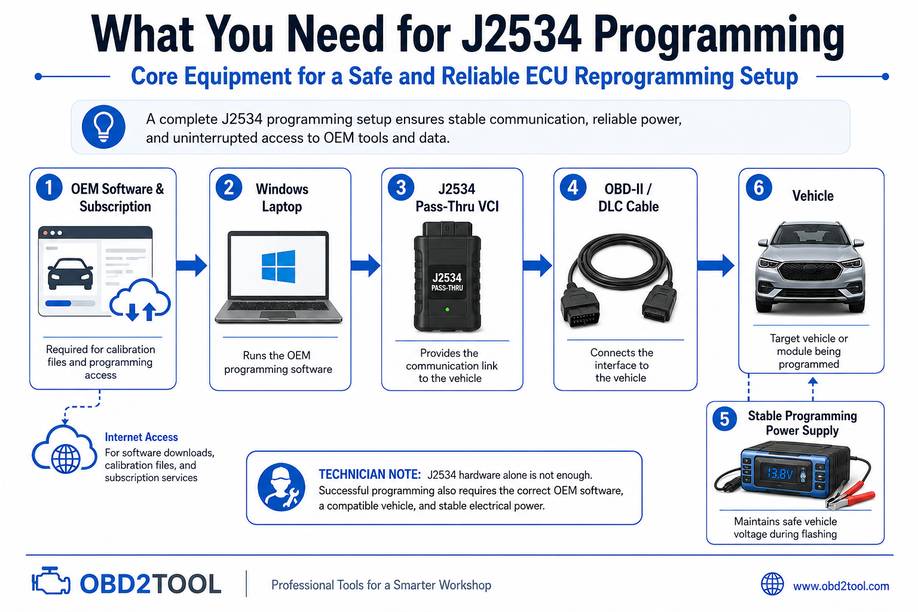
A professional setup normally requires more than just the interface.
1. Compatible J2534 Pass-Thru VCI
The VCI connects the PC to the vehicle.
Before purchasing, verify:
- J2534-1 support
- required J2534-2 functions, if applicable
- OEM compatibility
- supported API version
- current firmware
- Windows driver availability
- CAN FD capability if required
- DoIP capability if required
- USB/Ethernet connection requirements
- manufacturer-specific voltage-control requirements where applicable
An OEM-tested interface is preferable when programming reliability is critical.
Toyota warns that changes in interface hardware, firmware, DLLs, or APIs can affect reprogramming performance and recommends devices it has validated.
Honda similarly identifies supported and independently validated VCI combinations for its current i-HDS environment.
2. Compatible Windows PC
Do not assume every OEM application has the same computer requirements.
Check the current manufacturer documentation for:
- Windows version
- processor architecture
- RAM
- free storage
- browser components
- required runtime packages
- administrator permissions
- network requirements
- USB or Ethernet requirements
For example, Honda currently lists specific Windows 11 Pro, processor, RAM, storage, network, and USB requirements for its i-HDS software suite.
This is better evidence than using a generic rule such as “any Windows laptop with 8 GB RAM.”
3. OEM Software and Subscription
The J2534 interface does not contain factory calibration files.
A technician usually needs access to the appropriate manufacturer service or programming environment.
Examples include manufacturer applications from Ford, Honda, Toyota, and other OEMs.
Ford currently describes FJDS and FDRS as supporting compatible J2534 VCIs for applicable vehicle coverage.
Toyota requires the appropriate subscription and calibration access for J2534 reprogramming.
Do not assume subscription prices, duration, available functions, or application names remain unchanged. Check the OEM portal before quoting a programming job.
4. Stable Programming Power Supply
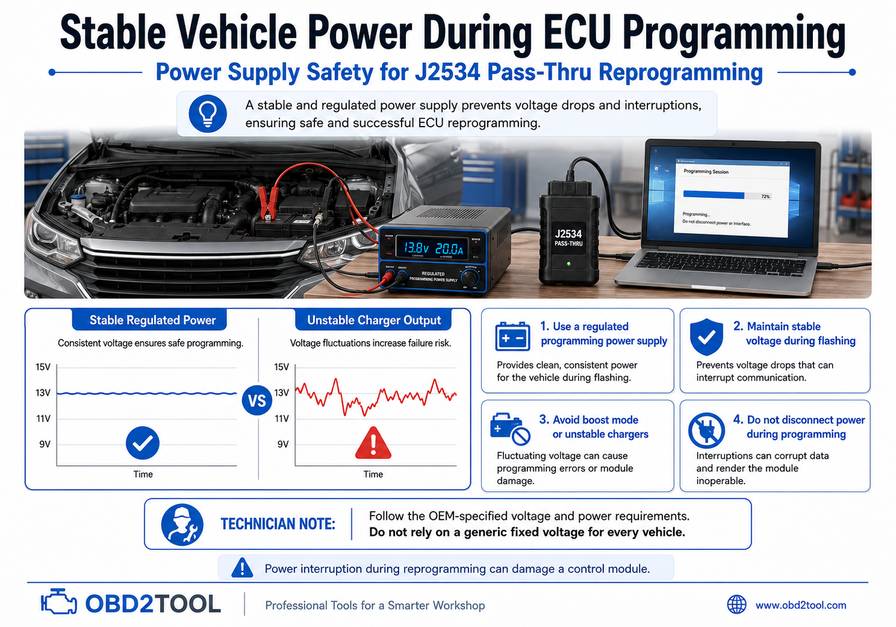
Voltage stability is one of the most important parts of ECU programming.
Do not use a universal internet recommendation such as “always program at exactly 13.5 volts.” Different manufacturers and vehicles may specify different power-supply requirements.
Instead:
Use a regulated programming power supply that can maintain the voltage and current specified by the OEM procedure.
Avoid:
- boost/start modes
- automatic charger modes that create large voltage fluctuations
- undersized maintainers
- programming with a weak battery
- disconnecting the power source during programming
Honda specifically warns that voltage fluctuation, overvoltage, or loss of voltage can interrupt programming and damage a controller.
How to Perform J2534 Programming Safely
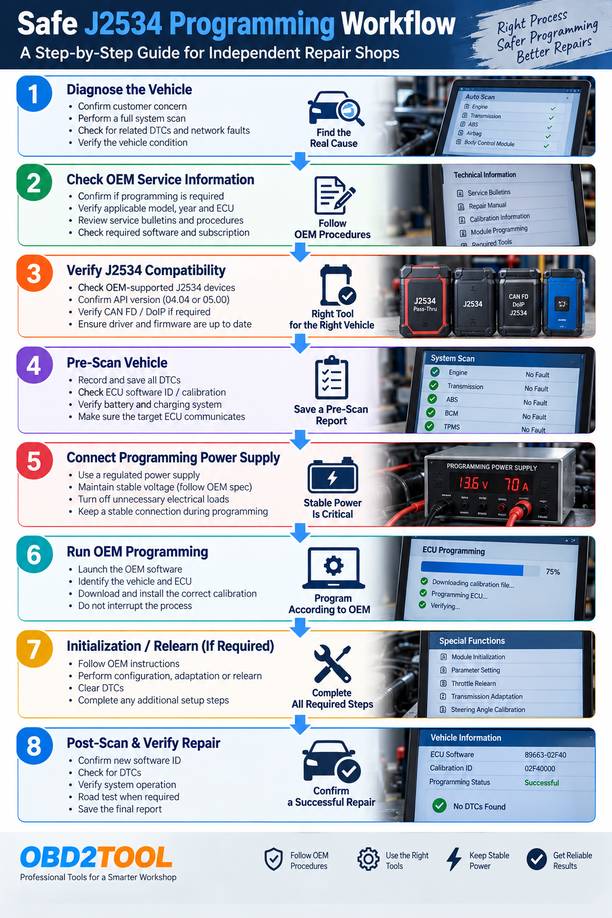
The exact screens and sequence vary by manufacturer, but the diagnostic logic should remain consistent.
Step 1: Verify That Programming Is Actually Required
Don’t start by flashing the ECU just because a newer calibration exists.
First determine why programming is being considered.
Typical evidence includes:
- an OEM service bulletin
- a module-replacement procedure
- an OEM calibration applicability check
- a documented software-related symptom
- manufacturer instructions following controller replacement
Honda specifically advises technicians not to update a control module unless a service procedure or applicable bulletin directs them to do so.
Why This Matters
A software update will not repair:
- damaged wiring
- low supply voltage
- poor grounds
- failed sensors
- network faults
- internal mechanical problems
Programming an ECU before diagnosing the underlying fault can waste time and complicate the repair.
Step 2: Perform a Complete Pre-Programming Scan
Before opening the programming application:
- identify the vehicle correctly
- scan all accessible modules
- record active and stored DTCs
- note communication faults
- record the existing ECU calibration or software ID where available
- verify battery and charging-system condition
- confirm the target controller communicates normally
Why This Matters
If several modules already have low-voltage or communication DTCs, the vehicle may not be ready for a safe programming session.
A pre-scan also provides evidence of the vehicle’s condition before programming.
Step 3: Check the OEM Procedure
Confirm:
- exact vehicle applicability
- target ECU
- required software
- required subscription
- VCI compatibility
- battery-support requirements
- ignition position
- whether doors must remain closed
- whether lighting/HVAC must be disabled
- whether additional initialization is required afterward
- whether security authorization is needed
Never substitute instructions from another model year simply because the ECU looks similar.
Step 4: Prepare the PC
Before beginning:
- connect the laptop to AC power
- turn off sleep and hibernation
- prevent automatic restart during the session
- confirm a stable internet connection
- install the correct VCI driver
- update VCI firmware only when required and supported
- confirm the OEM application can detect the VCI
- avoid unnecessary USB hubs
- close unrelated applications
Toyota specifically warns against allowing a PC to enter standby or hibernation during flash programming.
Step 5: Stabilize Vehicle Power
Connect the approved programming power supply according to the manufacturer’s procedure.
Then:
- switch off unnecessary electrical loads
- ensure VCI and DLC connections are secure
- keep cables away from pedals and moving components
- do not disconnect the battery during programming
- do not cycle the ignition unless instructed
If working around hybrid or electric vehicles, follow the OEM high-voltage safety procedure. A J2534 programming operation does not eliminate normal high-voltage PPE and isolation requirements.
Step 6: Run the OEM Programming Application
Allow the OEM software to:
- identify the vehicle
- identify the controller
- check existing software
- determine applicable calibration
- download or select the required file
- perform the reprogramming sequence
Do not:
- move the DLC connector
- disconnect the VCI
- disconnect USB or Ethernet
- operate high-current vehicle accessories
- close the programming application
- reboot the PC
- cycle the ignition unless requested by the software
Toyota warns that interrupting the flash process can permanently damage a controller.
Step 7: Complete Required Post-Programming Procedures
After the flash completes, carefully read the OEM application’s final instructions.
Depending on the vehicle, additional procedures may include:
- ignition cycling
- module initialization
- configuration
- variant setup
- steering-angle calibration
- throttle or idle relearn
- transmission adaptation
- immobilizer synchronization
- DTC clearing
- network sleep/wake cycle
These procedures depend on the vehicle and module. Do not assume they apply just because another vehicle requires them.
Step 8: Verify the Repair
Do not return the vehicle immediately after seeing “Programming Successful.”
Verify:
- ECU communication
- new calibration/software ID where applicable
- DTC status
- required relearns
- affected system operation
- original customer symptom
- any applicable road-test procedure
Save the post-scan and programming report when the OEM software provides one.
J2534 Programming Troubleshooting
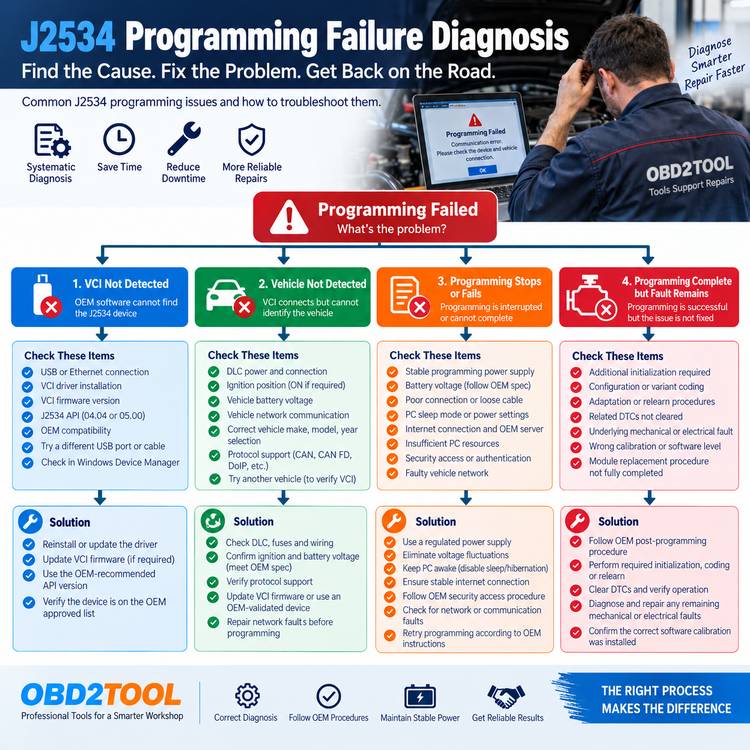
| Symptom | Likely Areas to Check | Diagnostic Logic |
|---|---|---|
| OEM software cannot find the VCI | Driver, firmware, API/DLL, USB/Ethernet connection, unsupported VCI | Confirm the interface works in its own device manager, then verify OEM-approved versions |
| VCI connects but cannot identify the vehicle | DLC power, vehicle network, ignition state, protocol compatibility | Diagnose communication before attempting programming |
| Programming option is unavailable | ECU not programmable, wrong application, subscription level, unsupported model/year | Verify OEM service information rather than assuming a tool fault |
| Calibration download fails | Internet, OEM server, authentication, subscription | Resolve the software/account issue before touching the ECU |
| Programming stops during transfer | Voltage instability, network interruption, PC sleep, loose connection | Follow OEM recovery procedure; do not randomly cycle power |
| New module programs but vehicle still has faults | Initialization/configuration/relearn may still be required | Check the module-replacement procedure |
| Security function is denied | Authentication, SGW, VSP or OEM security access may be required | J2534 compliance does not bypass security requirements |
| Late-model vehicle does not communicate | VCI may lack required CAN FD/DoIP capability or OEM compatibility | Verify both protocol hardware and OEM validation |
| Heavy-duty application does not detect adapter | Software may expect RP1210 rather than J2534 | Check the application’s VCI/API requirement |
The Most Common J2534 Programming Mistakes
1. Buying a VCI Based Only on the Words “J2534 Compatible”
Two interfaces can both claim J2534 support while behaving very differently with a specific OEM application.
Verify:
OEM + software + vehicle + module + VCI + firmware/API
before purchasing.
2. Confusing Diagnostics With Pass-Thru Programming
A full diagnostic tablet may read every ECU but not function as a PC J2534 interface.
Conversely, a dedicated J2534 VCI may program a PCM through OEM software but provide no standalone fault-code diagnostics.
Check the product specification for both functions separately.
3. Assuming CAN FD or DoIP Is Included
A J2534 label alone does not guarantee compatibility with late-model networks.
If your shop regularly services newer vehicles, confirm CAN FD and DoIP requirements before selecting hardware.
4. Using an Ordinary Battery Charger During Flashing
Programming requires stable electrical power, not just a charging battery.
Follow the OEM power-supply specification and avoid voltage spikes or charger modes not intended for programming.
5. Flashing Before Diagnosing
Do not use a calibration update as a substitute for electrical diagnosis.
Resolve supply-voltage, ground, network, and communication faults first.
6. Treating “Programming” and “Coding” as the Same Function
Software flashing, configuration, coding, initialization, adaptation, security authorization, and relearning are related but different processes.
A J2534 interface may support one workflow and not another.
J2534 vs Scan Tool vs OEM VCI
Feature Traditional Scan ToolJ2534 Pass-ThruOEM/Dealer VCI
Read/clear DTCs Usually Not inherently Yes with OEM software
Live data Usually Not inherently Yes with OEM software
Active tests Often Not inherently OEM-dependent
OEM ECU reflashing Usually limited/model-dependent Primary use Yes
Requires PC software Usually no Usually yes Often
OEM subscription Usually not for normal diagnostics Commonly required Commonly required
Multi-brand potential Yes Yes, if each OEM supports the VCI Usually OEM-specific
Guaranteed OEM compatibility No No Usually highest within supported OEM environment
For an independent workshop, the ideal choice depends on workflow.
A shop that performs everyday diagnostics but only occasional module flashing may prefer a diagnostic tablet plus a separate J2534 VCI.
A shop that frequently performs OEM programming may prioritize a robust dedicated pass-thru interface and a dedicated OEM-software laptop.
Does J2534 Work With Heavy-Duty Trucks and Equipment?
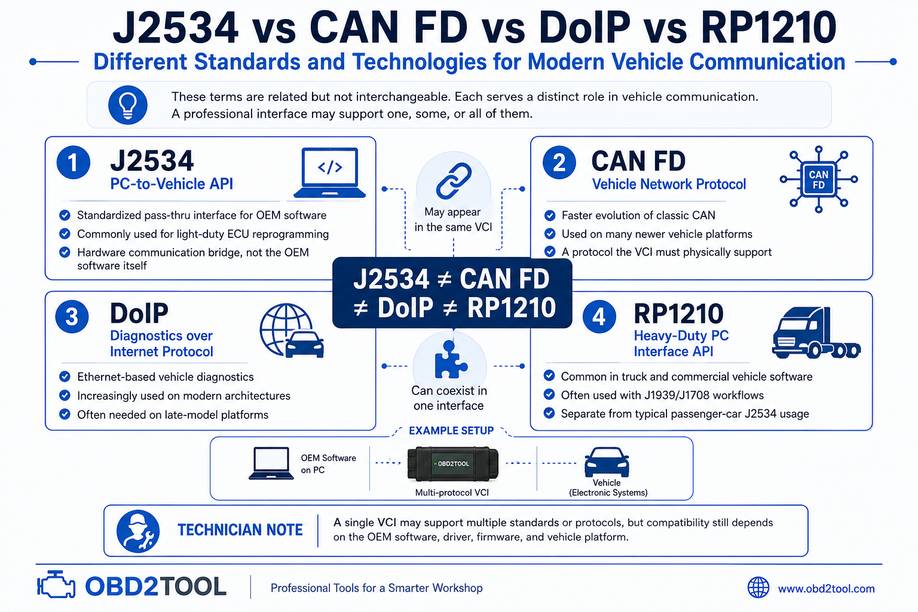
This requires an important qualification.
J2534 originated primarily around light-duty emissions-related reprogramming, but SAE has expanded the framework. SAE J2534-2/5, for example, defines J1939 support within the J2534 API framework.
However, many heavy-duty diagnostic applications use RP1210 rather than the passenger-car J2534 workflow.
U.S. regulations covering applicable 2013-and-later OBD heavy-duty engines with reprogramming capability allow manufacturers to comply through either SAE J2534-1 or TMC RP1210B.
For a truck, agricultural, construction, mining, generator, or off-highway repair shop, never assume that a J1939-capable VCI automatically works with:
- Cummins INSITE
- CAT ET
- John Deere Service Advisor
- CNH EST
- Volvo PTT
- Allison DOC
- Hino DX
- other OEM software
First, determine whether that application expects J2534, RP1210, D-PDU, a proprietary VCI, or another API.
Do You Need CAN FD and DoIP in a J2534 Tool?
For older CAN-based vehicles, not necessarily.
For a workshop servicing newer architectures, these capabilities can become important.
CAN FD
CAN FD allows larger data payloads and higher data rates than classic CAN and appears on an increasing number of newer vehicle platforms.
If the target vehicle and OEM application communicate through CAN FD, the VCI must have the appropriate hardware and software support.
DoIP
DoIP—Diagnostics over Internet Protocol—uses Ethernet-based vehicle communication and is common on a growing number of modern platforms.
Some J2534-capable VCIs also support DoIP, but again, verify the two capabilities independently.
A practical purchasing specification might therefore read:
J2534-1/2 + required API version + CAN FD + DoIP + OEM-tested driver support
rather than “supports J2534.”
How to Choose a J2534 Pass-Thru Tool for a Repair Shop
Before buying, list the manufacturers you actually service.
Then compare interfaces using this checklist:
Required
- SAE J2534-1 support
- stable Windows drivers
- reliable firmware support
- USB or wired connection for critical programming
- compatibility with your target OEM applications
- manufacturer technical support
Depending on Vehicle Mix
- J2534-2 support
- API 04.04 and/or 05.00
- CAN FD
- DoIP
- RP1210
- D-PDU
- programmable voltage capability
- wireless diagnostics
- integration with an existing diagnostic tablet
The most important specification is not the longest protocol list.
It is:
Will this exact VCI, with this driver and firmware, work with the OEM software and vehicles your shop needs to program?
OBD2TOOL maintains a selection of J2534 pass-thru programming tools and compatible VCIs here:
https://www.obd2tool.com/search-j2534.html
Before ordering, compare your target vehicle, OEM software, required protocol, and module-programming procedure with the interface specifications.
Practical J2534 Workflow for Independent Shops
A repeatable shop workflow looks like this:
Diagnose the vehicle
↓
Confirm software update or module replacement is required.
↓
Check OEM service information.
↓
Verify VCI/OEM compatibility.
↓
Purchase or activate required OEM subscription
↓
Perform pre-scan
↓
Connect regulated programming power supply.
↓
Prepare PC and VCI
↓
Run OEM programming procedure.
↓
Perform required initialization/relearn.
↓
Post-scan and verify the repair
The critical principle is simple:
Diagnosis determines whether programming is needed. OEM information determines how you perform programming. The J2534 device provides the communication path between them.
Frequently Asked Questions
Is J2534 the same as an OBD2 scanner?
No. J2534 is primarily a standardized PC-to-vehicle communication interface for compatible OEM applications. A scan tool normally provides functions such as DTC reading, live data, active tests, and service functions.
Some professional tools combine both capabilities.
Can one J2534 device program every vehicle brand?
No.
The standard enables multi-brand hardware, but actual support depends on the OEM application, vehicle, module, J2534 API, VCI firmware, network protocol, and manufacturer validation.
Always check OEM compatibility before programming.
Do I need OEM software if I already own a J2534 interface?
Usually yes for OEM reprogramming.
The VCI does not contain the manufacturer calibration files or programming logic. You typically need the relevant OEM software, subscription, authentication, and calibration access.
Can J2534 program replacement modules?
Sometimes.
Some manufacturers allow J2534-supported programming of replacement controllers. However, programming may be only one part of module replacement. Configuration, initialization, immobilizer synchronization, parameter transfer, or relearns may require separate procedures.
Check the exact OEM replacement procedure.
Does J2534 support CAN FD and DoIP?
Not automatically.
Some current J2534 interfaces also contain CAN FD and DoIP hardware, while others do not. Verify those specifications independently and confirm that the OEM software supports the specific interface.
Can J2534 be used for heavy-duty truck programming?
In some applications, yes, but heavy-duty workflows frequently use RP1210 or manufacturer-specific interfaces instead.
Verify the communication API required by the heavy-duty OEM software before buying an interface.
Conclusion
SAE J2534 gives independent workshops a standardized way to connect compatible OEM programming software to a vehicle without automatically requiring the manufacturer’s traditional dealer-only VCI.
Its biggest advantage is hardware flexibility.
Its biggest misunderstanding is assuming that “J2534 compatible” means “programs everything.”
Successful ECU programming depends on the complete combination of:
Vehicle + Module + OEM Software + Subscription + Security Access + J2534 VCI + Driver/Firmware + Vehicle Network + Stable Power
Treat J2534 as one part of an OEM programming system rather than a universal programming tool, and it becomes a valuable capability for professional independent repair shops.