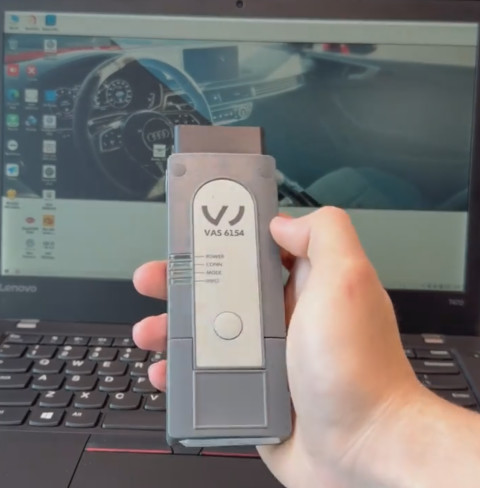
Volkswagen’s factory diagnostic platform is ODIS (Offboard Diagnostic Information System). For standard workshop diagnosis, ODIS Service supports vehicle identification, full-system scanning, fault-code diagnosis, measured values, actuator tests, guided functions, adaptations, coding, and supported programming procedures. ODIS Engineering is intended for more advanced diagnostic and engineering-level work.
A VAS 6154 or VAS 6154A diagnostic interface provides the communication link between the vehicle and the ODIS computer. However, installing ODIS and connecting a compatible VAS interface does not automatically unlock every Volkswagen Group function. Some newer vehicles and protected operations may require Volkswagen Group online access, SFD authorization, SVM, GeKo, or other security permissions.
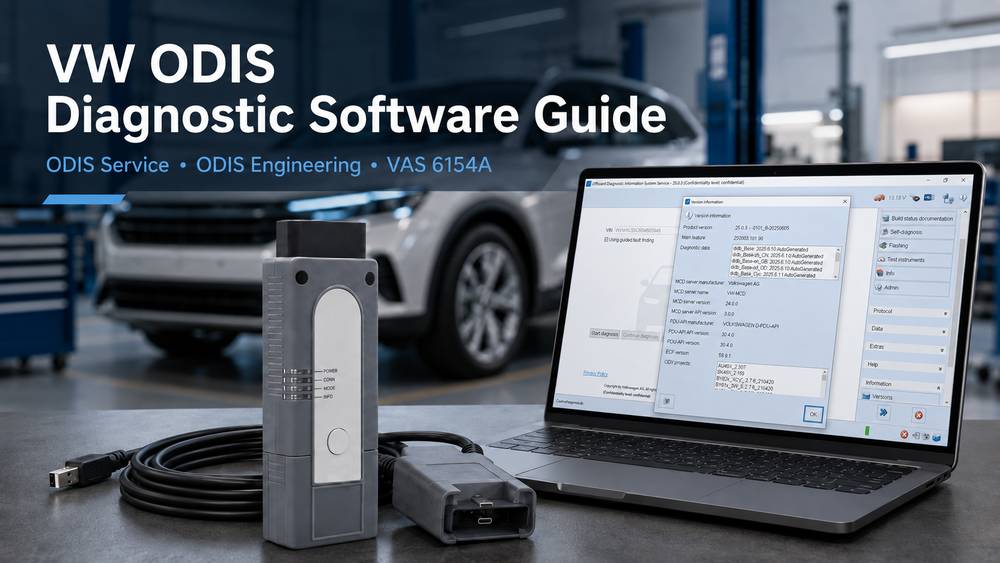
For an independent workshop, the key question is therefore not simply whether ODIS can read Volkswagen fault codes. The more important question is:
Can your ODIS software, VAS interface, vehicle platform, and online authorization complete the specific diagnostic, coding, or programming job you need to perform?
What Is VW ODIS Diagnostic Software?
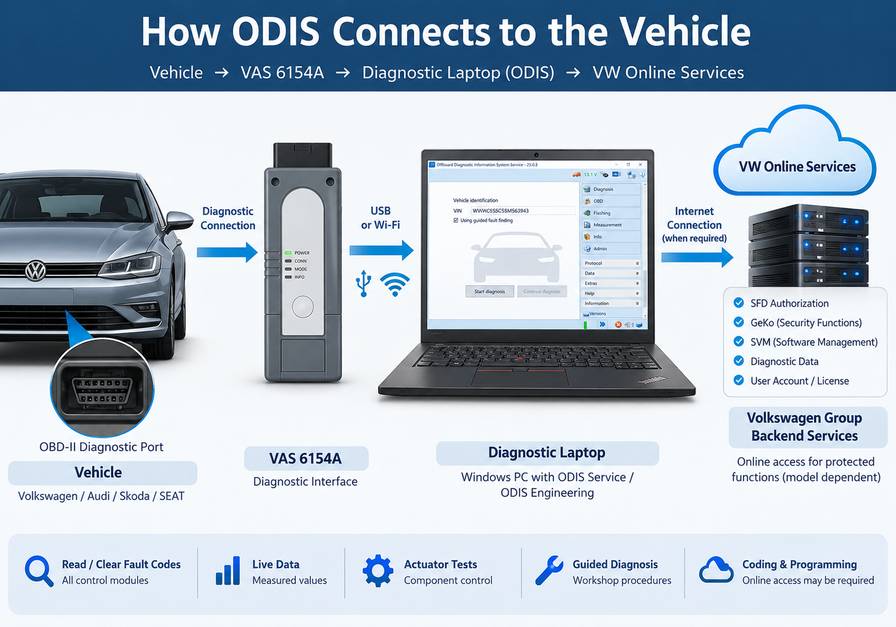
ODIS, short for Offboard Diagnostic Information System, is Volkswagen Group’s diagnostic software environment.
It works with compatible vehicle communication interfaces, such as the VAS 6154 family, to communicate with control modules in Volkswagen Group vehicles.
A typical diagnostic connection looks like this:
Vehicle → VAS 6154/6154A → Diagnostic Laptop → ODIS
When a procedure requires manufacturer backend services, the diagnostic computer may also need an Internet connection and authorized Volkswagen Group account access.
ODIS is commonly divided into two applications:
- ODIS Service, or ODIS-S
- ODIS Engineering, or ODIS-E
They overlap in some diagnostic capabilities but are designed for different types of work.
ODIS Service vs ODIS Engineering
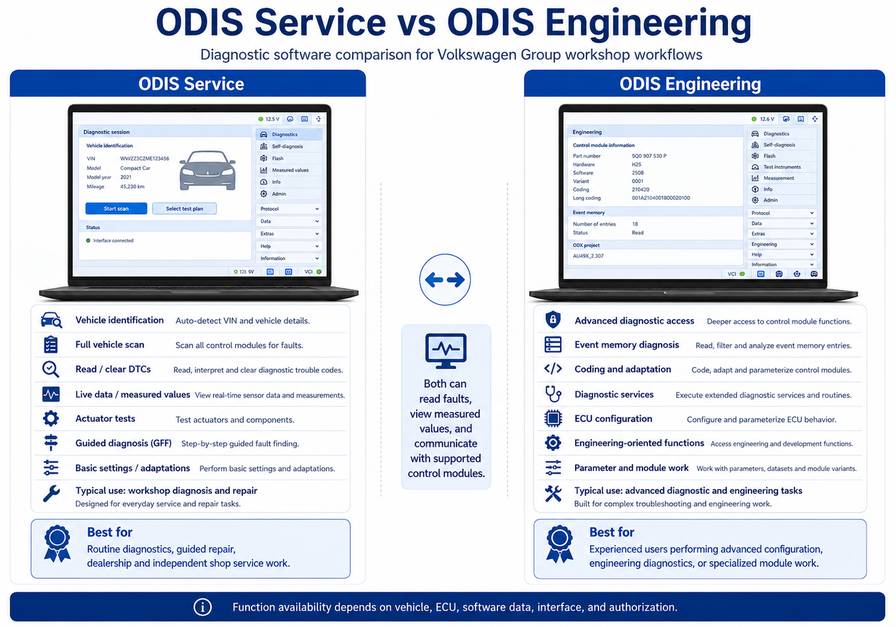
One of the most common questions from technicians is whether they need ODIS Service, ODIS Engineering, or both.
| Function | ODIS Service | ODIS Engineering |
| Vehicle identification | Yes | Yes |
| Full vehicle scan | Yes | Yes |
| Read and clear DTCs | Yes | Yes |
| Measured values | Yes | Yes |
| Actuator tests | Yes | Yes |
| Guided diagnosis | Major function | Not the primary focus |
| Adaptation and coding | Where supported | Advanced access available |
| ECU software functions | Supported service procedures | Engineering-oriented functions |
| Typical user | Repair shop technician | Advanced diagnostic/engineering user |
ODIS Service
ODIS Service is the better starting point for most repair shops.
It focuses on workshop diagnosis and manufacturer-guided repair procedures.
Typical uses include:
- Vehicle identification
- Control-module scanning
- Reading and clearing DTCs
- Viewing measured values
- Running actuator tests
- Guided fault finding
- Basic settings
- Adaptations
- Coding
- Supported ECU software procedures
For routine Volkswagen, Audi, Skoda, and SEAT workshop diagnosis, technicians normally use ODIS Service first.
ODIS Engineering
ODIS Engineering is aimed at more advanced diagnostic and engineering work.
It can expose engineering-oriented diagnostic services such as:
- ECU communication
- Event-memory diagnosis
- Measured values
- Actuator testing
- Coding
- Adaptation
- Diagnostic services
- ECU configuration work
More available functions do not automatically make ODIS Engineering the better choice for routine repairs.
Changing an incorrect coding value, adaptation, parameter, or ECU configuration can introduce additional faults or leave a control module incorrectly configured.
Use ODIS Engineering only when you understand the procedure and the vehicle or ECU actually requires it.
What Can VW ODIS Diagnostic Software Do?
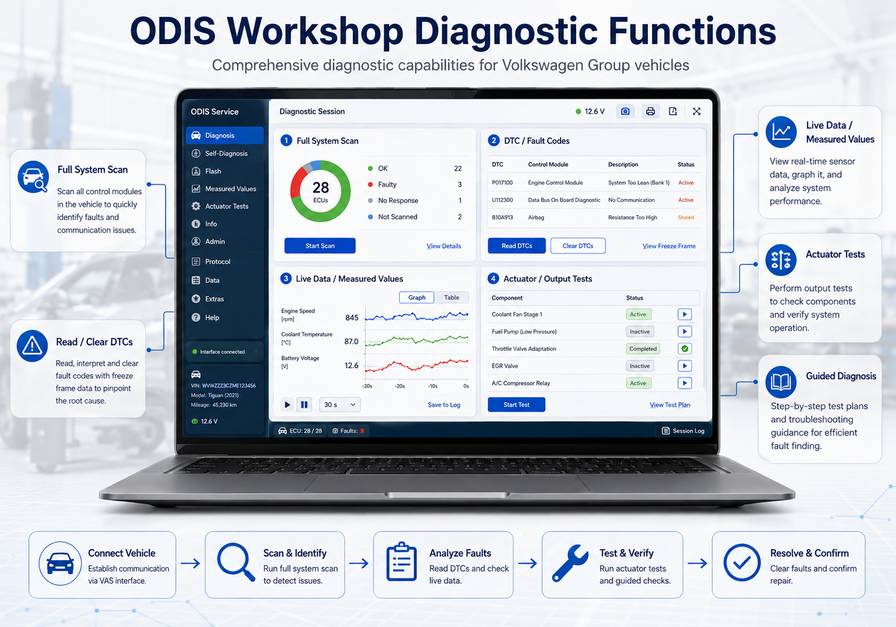
Actual ODIS functions depend on:
- Vehicle model and platform
- Model year
- Control module
- Installed diagnostic data
- ODIS version
- VAS interface
- Online access
- Security authorization
Therefore, ODIS should not be described as providing unrestricted access to every ECU or every Volkswagen Group vehicle.
The following are its most important workshop functions.
1. Full Vehicle Control-Module Scan
ODIS can interrogate supported vehicle control modules and retrieve stored diagnostic information.
Depending on the vehicle, modules may include:
- Engine control module
- Transmission control module
- ABS/ESC
- Airbag/SRS
- Steering
- Central gateway
- Body control electronics
- Instrument cluster
- Climate control
- Infotainment
- Parking systems
- Driver-assistance systems
- Battery management
- Hybrid and EV control modules
A complete scan should normally be performed before clearing fault codes or replacing components.
Why the Full Scan Matters
A single electrical or communication problem can create faults in several modules.
For example, low battery voltage may produce:
- Communication DTCs
- Control-module supply-voltage faults
- Sensor plausibility faults
- Gateway errors
- Temporary module shutdowns
If the technician replaces the first component named by a DTC without reviewing the full vehicle fault pattern, they may miss the actual root cause.
2. Read and Clear Diagnostic Trouble Codes
ODIS can retrieve stored DTCs from supported control units.
But treat a fault code as diagnostic evidence, not an automatic instruction to replace a part.
Before clearing the code, check:
- Is the fault active or intermittent?
- Which ECU originally reported the problem?
- Are other modules reporting related faults?
- Was low system voltage recorded?
- Are there communication faults involving the same ECU?
- Does the fault return immediately after clearing?
- Does it return only under specific operating conditions?
Whenever possible, save the original vehicle scan before deleting fault memories.
Clearing codes before recording them can remove valuable failure information.
3. Live Data and Measured Values
Measured values are often more useful than the DTC description itself.
ODIS can display ECU data such as:
- Voltage
- Temperature
- Pressure
- Engine speed
- Switch status
- Sensor signals
- Requested values
- Actual values
- Actuator positions
The exact available values vary by ECU and vehicle.
How a Technician Should Use Live Data
Do not look at a sensor value in isolation.
Compare it with:
- Another related sensor
- Ambient conditions
- Requested versus actual values
- Mechanical operating conditions
- Known-good behavior
For example, a sensor plausibility fault does not always mean the sensor itself has failed.
Possible causes can include:
- Wiring resistance
- Poor ground
- Incorrect reference voltage
- Connector damage
- Mechanical failure
- Contamination
- Another sensor affecting the calculated value
Live data helps narrow these possibilities before replacing parts.
4. Actuator and Output Tests
Where supported, ODIS can command specific components to operate.
Depending on the ECU, output tests may include components such as:
- Relays
- Pumps
- Solenoids
- Valves
- Motors
- Warning devices
- Other ECU-controlled actuators
An actuator test helps determine whether the ECU can command the circuit and whether the component responds.
However, an actuator that moves during an output test is not automatically mechanically healthy.
If the system still does not operate correctly, further checks may be required for:
- Restricted flow
- Mechanical binding
- Pressure
- Wiring voltage drop
- Sensor feedback
- Incorrect calibration
- Control logic
5. Guided Fault Finding
One of the main advantages of manufacturer diagnostic software is guided diagnosis.
Instead of displaying only a DTC and short description, ODIS Service can guide the technician through manufacturer-defined diagnostic procedures.
A typical process may follow this sequence:
Fault memory → Measured values → Electrical checks → Component test → Repair → Verification
This is particularly useful when several control modules are connected through the same vehicle network.
Guided diagnosis should still be combined with normal electrical and mechanical diagnostic judgment.
Software instructions cannot compensate for an incorrect physical assumption about the vehicle.
Can ODIS Perform Coding and Adaptations?
Yes. ODIS can perform supported coding, adaptations, basic settings, and configuration procedures.
However, availability depends on the vehicle and control module.
Some newer Volkswagen Group vehicles also protect diagnostic functions through online security systems.
Therefore:
Seeing a coding or adaptation function in ODIS does not guarantee you can complete the procedure without authorization.
Before changing coding or adaptations:
- Save the original vehicle scan.
- Record the existing configuration where possible.
- Verify that the replacement part is correct.
- Repair battery-voltage problems first.
- Repair communication faults first.
- Follow the specified diagnostic procedure.
- Do not copy coding from another vehicle without thinking.
- Rescan the vehicle after the procedure.
Incorrect configuration can create faults in multiple modules because vehicle configuration information is often shared across the CAN network.
Can ODIS Program or Flash Volkswagen ECUs?
ODIS supports Volkswagen Group control-module software and programming procedures.
However, ECU programming is significantly more sensitive than normal diagnostic scanning.
A programming procedure may require:
- Compatible VAS diagnostic hardware
- Correct ODIS installation
- Correct diagnostic data
- Stable Internet connection
- Volkswagen Group account access
- Appropriate security authorization
- A supported ECU
- Correct software package
- Stable vehicle voltage
Important ECU Programming Safety Warning
Never begin ECU programming with a weak battery.
Use an appropriate workshop battery support unit if the manufacturer’s procedure requires it.
During programming:
- Keep vehicle voltage stable.
- Turn off unnecessary electrical loads.
- Prevent the laptop from sleeping.
- Do not disconnect the VAS interface.
- Do not cycle the ignition unless instructed.
- Avoid unreliable network connections.
If programming is interrupted, the control module may stop communicating normally, and you may need to follow recovery procedures.
What Are SFD, GeKo and SVM?
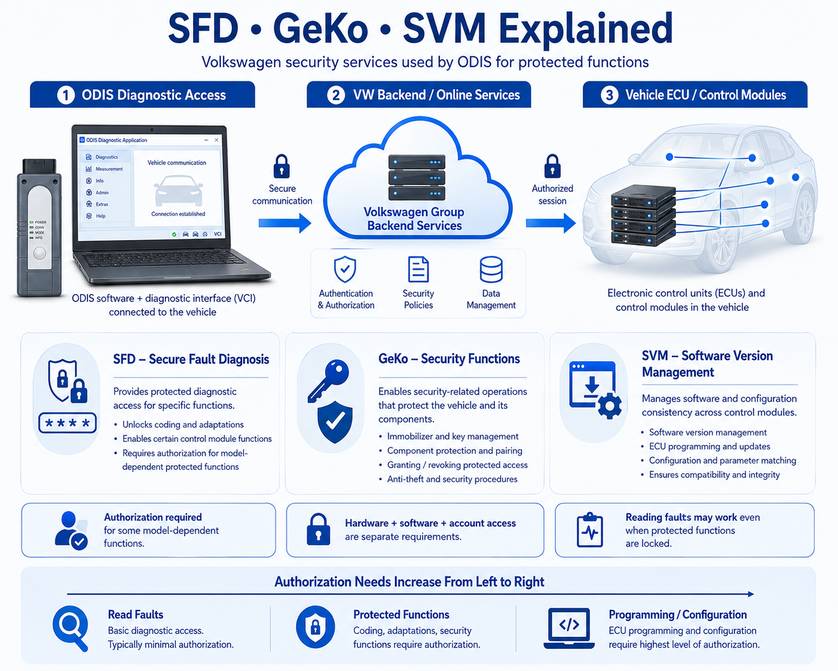
Modern Volkswagen Group diagnosis increasingly depends on backend authorization.
Understanding these systems helps explain why a workshop can sometimes read fault codes successfully but cannot complete coding, adaptation, or programming.
SFD — Vehicle Diagnostics Protection
SFD is Volkswagen Group’s protected diagnostic-access system used on supported newer vehicles and control modules.
Certain protected functions may require authorization before ODIS can perform them.
A vehicle may therefore allow:
- ECU identification
- Fault-code reading
- Measured values
while restricting certain:
- Adaptations
- Coding
- Basic settings
- Protected diagnostic operations
until the required authorization is obtained.
GeKo
GeKo is associated with protected security-related Volkswagen Group operations.
Depending on the vehicle and market, these may include work involving:
- Immobilizer systems
- Keys
- Instrument clusters
- Engine control units
- Component protection
Access requirements vary, so technicians should confirm authorization before accepting a job that depends on security functions.
SVM — Software Version Management
SVM, or Software Version Management, is part of Volkswagen Group’s controlled ECU software and configuration workflow.
It may be involved when:
- Updating ECU software
- Matching control-unit software
- Correcting configuration
- Completing manufacturer-defined programming procedures
The important workshop rule is:
VAS hardware compatibility, ODIS compatibility, and Volkswagen online authorization are three separate requirements.
Owning a VAS interface does not provide security credentials, and installing ODIS does not bypass manufacturer security systems.
What Hardware Is Used With ODIS?
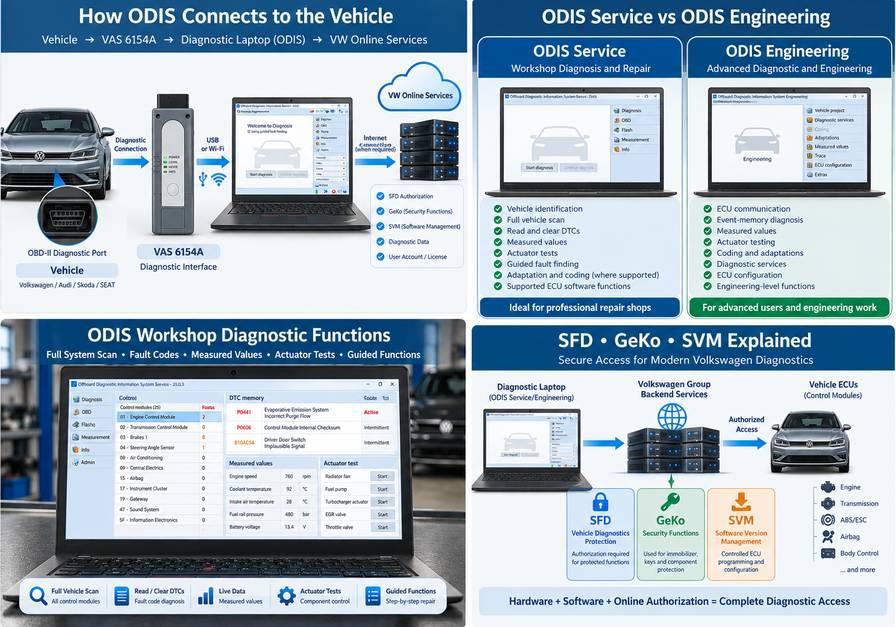
The VAS 6154 family is commonly used for modern Volkswagen Group diagnostics.
For an independent workshop, the correct configuration depends on whether you already have:
- A diagnostic laptop
- ODIS software
- Compatible VCI hardware
- Required drivers
- Volkswagen Group online access
OBD2TOOL currently provides several VAS/ODIS configurations.
VAS 6154A Diagnostic Interface
The VAS 6154A DoIP diagnostic tool suits technicians who mainly need the vehicle communication interface or already have an ODIS diagnostic computer.
Do not confuse a hardware purchase with Volkswagen online access.
If your job involves protected coding, programming, SFD, immobilizer, or other online functions, verify the required account separately.
If you are preparing a new diagnostic computer or changing interfaces, see our VAS5054A and VAS6154 ODIS installation guide for the recommended installation sequence, interface setup, drivers, and common connection checks.
VAS 6154 With ODIS Software
The VAS 6154 diagnostic tool with ODIS software combines diagnostic hardware with ODIS software options.
This type of package can reduce setup work for a workshop that does not already have a prepared ODIS environment.
Before ordering, confirm:
- Vehicle brand
- Model
- Model year
- Required function
- ODIS version
- VCI connection method
- Whether the job requires online authorization
VAS 6154A Diagnostic Package With Laptop
For workshops that don’t want to build a diagnostic computer from scratch, the VAS 6154A diagnostic tool package offers another configuration option.
A dedicated diagnostic laptop can be useful because it reduces:
- Driver conflicts
- Unwanted software changes
- Windows configuration problems
- Interference from unrelated applications
Even with a complete laptop package, treat online Volkswagen Group services separately from the installed software.
ODIS Service and ODIS Engineering Software
If you already own compatible VAS hardware, the ODIS and ODIS Engineering software for VAS 6154A may be the more relevant option.
Before choosing software only, verify:
- Exact VCI model
- VCI firmware
- Driver compatibility
- Windows version
- Available disk space
- Target vehicle
- Required diagnostic function
- Required ODIS application
Don’t choose software just because its version number is higher.
A newer ODIS release is useful only if it supports the interface, diagnostic data, and vehicle workflow you need.
Recommended VW ODIS Diagnostic Workflow
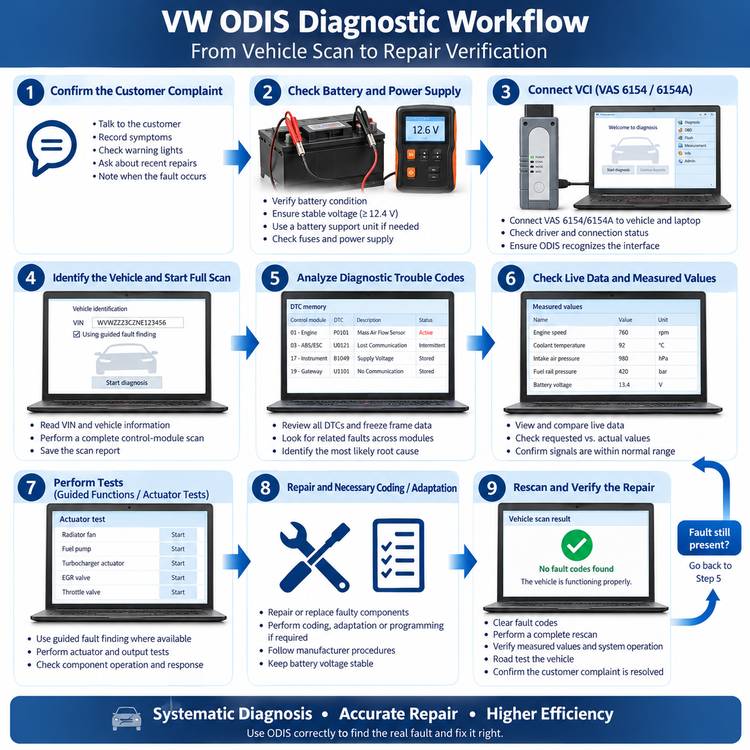
The following workflow is more reliable than connecting ODIS and immediately clearing whatever codes appear.
Step 1: Confirm the Customer Complaint
Before connecting the diagnostic tool, establish exactly what is wrong.
Record:
- Warning lights
- Starting problems
- Driveability symptoms
- Intermittent behavior
- Recent repairs
- Battery replacement
- Control-module replacement
- Previous coding or programming
- Collision repairs
- Water intrusion
- Conditions under which the fault occurs
A scan without a clearly defined complaint can produce a long fault list with no diagnostic direction.
Step 2: Check Battery and Power Supply
Before diagnosing communication or ECU problems, confirm basic vehicle power.
Low voltage can cause:
- Multiple ECU faults
- CAN communication errors
- Gateway faults
- Incorrect sensor DTCs
- Modules dropping offline
- Failed programming
If many unrelated ECUs report undervoltage or communication faults, correct the power-supply issue before replacing modules.
Step 3: Connect the VAS 6154 or VAS 6154A
Connect the diagnostic interface to the vehicle and computer.
Verify:
- VCI has power.
- The computer recognizes the interface.
- The correct driver is installed.
- ODIS detects the interface.
- Ignition is in the required state.
- Vehicle communication is established.
If the interface works through USB but not wirelessly, investigate the network configuration before reinstalling the entire ODIS system.
Step 4: Identify the Vehicle
Allow ODIS to identify the vehicle where supported.
Check that the VIN and vehicle information are correct.
If vehicle identification fails, check in this order:
- Vehicle battery voltage
- Ignition state
- Diagnostic connector power
- VAS interface connection
- VCI driver
- Gateway communication
- Communication with other ECUs
- ODIS vehicle data
Do not immediately assume that failed VIN identification means the ODIS software is defective.
Step 5: Perform a Complete Vehicle Scan
Run a full-system scan and save the results.
Look for patterns rather than individual codes.
Examples include:
- Multiple ECUs reporting one missing module
- Several modules recording undervoltage
- Multiple communication faults after ECU replacement
- Gateway faults
- Network faults appearing at the same time
These patterns can reveal the root failure faster than diagnosing each DTC separately.
Step 6: Prioritize Root-Cause Faults
A useful diagnostic priority is:
Power supply → Network communication → Primary sensor/input faults → Actuator faults → Secondary faults
For example, if multiple control modules report loss of communication with the engine ECU, investigate why that ECU is offline before diagnosing every secondary system.
Step 7: Check Measured Values
Use live data to confirm whether the ECU is seeing realistic information.
Ask:
- Is the value physically possible?
- Does the value change correctly?
- Does another sensor confirm it?
- Is the requested value different from the actual value?
- Is the ECU commanding the actuator?
- Does actuator feedback follow the command?
This helps separate sensor, wiring, mechanical, actuator, and software problems.
Step 8: Use Guided Tests or Actuator Tests
Run ODIS guided diagnosis or output tests where appropriate.
Before replacing an ECU, verify:
- Power
- Ground
- Network communication
- Connector condition
- Relevant wiring
- Required sensor inputs
Replacing a control module without checking these basics can turn the original fault into an expensive programming problem.
Step 9: Perform Coding, Adaptation or Programming Only When Required
Not every repair requires coding.
Follow the actual component replacement procedure.
Before programming:
- Stabilize vehicle voltage.
- Confirm the correct ECU.
- Confirm the correct software procedure.
- Check Internet stability when online access is required.
- Make sure the laptop cannot enter sleep mode.
Step 10: Verify the Repair
After the repair:
- Clear relevant fault memories.
- Cycle the ignition if required.
- Perform a complete rescan.
- Recheck measured values.
- Complete basic settings or adaptations if required.
- Road-test or operate the vehicle under the original fault conditions.
- Confirm the customer complaint is resolved.
- Check that no new DTCs were introduced.
A repair is not complete simply because the warning light disappeared.
ODIS vs Aftermarket VW Diagnostic Scanners
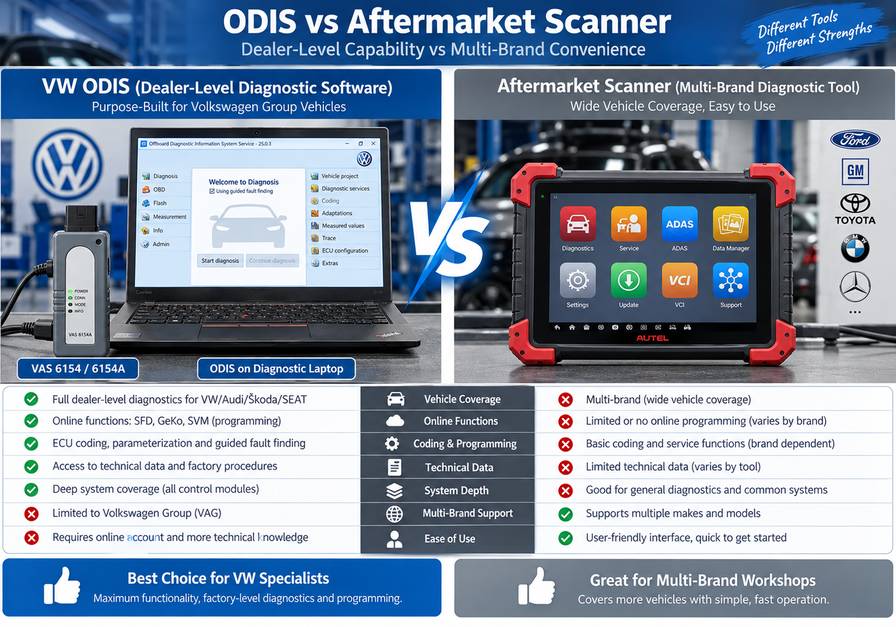
ODIS and aftermarket diagnostic scanners serve different purposes.
| Requirement | ODIS | Aftermarket Scanner |
| VW-specific diagnostics | Excellent | Tool dependent |
| Full-system scan | Yes | Usually |
| DTC read/clear | Yes | Yes |
| Live data | Yes | Usually |
| Actuator tests | Yes, supported systems | Tool dependent |
| Guided VW diagnosis | Major advantage | Usually limited |
| Coding/adaptation | Supported procedures | Tool dependent |
| VW online workflows | Main advantage when authorized | Usually limited |
| SVM integration | Volkswagen ecosystem | Not equivalent |
| Multi-brand coverage | Mainly VAG | Major advantage |
| Routine service speed | Good | Often faster |
| Engineering diagnostics | ODIS-E available | Tool dependent |
For a multi-brand repair shop, these tools often complement each other.
An aftermarket scanner may be faster for:
- Oil resets
- Routine service
- General fault scanning
- Multi-brand diagnosis
ODIS becomes especially useful when the job involves:
- Volkswagen-specific guided diagnosis
- Module configuration
- Manufacturer procedures
- ECU programming
- SVM
- Protected VAG functions
- Difficult Volkswagen communication problems
Common ODIS Mistakes to Avoid
Clearing Fault Codes Before Saving the Original Scan
The first scan may contain valuable evidence that disappears after you delete fault memories.
Save it first.
Replacing the Part Named in the DTC
A DTC tells you what the ECU detected.
It does not automatically identify the failed component.
Check power, ground, wiring, signal integrity, communication, and mechanical conditions.
Assuming ODIS Installation Includes Online Access
Installed software and manufacturer authorization are different.
Some procedures may require:
- Volkswagen Group login
- SFD authorization
- SVM
- GeKo
- Paid access
- Market-specific approval
Programming With a Weak Battery
A voltage drop during programming can interrupt the flash process.
Use appropriate battery support.
Changing Coding Without Recording the Original Configuration
Always preserve the original configuration when possible.
This gives you a recovery reference if the new coding produces unexpected faults.
Buying a VAS Interface Without Checking Compatibility
Before ordering, identify:
Vehicle + model year + required function + VCI + ODIS requirement
Do not assume that one VAS interface or one ODIS version supports every Volkswagen Group procedure.
Hybrid and EV Safety Warning
ODIS can diagnose Volkswagen Group hybrid and electric vehicle control modules, but diagnostic access does not make a technician qualified to work on high-voltage systems.
If a repair procedure requires:
- Opening the HV system
- Disconnecting high-voltage components
- Removing the traction battery
- Handling exposed HV conductors
- Performing isolation procedures
Follow Volkswagen’s high-voltage safety procedure and use appropriately trained personnel and PPE.
Never touch orange high-voltage cables or exposed HV components simply because ODIS has identified a fault in that system.
Which ODIS Setup Should a Workshop Buy?
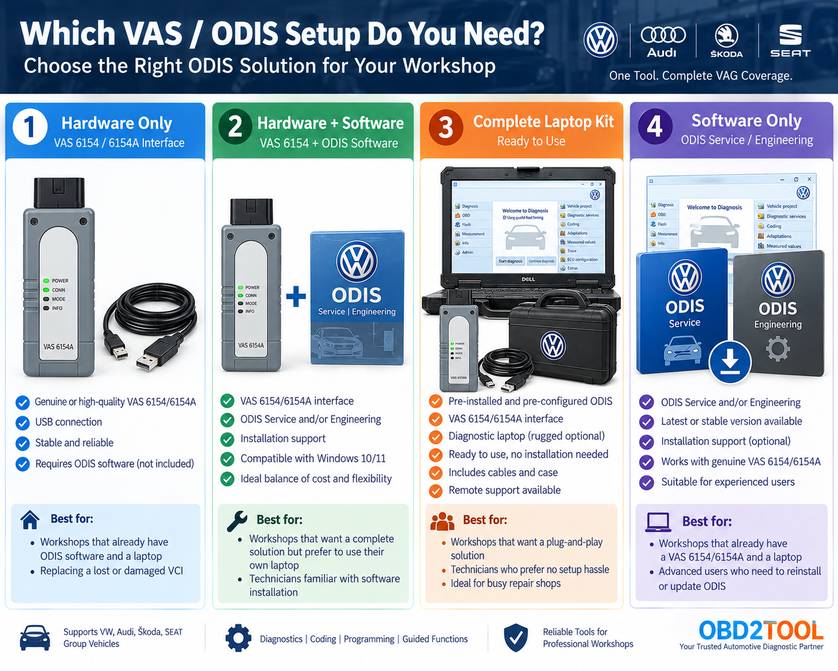
The right setup depends on how much equipment you already have.
Choose VAS Hardware Only If:
- You already have a dedicated diagnostic laptop.
- Your ODIS installation is compatible.
- You understand VCI driver and network configuration.
- You only need the interface.
A hardware-focused option is the VAS 6154A DoIP diagnostic tool.
Choose VAS Hardware + ODIS If:
- You need both the VCI and software.
- You want to reduce initial installation work.
- You are building a Volkswagen-specific diagnostic station.
Choose a Complete Laptop Package If:
- You do not already have a suitable computer.
- You want a dedicated Volkswagen diagnostic machine.
- You want to reduce Windows and driver conflicts.
See the VAS 6154A diagnostic package.
Choose ODIS Software Only If:
- You already own compatible VAS hardware.
- Your laptop meets the software requirements.
- You know which ODIS version your workflow requires.
Before buying any configuration, send the supplier:
Vehicle model + model year + required diagnostic function + current VCI
For programming, immobilizer, component-protection, or protected coding work, also confirm whether Volkswagen online authorization is required.
Frequently Asked Questions
Is ODIS the Official Volkswagen Diagnostic Software?
Yes. ODIS is Volkswagen Group’s diagnostic software environment.
ODIS Service is primarily intended for workshop diagnosis and guided repair procedures, while ODIS Engineering provides more engineering-oriented diagnostic functions.
Can ODIS Diagnose Audi, Skoda, and SEAT?
ODIS is used within the Volkswagen Group ecosystem, but actual coverage depends on the installed diagnostic data, software version, vehicle platform, ECU, and authorization.
Do not assume that every function is available simply because a vehicle belongs to the Volkswagen Group.
Does a VAS 6154A Include Volkswagen Online Access?
No.
The diagnostic interface provides communication between the vehicle and computer.
Online coding, protected programming, SFD, GeKo, or other manufacturer services may require separate Volkswagen Group authorization.
Can ODIS Code Volkswagen Control Modules?
ODIS can perform supported coding, adaptations, and configuration procedures.
On newer vehicles, some functions may be protected and require online authorization.
Can ODIS Program an ECU?
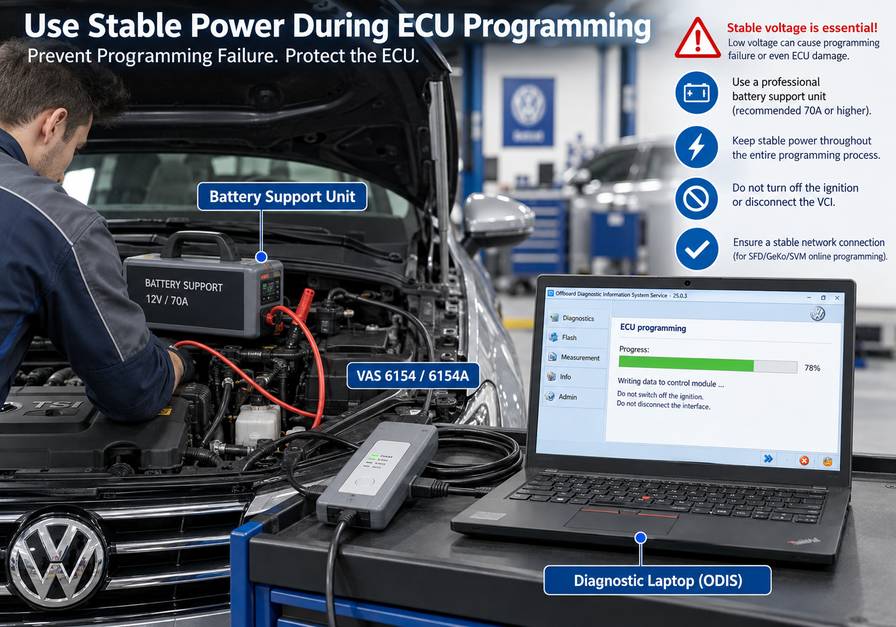
ODIS supports Volkswagen Group ECU software and programming procedures where supported.
Programming may require:
- Correct diagnostic hardware
- Correct software
- Stable battery support
- Internet connection
- Manufacturer authorization
- Supported ECU and software data
What Is the Difference Between ODIS Service and ODIS Engineering?
ODIS Service is designed primarily for normal workshop diagnosis and guided repair.
ODIS Engineering provides deeper, engineering-oriented access and suits technicians who understand the control-unit architecture and the exact procedure being performed.
Is ODIS Better Than an Aftermarket VW Scanner?
Not for every job.
A good aftermarket scanner can be faster for routine maintenance and is more useful in a multi-brand shop.
ODIS has the advantage when Volkswagen-specific guided diagnostics, manufacturer software procedures, or authorized online functions are required.
Final Workshop Recommendation
For professional Volkswagen Group diagnostics, think of the system as four separate layers:
Vehicle compatibility → VAS interface → ODIS software → Online/security authorization
All four matter.
A VAS 6154 or VAS 6154A provides the vehicle communication path.
ODIS provides the diagnostic environment.
Volkswagen Group backend services authorize functions that require manufacturer access.
If any of these layers are incompatible, a procedure may fail even though the diagnostic interface connects successfully to the vehicle.
Before buying an ODIS setup, confirm:
- Vehicle
- Model year
- Required repair or diagnostic function
- VAS interface
- ODIS requirement
- Online authorization requirement
That compatibility check is especially important before accepting jobs involving ECU programming, immobilizer work, component protection, SFD-protected functions, or replacement control-module configuration.