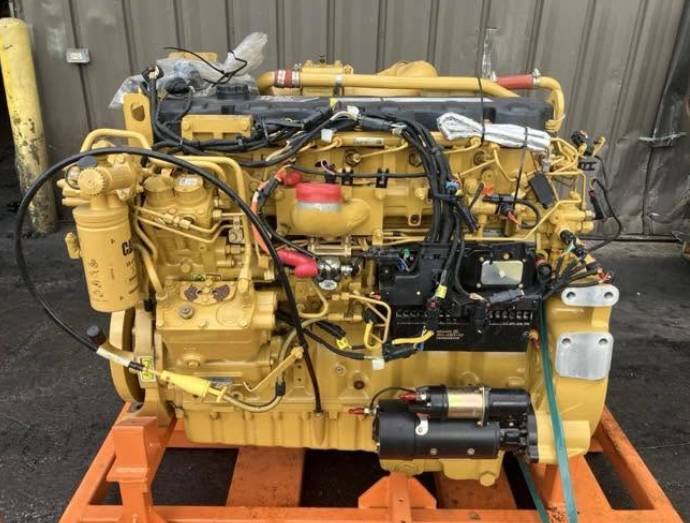
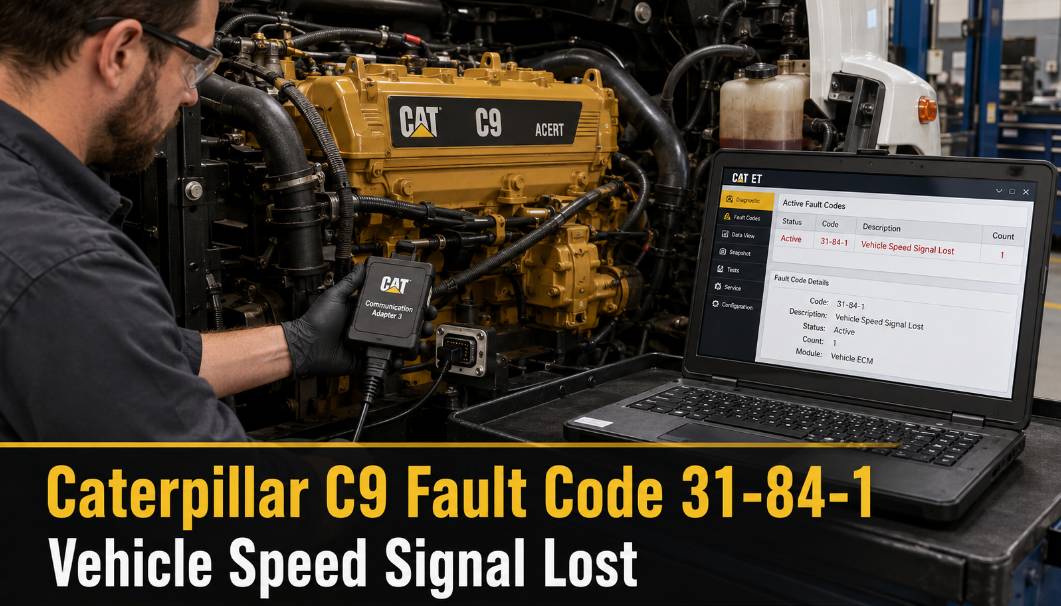
Caterpillar C9 engine fault code 31-84-1 indicates that the Engine Control Module has detected a loss of the vehicle speed signal.
This fault may appear when the engine is running above the programmed Vehicle Speed Limit protection setting, but the ECM does not receive the expected vehicle speed information.
Fault Code Description
Fault code: 31-84-1
System: Vehicle speed
Failure type: Loss of signal
Common description: Vehicle Speed Signal Abnormal, Lost, or Not Received
The Caterpillar Engine Control Module may log this fault when:
- The VSL Protection parameter is not programmed to TEL.
- The ECM does not detect vehicle speed when operating conditions indicate that a speed signal should be present.
- The desired engine speed is higher than the programmed Vehicle Speed Limit protection value.
- The hard-wired vehicle speed circuit is open, shorted, or incorrectly connected.
- Vehicle speed information is not being received through the J1939 data link.
- The vehicle speed calibration value is incorrect.
Diagnostic Equipment Required
To diagnose the problem, prepare:
Before performing electrical tests, park the vehicle safely, apply the parking brake, and follow the manufacturer’s electrical safety procedures.
How the Caterpillar C9 ECM Receives Vehicle Speed
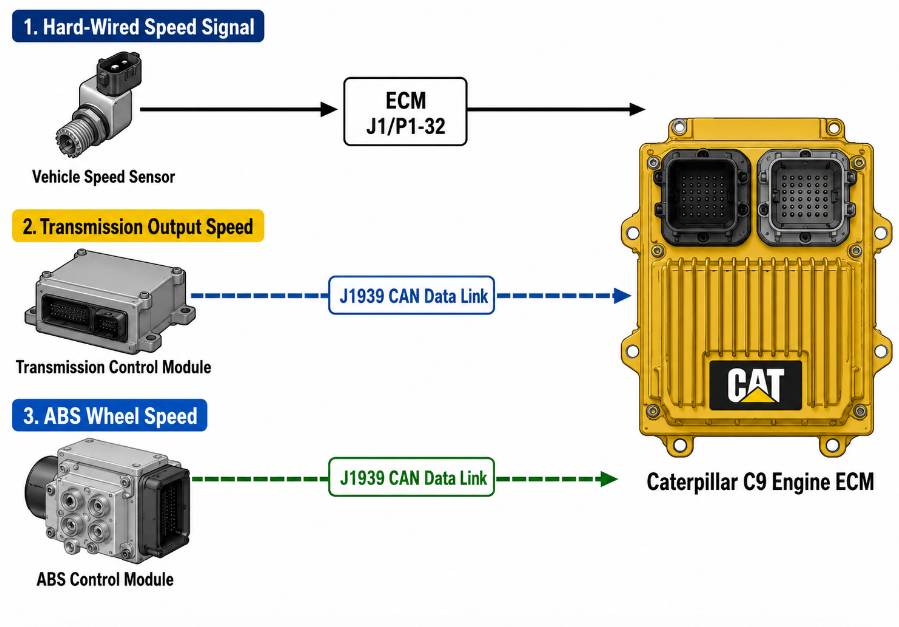
Depending on the vehicle configuration, the ECM may receive vehicle speed information from one of three sources:
- A hard-wired electronic vehicle speed signal
- An electronically controlled transmission through J1939
- An Anti-lock Brake System through J1939
Identifying the source of the programmed vehicle speed is an important first step.
1. Hard-Wired Electronic Vehicle Speed Signal
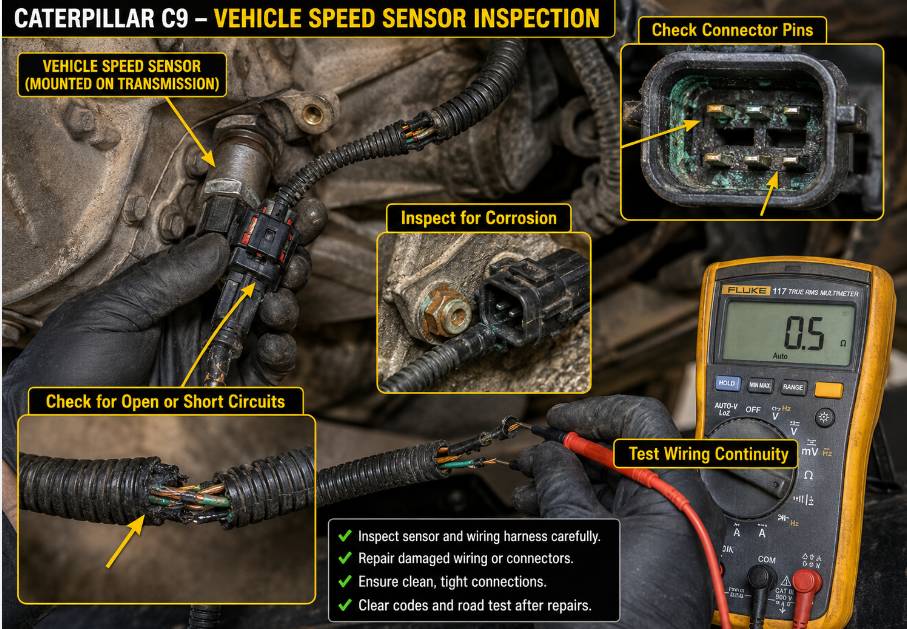
On vehicles using a direct electronic speed signal, the signal is sent through a single wire connected to:
- ECM connector J1/P1 terminal 32: Vehicle Speed Positive
Do not connect another device, such as a speedometer, to this signal wire. Additional connections may interfere with the signal received by the ECM.
For this type of electronic speed input:
- J1/P1 terminal 33, Vehicle Speed Negative, should not be connected to the ECM.
Connecting terminal 33 unnecessarily may introduce electrical noise into the vehicle speed circuit.
Inspection Procedure

Inspect the wiring between the electronic vehicle speed source and the engine ECM for:
- Open circuits
- Short circuits to ground
- Short circuits to battery voltage
- Corroded terminals
- Loose connector pins
- Damaged or rubbed-through wiring
- Incorrect aftermarket connections
Repair any wiring or connector problems before replacing the vehicle speed sensor or ECM.
2. Vehicle Speed From the Transmission Through J1939
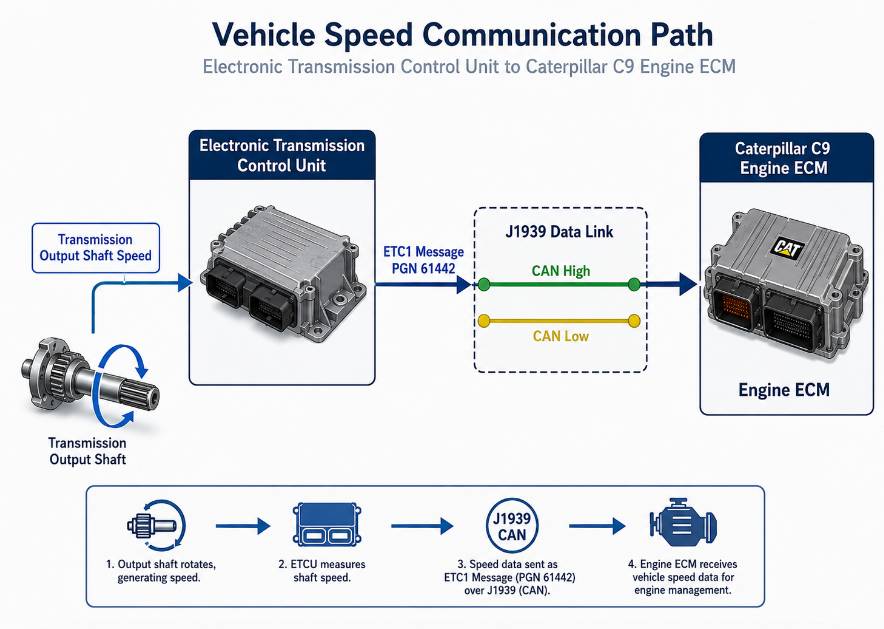
The ECM can be configured to receive vehicle speed information from an electronically controlled transmission through the J1939 data link.
The transmission must support the:
J1939 ETC1 Broadcast Message — PGN 61442, Bytes 2 and 3
This message provides the transmission output-shaft speed.
This configuration requires:
- A properly installed J1939 data-link circuit
- An electronically controlled transmission
- A transmission controller that supports the required J1939 message
- Correct ECM programming and calibration
When the ECM is programmed to use the J1939 transmission speed source, the hard-wired vehicle speed input at terminals 32 and 33 is ignored.
The ECM calculates vehicle speed using:
- Transmission output-shaft speed received through J1939
- The programmed Vehicle Speed Cal (J1939-Trans) parameter
Check the Calibration Parameter
The Vehicle Speed Cal (J1939-Trans) parameter is based on the number of revolutions of the transmission output shaft per mile.
An incorrect calibration value may cause:
- Incorrect vehicle speed readings
- An unstable speed signal
- Vehicle Speed Limit control problems
- Fault code 31-84-1
Use CAT ET to compare the programmed calibration value with the vehicle’s axle ratio, tire size, and drivetrain specifications.
3. Vehicle Speed From the ABS Through J1939
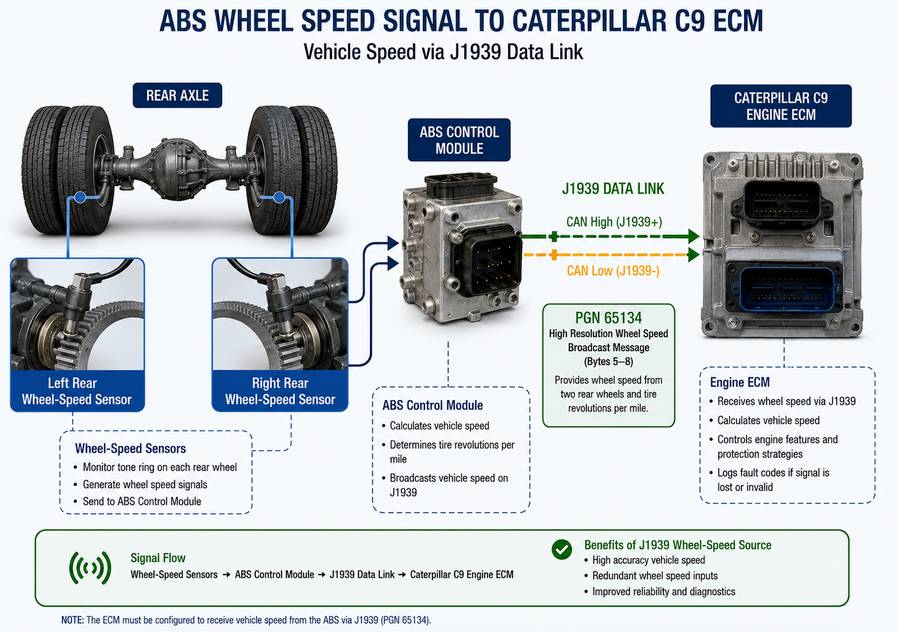
The Caterpillar C9 ECM may also receive vehicle speed information from the Anti-lock Brake System through the J1939 network.
The ABS must support the:
J1939 High-Resolution Wheel Speed Broadcast Message — PGN 65134, Bytes 5 through 8
This message provides wheel-speed information from the two rear wheels. The ABS controller may also broadcast the assumed tire revolutions per mile.
If the ECM is configured to use ABS wheel-speed data, inspect:
- ABS fault codes
- Rear wheel-speed sensors
- Wheel-speed sensor wiring
- ABS power and grounds
- J1939 communication
- Tire revolutions-per-mile settings
- Incorrect or mismatched tire sizes
A fault in the ABS system may prevent the engine ECM from receiving valid vehicle speed information.
Probable Causes of Fault Code 31-84-1
The most likely causes include:
- Poor connection at the engine ECM
- An incorrect vehicle speed source was programmed in the ECM
- Incorrect vehicle speed calibration
- Failed vehicle speed sensor
- Open or shortened vehicle speed sensor wiring
- Corroded or loose harness connectors
- Missing transmission or ABS speed message on the J1939 network
- Incorrect VSL Protection programming
- Internal ECM failure
An ECM failure is possible, but it should only be considered after the wiring, sensors, parameter settings, and J1939 communication have been tested.
Caterpillar C9 Vehicle Speed Diagnostic Procedure
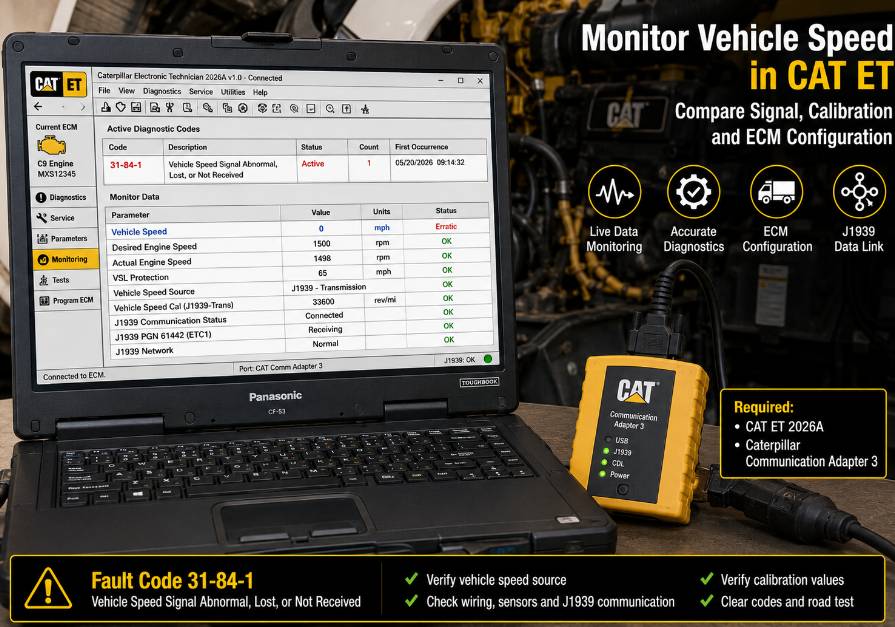
Step 1: Connect CAT ET
Connect the Caterpillar Communication Adapter 3 between the diagnostic laptop and the vehicle diagnostic connector.
Open CAT ET and establish communication with the Caterpillar C9 engine ECM.
Record:
- Active diagnostic codes
- Logged diagnostic codes
- ECM configuration
- Vehicle speed source
- Vehicle speed calibration
- VSL Protection setting
Save an ECM configuration report before changing any parameter.
Step 2: Monitor Vehicle Speed
Open the CAT ET status screen and monitor the vehicle speed parameter.
Operate or test the vehicle in accordance with approved service procedures.
Check whether the displayed vehicle speed:
- Remains at zero
- Changes intermittently
- Displays an unrealistic value
- Drops out while the vehicle is moving
- Does not match the speedometer
An intermittent reading usually indicates a wiring, connector, sensor, or network communication problem.
Step 3: Confirm the Programmed Speed Source
Determine whether the ECM is configured to receive vehicle speed from:
- J1/P1 terminal 32
- The transmission controller through J1939
- The ABS controller through J1939
The programmed source must match the actual vehicle wiring and controller configuration.
Step 4: Inspect the ECM Connector
Disconnect the appropriate power source and inspect the engine ECM connector according to Caterpillar service procedures.
Pay particular attention to:
- J1/P1 terminal 32
- J1/P1 terminal 33
- J1939 CAN High and CAN Low terminals
- Bent or recessed pins
- Moisture or corrosion
- Loose terminal tension
- Wiring repairs or aftermarket connections
Terminal 33 should not be connected when the vehicle uses the specified single-wire electronic speed source.
Step 5: Test the Sensor and Harness
For a hard-wired vehicle speed system, test the sensor power supply, ground, signal, and harness continuity according to the vehicle wiring diagram.
Check the signal while rotating the driveline or operating the vehicle under approved test conditions.
Do not replace the sensor solely because fault code 31-84-1 is active. Confirm that the sensor is not producing the required signal first.
Step 6: Check J1939 Communication
For a transmission- or ABS-based speed signal, use CAT ET and the appropriate controller diagnostic software to check for J1939 communication faults.
Verify that:
- The transmission controller or ABS controller is online
- The required vehicle speed message is being transmitted
- The engine ECM is receiving the message
- J1939 network resistance and wiring are within specification
- No controller is disrupting the data link
Repair active J1939 communication faults before continuing with vehicle speed calibration.
Step 7: Verify Vehicle Speed Calibration
Check the Vehicle Speed Cal (J1939-Trans) parameter or the applicable tire revolutions-per-mile setting.
Confirm the value using the correct:
- Tire size
- Axle ratio
- Transmission output ratio
- Output-shaft revolutions per mile
Do not enter an estimated calibration value. Incorrect programming can affect the speedometer, cruise control, engine protection functions, and Vehicle Speed Limit operation.
Step 8: Clear and Retest the Fault
After completing repairs:
- Clear the active and logged diagnostic codes.
- Cycle the ignition.
- Start the engine.
- Monitor the vehicle speed parameter.
- Perform an approved road test.
- Confirm that the displayed speed is stable and accurate.
- Check that fault code 31-84-1 does not return.
When Should the ECM Be Replaced?
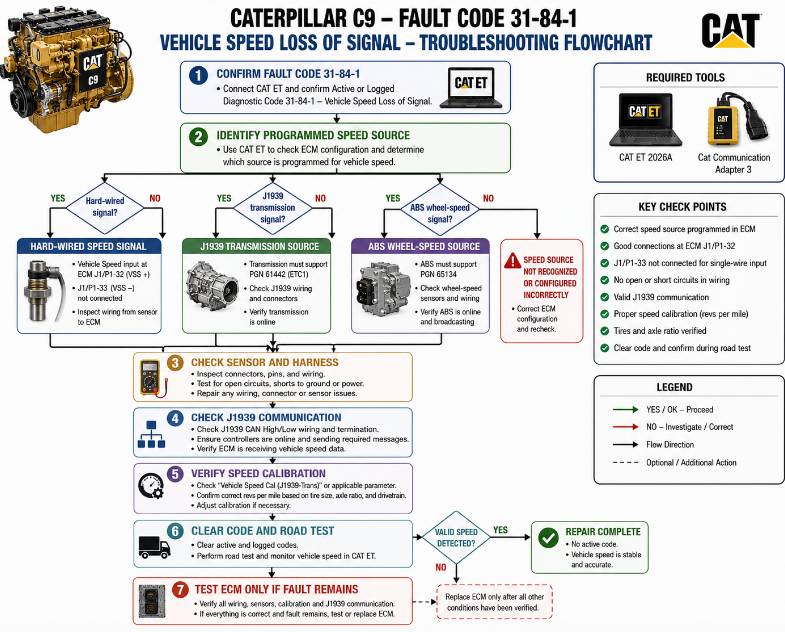
Replace the engine ECM only after confirming that:
- The vehicle speed sensor operates correctly
- The wiring and connectors pass all tests
- The correct speed source is programmed
- The calibration value is correct
- Required J1939 messages are present
- ECM power and ground circuits are stable
If all external circuits and parameter settings are correct but the ECM still fails to recognize a valid vehicle speed signal, further ECM testing or replacement may be required.
Conclusion
Caterpillar C9 fault code 31-84-1 is usually caused by a missing, invalid, or incorrectly configured vehicle speed signal.
Start by checking the ECM configuration with CAT ET. Then identify whether vehicle speed should come from the hard-wired input, the transmission controller, or the ABS controller. Inspect the related wiring, verify J1939 communication, and confirm that the vehicle speed calibration is correct.
A failed ECM is less common and should be considered only after all sensors, wiring, network communication, and programming settings have been verified.
FAQ
Q1: What does Caterpillar C9 fault code 31-84-1 mean?
A: Caterpillar C9 fault code 31-84-1 indicates that the engine ECM has lost or detected an invalid vehicle speed signal.
Q2: What causes CAT C9 vehicle speed signal loss?
A: Common causes include faulty speed sensors, damaged wiring, incorrect ECM calibration, J1939 communication problems, and incorrect vehicle speed source programming.
Q3: Can CAT ET diagnose Caterpillar C9 31-84-1 fault codes?
A: Yes. CAT ET with a compatible Caterpillar Communication Adapter can monitor vehicle speed parameters, ECM configuration, J1939 data, and calibration settings.
Q4: Should I replace the Caterpillar ECM for fault code 31-84-1?
A: ECM replacement should only be considered after verifying the sensor, wiring, vehicle speed source configuration, J1939 communication, and calibration values.