If you are working with Case IH, New Holland, or STEYR equipment, having dealer-level diagnostics and full repair information is essential.
Now available for 2026, CNH EST 9.14 (02.2026 update) combined with eTimGo 8.21 (2025.09) OFFLINE database gives you complete diagnostic, programming, and repair support — without needing an online dealer account.
CNH EST 9.14 (02.2026) – Dealer-Level Diagnostic Software
Version: 9.14
Update: February 2026
Size: 100GB
Region: All regions
OS Support: Windows 10 64-bit / Windows 11 64-bit PRO (Not compatible with Home Edition)
Languages: English, Italian, Russian, Polish, Spanish, French, Portuguese, German, Dutch, Danish
New Holland Electronic Service Tools (CNH EST v9.14) (v9.4, 9.5, 9.6) Engineering Diagnostic Software
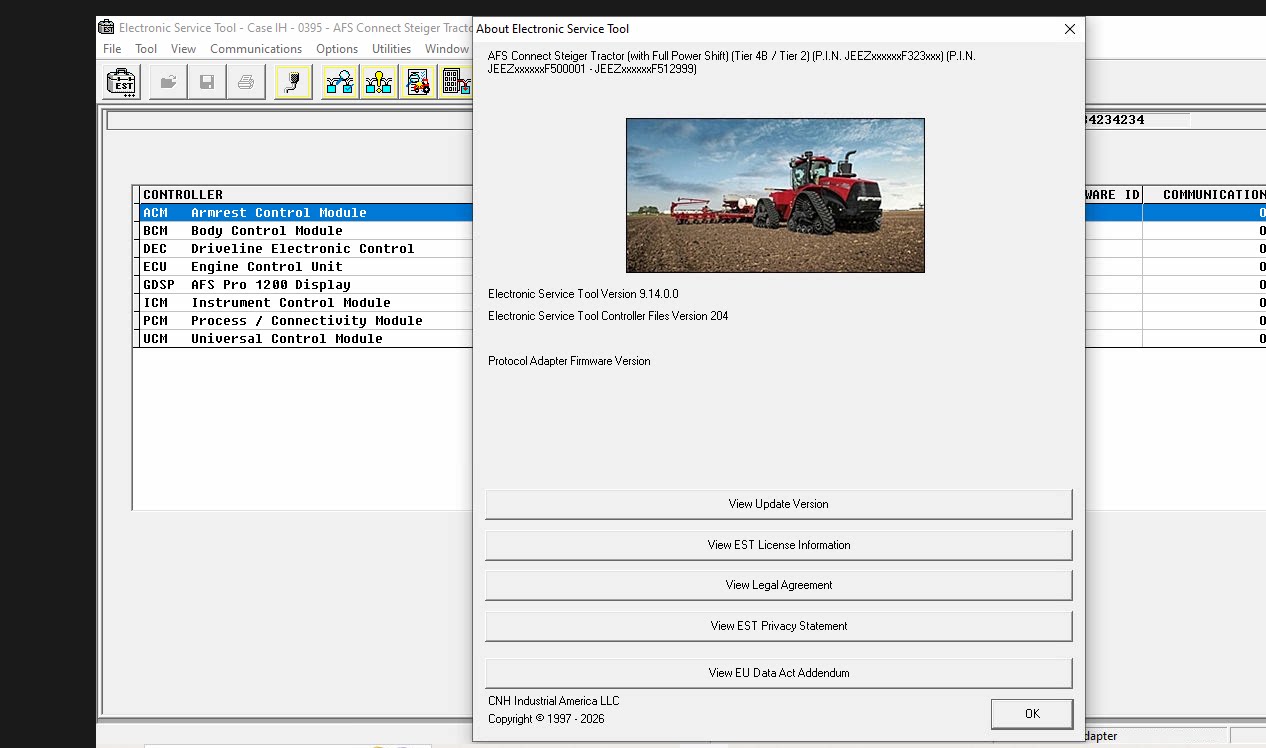
What Is CNH EST?
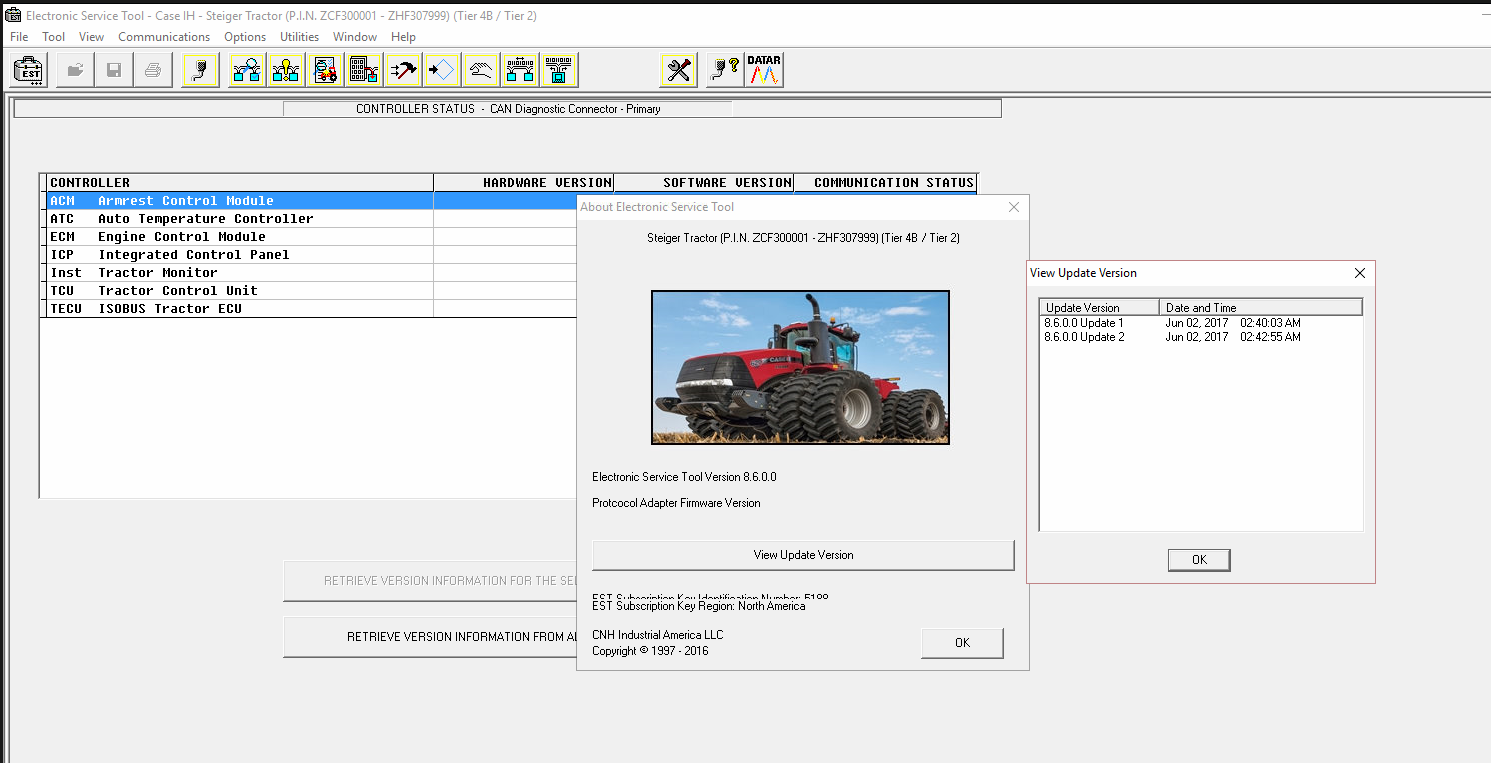
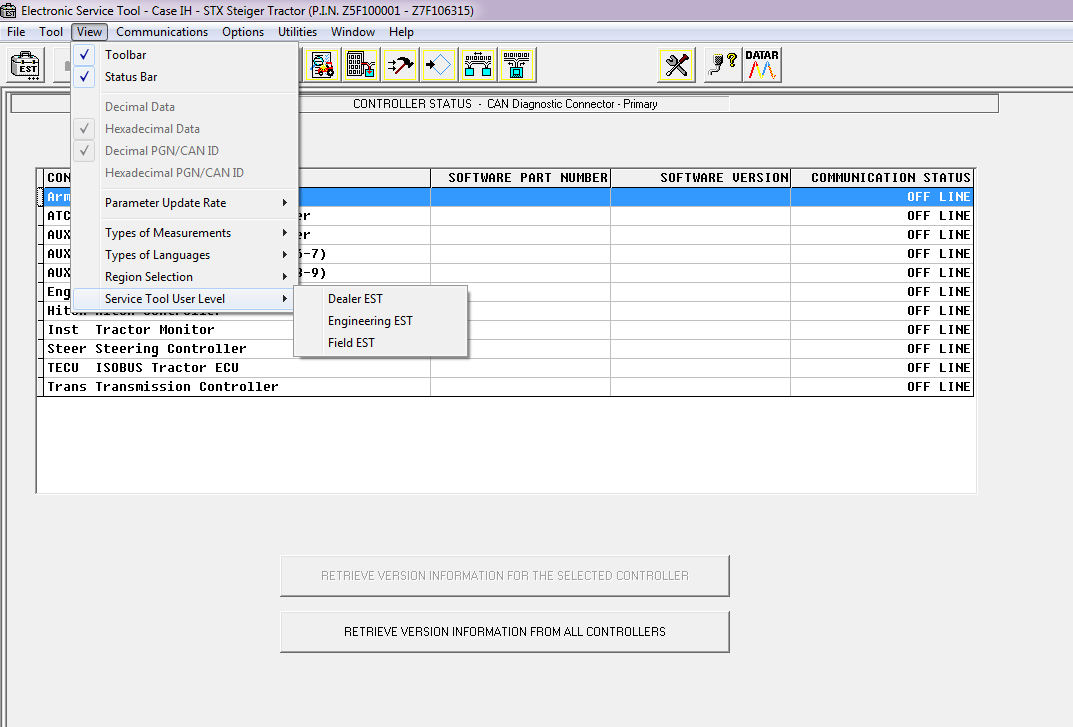
CNH Electronic Service Tool (EST) is the official diagnostic software used by dealer technicians. It connects to equipment via CAN BUS systems and provides engineering-level access for diagnostics, testing, and ECU programming.
This software is ideal for workshops, agricultural equipment technicians, and fleet maintenance professionals.CNH Electronic Service Tool 9.14 Diagnostic Software (EST) with Engineering Level – used by New Holland dealer technicians to connect with vehicles that have a Controller Area Network (CAN) BUS.The new version of New Holland CNH EST works with OS Windows 10 64-bit and Windows 11 64-bit PRO, except the Home edition).
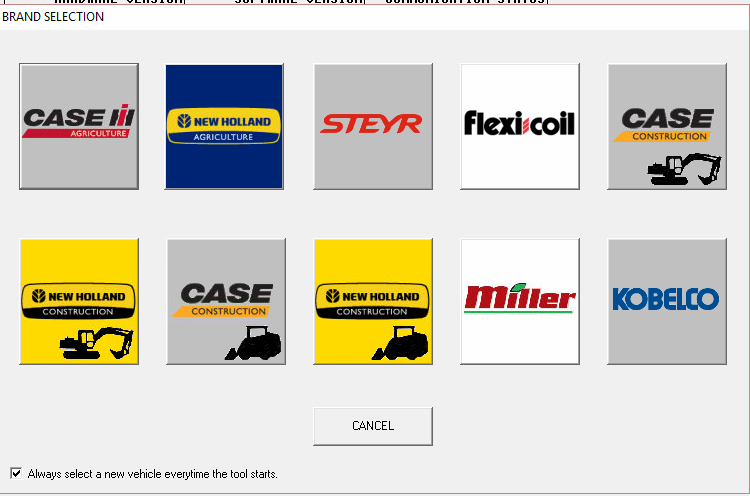
Supported Brands
CNH EST 9.14 supports:
-
Case IH Agriculture
-
Case Construction
-
New Holland Agriculture
-
New Holland Construction
-
STEYR
-
Flexi Coil
-
Miller
⚠️ Note: Kobelco is no longer included from version 9.9 onward. If you require Kobelco support, version 9.8 is available upon request.
CNH EST 9.14 Key Functions
With CNH EST, you can:
✔ Check live parameters
✔ Read and clear fault codes
✔ Perform diagnostic tests
✔ ECU programming and parameter configuration
✔ Monitor active and stored diagnostics
✔ Modify ECU configuration
✔ Access diagnostic procedures and schematics
✔ Perform troubleshooting
✔ Run scope diagnostics
Minimum Specifications:
Processor:Intel Core i5 6th gen Processor or higher (Laptop must be manufactured in last 5 years)
RAM Memory:8 GB or greater
Operating System:Windows 10 64-bit or Windows 11 64-bit
Hard Drive:512 GB or greater – Solid State Drive (SSD) is recommended for improved
Ports:One 9-pin Serial port (preferred) OR USB to RS-232 Converter – FTDI Chipset) 380003514
USB to RS232 adapter
Two USB ports • Ethernet port
WiFi 802.11b / g • Bluetooth • Mobile Wireless – Recommended
2026 latest Diagnostic Software New Holland Electronic Service Tool (CNH EST v9.14) Engineering Diagnostic Software
Type of catalogue: Diagnostic Software
Make: Case, New Holland
Region: WorldWide
languages: English, Italian, Russian, Polish, Spanish, French, Portuguese, German, Dutch, Danish.
Amount of disks: 100 Gb
OS: Windows 10 64 bit, Windows 11 64 bit, Windows 11 Pro 64 bit
CNH Electronic Service Tool 9.14 Diagnostic Software (EST) with Engineering Level – used by New Holland dealer technicians to connect with vehicles that have a Controller Area Network (CAN) BUS.The new version of New Holland CNH EST works with OS Windows 10 64-bit and Windows 11 64-bit PRO, except the Home edition).
Notice
Please make sure you have checked the minimum system requirements. If your laptop is unsuitable for CNH EST v9.14, we can install v9.4, which has lower hardware requirements.
for advanced dataset registration, many hidden options programming for vehicles, and raw message simulations.
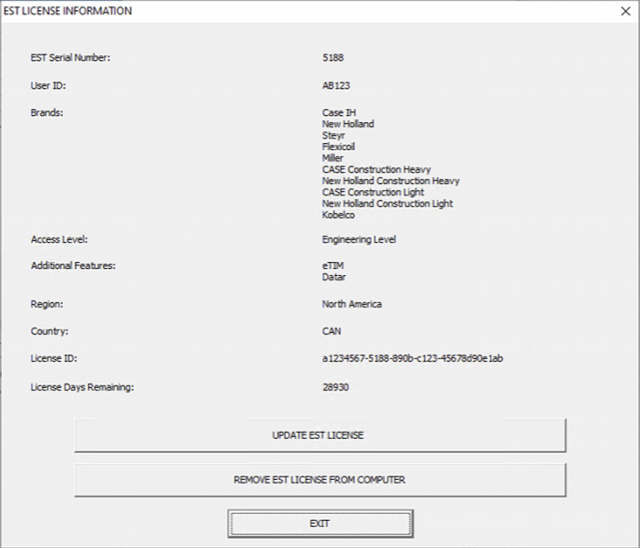
Electronic Service Tool Software Brands coverage:
– Case IH Agriculture
– Case Construction
– New Holland Agriculture
– New Holland Construction
– STEYR
– Flexi Coil
– Miller
– Kobelco (since the 9.9, update, this brand is no longer included; if you need it, we can offer the 9.8 version instead)
New Holland, Electronic Service Tool, allows you
• Check the status of parameters;
• Retrieve faults;
• Run diagnostic tests;
• Make ECU and parameter programming;
• Monitor active and logged diagnostics;
• View and change ECU configuration;
• View diagnostic procedures and schematics.
• Troubleshoot problems;
• Run scope diagnostics;
Optionally, you can purchase eTimGo for CNH EST for all brands OFFLINE, which is a completely offline repair and diagnostics information database, with PIN search support.
2025.09 eTimGo 8.21 for CNH EST All Brands OFFLINE Repair Manual
Size: Etimgo 250 Gb
Language: English
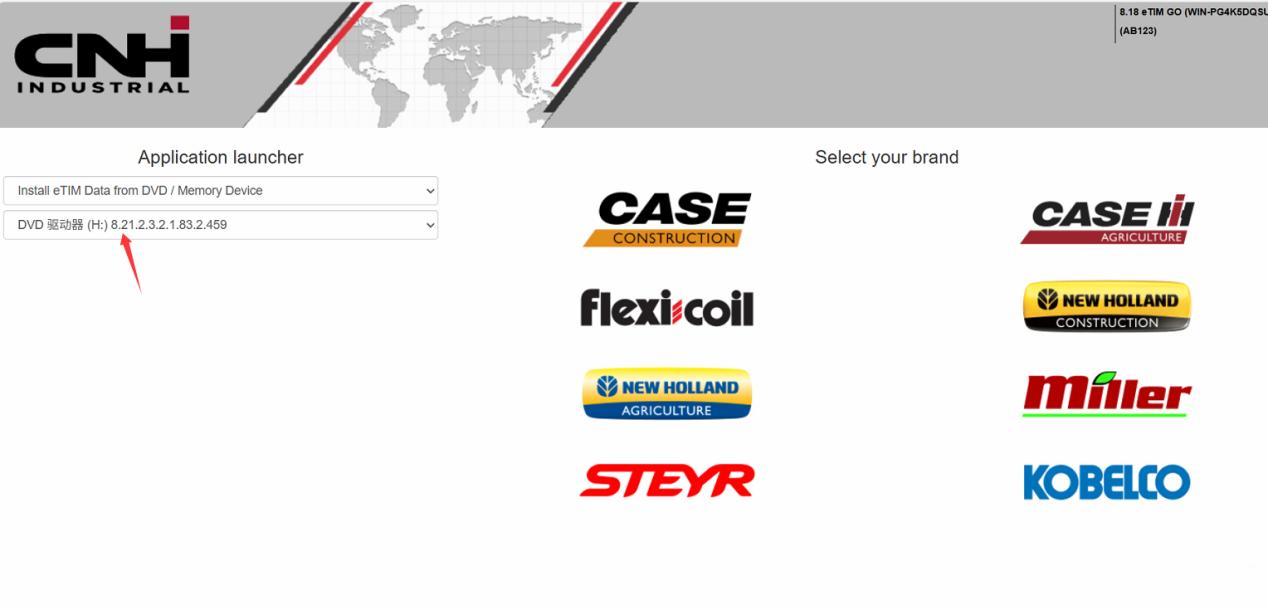
What eTimGo Includes
Depending on the model, the database may contain:
-
Fault Code Resolutions
-
Wiring Schematics
-
Complete Service Manuals
-
Installation Instructions
-
Operator Manuals
-
Knowledge Articles
-
Service Bulletins
-
Standard Repair Time (SRT)
-
Parts Catalogs (available for selected models)
📌 Note: Some model series may have incomplete information. The database is updated periodically. Contact us to confirm availability for a specific model.
Electronic Service Tool Software Brands coverage:
– Case IH Agriculture
– Case Construction
– New Holland Agriculture
– New Holland Construction
– STEYR
– Flexi Coil
– Miller
– Kobelco
Optionally, you can purchase eTimGo for CNH EST for all brands OFFLINE which is a completely offline repair and diagnostics information database. With PIN search support.
Why Choose CNH EST 9.14 + eTimGo 8.21?
✔ Dealer-level diagnostics
✔ Engineering programming access
✔ Complete OFFLINE repair database
✔ No subscription required
✔ Supports multiple agricultural & construction brands
✔ Perfect for professional workshops
Whether you’re troubleshooting fault codes, performing ECU programming, or searching for detailed wiring diagrams, this combination gives you full control over CNH equipment maintenance.
CNH EST Download Package v9.14 Contains:
CNH EST 9.14.0.0.1 installation file
CNH EST 9.14.0.0.2 update 1 file
Controller Package v170 (03/2025)
EASY Software installation package v18.1.1.0 (E.A.S.y – additional engine diagnostic tool for connection directly to ECU to perform diagnostic, programming, and ECU reload by K-Line protocol)
New Legacy Diagnostics database for Troubleshooting
Activation for a single computer
Teamviewer remote assistance with setup & activation
CNH EST Download Package v9.11 Contains:
CNH EST 9.11.0.0.1 installation file
CNH EST 9.11.0.0.2 update 1 file
CNH EST 9.11.0.0.3 update 2 file
Controller Package v154 (09/2024)
EASY Software installation package v18.1.1.0 (E.A.S.y – additional engine diagnostic tool for connection directly to ECU to perform diagnostic, programming, and ECU reload by K-Line protocol)
New Legacy Diagnostics database for Troubleshooting
Activation for a single computer
Teamviewer remote assistance with setup & activation
CNH EST Download Package v9.10 Contains:
CNH EST 9.10.0.0.1 installation file
CNH EST 9.10.0.0.2 (EST91000Up1) update
CNH EST 9.10.0.0.3 (EST91000Up2) update
CNH EST 9.10.0.0.4 (EST91000Up3) update
CNH EST 9.10.0.0.5 (EST91000Up4) update
CNH EST 9.10.0.0.6 (EST91000Up5) update
Controller Package v153 (09/2024)
EASY Software installation package v18.1.1.0 (E.A.S.y – additional engine diagnostic tool for connection directly to ECU to perform diagnostic, programming, and ECU reload by K-Line protocol)
New Legacy Diagnostics database for Troubleshooting
Activation for a single computer
Teamviewer remote assistance with setup & activation
The Software EST v9.9 Comes As:
CNH EST 9.9.0.0.1 installation file
CNH EST 9.9.0.0.2 (EST9900Up1) update
CNH EST 9.9.0.0.3 (EST9900Up2) update
CNH EST 9.9.0.0.4 (EST9900Up3) update
Controller Package v130 (01/2024)
EASY Software installation package v18.1.1.0 (E.A.S.y – additional engine diagnostic tool for connection directly to ECU to perform diagnostic, programming, and ECU reload by K-Line protocol)
New Legacy Diagnostics database for Troubleshooting
Activation for a single computer
Teamviewer remote assistance with setup & activation
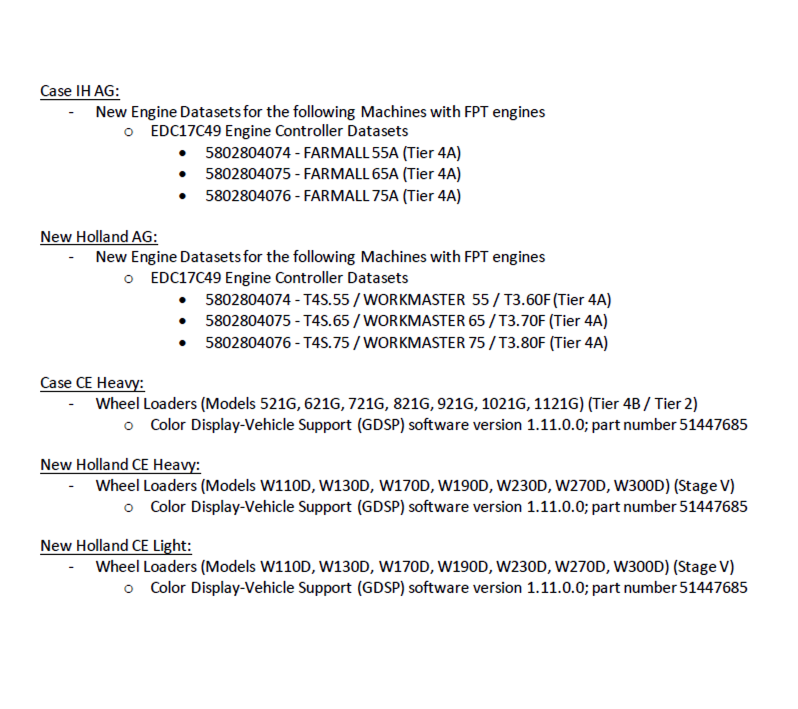
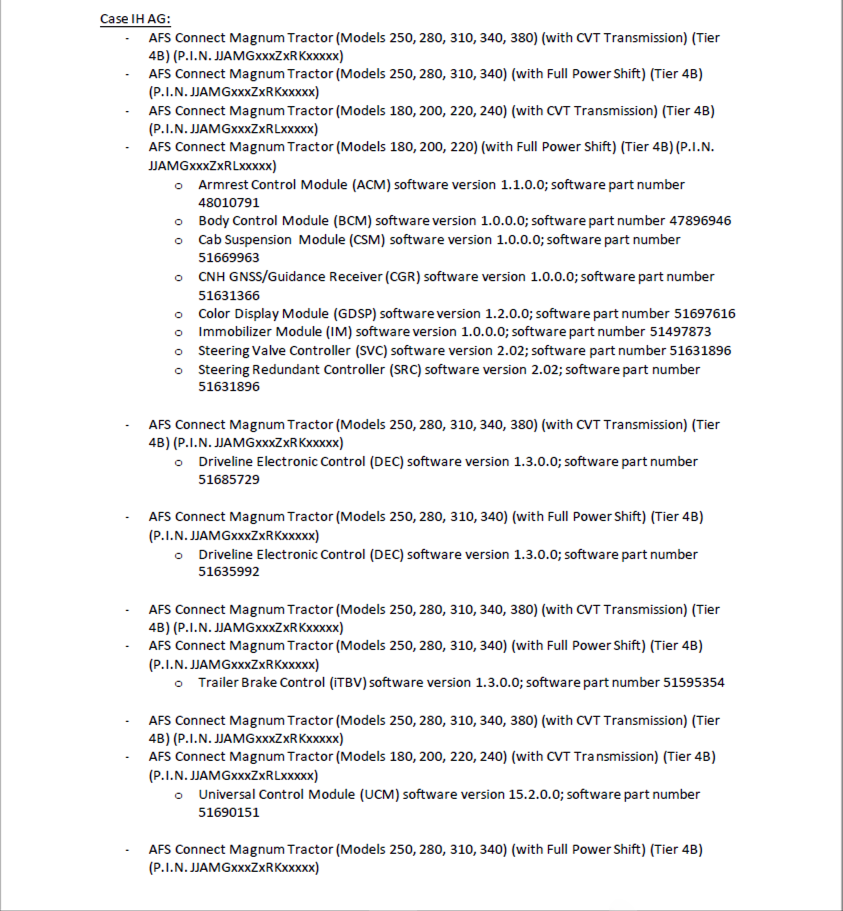
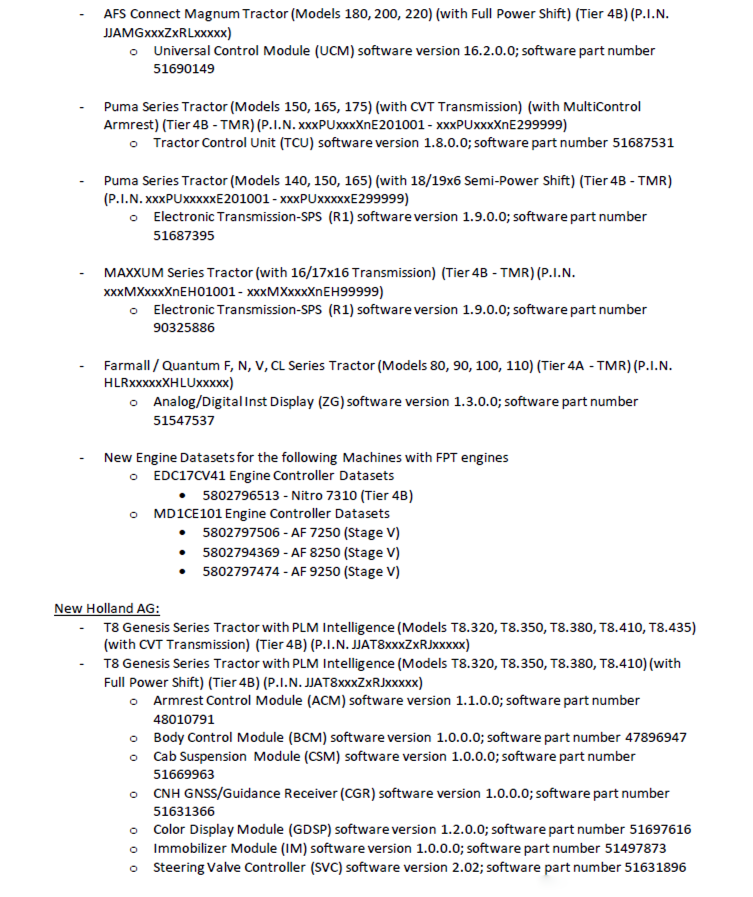
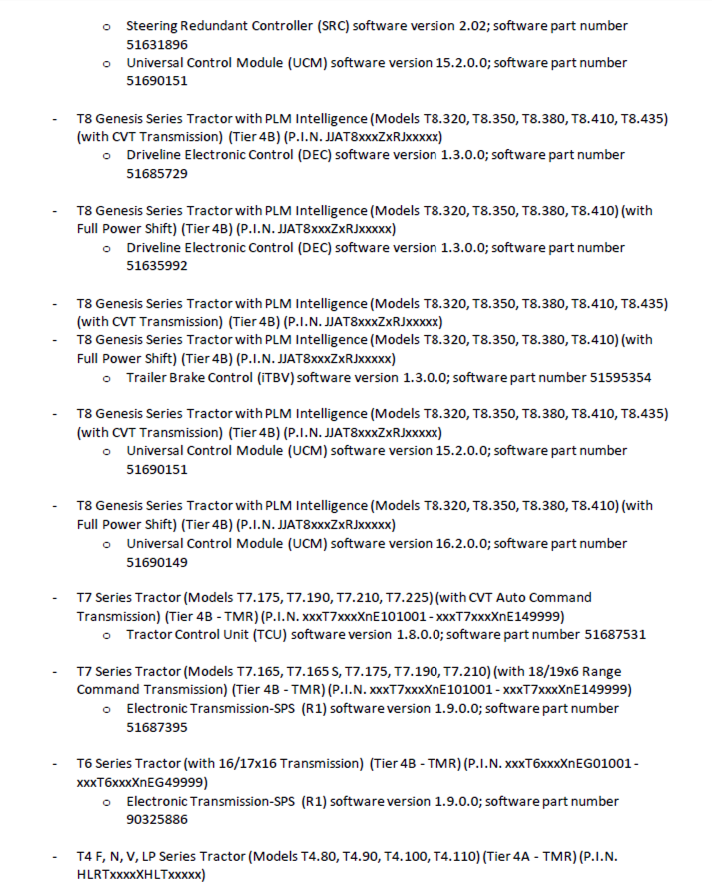
The release of the Electronic Service Tool (EST) 9.8.0.0 and new eTIM software includes several improvements to the service tool software. These changes include:
– EST PC Operating System (OS) and hardware requirements
– Windows 11 support
– EST Software Installation and licensing
– DPA5 Hardware and Firmware updates
– EASy ECU programming crashing
– New Models in EST9700
The software EST v9.8 comes as:
CNH EST 9.8.0.0.0 installation file,
CNH EST 9.8.0.0.2 (EST9800Up1) update,
CNH EST 9.8.0.0.3 (EST9800Up2) update,
CNH EST 9.8.0.0.4 (EST9800Up3) update,
CNH EST 9.8.0.0.5 (EST9800Up4) update,
CNH EST 9.8.0.0.6 (EST9800Up5) update,
CNH EST 9.8.0.0.7 (EST9800Up6) update
Controller Package v113 (09/2023),
EASY Software installation package (E.A.S.y – additional engine diagnostic and download tool for connection directly to ECU to perform diagnostic, programming and ECU reload by K-Line protocol),
New Legacy Diagnostics database for Troubleshooting,
PC locked activation
Teamviewer remote assistance with setup & activation
EST 9.8.0.0 New Features
– EST PC Operating System (OS) and hardware requirements
Minimum Specifications:
Processor:
Intel Core i5 6th gen Processor or higher (Laptop must be manufactured in last 5 years)
RAM Memory:
8 GB or greater
Operating System:
Windows OS: Windows 10 64-bit or Windows 11 64-bit
Hard Drive:
250 GB or greater – Solid State Drive (SSD) is recommended for improved performance
Ports:
One 9-pin Serial port (preferred) OR USB to RS-232 Converter – FTDI Chipset) 380003514
USB to RS232 adapter
Two USB ports • Ethernet port
WiFi 802.11b / g • Bluetooth • Mobile Wireless – Recommended
– Vehicle PIN Management
– Diagnostic Tool Manager (DTM)
– PRO 700 Plus / IntelliView IV Plus display support
– Engine download request faults update
– DATAR updates
– New Equipment selections in EST
– Straight Tracking Calibration
EST 9.7.0.0 New Features
The release of the Electronic Service Tool (EST) 9.7.0.0 and the new eTIM software includes several improvements to the service tool software. These changes include:
– EST PC Operating System (OS) and hardware requirements
– Windows 11 support
– EST Software Installation and licensing
– DPA5 Hardware and Firmware updates
– EASy ECU programming crashing
– New Models in EST9700
The software EST v9.7 comes as:
CNH EST 9.7.0.0.0 installation file,
CNH EST 9.7.0.0.2 (EST9700Up1) update,
CNH EST 9.7.0.0.3 (EST9700Up2) update,
CNH EST 9.7.0.0.4 (EST9700Up3) update,
CNH EST 9.7.0.0.5 (EST9700Up4) update,
Controller Package v91 (01/2023),
EASY Software installation package,
New Legacy Diagnostics database for Troubleshooting,
PC locked activation
Teamviewer remote assistance with setup & activation
The software EST v9.6 comes as:
CNH EST 9.6.0.0.0 installation file,
CNH EST 9.6.0.0.2 (EST9400Up1) update,
CNH EST 9.6.0.0.3 (EST9400Up2) update,
CNH EST 9.6.0.0.4 (EST9400Up3) update,
CNH EST 9.6.0.0.5 (EST9400Up4) update,
CNH EST 9.6.0.0.6 (EST9400Up5) update,
CNH EST 9.6.0.0.7 (EST9400Up6) update,
CNH EST 9.6.0.0.8 (EST9400Up7) update,
CNH EST 9.6.0.0.9 (EST9400Up8) update,
CNH EST 9.6.0.0.10 (EST9400Up9) update,
CNH EST 9.6.0.0.11 (EST9400Up10) update,
CNH EST 9.6.0.0.12 (EST9400Up11) update,
Controller Package v78 (08/2022),
EASY Software installation package,
New Legacy Diagnostics database for Troubleshooting,
PC locked activation
Teamviewer remote assistance with setup & activation
What’s new with EST 9.6.0.0
EST 9.6.0.0 New Features
The release of the Electronic Service Tool (EST) 9.6.0.0 includes several improvements to the service tool software. These changes include:
– EST PC Operating System (OS) and hardware requirements
Minimum Specifications:
Processor:
Intel Core i5 6th Gen Processor or higher (Manufactured in 2015 or later)
RAM Memory:
8 GB or greater
Operating System:
Windows OS: Windows 10 64-bit Note: A 64-bit operating system is mandatory
Hard Drive:
250 GB or greater – Solid State Drive (SSD) is recommended for improved performance
Ports required for adapter connection:
One 9 pin Serial port (preferred) OR USB to RS-232 Converter – (FTDI Chipset) 380003514 – USB to RS232 adapter
– New diagnostic adapter support
The EST9600 base software introduces support for a new diagnostic adapter to interface with CNHi equipment.
EST9600 will support both the DPA5 and CoreXS and allow for easy conversion between these two diagnostic adapters.
To view the connector selection with EST9600, click Communications in the top ribbon.
In the dropdown menu, hover over the Communications Adapter Selection.
– Legacy Diagnostics download and installation
The new legacy troubleshooting database is released and will be available with the EST9600 software.
What’s new with EST 9.5.0.0
The release of the Electronic Service Tool (EST) 9.5.0.0 and new eTIM software includes several improvements to increase the ability of the user to service and diagnose equipment. These changes include:
– EST PC OS and hardware requirements
– EST Software Installation
– Equipment Auto-Detection Support
– EASy Software Management
– EASy Injector Cutout Test Improvements
The software EST v9.5 comes as:
CNH EST 9.5.0.0.0 installation file,
CNH EST 9.5.0.0.2 (EST9400Up1) update,
CNH EST 9.5.0.0.3 (EST9400Up2) update,
CNH EST 9.5.0.0.4 (EST9400Up3) update,
CNH EST 9.5.0.0.5 (EST9400Up4) update,
CNH EST 9.5.0.0.6 (EST9400Up5) update,
CNH EST 9.5.0.0.7 (EST9400Up6) update,
CNHSupportUpdate_27790_3_2_10,
EasyNETMainProgram_27787_10_18_1,
ECM_MD1CS069_DA_FPT_27696_0_45_7,
EDC16C39_P_CNH_1_3_SETUP_28684_1_10_1,
EDC17CV41_CAN_D_CNH_Setup_29247_0_16_1,
EDC17CV41_DA_CNH_28427_1_4_6,
EDC17CV41_VECTOR_DatiMemorizzatiMuda_IV_setup_23505_1_19_6,
MD1_ET_28410_0_3_1,
MD1CS069_DatiMemorizzati_setup_27994_1_2_4,
MD1CS069_DB_27950_0_2_1,
MD1CS069_DB_28493_0_4_7,
16.1.1.0
EST Legacy Diagnostics package,
Vehicle Controller Files v67 (03/2022 date of update)
PC locked activation
Teamviewer remote assistance with setup & activation
The software EST v9.4 comes as:
CNH EST 9.4.0.0.0 installation file,
CNH EST 9.4.0.0.2 (EST9400Up1) update,
CNH EST 9.4.0.0.3 (EST9400Up2) update,
CNH EST 9.4.0.0.4 (EST9400Up3) update,
CNH EST 9.4.0.0.5 (EST9400Up4) update,
Vehicle Controller Files v46,
Legacy Multilanguage Diagnostic Procedures installer,
Optionally, by request, with Additional assistant Programs,
PC Locked Activation tool with the engineering access level.
The software EST v9.3 comes as:
CNH EST 9.3.0.0.0 installation file,
CNH EST 9.3.0.0.2 – 9.3.0.0.7 (EST9300Up5) updates,
Legacy Multilanguage Diagnostic Procedures installer,
Optionally, by request, with Additional assistant Programs,
PC Locked Activation tool with the engineering access level.
IMPORTANT NOTICE. Service Manuals and schemes are available only online.
In case if your PC/Laptop doesn’t fit with the minimum hardware requirements, we can offer the CNH EST v9.0 (2019/01), which is still compatible with 32-bit Windows and 3/4 GB of RAM. Please indicate the desired application version in the comments field. Or via the Contact Us form.
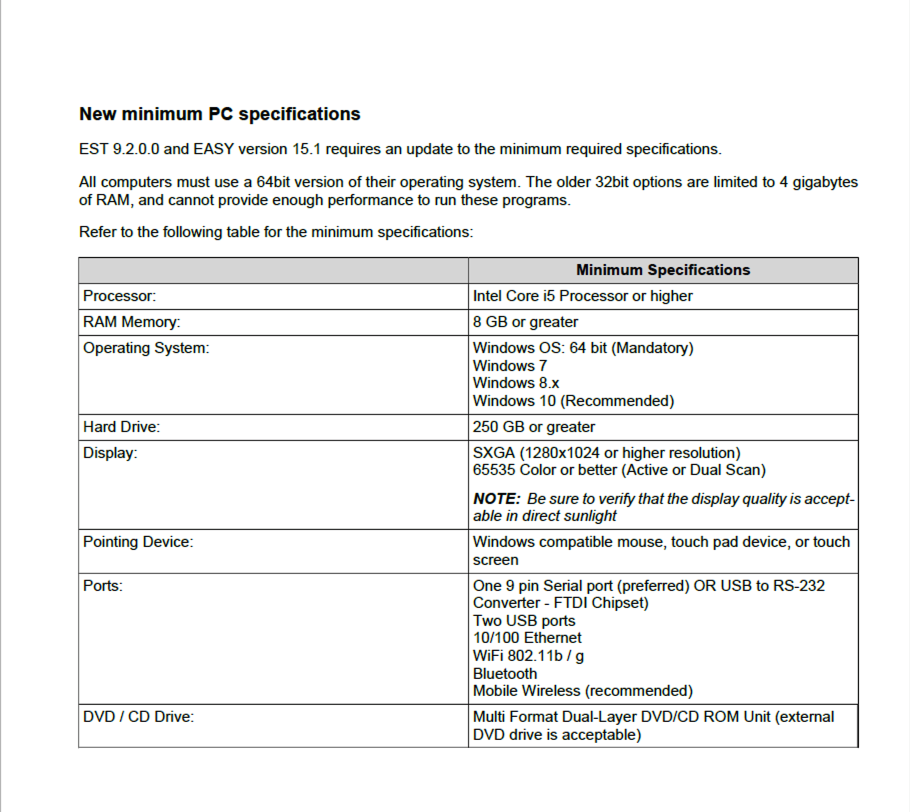
New minimum PC specifications
All computers must use a 64-bit version of their operating system. The older 32-bit options are limited to 4 gigabytes of RAM and cannot provide enough performance to run these programs.
Minimum Specifications
Processor: Intel Core i5 Processor or higher(manufactured in last 3 years);
RAM Memory: 8 GB or greater;
Operating System: Windows OS: 64-bit (Mandatory)
Windows 10 PRO (Recommended)
Hard Drive: 500 GB or greater;
Ports: One 9 pin Serial port (preferred) OR USB to RS-232
Converter – FTDI Chipset)
Two USB ports
10/100 Ethernet
WiFi 802.11b / g
Bluetooth
Mobile Wireless (recommended)
The following brands of the CNH group are covered:
New Holland (Agriculture and Construction)
New Holland FK (Fiat-Kobelco)
New Holland O&K (Orenstein & Koppel)
CASE (Agriculture and Construction)
STEYR
KOBELCO
Iveco (Astra) (articulated dump trucks only)
Flexi-Coil
Sumitomo (S.H.I.)
Link-Belt
The last version of CNH EST with technical documents is 7.6. If you need electrical schemes, please consider purchasing CNH EST 7.6 version on a virtual PC with Windows XP Works with any Windows platform.
CNH EST can be downloaded, or we can send it as a set of DVDs
We recommend using our free remote assistance with the setup and activation process.
If you have advanced Computer Skills, we can provide you with all the information for installation and activation.
Frequently Asked Questions (FAQ)
1. What is CNH EST 9.14?
CNH EST 9.14 (Electronic Service Tool) is dealer-level diagnostic software used for Case IH, New Holland, STEYR, and other CNH brands. It allows technicians to diagnose faults, perform ECU programming, monitor live data, and run system tests via CAN BUS communication.
2. Which operating systems are compatible with CNH EST 9.14?
CNH EST 9.14 supports:
-
Windows 10 64-bit (Professional version recommended)
-
Windows 11 64-bit PRO
⚠ Windows Home Edition is not supported.
3. Does CNH EST 9.14 require an internet connection?
No. The software can work offline once installed and activated. Internet is not required for daily diagnostics.
4. What brands are supported by CNH EST 9.14?
Supported brands include:
-
Case IH Agriculture
-
Case Construction
-
New Holland Agriculture
-
New Holland Construction
-
STEYR
-
Flexi Coil
-
Miller
Note: Kobelco is no longer included from version 9.9 onward.
5. What can CNH EST 9.14 do?
With CNH EST you can:
-
Read and clear fault codes
-
Monitor live parameters
-
Perform ECU programming
-
Run diagnostic tests
-
Configure ECU settings
-
Access wiring diagrams and procedures
-
Perform troubleshooting
6. What is eTimGo 8.21?
eTimGo 8.21 (2025.09) is a fully offline repair and diagnostic information database designed to work alongside CNH EST. It includes service manuals, wiring schematics, bulletins, operator manuals, and fault code repair procedures.
7. Is eTimGo completely offline?
Yes. eTimGo works 100% offline without subscription or dealer login.
8. What information does eTimGo include?
Depending on the model, eTimGo may provide:
-
Fault Code Solutions
-
Wiring Diagrams
-
Complete Service Manuals
-
Installation Instructions
-
Operator Manuals
-
Service Bulletins
-
Standard Repair Time (SRT)
-
Parts Catalogs (selected models)
9. Can I check if my specific machine model is supported?
Yes. Support may vary by model and series. It is recommended to confirm model compatibility before purchase.
10. Is this system suitable for professional workshops?
Yes. CNH EST 9.14 combined with eTimGo 8.21 is ideal for agricultural equipment technicians, construction machinery workshops, and fleet maintenance professionals needing dealer-level diagnostic and repair capabilities.