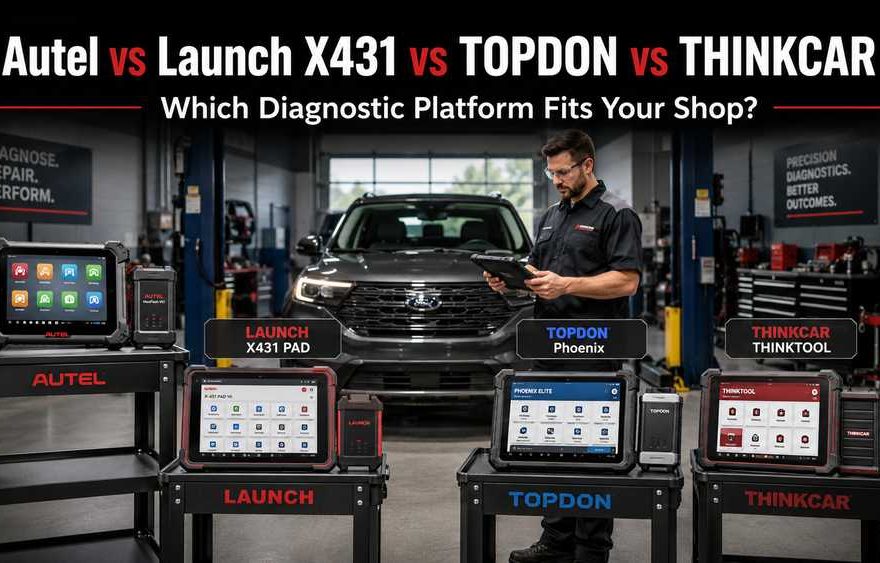
Choosing between Autel, Launch X431, TOPDON, and THINKCAR is not really about finding one universally “best” brand. The right diagnostic platform depends on the vehicles your shop services, the ECUs you work with, and whether your workflow requires full-system diagnostics, bi-directional testing, coding, ECU programming, electrical measurement, remote diagnosis, ADAS, immobilizer work, or heavy-duty expansion.
For most professional workshops, the safest buying process is:
Vehicle → ECU → Required Function → Communication Protocol → VCI Capability → Scanner Platform
Do not reverse that order.
A high-end scanner can communicate with many control modules and still lack one specific coding, calibration, or programming routine needed for a particular repair.
Quick Answer
Autel is particularly attractive for workshops that value integrated electrical measurement, especially with the MS919 and MaxiSYS Ultra. Launch X431 is strong when SmartLink, remote diagnosis, and modular expansion matter. TOPDON offers capable professional platforms with topology, programming, and optional heavy-duty or ADAS expansion. THINKCAR remains a flexible multi-brand ecosystem, but exact hardware and software coverage should be verified before purchase.
The better question is not:
Which brand is best?
It is:
Which platform can reliably complete the jobs my workshop actually receives?
Key Takeaways
- Autel MS906 Pro fits general professional diagnostics and bi-directional testing.
- Autel MS909 moves into advanced diagnostics, topology, and programming-oriented workflows.
- Autel MS919 and Ultra add integrated VCMI electrical measurement.
- Launch CRP919X BT is a cost-conscious professional full-system scanner.
- Launch PAD V and PAD VII focus strongly on SmartLink, advanced communication, and expansion.
- TOPDON Phoenix Smart and Phoenix Max compete directly in the professional segment with topology, programming, and optional expansion.
- THINKCAR offers a broad multi-brand ecosystem, but model, license, and regional coverage should be confirmed.
- Reading DTCs, active tests, coding, programming, calibration, and J2534 are separate functions.
- A tool supporting one vehicle brand does not guarantee every advanced function on every ECU.
- Confirm year, make, model, engine, VIN, ECU, and required function before ordering.
Who Is This Comparison For?
This guide is intended for:
- Professional automotive technicians
- Independent repair shops
- Mobile diagnostic technicians
- Fleet maintenance teams
- Advanced electrical diagnostic specialists
- Workshops planning to add coding or programming services
- Shops considering future heavy-duty, ADAS, or remote-diagnostic expansion
This guide focuses on professional multi-brand diagnostic platforms rather than basic code readers.
Who Should Not Choose Based on This Comparison Alone?
A multi-brand aftermarket scanner may not replace dedicated OEM or specialist equipment.
A Mercedes-Benz specialist may still require:
- Xentry
- OEM online access
- MB Star diagnostic hardware
A heavy-equipment technician may require dedicated software such as:
- CAT ET
- John Deere Service Advisor
- JCB ServiceMaster
- Deutz SerDia
An automotive locksmith may also require:
- Dedicated immobilizer programmers
- EEPROM/MCU tools
- Key-cutting equipment
- Manufacturer-specific security access
The four platforms compared here are primarily professional multi-brand diagnostic systems.
Define the Repair Job Before Comparing Scanner Brands
The most reliable way to compare Autel, Launch X431, TOPDON and THINKCAR is to describe the actual repair task.
Do not ask only:
Does this scanner support BMW?
Instead provide:
Year:
Make:
Model:
Engine:
VIN:
ECU/System:
Required Function:
Make:
Model:
Engine:
VIN:
ECU/System:
Required Function:
For example:
2021 BMW X5 G05, B58 engine, DME replacement — need coding and programming.
That request is specific enough to check actual function coverage.
Diagnostic Functions Are Not the Same
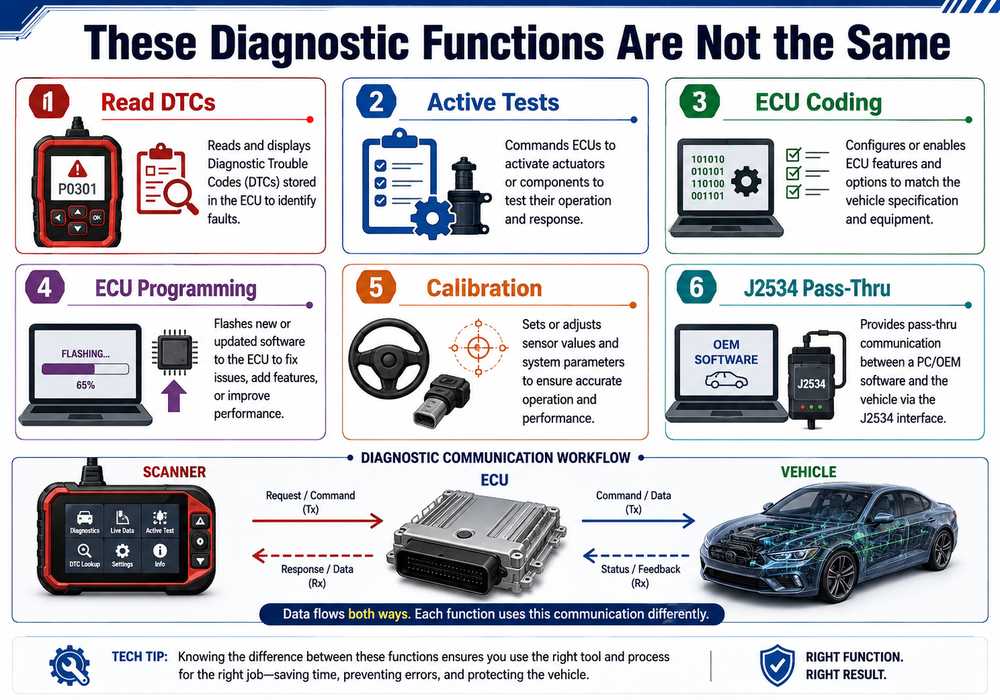
A common buying mistake is treating every advanced scanner feature as the same thing.
They are not.
Read and Clear Diagnostic Trouble Codes
Diagnostic Trouble Codes, or DTCs, do vehicle control modules store fault records.
A professional full-system scanner may communicate with:
- Engine Control Module
- Transmission Control Module
- ABS
- SRS
- Body Control Module
- HVAC
- Steering
- Parking systems
- ADAS
- Gateway modules
Reading a code identifies what the ECU has detected. It does not automatically identify the failed component.
A better workflow is:
Read Codes → Review Freeze Frame → Check Live Data → Test Circuit or Component → Repair → Clear Codes → Rescan
What Is a Bi-Directional or Active Test?
A bi-directional test allows the scanner to send a command to a supported ECU and operate a component.
Common examples include:
- Cooling fan
- Fuel pump
- EGR valve
- Purge solenoid
- Door locks
- Electronic parking brake
- Relays
This helps technicians determine whether the problem is in the command, wiring, or component.
For example:
Command Cooling Fan ON → Fan Does Not Run.
The next checks should include:
- Power supply
- Ground
- Relay
- Wiring
- Fan motor
Rather than immediately replacing a temperature sensor.
What Is ECU Coding?
ECU coding changes supported configuration settings inside a control module.
Coding may be required when:
- Installing a replacement module
- Configuring supported vehicle options
- Registering components
- Performing supported adaptations
Possible examples include:
- Injector coding
- Battery registration
- Variant configuration
- Replacement-module setup
Coding support depends on:
- Vehicle manufacturer
- Model year
- ECU
- Region
- Software version
A product page listing “ECU Coding” should never be interpreted as universal coding coverage.
What Is ECU Programming?
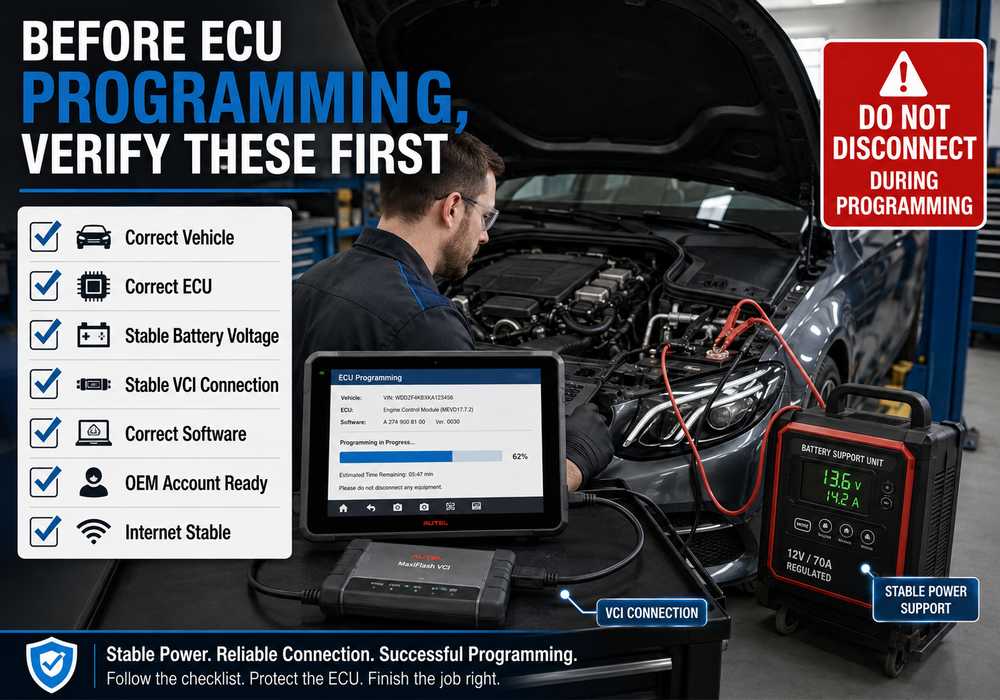
ECU programming, also called flashing, writes software, firmware, or calibration data into a control unit.
Programming may be required after:
- ECU replacement
- Manufacturer software update
- Calibration update
- Module recovery
- Certain service procedures
Programming carries more risk than reading codes because interrupted communication or unstable power can leave a control unit unable to communicate.
Before programming, confirm:
- Correct VIN
- Correct ECU
- Correct software
- Correct programming method
- Stable vehicle voltage
- Stable VCI communication
- Required internet access
- Required OEM subscription or account
Stop the Programming Procedure If:
- Vehicle voltage cannot be maintained.
- VCI communication repeatedly drops
- ECU identification is uncertain
- Calibration file is uncertain.
- Required OEM credentials are unavailable.
- USB, Ethernet, or Wi-Fi is unstable
Do not experiment with programming files on a customer vehicle.
What Is Calibration?
Calibration teaches a control system the correct reference position or relationship after repair.
Examples include:
- Steering Angle Sensor calibration
- Radar calibration
- Camera calibration
- Suspension ride-height calibration
Some calibration functions require physical equipment in addition to the diagnostic tablet.
For example, ADAS calibration can require:
- Calibration frame
- Targets
- Level workshop floor
- Correct alignment
- Specific software package
A scanner showing an ADAS menu does not mean the complete calibration system is included.
What Does J2534 Pass-Thru Mean?
SAE J2534 is a pass-thru communication standard.
A compatible J2534 interface can act as the communication bridge between:
Vehicle → VCI → Windows PC → OEM Software
J2534 does not automatically include:
- OEM software
- Manufacturer account
- Programming subscription
- Calibration files
- Security authorization
- Internet access
This distinction matters when comparing advanced scanners.
Why the VCI Matters More Than Tablet Specifications
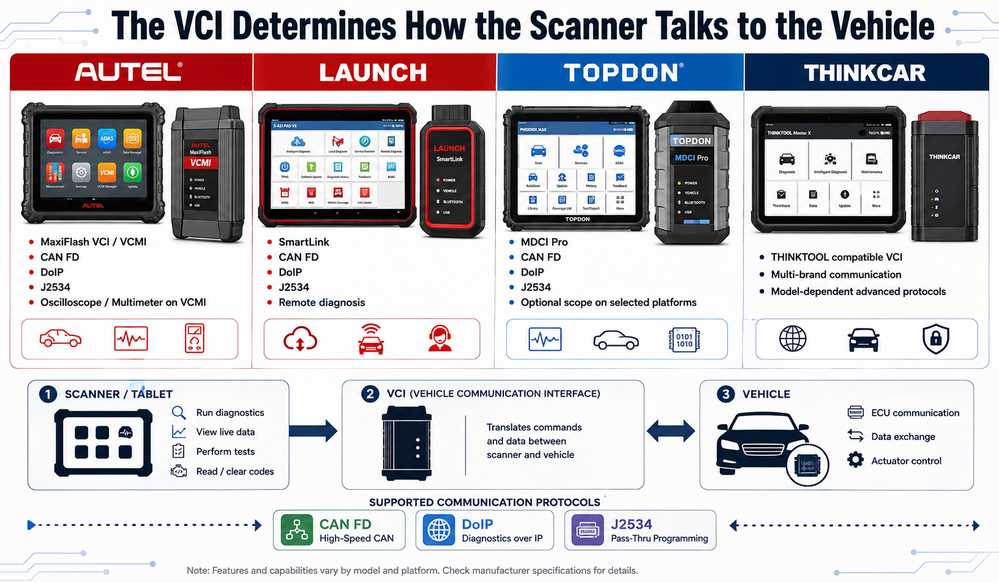
The Vehicle Communication Interface (VCI) determines how the scanner communicates with the vehicle.
On professional platforms, the VCI can also determine:
- CAN FD support
- DoIP support
- J2534 capability
- Remote diagnosis
- CAN BUS testing
- Oscilloscope functions
- Multimeter functions
For advanced workshops, the VCI can matter more than:
- Screen size
- Camera resolution
- Tablet storage
- Processor speed
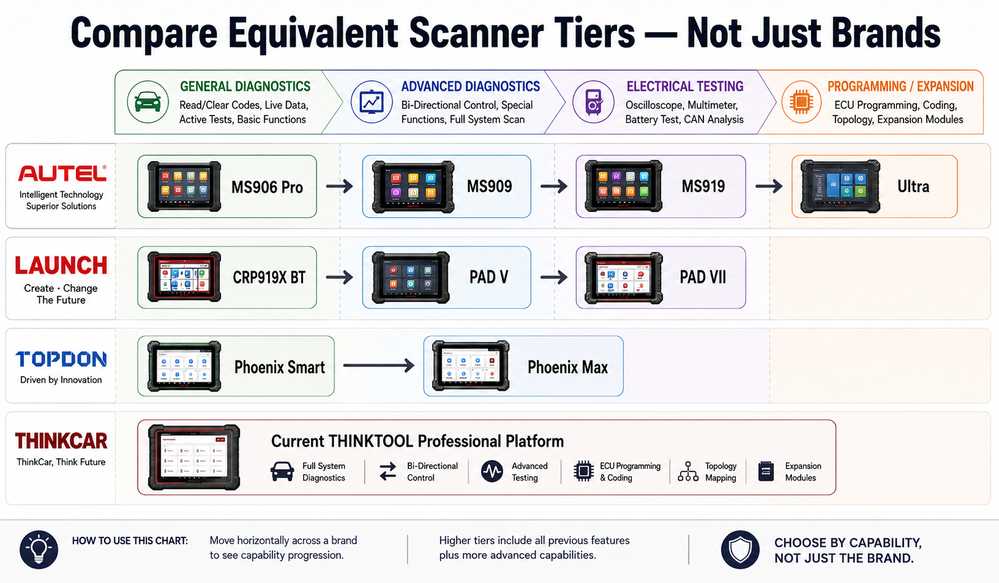
Autel: Where Does It Fit Best?
Autel provides a clear progression from general professional diagnostics to advanced electrical measurement.
The relevant models include:
- MS906 Pro
- MS909
- MS919
- MaxiSYS Ultra
Autel MaxiSYS MS906 Pro
The Autel MS906 Pro is a practical option for independent repair shops that mainly need:
- Full-system diagnostics
- Live data
- Active tests
- Service functions
- Supported coding
- Adaptations
It is best suited to general repair rather than advanced electrical measurement.
Good Fit For
- Independent shops
- Mobile technicians
- Multi-brand repair
- Bi-directional testing
- Everyday diagnostics
Less Suitable If You Regularly Need
- Oscilloscope testing
- CAN BUS signal analysis
- Frequent ECU flashing
- Advanced electrical measurement
Product
Autel MaxiSYS MS909
The Autel MS909 moves into advanced diagnostics and programming-oriented work.
It is better suited to shops that need:
- Full-system diagnostics
- Topology on supported vehicles
- Active tests
- ECU coding
- Programming workflows
- Modern vehicle communication protocols
The MS909 is an important step up from general diagnostic tablets, but it does not provide the same integrated electrical measurement workflow as the MS919 or Ultra.
Product
Autel MS919: When Electrical Testing Matters
The Autel MS919 becomes especially useful when technicians diagnose electrical circuits rather than only scan control modules.
Its VCMI-based workflow combines vehicle communication with measurement functions.
A more complete diagnosis can look like:
DTC → Live Data → Active Test → Measure Signal → Confirm Fault
This is useful when diagnosing:
- Intermittent sensors
- Power supply faults
- Ground problems
- CAN communication issues
- Actuator control problems
Product
Autel MaxiSYS Ultra
The Autel MaxiSYS Ultra is best suited to advanced workshops that will regularly use both diagnostic software and integrated electrical measurement.
It makes more sense when technicians frequently perform:
- Complex electrical diagnosis
- Network diagnosis
- ECU programming
- Topology-guided troubleshooting
- Multi-PID live-data analysis
- Oscilloscope testing
If the shop mainly performs routine scans and service resets, Ultra may provide more capability than necessary.
Product
Launch X431: Where Does It Fit Best?
Launch X431 is especially attractive when:
- SmartLink matters
- Remote diagnosis matters
- Newer communication protocols are required.
- J2534 pass-thru is important
- Future expansion is planned.
The relevant products include:
- CRP919X BT
- PAD V / PAD5
- PAD VII
Launch X431 CRP919X BT
The Launch CRP919X BT is best viewed as a professional general diagnostic scanner.
It is suitable for:
- Full-system scanning
- Live data
- Active tests
- Service functions
- Supported ECU coding
- Wireless communication
It should not automatically be treated as a replacement for PAD-series programming and expansion workflows.
Product
Launch X-431 PAD V / PAD5
The Launch X-431 PAD V / PAD5 is better suited to workshops that need an advanced SmartLink-based platform.
Potential uses include:
- Full-system diagnostics
- Advanced coding
- Programming workflows
- CAN FD
- DoIP
- J2534
- Remote diagnosis
- Topology on supported configurations
Important Compatibility Note
Several PAD V/PAD5 hardware versions exist.
Before ordering, confirm:
- Exact tablet version
- Included SmartLink version
- Software package
- Region
- Required ECU
- Required programming function
Product
Launch X-431 PAD VII
The Launch PAD VII is aimed at higher-end workshops that require:
- Advanced diagnostics
- Topology
- SmartLink
- Remote diagnosis
- CAN FD
- DoIP
- J2534
- Modular expansion
It may also offer a path toward commercial-vehicle diagnosis when the correct software, license, and cables are included.
Important
Do not assume every PAD VII package automatically includes:
- Heavy-duty software
- Truck cables
- Heavy-duty license
- Every SmartLink configuration
Confirm the exact package.
Product
TOPDON: Where Does It Fit Best?
TOPDON now competes directly in the professional diagnostic market rather than only as a lower-cost alternative.
Professional Phoenix platforms can include features such as:
- Full-system diagnostics
- Topology
- Online coding
- Programming-related workflows
- ADAS expansion
- Heavy-duty expansion
- Oscilloscope integration on selected models
TOPDON can make sense for workshops that want strong professional functionality with room to expand later.
Potential Good Fit
- Multi-brand independent shop
- Mobile diagnostic specialist
- Growing repair business
- Shop planning ADAS expansion
- Shop planning heavy-duty expansion
The exact Phoenix model, regional software package, and optional hardware should be confirmed before purchase.
THINKCAR: Where Does It Fit Best?
THINKCAR offers a broad diagnostic ecosystem covering passenger and, on selected platforms, commercial vehicles.
It can be attractive to:
- Multi-brand shops
- Workshops seeking modular expansion
- Technicians handling passenger and commercial vehicles
- Shops that value a broad software ecosystem
However, THINKCAR model names, hardware, and software packages can vary by region.
Before purchase, confirm:
- Exact THINKTOOL model
- Included VCI
- Software package
- Heavy-duty license
- Commercial-vehicle cables
- Update policy
- Regional coverage
Do not assume an older online specification applies to the current package.
Autel vs Launch X431 vs TOPDON vs THINKCAR: Practical Comparison
| Workshop Requirement | Autel | Launch X431 | TOPDON | THINKCAR |
| Full-system diagnostics | Strong | Strong | Strong | Strong |
| Bi-directional tests | Yes | Yes | Yes | Model dependent |
| Topology | Advanced models | PAD series | Phoenix models | Model dependent |
| ECU coding | Vehicle dependent | Vehicle dependent | Vehicle dependent | Vehicle dependent |
| ECU programming | Selected workflows | Selected workflows | Selected workflows | Verify |
| J2534 | Advanced VCI | SmartLink | Selected MDCI models | Verify |
| CAN FD | Advanced VCI | SmartLink | Selected models | Model dependent |
| DoIP | Advanced VCI | SmartLink | Selected models | Model dependent |
| Integrated oscilloscope | MS919 / Ultra | Usually separate | Selected Phoenix packages | Usually separate |
| Remote diagnosis | Platform dependent | Strong SmartLink focus | Model dependent | Model dependent |
| Heavy-duty expansion | Separate/specialized | Strong expansion path | Optional | Selected models |
| ADAS expansion | Optional | Optional | Optional | Optional |
| IMMO expansion | Separate ecosystem | Optional X-PROG3 | T-Ninja ecosystem | Optional modules |
Important: All advanced functions remain vehicle-, ECU-, software- and package-dependent.
Which Is Better for General Diagnostics?
For general repair work, scanner tier matters more than brand.
If your daily work is mainly:
- Check engine diagnosis
- ABS/SRS diagnosis
- Live data
- Service resets
- Active tests
- Common adaptations
then a mid-level professional scanner may provide better value than a flagship.
Good OBD2Tool options include:
Autel MS906 Pro
Launch CRP919X BT
Which Is Better for ECU Programming?
No brand should be considered universally best for ECU programming.
Programming support depends on:
- Vehicle manufacturer
- Model year
- ECU
- ECU software version
- Region
- Programming method
- OEM account requirements
The useful question is:
Can this exact scanner and VCI program this exact ECU on this exact vehicle?
not:
Does it program BMW?
ECU Programming Preparation Checklist
Before flashing a control unit:
- Confirm VIN
- Identify ECU
- Save diagnostic report
- Connect appropriate battery support.
- Verify VCI communication
- Confirm OEM software requirements.
- Confirm internet requirements
- Confirm programming file
- Close unnecessary software
Stop Programming If:
- Vehicle voltage becomes unstable.
- VCI repeatedly disconnects
- ECU identification is uncertain
- Programming file is uncertain.
- OEM session expires
- Communication becomes unstable
Which Is Better for Electrical Diagnostics?
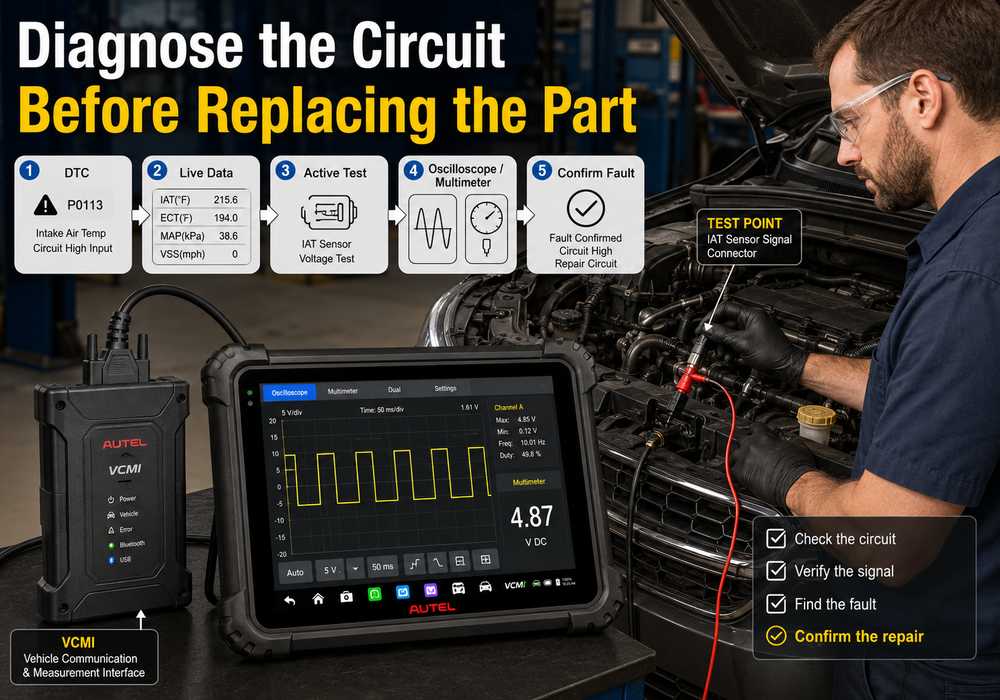
Among the OBD2Tool products listed here, Autel MS919 and MaxiSYS Ultra are especially relevant when electrical diagnosis is part of daily workshop work.
A circuit-level workflow may include:
Read DTC → View Live Data → Command Active Test → Measure Voltage/Signal → Confirm Failure.
This is useful for diagnosing:
- Sensor reference voltage
- Ground faults
- CAN BUS problems
- PWM signals
- Actuator control
- Intermittent faults
Do not replace the component named in a DTC until the circuit has been verified where appropriate.
Which Is Better for Remote Diagnosis?
Launch X431 has a particularly strong focus on SmartLink-based remote diagnosis in its higher-end PAD ecosystem.
Remote diagnostics can be useful for:
- Mobile repair technicians
- Multi-location workshops
- Remote expert support
- Specialist programming assistance
However, remote functionality depends on:
- Scanner package
- SmartLink version
- Network connection
- Software service
- Region
Which Is Better for Heavy-Duty Diagnostics?
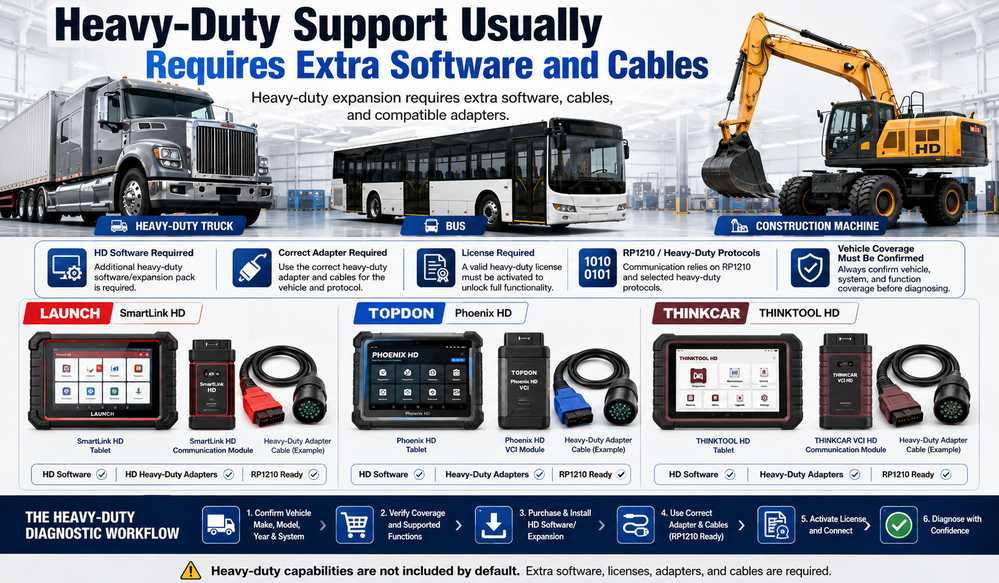
Launch, TOPDON and THINKCAR all offer routes into commercial-vehicle diagnostics on selected platforms.
However:
Passenger-car flagship does not automatically mean full heavy-duty coverage.
Heavy-duty diagnosis may require:
- Dedicated software
- Additional license
- Truck cables
- Specific VCI
- RP1210 support
- Brand-specific connectors
A shop servicing trucks, buses, or construction equipment should confirm these requirements separately.
Which Is Better for ADAS, TPMS and IMMO Expansion?
Advanced diagnostic platforms can often be expanded, but additional equipment is usually required.
ADAS
May require:
- Calibration frame
- Targets
- Software
- Proper alignment area
TPMS
May require:
- Dedicated sensor tool
- Sensor programming hardware
Immobilizer / Key Programming
May require:
- X-PROG3
- MaxiIM
- T-Ninja
- MCU/EEPROM tools
- Security authorization
Do not assume the diagnostic tablet alone includes all these functions.
Why a Diagnostic Scanner Sometimes Cannot Connect
A failed diagnostic session does not automatically mean the scanner is defective.
Communication can fail because of:
- Ignition position
- Wrong vehicle selection
- VCI power problem
- Bluetooth/Wi-Fi problem
- DLC fuse
- DLC ground
- Bent connector pins
- CAN network fault
- Security gateway
- Unsupported ECU
- Firmware mismatch
Diagnostic Communication Failure Priority Table
| Priority | Possible Cause | First Check |
| 1 | Ignition OFF | Switch ignition correctly |
| 2 | Wrong vehicle selected | Verify VIN/model |
| 3 | VCI not powered | Check VCI LEDs/power |
| 4 | Bluetooth/USB/Wi-Fi issue | Reconnect VCI |
| 5 | DLC fuse/power fault | Test DLC supply |
| 6 | Poor DLC ground | Check ground integrity |
| 7 | Damaged connector pins | Visual inspection |
| 8 | Firmware mismatch | Check updates |
| 9 | Security gateway restriction | Confirm authorization |
| 10 | CAN network fault | Perform network diagnosis |
| 11 | Unsupported ECU/function | Verify coverage |
| 12 | Failed ECU or VCI | Confirm with known-good equipment |
VCI Not Detected vs Vehicle Not Detected
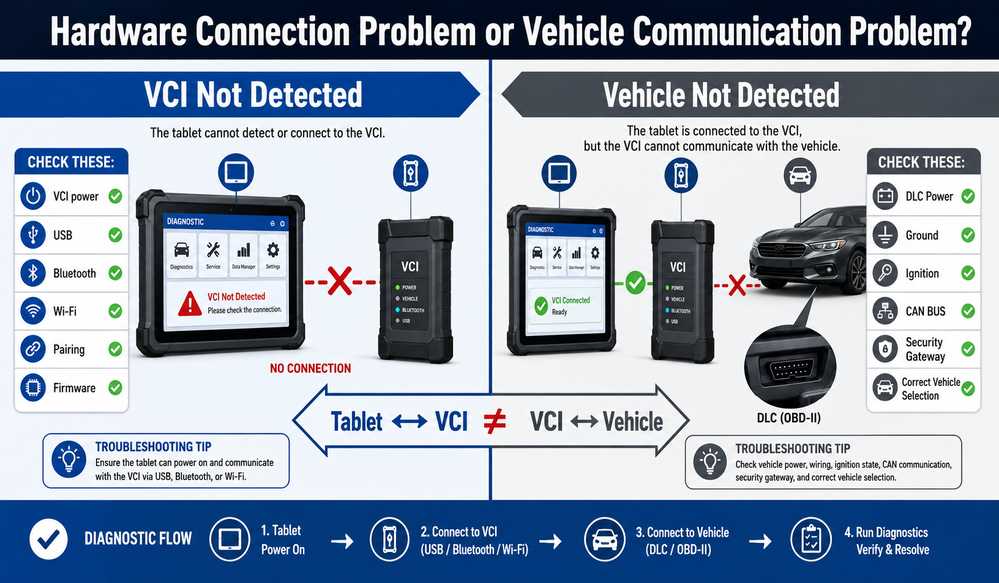
These are two different faults.
Case 1: Scanner Cannot Detect the VCI
The fault is between:
Tablet ↔ VCI
Check:
- VCI power
- USB cable
- Bluetooth pairing
- Wi-Fi connection
- Correct VCI selected
- Firmware
- Restart both devices
Case 2: VCI Is Detected, but Vehicle Is Not Detected
The fault is farther downstream:
VCI ↔ Vehicle
Check:
- Ignition ON
- Correct vehicle
- DLC power
- DLC ground
- Bent pins
- Required adapter
- CAN communication
- Security gateway
- Function coverage
A VCI appearing in the tablet only proves the tablet can see the interface.
It does not prove the vehicle network is communicating.
Basic DLC Checks Before Replacing a Scanner
Before assuming the scanner is defective:
- Inspect the diagnostic connector.
- Check the relevant fuse.
- Verify DLC power
- Verify ground
- Inspect CAN/network condition if required.
Use:
- Wiring diagram
- Multimeter
- Appropriate test equipment
Do not short DLC terminals during diagnosis.
Common Buying Mistakes
Mistake 1: Buying by Brand Name
“Supports Mercedes-Benz” is too broad.
Verify:
Mercedes-Benz + Model + Year + ECU + Function
Mistake 2: Buying the Highest-Priced Scanner Automatically
A general repair shop may get better value from:
- MS906 Pro
- CRP919X BT
than from Ultra or PAD VII.
Mistake 3: Ignoring the VCI
The VCI determines much of the platform’s real communication capability.
Mistake 4: Confusing Coding and Programming
Coding does not automatically mean ECU flashing.
Mistake 5: Assuming J2534 Includes OEM Access
J2534 does not include:
- OEM subscription
- OEM login
- Calibration files
- Security authorization
Mistake 6: Assuming ADAS Hardware Is Included
ADAS usually requires dedicated calibration equipment.
Mistake 7: Assuming Heavy-Duty Software Is Included
Check:
- License
- Cables
- VCI
- Target vehicle
- Software version
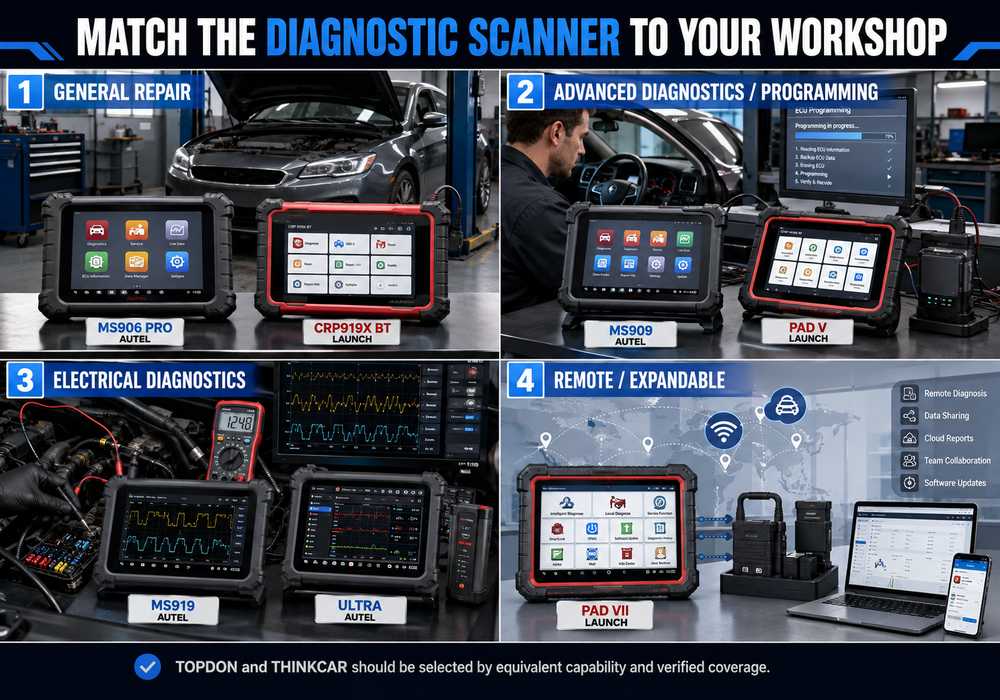
Which Diagnostic Tool Fits Your Workshop?
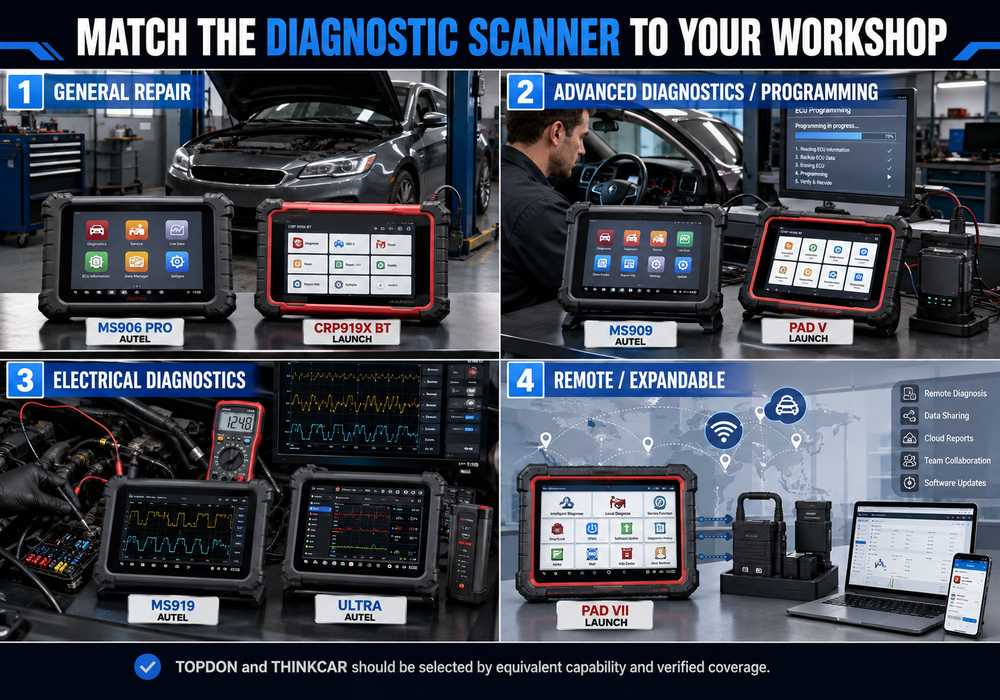
General Independent Repair Shop
Consider:
Autel MaxiSYS MS906 Pro
Launch X431 CRP919X BT
Best for:
- Full-system scans
- Active tests
- Live data
- General repair
- Service functions
Advanced Diagnostic / Programming Shop
Consider:
Autel MaxiSYS MS909
Launch X-431 PAD V / PAD5
Best when:
- Topology matters
- Programming is part of the workflow.
- Modern communication protocols are required.
- Higher-level coding is performed.
Electrical Diagnostic Specialist
Consider:
Autel MaxiSYS MS919
Autel MaxiSYS Ultra
Best for technicians who regularly need:
- Oscilloscope
- Multimeter
- Signal analysis
- CAN BUS diagnosis
- Circuit-level confirmation
SmartLink / Remote / Expandable Workshop
Consider:
Launch X-431 PAD VII
Especially if:
- SmartLink matters
- Remote diagnosis is required.
- Advanced communication protocols are important.
- Future expansion is planned.
Product Compatibility Recommendation
Before ordering any advanced diagnostic tool, provide:
Year + Make + Model + Engine + VIN + ECU/System + Required Function
Examples:
2019 Mercedes-Benz Sprinter — need SCR adaptation.
2022 BMW G05 — need DME programming.
2021 Ford F-150 — need fuel-pump active test.
This is much more reliable than choosing a scanner only from its supported-brand list.
Final Diagnostic Verification Checklist
After diagnosis or repair:
Clear repaired DTCs
Cycle ignition if required
Perform full-system rescan
Confirm no relevant active faults.
Review live data
Perform active test when appropriate.
Complete adaptation/calibration if required
Save final diagnostic report.
Road test when safe
Recheck fault memory
A repair should not be considered complete just because the dashboard warning lamp has turned off.
Frequently Asked Questions
Which Is Better: Autel, Launch X431, TOPDON or THINKCAR?
There is no universal winner. Autel is especially attractive for integrated electrical measurement at the MS919 and Ultra level. Launch X431 is strong in SmartLink and remote expansion. TOPDON offers capable Phoenix platforms with programming and optional expansion, while THINKCAR offers a broad multi-brand ecosystem. Exact function coverage should decide the purchase.
Is Autel Better Than Launch X431?
Not universally. Autel MS919 and Ultra are particularly useful for integrated electrical diagnosis, while Launch PAD-series scanners are attractive when SmartLink, remote diagnosis, and modular expansion matter.
Is TOPDON as Capable as Autel or Launch?
TOPDON’s professional Phoenix platforms offer features such as full-system diagnostics, topology, coding and programming-related workflows. Some higher-end models can also expand into ADAS, heavy-duty diagnostics, or oscilloscope work depending on the package.
Is THINKCAR Good for Heavy-Duty Diagnostics?
Selected THINKCAR platforms support commercial-vehicle software. Exact hardware, license, cables and vehicle coverage should be verified before purchase.
Which Scanner Is Best for ECU Programming?
No scanner is universally best. Programming support depends on manufacturer, ECU, year, region, software version and programming method. Verify the exact ECU function before purchase.
Which Scanner Is Best for Electrical Diagnostics?
Among the OBD2Tool products discussed here, Autel MS919 and MaxiSYS Ultra are especially suited to electrical diagnosis because their VCMI workflow integrates vehicle communication and measurement functions.
Does J2534 Mean a Scanner Can Program Every Vehicle?
No. J2534 provides pass-through communication capability. OEM software, subscriptions, accounts, calibration files, and security authorization may still be required.
Do Professional Shops Need More Than One Scanner?
Some multi-brand workshops eventually use more than one diagnostic ecosystem because no aftermarket scanner should be assumed to provide every advanced coding, programming, and calibration function on every vehicle.
Final Verdict
The most useful scanner is not automatically the most expensive one and not necessarily the most popular brand.
A practical shortlist is:
| Workshop Need | Recommended Type |
| General professional diagnostics | MS906 Pro / CRP919X BT |
| Advanced diagnosis and programming | MS909 / PAD V |
| Electrical diagnosis | MS919 / Ultra |
| SmartLink / remote / expansion | PAD VII |
| TOPDON ecosystem | Phoenix Smart / Phoenix Max class |
| THINKCAR ecosystem | Verify current THINKTOOL platform |
The final decision should always be based on:
Vehicle → ECU → Required Function → VCI → Software → Scanner
not:
Brand → Price → Screen Size
Need Help Choosing a Professional Diagnostic Scanner?
Before ordering, send OBD2Tool:
Year + Make + Model + Engine + VIN + ECU/System + Required Function
Then compare:
- Full-system coverage
- Active tests
- ECU coding
- ECU programming
- CAN FD
- DoIP
- J2534
- VCI capability
- ADAS requirements
- Heavy-duty expansion
You can start with these professional diagnostic tools:
- Autel MaxiSYS MS906 Pro
- Autel MaxiSYS MS909
- Autel MaxiSYS MS919
- Autel MaxiSYS Ultra
- Launch X431 CRP919X BT
- Launch X-431 PAD V / PAD5
- Launch X-431 PAD VII
Always confirm the exact vehicle, ECU, communication protocol, software package, and target function before purchasing.