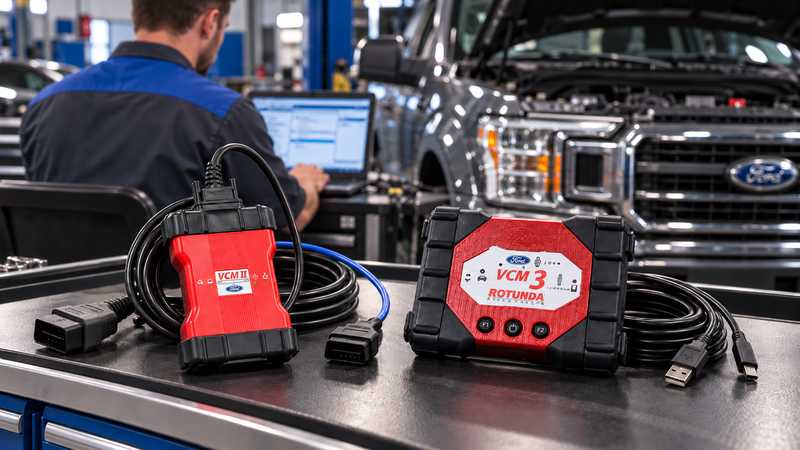
Choosing a Ford diagnostic tool isn’t as simple as buying a VCM interface and installing IDS.
Ford workshops today may encounter several diagnostic environments, including IDS, FDRS, and FJDS, while hardware options include older VCM II interfaces and newer VCM III hardware.
So which combination should you use?
For many older Ford vehicles, IDS + VCM II remains a practical diagnostic setup. For newer platforms, especially vehicles using newer network architectures such as CAN-FD, FDRS + VCM III is generally the better option.
This guide explains how IDS and FDRS differ, where VCM II still makes sense, and when upgrading to VCM III is the better choice.
Quick Answer: IDS, FDRS, VCM II or VCM III?
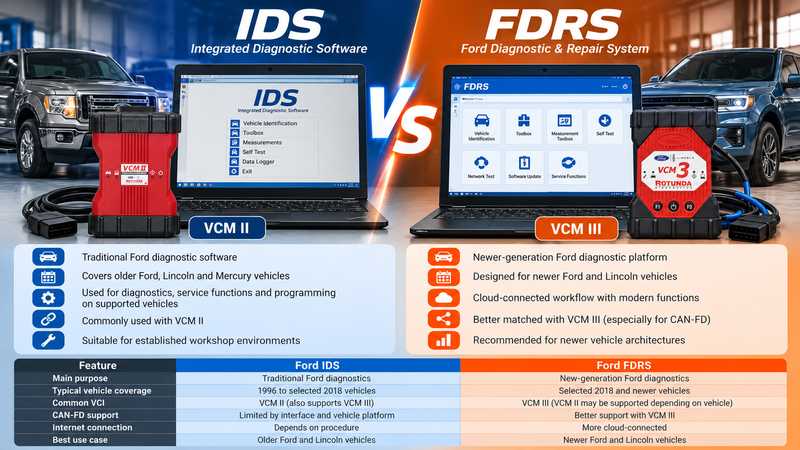
Use this table as a starting point:
| Diagnostic Situation | Recommended Direction |
|---|---|
| Older Ford/Lincoln vehicle | IDS + VCM II |
| Existing IDS workshop environment | VCM II can remain practical |
| Selected newer Ford platform | FDRS |
| Newer vehicle with CAN-FD | VCM III preferred |
| Workshop regularly servicing newer Ford models | VCM III |
| Unsure about vehicle compatibility | Confirm model, year, VIN and required function |
What Is Ford IDS?
IDS — Integrated Diagnostic Software — is Ford’s long-established factory diagnostic platform.
It is commonly associated with older and traditional Ford diagnostic applications and can provide functions such as:
- Reading and clearing DTCs
- Vehicle identification
- Live data monitoring
- Active tests
- Service procedures
- Module configuration
- Module programming on supported vehicles
- Network and ECU diagnostics
For technicians who regularly work on older Ford and Lincoln vehicles, IDS remains an important diagnostic environment.
Typical IDS Diagnostic Workflow
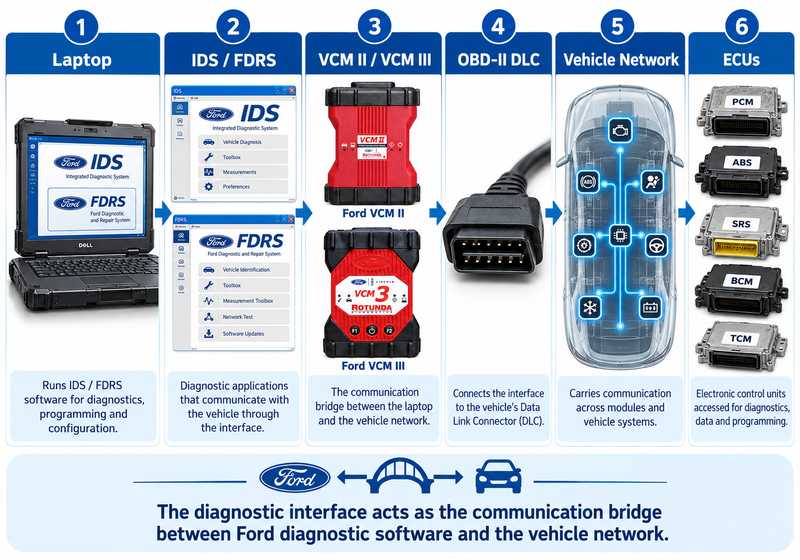
A traditional VCM II setup looks like this:
Laptop → IDS → VCM II → OBD-II DLC → Vehicle ECUs
This is one of the main reasons VCM II remains useful in independent Ford repair workshops.
Where Does Ford VCM II Fit?
Ford developed VCM II as a dedicated Vehicle Communication Interface, and it became widely used with IDS.
For workshops already servicing vehicles within the traditional IDS environment, VCM II can still provide a practical solution.
VCM II is best suited for:
- Older Ford vehicles
- Older Lincoln vehicles
- Traditional IDS diagnostics
- Existing workshop IDS installations
- DTC diagnosis and live data
- Supported service functions
- Supported ECU programming and configuration
However, VCM II should not be treated as the ideal interface for every current Ford vehicle.
Newer vehicle architectures can require newer communication capabilities.
Ford VCM II for IDS-Based Diagnostics
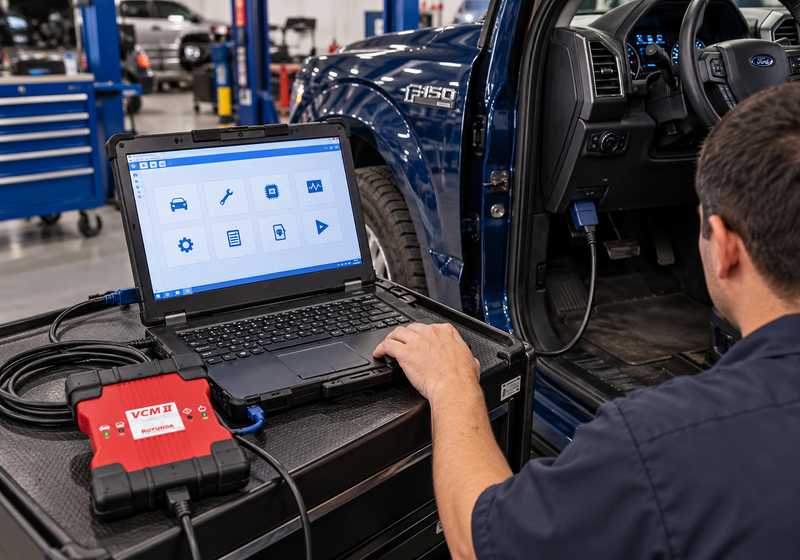
If your workshop mainly repairs older Ford vehicles and uses IDS, the Ford VCM II diagnostic interface can still be a cost-effective choice.
It is especially suitable for technicians with an established IDS-based workflow who do not regularly work on the newest Ford electrical architectures.
View Ford VCM II Diagnostic Tool:
https://www.obd2tool.com/goods-4733-Best-Quality-Ford-VCM-II-Ford-VCM2-Diagnostic-Tool.html
When VCM II Makes Sense
Choose VCM II when:
- Most of your vehicles are older Ford models
- You mainly use IDS
- Your workshop already has an IDS-compatible laptop
- You need a dedicated Ford interface
- Your required functions are supported by the vehicle and software combination
If your work is increasingly moving toward newer Ford vehicles, however, VCM III deserves serious consideration.
What Is Ford FDRS?
FDRS — Ford Diagnostic & Repair System — is Ford’s newer diagnostic platform.
Ford introduced it as it moved to more modern electrical architectures and newer diagnostic workflows.
FDRS is commonly associated with newer Ford and Lincoln vehicles and can provide functions such as:
- Vehicle identification
- Diagnostic trouble code analysis
- Guided diagnostic routines
- ECU data monitoring
- Module testing
- Software installation
- Module programming
- Vehicle configuration
- Network diagnostics
Unlike the traditional IDS environment, FDRS uses a more modern and increasingly connected diagnostic workflow.
Does VCM II Work With FDRS?
You may still encounter VCM II in some FDRS applications.
However, that doesn’t mean VCM II is the best interface for every FDRS-supported vehicle.
The limitation is primarily hardware generation.
Newer Ford vehicles increasingly use newer communication protocols and faster vehicle networks.
This is where VCM III becomes more relevant.
A safer way to think about it is:
VCM II may still work in supported FDRS environments, but VCM III is generally the better hardware choice for technicians working regularly on newer Ford platforms.
Don’t assume every new Ford vehicle can be fully diagnosed or programmed through VCM II.
What Is Ford VCM III?
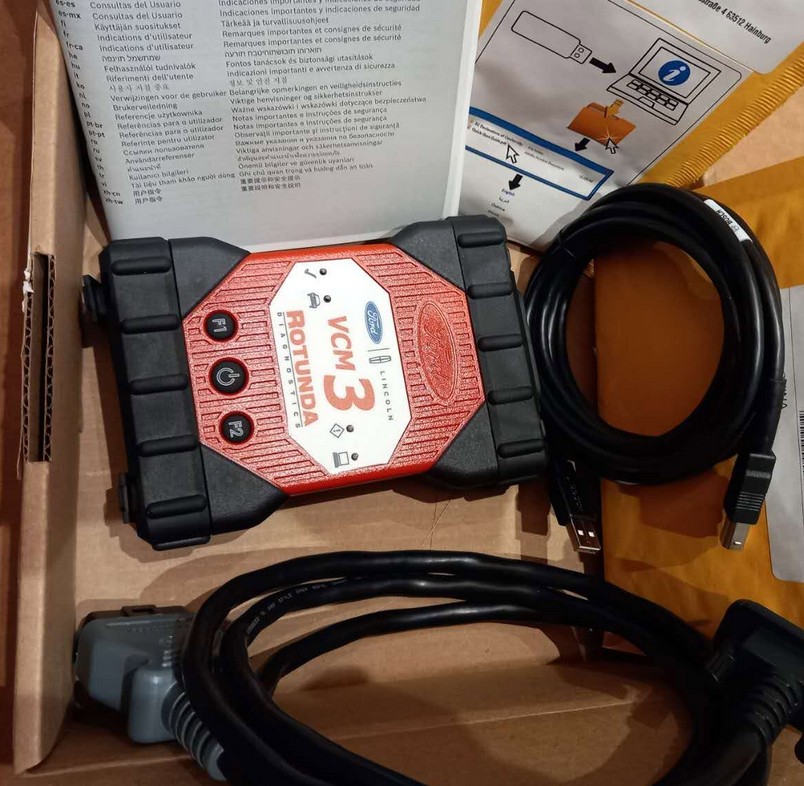
VCM III is the newer generation Ford Vehicle Communication Interface.
It was developed for newer Ford diagnostic environments and newer vehicle network requirements.
Compared with VCM II, VCM III is a better long-term option for workshops that increasingly work on newer Ford and Lincoln vehicles.
VCM III Is Better Suited for:
- Newer Ford platforms
- FDRS diagnostic workflows
- Newer electrical architectures
- CAN-FD communication
- Modern ECU programming environments
- Workshops that want newer-generation Ford hardware
Why CAN-FD Matters
One of the most important reasons to consider VCM III is CAN-FD.
Traditional CAN networks have been widely used for automotive communication for many years.
CAN-FD allows:
- Higher data throughput
- Larger data frames
- Faster communication
- Improved support for newer vehicle networks
As vehicle modules become more complex, faster communication becomes increasingly important for:
- ECU programming
- Module software installation
- Network diagnostics
- New-generation vehicle platforms
VCM II was designed before CAN-FD became common.
VCM III is therefore a better choice for newer Ford systems that require CAN-FD communication.
Ford VCM III for Newer Ford Diagnostics
If your workshop regularly services newer Ford or Lincoln vehicles, the Ford VCM III diagnostic interface is the more future-oriented option.
It is especially worth considering when your work involves newer platforms, FDRS or CAN-FD networks.
View Original Ford VCM III Diagnostic Tool:
https://www.obd2tool.com/goods-10655-Original-Ford-VCM-III-Ford-VCM-3-Diagnostic-Tool.html
When VCM III Makes More Sense
Choose VCM III if:
- You work on newer Ford vehicles regularly
- You expect to use FDRS more often
- CAN-FD communication is required
- You perform frequent ECU programming
- You want a newer Ford-specific VCI
- You want to reduce future hardware compatibility limitations
For a workshop servicing both old and new Ford vehicles, it can make sense to keep VCM II for older IDS work and use VCM III for newer platforms.
VCM II vs VCM III: Quick Comparison
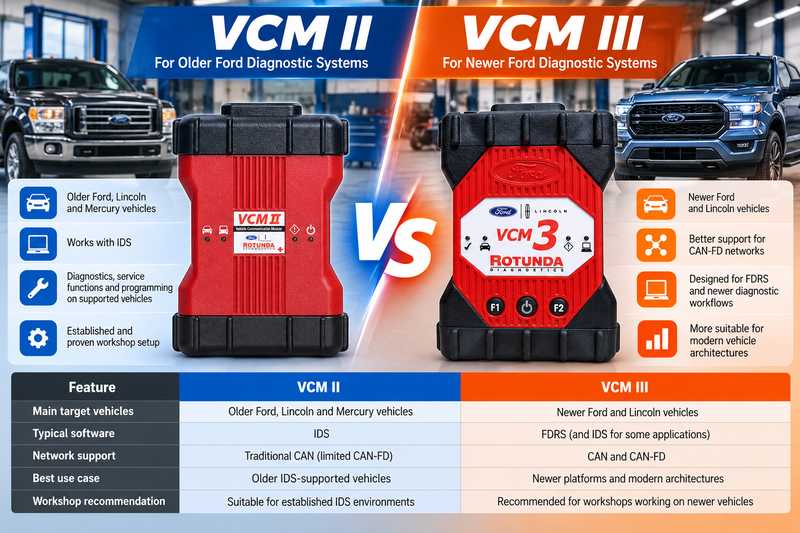
| Feature | VCM II | VCM III |
|---|---|---|
| Best suited for | Older Ford platforms | Newer Ford platforms |
| Typical software | IDS | IDS / FDRS depending on application |
| Traditional CAN diagnostics | Yes | Yes |
| CAN-FD | Not the preferred choice | Better suited |
| Older IDS workshop | Excellent fit | Usually unnecessary upgrade |
| Newer vehicle diagnostics | Limited by platform | Better choice |
| Long-term workshop use | Good for legacy vehicles | Better for newer vehicles |
| Best buyer | Older Ford specialist | Workshop servicing newer Ford models |
The key question is not simply:
“Which tool is newer?”
Instead ask:
“Which Ford vehicles does my workshop actually service?”
IDS vs FDRS: Main Differences
IDS vs FDRS: Main Differences
| Feature | IDS | FDRS |
|---|---|---|
| Main role | Traditional Ford diagnostics | Newer-generation Ford diagnostics |
| Typical vehicle range | Older Ford/Lincoln platforms | Selected newer platforms |
| Common VCI | VCM II | VCM III |
| Diagnostic workflow | Traditional desktop software | More connected workflow |
| Newer vehicle architecture | Limited | Better suited |
| CAN-FD applications | Hardware-dependent | Better matched with VCM III |
| Best for | Legacy Ford repair | Newer Ford diagnostics |
IDS and FDRS should not be thought of as simply an old version and a new version of the same program.
They are different diagnostic environments used across different Ford vehicle platforms.
What About FJDS?
Ford workshops may also encounter FJDS — Ford J2534 Diagnostic Software.
FJDS is designed around compatible J2534 pass-through interfaces and is primarily used for selected diagnostic and module programming applications.
This means Ford technicians may encounter three main software environments:
IDS
Best known for traditional Ford diagnostics using VCM hardware.
FDRS
Ford’s newer diagnostic and repair platform.
FJDS
A J2534-based diagnostic and programming environment.
If you already own VCM II and mainly repair older Ford vehicles, IDS remains the most logical environment.
If you are expanding into newer Ford platforms, VCM III and FDRS are usually more relevant.
Which Tool Should You Buy?
Buy VCM II If:
Your workshop mainly services:
- Older Ford vehicles
- Older Lincoln vehicles
- Vehicles already covered by IDS
- Traditional CAN networks
- Existing IDS installations
Ford VCM II:
https://www.obd2tool.com/goods-4733-Best-Quality-Ford-VCM-II-Ford-VCM2-Diagnostic-Tool.html
Buy VCM III If:
Your workshop mainly services:
- Newer Ford vehicles
- Newer Lincoln vehicles
- FDRS-supported platforms
- CAN-FD vehicles
- Vehicles requiring newer diagnostic communication
Ford VCM III:
https://www.obd2tool.com/goods-10655-Original-Ford-VCM-III-Ford-VCM-3-Diagnostic-Tool.html
Should a Workshop Own Both VCM II and VCM III?
For a professional Ford-focused workshop, owning both interfaces can make sense.
For example:
Older vehicle arrives:
IDS → VCM II
Newer vehicle arrives:
FDRS → VCM III
This avoids forcing one diagnostic interface to cover vehicle generations it was not primarily designed for.
A workshop repairing Ford vehicles across many model years may therefore benefit from keeping VCM II as a legacy diagnostic tool while using VCM III for newer platforms.
Before Ford Module Programming
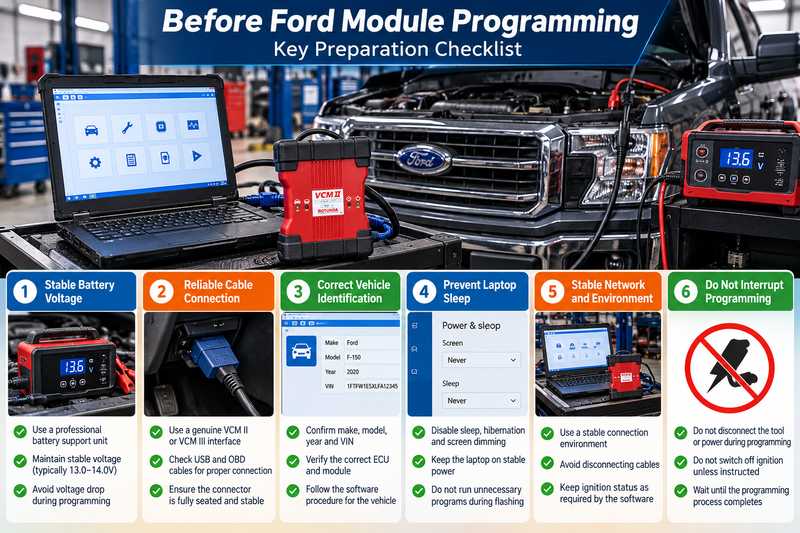
Whether you use IDS or FDRS, module programming requires a stable diagnostic environment.
Before programming:
- Connect a suitable battery support unit
- Maintain stable vehicle voltage
- Confirm the correct VIN
- Confirm the correct ECU/module
- Use secure USB or network connections
- Avoid moving diagnostic cables
- Disable laptop sleep and hibernation
- Ensure the diagnostic interface firmware is compatible
- Do not switch off the ignition unless instructed
- Never interrupt programming once flashing begins
Voltage loss or communication interruption during ECU programming can leave a module unable to operate correctly.
Common Mistake: Choosing Hardware Only by Model Year
A common mistake is assuming:
“Older than 2018 = VCM II”
or
“2018 and newer = VCM III”
Real-world Ford diagnostics are more complicated.
Vehicles transitioned to newer diagnostic platforms at different times.
Instead check:
- Vehicle model
- Model year
- VIN
- Required diagnostic software
- Vehicle communication protocol
- Required diagnostic or programming function
This is particularly important for vehicles produced during the transition from IDS-based diagnostics to newer FDRS platforms.
FAQ
Does Ford VCM II Work With IDS?
Yes. VCM II is closely associated with Ford IDS and remains useful for compatible Ford and Lincoln vehicles supported by IDS.
Does Ford VCM II Work With FDRS?
It may work in supported applications, but VCM II should not be assumed to provide full compatibility with every newer FDRS vehicle.
For workshops regularly servicing newer Ford platforms, VCM III is generally the better hardware choice.
What Is the Main Difference Between VCM II and VCM III?
VCM II is an older-generation Ford diagnostic interface commonly used with IDS.
VCM III is newer hardware designed to support current Ford diagnostic environments and newer vehicle networks such as CAN-FD.
Does VCM III Work With Older Ford Vehicles?
Compatibility depends on the vehicle, software, and diagnostic function.
If most of your work involves older IDS-supported Ford vehicles, VCM II may still be the simpler and more economical option.
Do I Need VCM III for CAN-FD?
If the vehicle diagnostic procedure requires CAN-FD communication, VCM III is the more appropriate Ford interface.
Always verify the specific vehicle before programming.
Is VCM II Still Worth Buying?
Yes, particularly for workshops focusing on older Ford and Lincoln vehicles supported by IDS.
It remains useful because many vehicles on the road still belong to the IDS generation.
Is VCM III Better Than VCM II?
For newer Ford vehicles, generally yes.
For older IDS-based vehicles, however, buying VCM III solely because it is newer may not provide a meaningful advantage.
The correct tool depends on the vehicles you service.
Final Recommendation
No single Ford diagnostic interface is automatically the best choice for every workshop.
For technicians mainly working on older Ford vehicles:
IDS + VCM II remains a practical combination.
Ford VCM II Diagnostic Tool:
https://www.obd2tool.com/goods-4733-Best-Quality-Ford-VCM-II-Ford-VCM2-Diagnostic-Tool.html
For workshops increasingly servicing newer Ford vehicles:
FDRS + VCM III is generally the better long-term direction, particularly where newer communication networks such as CAN-FD are involved.
Original Ford VCM III Diagnostic Tool:
https://www.obd2tool.com/goods-10655-Original-Ford-VCM-III-Ford-VCM-3-Diagnostic-Tool.html
If you are unsure which interface is appropriate, confirm the Ford model, model year, VIN, and required diagnostic or programming function before purchasing.
That is more reliable than choosing a VCM interface based only on vehicle age.