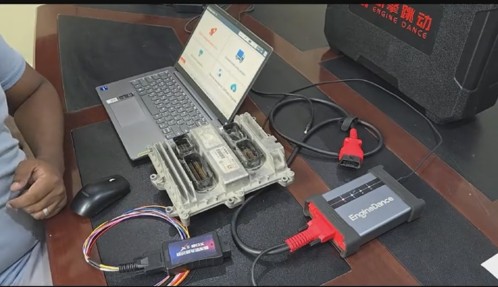
A basic OBD2 scanner can identify an emissions-related fault code. A professional commercial-vehicle diagnostic platform must go much further.
Modern repair work increasingly requires access to multiple vehicle networks, active component tests, diesel aftertreatment procedures, ECU calibration, module replacement workflows, authenticated security functions, and reliable technical information. As a result, the boundary between a diagnostic scanner, programming interface, and ECU repair tool is becoming less distinct.
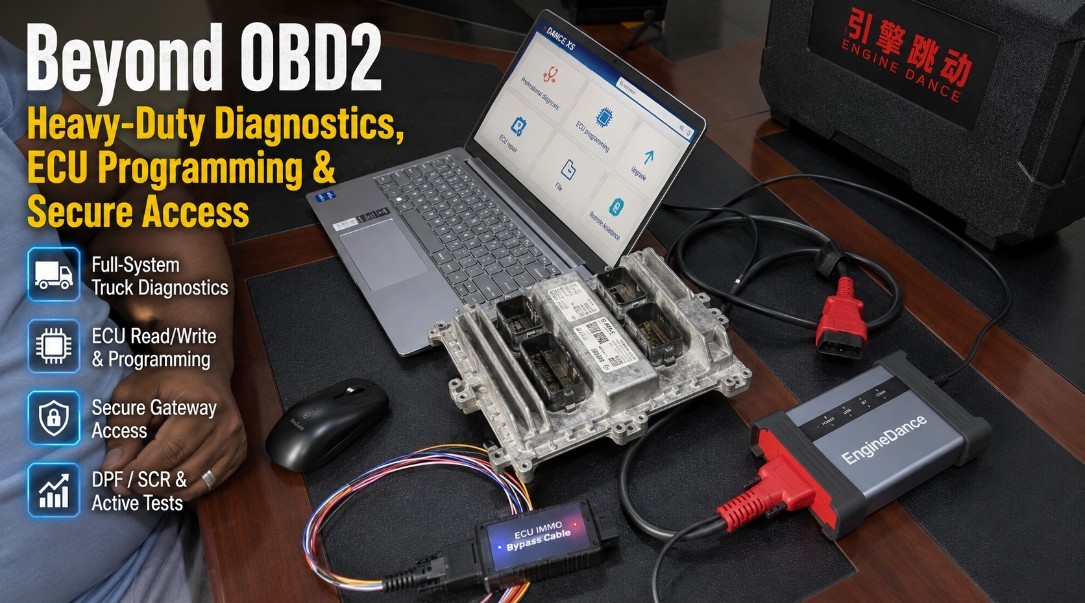
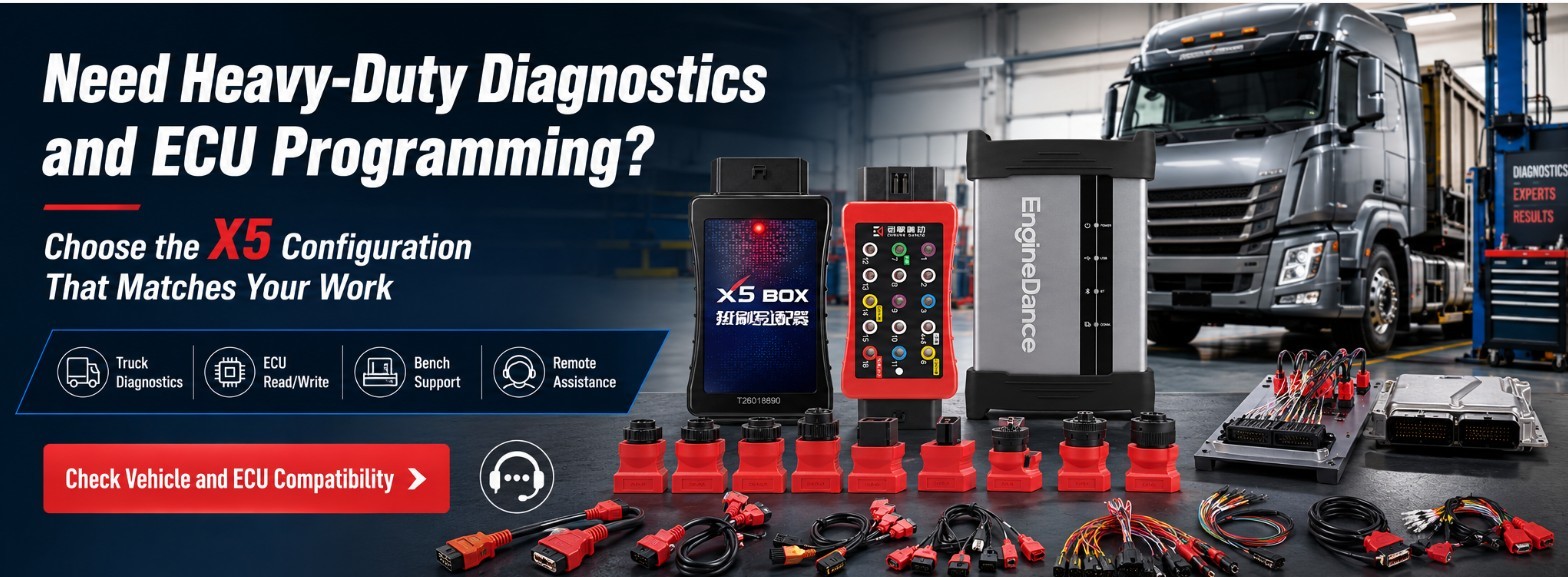
One example is the EngineDance X5, which its manufacturer describes as a two-in-one platform combining commercial-vehicle diagnostics with ECU programming and calibration. EngineDance also offers the X5Box for bench-mode ECU access on supported European and Japanese applications. The company’s software-download page lists an updated X5 two-in-one installer dated 2 July 2026.
However, shops should not interpret “all-in-one” to mean that one device replaces every OEM application, security credential, cable, bench harness, or programming subscription. The real value of an integrated platform is its ability to reduce unnecessary tool changes while covering more of the diagnostic and repair workflow from one interface.
Key Takeaways
- A code reader is not sufficient for full-system commercial-vehicle repair.
- Modern platforms should support live data, actuator tests, aftertreatment functions, calibration, and repair verification.
- ECU programming and bench access can expand a shop’s module-repair capabilities, but coverage must be confirmed ECU by ECU.
- Secure diagnostic access increasingly depends on accounts, roles, certificates, or OEM authorization.
- A J2534 label does not automatically guarantee heavy-duty coverage, complete diagnostics, or support for every programming operation.
- Coverage quality, update policies, technical support, and workflow stability matter more than the number of advertised functions.
What Has Changed in Heavy-Duty Diagnostics?
Traditional truck diagnostics focused primarily on reading fault codes from the engine, transmission, ABS, and other major systems. That is no longer enough for many late-model repairs.
A technician may now need to:
- Scan every available control module.
- Review freeze-frame and live vehicle data.
- Run an actuator or automated system test.
- Perform a DPF, SCR, or NOx-related service procedure.
- Update, initialize, calibrate, or replace a control module.
- Authenticate through an OEM-controlled service system.
- Verify the repair with a post-scan and functional test.
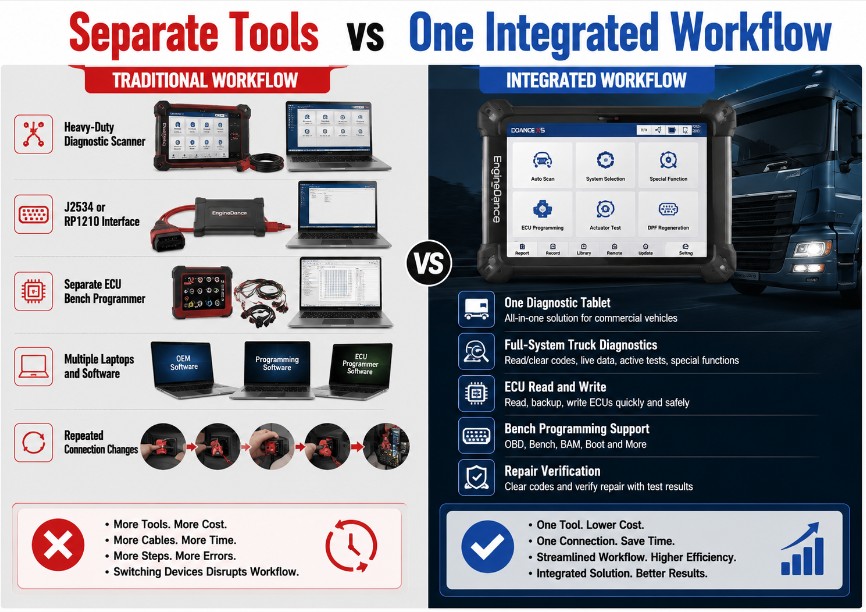
Using completely separate devices for every stage can create additional connection changes, driver conflicts, subscription management, and training requirements. Integrated platforms attempt to reduce that fragmentation.
EngineDance X5: An Example of the Integrated-Tool Strategy
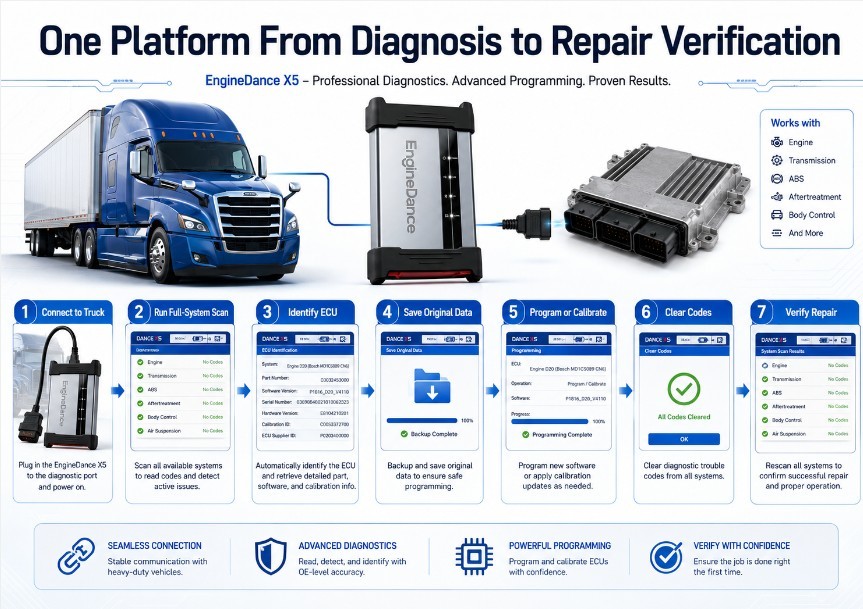
EngineDance markets the X5 as a combined heavy-duty diagnostic and ECU-programming platform. According to the manufacturer, the system supports commercial-vehicle ECU diagnosis, calibration, programming, remote assistance, DPF regeneration, SCR testing, actuator functions, and ECU read-and-write operations. EngineDance states that its commercial-vehicle coverage includes engine, AMT, ABS, EBS, VCU, and other electronic systems.
When paired with the X5Box, the system adds bench-mode ECU access for selected European and Japanese applications. EngineDance lists supported operations such as ECU flashing, checksum handling, corrupted-file recovery, and specific OBD, BAM, and bench procedures.
Important coverage qualification
These are manufacturer-published capabilities, not independent proof that every listed function works on every truck, ECU, software version, or market.
Before purchasing, a shop should request confirmation based on:
- Vehicle manufacturer
- Model and year
- Engine or powertrain
- ECU manufacturer
- ECU hardware number
- ECU software number
- Required connection method
- Required diagnostic or programming function
“Supports Volvo,” for example, does not necessarily mean that every Volvo truck, construction machine, engine ECU, transmission controller, and aftertreatment module is covered.
What Bosch ADS X 7.3 Shows About the Broader Market
Bosch released ADS X software version 7.3 on 8 April 2026. The release added more than 6,100 special tests, approximately 2,000 system applications, additional 2026 model-year coverage, and expanded Mercedes-Benz secure access for protected 2020–2026 applications. Bosch states that this access uses Seed and Key authentication through an MBA unlock process and does not require an AutoAuth subscription.
Bosch ADS X should not be presented as a direct alternative to a specialist heavy-duty truck programming platform. Its published coverage is primarily associated with passenger and light-vehicle service.
It is nevertheless relevant because it demonstrates a broader industry direction: secure vehicle access is becoming a standard scan-tool requirement rather than an optional specialist feature.
For commercial vehicles, Daimler Truck’s own service-information system shows that independent operators may need separate diagnosis, flash, and security-related rights. Certain security-relevant operations also require SERMI authentication or specific training and authorization.
Why a Basic OBD2 Scanner Is No Longer Enough
1. Commercial Vehicles Use Multiple Electronic Systems
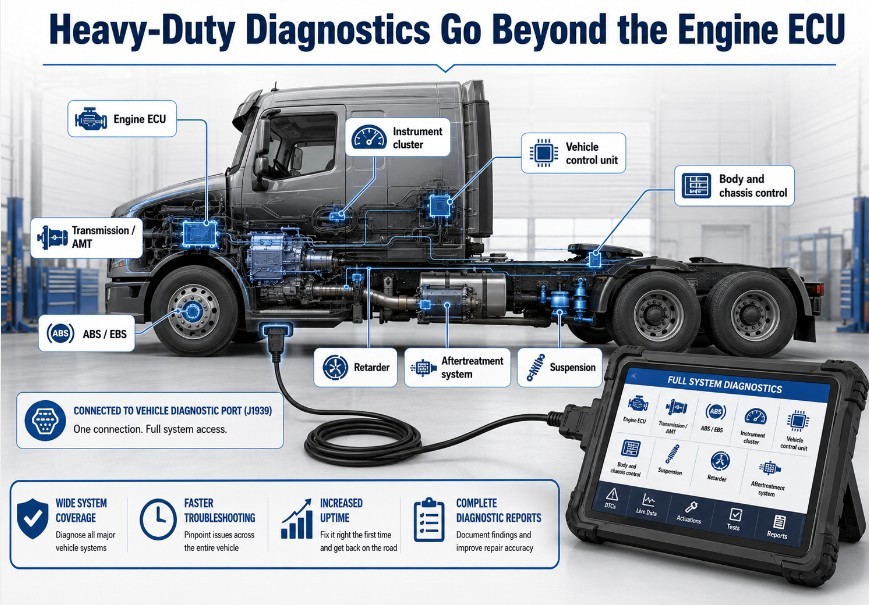
One engine ECU does not control a modern truck. Depending on the vehicle, it may contain separate modules for:
- Engine management
- Transmission or AMT
- ABS and EBS
- Body and chassis control
- Instrument cluster
- Vehicle control
- Retarder
- Suspension
- Steering
- Aftertreatment
- Telematics
- Driver-assistance systems
A basic OBD2 scanner may retrieve emissions-related engine information but provide little or no access to the remaining systems.
A professional platform should be able to perform a full vehicle scan and clearly identify which modules are supported.
2. Diesel Aftertreatment Repair Requires Active Functions
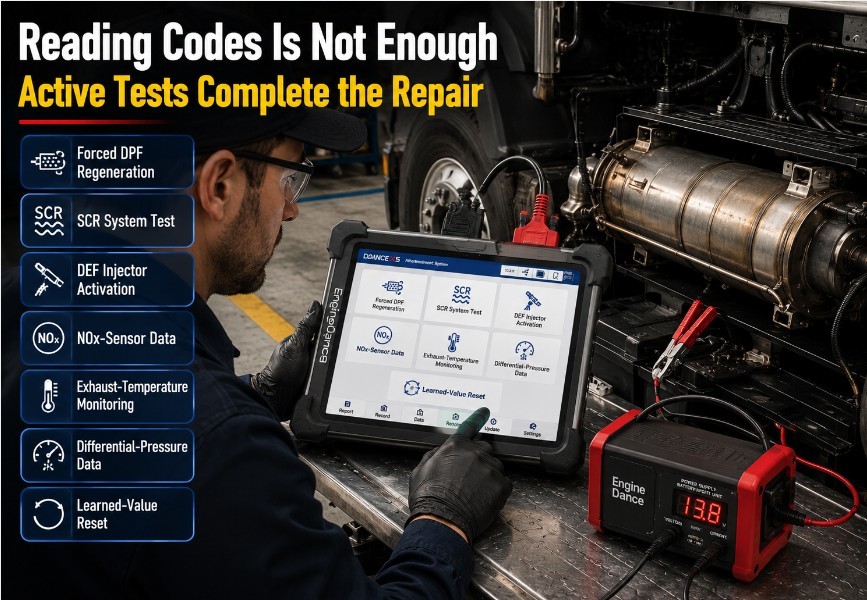
DPF, SCR, DEF, NOx, and exhaust-temperature faults cannot always be diagnosed by reading and clearing codes.
A complete diagnostic process may require:
- Monitoring exhaust temperatures
- Reviewing differential pressure
- Checking NOx-sensor values
- Commanding DEF injection
- Running a stationary regeneration
- Testing a dosing valve
- Resetting learned values
- Confirming regeneration conditions
- Running post-repair verification
These are active or guided procedures. The tool must communicate with the relevant controller, display the necessary data, and command the system under controlled conditions.
A scanner that only erases the fault code does not complete the repair.
3. Module Replacement Often Requires Programming or Initialization
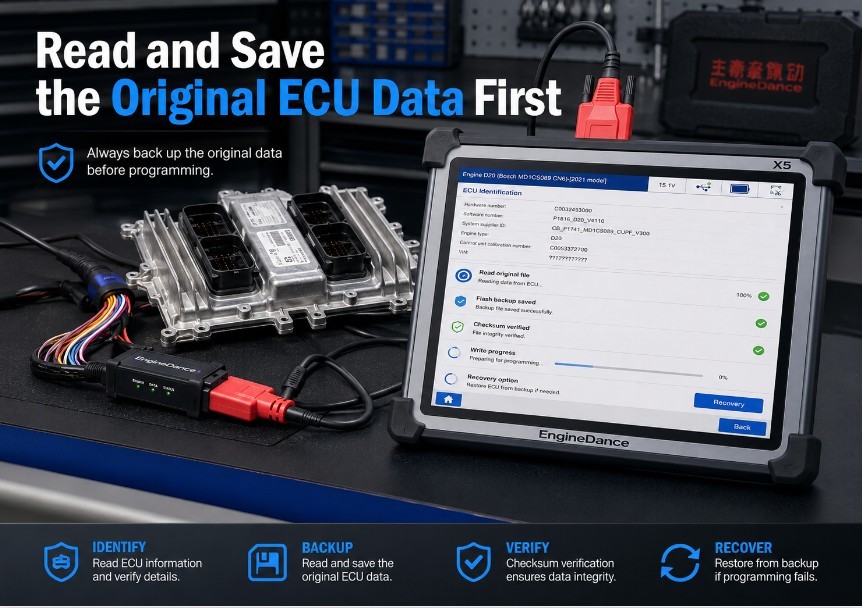
Replacing a control unit may require more than installing another component.
Depending on the application, the technician may need to:
- Identify the original ECU.
- Record configuration data
- Back up flash or EEPROM data.
- Install an OEM calibration.
- Transfer supported data to a donor module.
- Write vehicle-specific parameters
- Perform initialization
- Complete relearn procedures
- Clear related codes
- Verify communication with other modules.
Some of these operations can be performed through the diagnostic connector. Others require bench, boot, BAM, BDM, JTAG, direct-pin, or manufacturer-specific access.
An integrated tool can simplify the workflow, but the technician must still use the correct protocol and connection method for the exact ECU.
4. Secure Access Is Becoming Part of Diagnostics
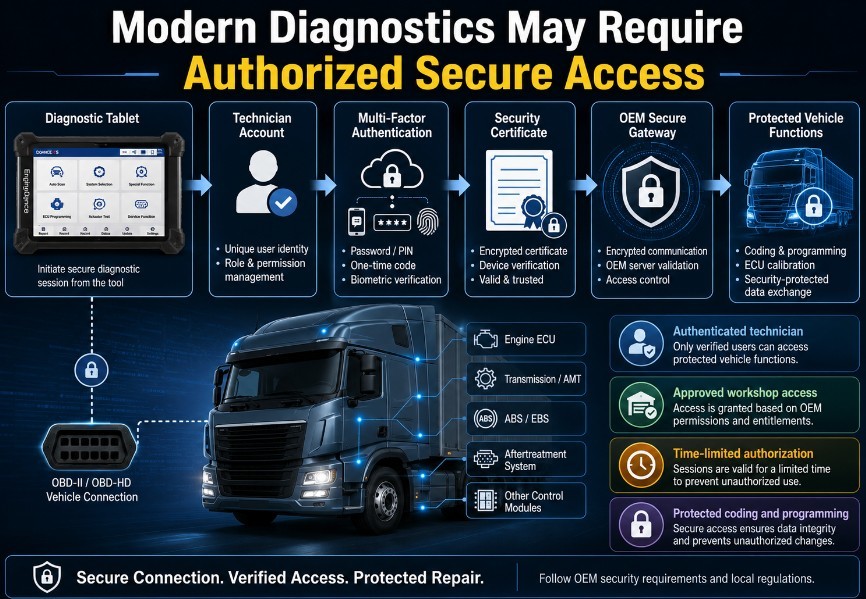
Vehicle manufacturers are increasingly protecting programming, coding, immobilizer, and other sensitive functions through authenticated systems.
Secure access can involve:
- User accounts
- Multi-factor authentication
- Security certificates
- Workshop registration
- Technician identification
- Specific diagnostic roles
- Time-limited access
- Training requirements
- Separate flash or immobilizer authorization
Daimler Truck, for example, separates certain diagnostic, flash, and FBS security rights for independent service providers. Some European security-related procedures require SERMI authentication.
This means that hardware compatibility alone may not be enough. A scanner may support the communication protocol but still be unable to perform a protected function without the required authorization.
Diagnostics, Pass-Thru Programming, and ECU Bench Work Are Different
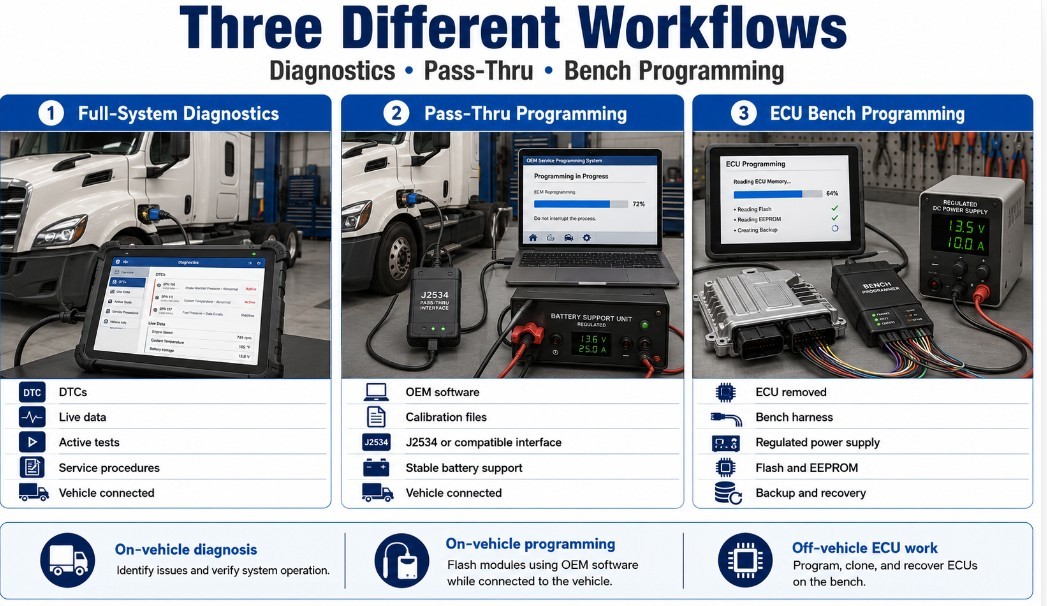
These functions are often combined in product advertising, but they are not interchangeable.
| Capability | Primary purpose | Typical requirements |
|
Full-system diagnostics
|
Read codes, view live data, run tests, and perform service functions | Vehicle-specific diagnostic coverage and suitable interface |
|
Pass-thru programming
|
Install an OEM-issued calibration using manufacturer software | Compatible interface, OEM software, subscription, stable power and authorization |
|
ECU bench programming
|
Read or write a controller outside the vehicle | Correct bench harness, pinout, protocol, regulated power and supported ECU |
|
Boot-mode programming
|
Gain low-level ECU access for supported repair or recovery procedures | ECU opening may be required, exact boot connection and qualified technician |
|
Module cloning
|
Transfer supported data between compatible modules | Matching hardware, complete backup and supported read/write method |
|
Secure gateway access
|
Authenticate protected diagnostic or programming functions | Supported tool plus the required OEM or third-party credentials |
SAE J2534 defines a standardized pass-thru interface for vehicle reprogramming. J2534-1 primarily addresses emission-related controller reprogramming, while the J2534-2 document family provides optional extensions, including support frameworks for protocols such as SAE J1939 and J1708. An interface must specifically implement the relevant extension; “J2534 compatible” alone does not confirm complete heavy-duty capability.
Does One Integrated Tool Replace Every Separate Device?
Not necessarily.
An integrated platform can reduce the number of devices needed for common jobs, but a professional shop may still require:
- OEM diagnostic software
- OEM programming subscriptions
- RP1210 interfaces
- J2534 interfaces
- Brand-specific cables
- Bench harnesses
- Breakout boxes
- ECU adapters
- Regulated power supplies
- Oscilloscopes
- Multimeters
- Specialist key or security tools
The best integrated tool is not the one that claims to replace everything. It is the one that covers the largest percentage of the shop’s real workload without creating unacceptable compromises in reliability, support, or safety.
The Real Cost of Separate Diagnostic Systems
The cost of diagnostic equipment is not limited to the purchase price.
A shop should consider:
| Cost category | Questions to ask |
|
Annual updates
|
Is coverage renewed annually, and can the tool still operate without renewal? |
|
OEM subscriptions
|
Are programming files or secure functions purchased separately? |
|
Gateway access
|
Is authentication included or charged by brand, vehicle, or year? |
|
Adapters and cables
|
Which items are included, and which must be purchased separately? |
|
Technical support
|
Is remote assistance included, time-limited, or charged per case? |
|
Training
|
Can technicians use the programming and bench functions safely? |
|
Downtime
|
How quickly can a failed interface, cable, or tablet be replaced? |
|
Coverage overlap
|
Are multiple subscriptions providing the same basic functions? |
An integrated platform may lower the cost of overlapping hardware and software, but only when it covers the vehicles that actually enter the workshop.
What to Look for in a 2026 Heavy-Duty Diagnostic Platform
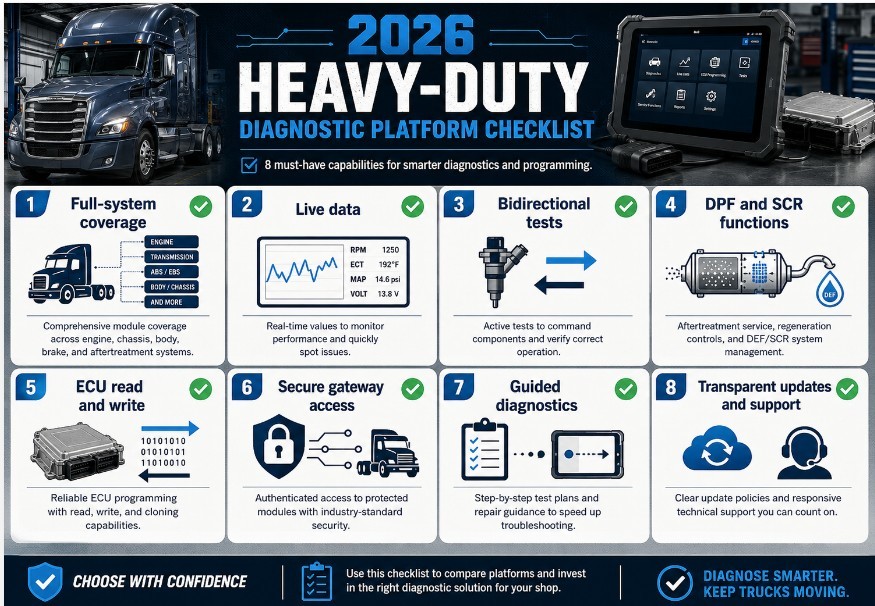
Full-System Coverage
Confirm access to more than the engine ECU.
A professional platform should ideally cover:
- Engine
- Transmission and AMT
- ABS and EBS
- Body and chassis modules
- Instrument cluster
- Vehicle control unit
- Suspension
- Retarder
- Aftertreatment systems
Ask for a model-specific coverage report rather than relying on a brand logo.
Live Data and Bidirectional Tests
The tool should provide:
- Clearly named data parameters.
- Graphing and recording
- Multiple data-stream selection
- Actuator tests
- Automated system tests
- Precondition warnings
- Post-test results
Live data should help the technician confirm the cause of a problem, not merely provide a long, unorganized list of values.
Aftertreatment Functions
For diesel commercial vehicles, verify support for:
- DPF regeneration
- DPF reset procedures
- SCR testing
- DEF dosing tests
- NOx-sensor diagnosis
- Exhaust-temperature monitoring
- Differential-pressure analysis
- Learned-value resets
Coverage should be checked by engine, aftertreatment controller, and model year.
Integrated ECU Read and Write
For shops performing ECU work, look for:
- ECU identification
- OBD read and write
- Bench access
- Boot access where supported
- Flash and EEPROM backup
- Checksum processing
- Recovery capability
- Module-replacement support
- Clear protocol instructions
Never assume that a listed truck brand means every controller from that manufacturer can be read or written.
Secure Diagnostic Access
Ask whether the platform supports:
- OEM authentication
- Certificate-based access
- Seed-and-key processes
- User-role management
- Secure programming
- Regional security requirements
- Independent-repairer access
Also determine whether access is included in the tool subscription or requires a separate account.
Guided Diagnostics
Useful guided functions may include:
- Symptom-based test plans
- Wiring information
- Connector locations
- Expected values
- Component tests
- Repair instructions
- Post-repair verification
Guided diagnostics can be particularly valuable for aftertreatment systems, where multiple related faults can produce similar symptoms.
Coverage Transparency
A trustworthy supplier should be willing to confirm:
- Vehicle
- Model year
- Engine
- ECU
- Required function
- Connection mode
- Software version
- Necessary adapter
- Subscription requirement
Avoid purchasing based only on broad claims such as “all trucks,” “full ECU programming,” or “dealer level.”
Update Policy
Before buying, ask:
- How frequently is the software updated?
- Are diagnostic and programming updates separate?
- Does renewal include new brands?
- Does secure access require an additional payment?
- Can the tool continue operating after the update period expires?
- Are older software versions available if an update causes a compatibility problem?
Technical Support
ECU programming requires stronger support than ordinary code reading.
Look for:
- Pre-sale compatibility checking
- Setup assistance
- Remote technical support
- Programming instructions
- Pinout diagrams
- Recovery guidance
- Clear warranty terms
- Repair or replacement service
Safe ECU Programming Practices
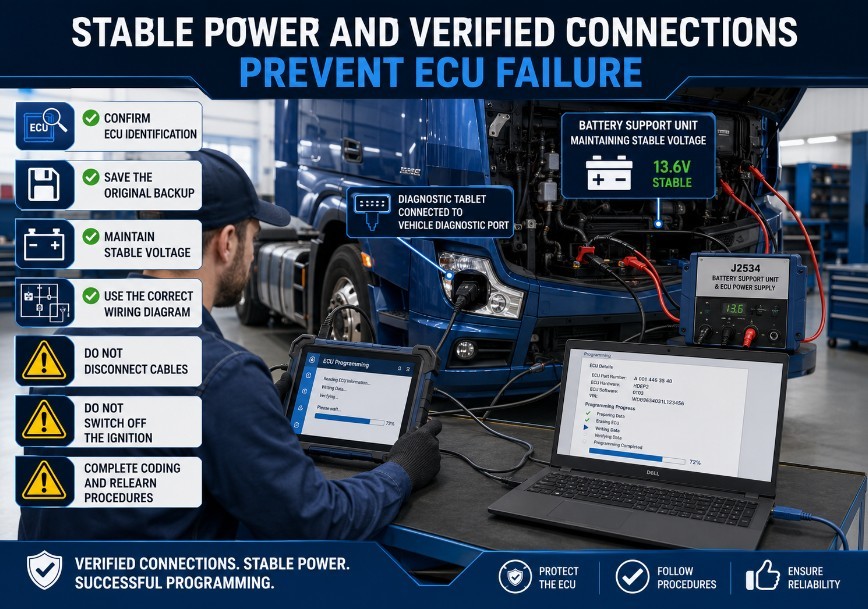
Before programming or cloning an ECU:
- Confirm the exact ECU hardware and software numbers.
- Use the correct protocol and wiring diagram.
- Read and save the original data whenever possible.
- Store backups in more than one location.
- Use a regulated power supply.
- Verify every power, ground, communication, and boot connection.
- Disable computer sleep and USB power saving.
- Do not disconnect cables during writing.
- Do not substitute an unverified file.
- Complete required coding, initialization, and relearn procedures.
- Perform a complete post-programming scan.
- Test the vehicle before delivery.
ECU programming, cloning, and calibration should only be performed on vehicles and modules the technician is authorized to service. Emissions, immobilizer, odometer, and safety-related modifications may be regulated or prohibited.
Is the EngineDance X5 the Right Choice?
The X5 may be worth evaluating for workshops that need both commercial-vehicle diagnostics and ECU programming, especially when the listed vehicle and ECU coverage matches the shop’s workload.
Its manufacturer presents several potential advantages:
- Two-in-one diagnostics and programming
- Full-system commercial-vehicle scanning
- ECU read-and-write functions
- Calibration and aftertreatment procedures
- Bench-mode support through the X5Box
- Remote assistance
- One-click software updates
These are vendor-stated capabilities and should be verified against the exact truck, ECU, and required procedure before purchase.
The X5 may not eliminate the need for OEM software, specialized interfaces, additional adapters, security credentials, or dedicated ECU tools. Shops should evaluate it as part of their complete diagnostic strategy rather than as a universal replacement for every existing platform.
Choose the Right EngineDance X5 Configuration
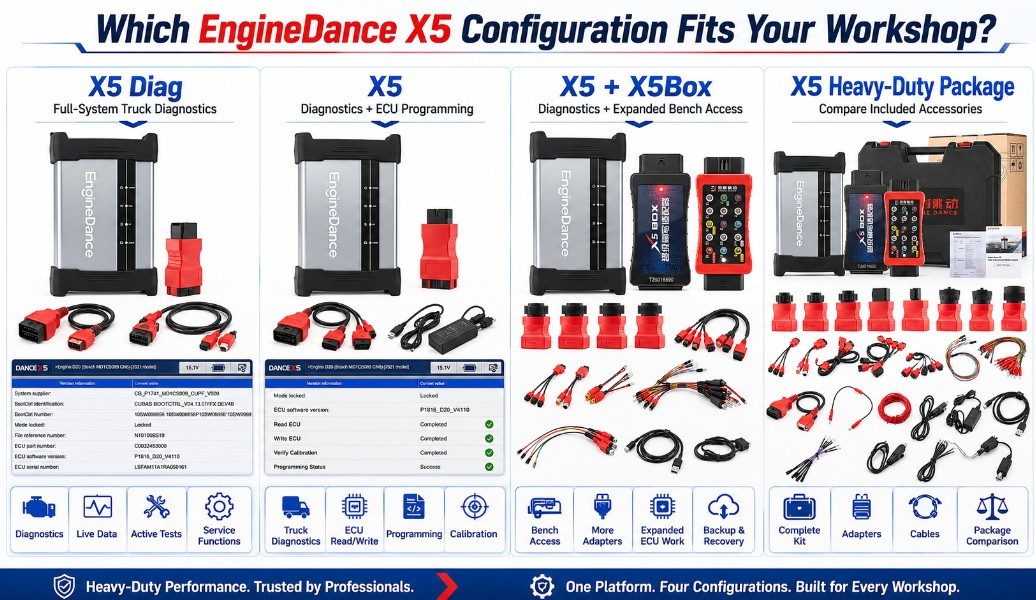
EngineDance offers several X5 configurations for different workshop requirements. Choose the package according to whether you need full-system diagnostics, ECU programming, or expanded bench-mode access.
EngineDance X5 with X5Box — Complete Diagnostic and Bench Programming Package
View EngineDance X5 with X5Box
The X5 with X5Box is the most complete option for workshops that perform both commercial-vehicle diagnostics and ECU repair. It combines the X5 diagnostic and programming platform with additional bench-mode support for selected European and Japanese ECUs.
Suitable applications may include:
- Full-system truck diagnostics
- ECU identification, reading, and writing
- OBD, BAM, and bench programming
- Flash and calibration-data backup
- Checksum correction
- Corrupted-file recovery
- ECU replacement and cloning workflows
The manufacturer lists bench support for selected Volvo, Renault, Mack, UD, Scania, MAN, DAF, Iveco, Isuzu, Hino, Hyundai, Kia, Denso, Bosch, and other ECU families. Exact coverage must be verified by ECU hardware number, software number, processor, and required connection mode.
Best for: ECU repair specialists and heavy-duty workshops that need diagnostics, OBD programming, and expanded bench access.
EngineDance X5 — Diagnostics and ECU Programming
View EngineDance X5 2-in-1 Diagnostic and Programming Tool
The standard EngineDance X5 combines professional commercial-vehicle diagnostics with ECU programming in one platform. It is designed for workshops that need more than fault-code reading but do not require the additional X5Box bench adapter.
Depending on the application, supported functions may include:
- Full-system fault-code scanning
- Live data and actuator tests
- DPF regeneration
- SCR and NOx-sensor testing
- Calibration and parameter adjustment
- ECU reading and writing
- Transmission and retarder programming
- Remote diagnostic and programming assistance
EngineDance publishes coverage for light trucks, heavy trucks, buses, agricultural equipment, and construction machinery. Coverage includes selected European, Asian, and Chinese vehicle and ECU manufacturers.
Best for: General heavy-duty repair shops that need integrated diagnostics and ECU programming without extensive bench-mode work.
EngineDance X5 Diag — Heavy-Duty Diagnostics Only
https://www.obd2tool.com/goods-10887-enginedance-x5-diag-heavy-duty-truck-diagnostic-tool.html View EngineDance X5 Diag Heavy-Duty Truck Diagnostic Tool
The X5 Diag is intended for technicians who need professional truck diagnostics but do not currently require ECU read-and-write functions.
Its diagnostic capabilities include:
- Automatic ECU identification
- Reading and clearing fault codes
- Live or actual-value data
- Actuator and bidirectional tests
- Special service functions
- Engine, AMT, ABS, EBS, VCU, and other system diagnostics
- Support for trucks, buses, agricultural machinery, and construction equipment
EngineDance describes the X5 Diag as its dedicated heavy-duty diagnostic platform, while the standard X5 adds ECU programming functions.
Best for: Fleet workshops and technicians focused on fault diagnosis, active tests, service procedures, and repair verification.
EngineDance X5 Heavy-Duty Scanner Package
https://www.obd2tool.com/goods-10846-EngineDance-X5-Heavy-Duty-Scanner-Diagnosis-Tool.html View EngineDance X5 Heavy-Duty Scanner and ECU Programming Package
This X5 package is another option for commercial-vehicle workshops requiring heavy-duty diagnostics, ECU tuning, and programming support.
Before ordering, compare its included software, cables, adapters, programming authorization, update period, and technical-support terms with the newer X5 product configurations. Similar product names do not necessarily mean that every package contains the same accessories or software licenses.
Best for: Buyers comparing available X5 packages and included accessories before selecting a configuration.
Which EngineDance X5 Should You Buy?
| Workshop requirement | Recommended configuration |
| Fault codes, live data, active tests, and service functions |
EngineDance X5 Diag
|
| Full-system diagnostics plus ECU reading and programming |
EngineDance X5
|
| Diagnostics, ECU programming, and expanded European/Japanese bench access |
EngineDance X5 with X5Box
|
| Alternative complete package or accessory comparison |
EngineDance X5 Heavy-Duty Scanner Package
|
Compatibility check required: Before ordering, provide the vehicle make, model, year, engine, ECU manufacturer, ECU hardware number, ECU software number, and required function. Confirm whether the job uses OBD, BAM, bench, boot, or another connection method.
Need Help Choosing an X5 Package?
Send your truck and ECU information before purchasing. The technical support team can help confirm the appropriate EngineDance X5 configuration, required adapters, and supported diagnostic or programming method.
Information to provide:
- Vehicle manufacturer and model
- Model year and engine
- ECU brand and part number
- ECU hardware and software numbers
- Required diagnostic or programming function
- Clear photographs of the ECU label and connector
Frequently Asked Questions
What is the difference between an OBD2 scanner and a heavy-duty diagnostic tool?
An OBD2 scanner primarily accesses standardized emissions information. A professional heavy-duty platform may access multiple truck systems, display manufacturer-specific data, run active tests, perform aftertreatment procedures, calibrate components, and support module programming.
Can one tool diagnose and program truck ECUs?
Some platforms combine both functions. However, programming coverage depends on the ECU, protocol, connection mode, software version, and required authorization.
Does a J2534 interface provide full heavy-duty diagnostics?
Not automatically. J2534 is primarily a pass-through programming framework. Heavy-duty functions such as J1939 or J1708 require the interface and software to implement the relevant capabilities. Full diagnostic coverage must be confirmed separately.
Why is secure access important?
Certain manufacturers protect programming, immobilizer, coding, and other sensitive procedures through authenticated systems. A compatible scanner may still require an approved user account, role, certificate, or workshop authorization.
Can a diagnostic scanner perform ECU cloning?
Only when it supports reading the necessary memory areas and writing them to a compatible replacement ECU. Some modules require bench or boot access rather than an OBD connection.
Does an integrated tool eliminate OEM subscriptions?
Usually not. OEM programming files, repair information, security access, and online functions may still require separate subscriptions.
What information should be checked before buying?
Provide the supplier with the vehicle manufacturer, model, year, engine, ECU hardware number, ECU software number, country, and exact function required.
Conclusion
The most important change in commercial-vehicle diagnostics is not that every scanner must become an ECU programmer. It is that professional tools must support more of the complete repair process.
For many workshops, that process now includes:
- Full-system scanning
- Live-data analysis
- Bidirectional testing
- Diesel aftertreatment procedures
- Calibration and initialization
- ECU programming
- Secure OEM access
- Guided troubleshooting
- Post-repair verification
Platforms such as the EngineDance X5 illustrate how diagnostic and ECU-programming functions are being combined. Bosch ADS X 7.3 demonstrates the related growth of authenticated secure access in the broader diagnostic market. Daimler Truck’s own service system confirms that diagnosis, flashing, and security-related procedures can require distinct roles and authorization.
The right investment is therefore not simply the scanner with the longest feature list. It is the platform that provides verified coverage for the shop’s vehicles, stable communication, transparent update costs, appropriate security access, qualified technical support, and a safe path from initial fault code to completed repair.