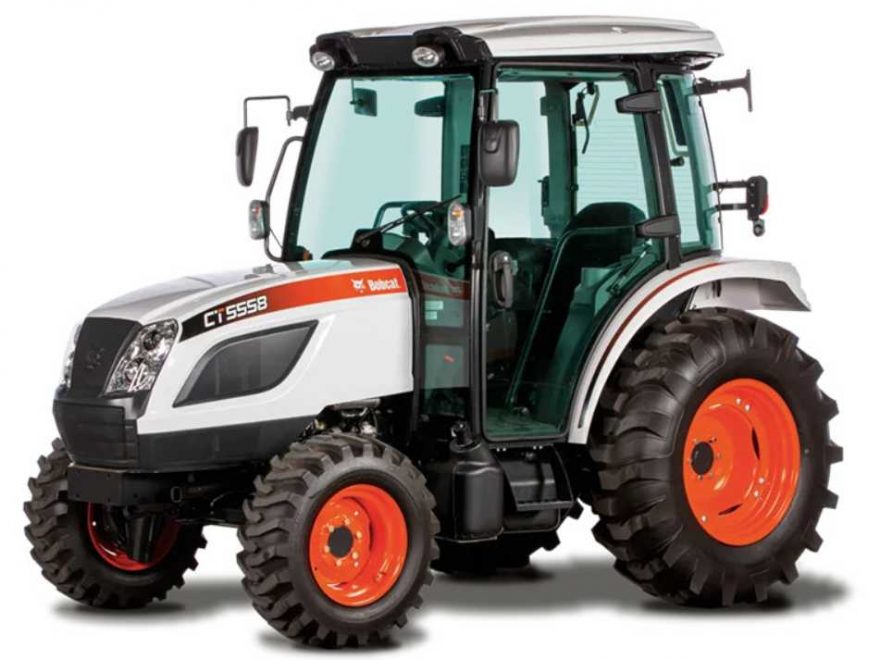
Modern Bobcat machines equipped with DEF/SCR emission systems use heated urea lines to prevent DEF fluid from freezing in cold conditions. When the system detects an electrical fault in the DEF suction line heater circuit, the machine may display a fault such as P18A5 suction line heater open error or U004357-05.
This guide explains the possible causes, diagnostic conditions, inspection points, and repair steps for this Bobcat DEF suction line heater open circuit fault.
Important note: The original fault information may show both P18A5 and U004357-05. Always confirm the active code with Bobcat diagnostic software or the official Bobcat service manual before replacing parts.
Fault Code Information
Fault description: Suction line heater open error
Related code: U004357-05
System involved: DEF / SCR aftertreatment system
Affected component: DEF suction line heater circuit
Fault type: Open circuit or no-load detection
Possible machine response: Inducement Group 2
When this error appears, the ECU/DCU detects that the DEF suction line heater circuit is not operating correctly. In most cases, this means the heater circuit is open, disconnected, damaged, or not receiving proper electrical control.
Related Contents:
Bobcat Engine Analyzer ECU DCU 2023
Bobcat Service Analyzer V5.46.3 [2026.06] Bobcat Diagnostic Software
What Does “Suction Line Heater Open” Mean?
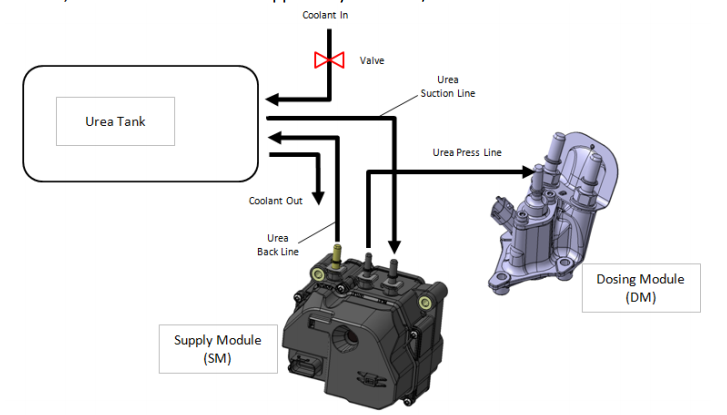
The DEF suction line carries urea fluid from the DEF tank to the dosing system. In low-temperature conditions, DEF can freeze, so the suction line may include a heating element.
An open circuit means the control unit does not detect the expected electrical load from the heater circuit. This may happen when:
- The DEF suction line heater connector is loose or damaged
- The heater element inside the line is faulty
- The wiring harness is broken or corroded
- The heater relay is not supplying power correctly
- The DCU connector or DCU itself has an electrical issue
Possible Causes of Bobcat P18A5 / U004357-05
The fault is usually related to an electrical problem in the DEF suction line heater system.
1. DEF Pressure Line or Suction Line Heater Connector Problem
A loose, corroded, wet, or damaged connector can cause the control unit to detect no load from the heater circuit.
Check for:
- Loose connector pins
- Bent terminals
- Corrosion
- Water ingress
- Poor contact
- Damaged connector locking clips
2. Heater Relay or Wiring Harness Problem
The heater relay and wiring harness supply power and control to the DEF line heater. If the wiring is open or damaged, the heater will not operate.
Check for:
- Broken wires
- Rubbed or pinched harness sections
- Poor grounding
- Relay failure
- Fuse issues
- Open circuit between relay, heater, and DCU
3. DCU Connector or DCU Problem
The DCU, or dosing control unit, monitors and controls DEF aftertreatment components. If the DCU connector or internal circuit has a fault, the heater circuit may report an open error.
Check for:
- Loose DCU connector
- Corroded DCU pins
- Damaged connector seals
- Poor terminal contact
- DCU communication or control faults
Replace the DCU only after the wiring, connector, relay, and heater circuit have been properly checked.
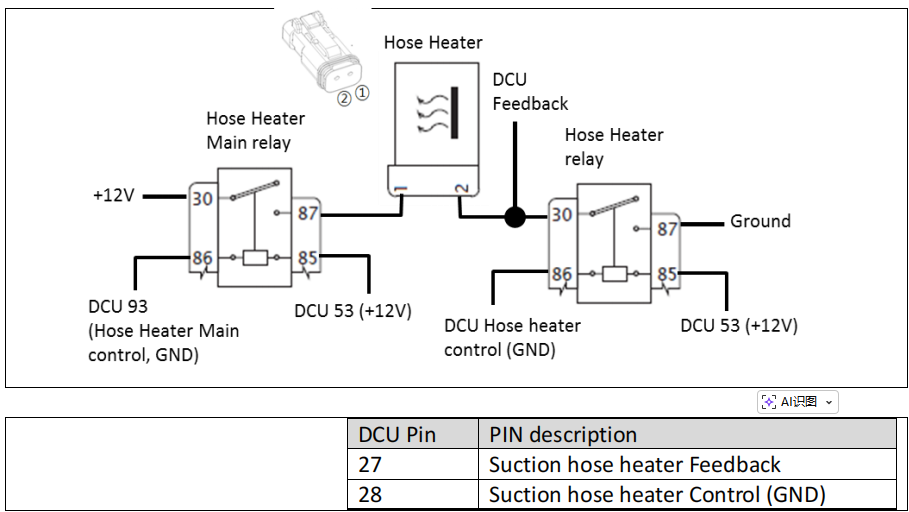
Component Location
The DEF tank, valve, and urea lines are installed according to the machine or vehicle manufacturer’s layout. On Bobcat machines, the exact location may vary depending on model and engine configuration.
Generally, inspect the following areas:
- DEF tank area
- Urea suction line
- DEF pressure line
- DEF line heater connectors
- Heater relay box
- DCU connector
- Wiring harness between DEF tank, heater line, relay, and DCU
Before inspection, park the machine safely, turn off the engine, remove the key, and allow hot components to cool.
Diagnostic Running Condition
The diagnostic runs continuously according to the process raster, approximately every 10 ms. This fault can only be detected when the power stage is energized.
In simple terms, the system must be actively controlling or monitoring the DEF line heater before it can detect the open circuit fault.
Condition for Setting the Fault Code
The fault code is set when the power stage hardware reports a “no load” error.
This means the control unit expected to see electrical resistance from the heater circuit, but the circuit appeared open or disconnected.
Condition for Clearing the Fault Code
The fault code may clear when no defect is detected during system monitoring. However, if the root cause remains, the code will return after the diagnostic runs again.
After repairing the issue, clear the code with diagnostic software and run the machine long enough to confirm the fault does not come back.
Diagnostic Checklist
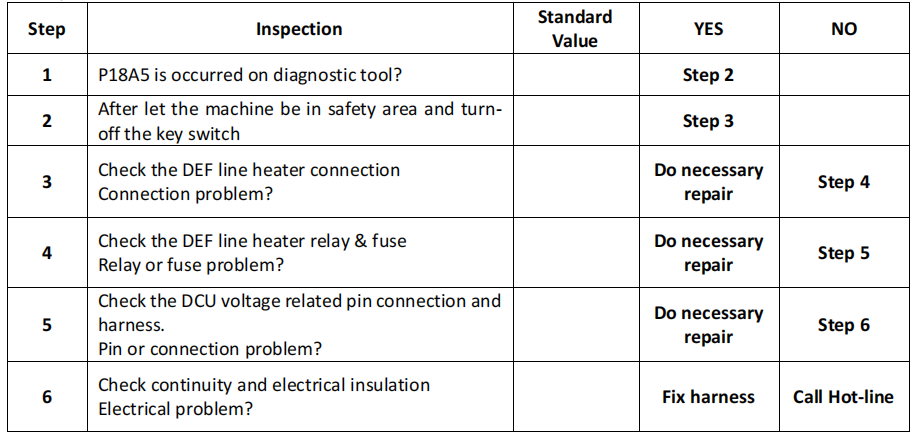
Step 1: Confirm the Fault Code
Use Bobcat diagnostic software or a compatible diagnostic tool to confirm the active and stored fault codes.
Record:
- Active fault code
- Stored fault code
- Freeze frame data
- Machine model
- Engine model
- Battery voltage
- DEF temperature
- Related aftertreatment codes
Do not replace parts based only on one fault message. Confirm whether the code is active or historical.
Step 2: Inspect the DEF Suction Line Heater Connector
Locate the DEF suction line heater connector and inspect it carefully.
Check for:
- Loose connection
- Corrosion
- Moisture
- Bent or pushed-back pins
- Damaged connector housing
- Broken lock tab
Clean and reconnect the connector if needed. Make sure it is fully seated.
Step 3: Check the Wiring Harness
Inspect the wiring harness from the DEF line heater to the relay and DCU.
Look for:
- Broken wires
- Damaged insulation
- Wires rubbed against the frame
- Harness pinched near brackets
- Previous repair damage
- Oil, DEF crystallization, or corrosion around connectors
Repair or replace damaged wiring according to proper electrical repair procedures.
Step 4: Check the Heater Relay and Fuse
A failed relay or blown fuse may prevent the DEF line heater from receiving power.
Check:
- Related fuse
- Heater relay operation
- Relay socket condition
- Power supply voltage
- Ground circuit
Replace any faulty relay or fuse, but also check for short circuits or harness damage that may have caused the failure.
Step 5: Measure Heater Circuit Resistance
Use a digital multimeter to check the heater circuit resistance if the service manual provides specifications.
A very high resistance or open reading usually indicates:
- Broken heater element
- Open circuit in wiring
- Disconnected connector
- Damaged terminal
If the heater line is open internally, the DEF suction line assembly may need replacement.
Step 6: Inspect the DCU Connector
Disconnect and inspect the DCU connector only after following safe electrical procedures.
Check for:
- Corrosion
- Loose pins
- Damaged seals
- DEF contamination
- Poor terminal tension
- Water ingress
Reconnect securely and clear the fault code.
Step 7: Clear the Fault Code and Test the Machine
After repairs are completed:
- Reconnect all connectors.
- Clear the fault code with diagnostic software.
- Start the machine.
- Monitor the DEF heater circuit status.
- Confirm the code does not return.
- Check for related DEF/SCR faults.
If the fault returns immediately, continue checking the circuit for an open wire, failed heater, faulty relay, or DCU issue.
Recommended Repair Actions
Depending on the inspection result, possible repairs include:
- Reconnect the DEF heater connector
- Clean corroded terminals
- Repair damaged wiring harness
- Replace faulty heater relay
- Replace faulty fuse after checking the circuit
- Replace the DEF suction line heater assembly
- Repair or replace DCU connector terminals
- Replace the DCU only after all wiring and component checks are completed
Technician Tips
- DEF crystallization can damage connectors and cause poor electrical contact.
- Always check wiring and connectors before replacing expensive modules.
- Low battery voltage may cause multiple misleading electrical codes. Test the battery and charging system if several faults appear together.
- Do not bypass DEF/SCR emission components. Repair the original fault correctly to keep the machine compliant and reliable.
- After repair, run a full diagnostic scan to confirm there are no remaining aftertreatment faults.
Conclusion
The Bobcat P18A5 / U004357-05 suction line heater open error is usually caused by an electrical open circuit in the DEF suction line heater system. Common causes include a loose heater connector, damaged wiring harness, faulty heater relay, open heater element, or DCU connector problem.
A proper diagnosis should start with connector and wiring inspection, then continue with relay, fuse, resistance, and DCU connector checks. Replacing parts without testing may increase repair cost and may not solve the fault.
For best results, confirm the code with Bobcat diagnostic software, follow the official wiring diagram, and verify the repair after clearing the fault code.
More repair topic for Bobcat,please refer to:Bobcat Excavator Repair
FAQ
What is Bobcat fault code P18A5?
Bobcat fault code P18A5 usually refers to a DEF suction line heater open circuit. The control unit detects no electrical load from the heater circuit.
What does U004357-05 mean on a Bobcat machine?
U004357-05 is related to an electrical open or no-load condition in the DEF suction line heater circuit. It may be displayed together with or instead of P18A5 depending on the diagnostic tool.
Can I keep using the machine with this fault code?
The machine may continue running, but it may enter an inducement stage if the DEF/SCR system fault is not repaired. It is recommended to diagnose and repair the issue as soon as possible.
What is the most common cause of a suction line heater open fault?
Common causes include a loose connector, corroded terminals, damaged wiring harness, failed heater relay, or an open heater element inside the DEF suction line.
Do I need to replace the DEF suction line heater?
Not always. First inspect the connector, wiring, fuse, relay, and DCU connector. Replace the DEF suction line heater only if testing confirms the heater circuit is open or faulty.
Can this fault clear by itself?
The code may clear if the system no longer detects a defect, but if the open circuit remains, the fault will return. After repair, clear the code with diagnostic software and test the machine.